You have a project in Azure DevOps named Project1 that contains a Kanban board named Board1.
You create a Microsoft Teams channel and add the Azure Boards app to the channel.
You need to ensure that users can create work items in Board1 from Microsoft Teams.
Which command should you run?
A. @azure boards subscriptions
B. @azure boards create
C. @azure boards sign in
D. @azure boards link
Show Answer
Correct Answer: D
Explanation: To enable work item creation from Microsoft Teams, the Teams channel must first be linked to the Azure DevOps project using the Azure Boards app. The `@azure boards link` command associates the channel with the project. After the project is linked, users can create work items with `@azure boards create` or message actions. `subscriptions` manages notifications, `sign in` authenticates the user, and `create` creates a work item but does not establish the required project link.
Question 180
DRAG DROP
-
You have the repositories shown in the following table.
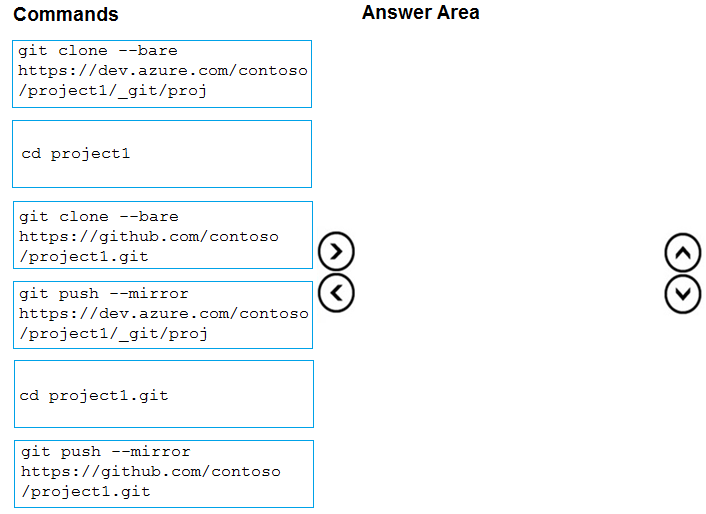
You need to migrate the contents of the GitHub repository to the Azure Repos repository. The solution must ensure that the Azure Repos repository only contains branches and history from the GitHub repository.
Which three commands should you run in sequence? To answer, move the appropriate commands from the list of commands to the answer area and arrange them in the correct order.
Explanation: A bare clone preserves all refs and history. Enter the bare repository directory, then use --mirror to push all branches, tags, and history to the Azure Repos destination, replacing its refs with those from GitHub.
Question 181
DRAG DROP
-
You use Git for source control.
You delete a file, commit the changes, and continue to work.
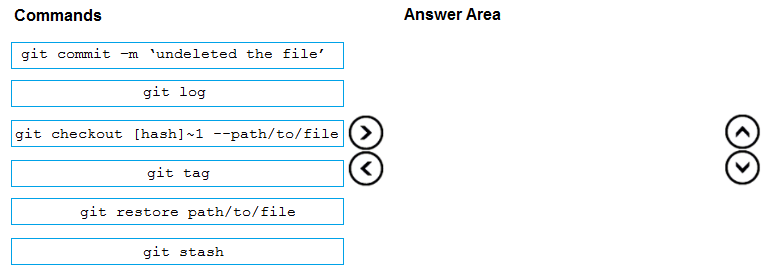
You need to recover the deleted file.
Which three commands should you run in sequence? To answer, move the appropriate commands from the list of commands to the answer area and arrange them in the correct order.
Explanation: Use git log to find the commit where the file existed, check out the file from the parent of the deletion commit, then commit the restored file. The listed git restore command lacks a source parameter, so it is not the correct choice here.
Question 182
You use Git for source control.
You enable GitHub code scanning.
You raise a pull request from a non-default branch. In the code scanning output, you receive the following error message: “Analysis not found.”
You need to ensure that the code scanning completes successfully for the pull request.
Which two actions should you perform? Each correct answer presents part of the solution.
NOTE: Each correct selection is worth one point.
A. Add the name of the default branch to the on: push specification in the code scanning workflow.
B. Add the name of the non-default branch to the on:push specification in the code scanning workflow.
C. Delete the pull request, and then raise the request again from the default branch.
D. Update the code in the pull request.
E. Add a new workflow for code scanning.
Show Answer
Correct Answer: A, D
Explanation: The "Analysis not found" error commonly occurs when the base (target) branch for the pull request has not been configured for code scanning. The workflow must include the base/default branch in the on: push trigger (and, per GitHub guidance, also the pull_request trigger in the workflow), then a new commit must update the open pull request so the scan runs again. Among the options given, adding the default branch to on:push and updating the pull request are the matching actions.
Sources:
https://www.pass4success.com/microsoft/discussions/exam-az-400-topic-3-question-96-discussion
Question 183
You have an Azure Automation account that contains a runbook. The runbook is used to configure the application infrastructure of an Azure subscription.
You have a project in Azure DevOps named Project1. Project1 contains a repository that stores code for the runbook.
You need to ensure that every committed change to the code will update automatically and publish the runbook to Azure Automation.
What should you configure?
A. the Service hooks settings for Project1
B. the Connections settings for the Automation account
C. the Source control settings for the Automation account
D. the Service connections settings for Project1
Show Answer
Correct Answer: C
Explanation: Azure Automation Source Control integration connects an Automation account to an Azure DevOps repository. When configured with auto-sync, committed changes are automatically imported and can be published to the Automation account's runbooks. Service hooks and service connections do not provide native runbook source synchronization and publishing, and Automation account Connections are for runtime assets, not source code integration.
Question 184
You use GitHub for source control and Azure Boards for project management. GitHub and Azure Boards are integrated.
You plan to create a pull request in GitHub.
You need to automatically link the request to an existing Azure Boards work item by using the text of AB#
A. milestone
B. label
C. title
D. comment
E. description
Show Answer
Correct Answer: C, E
Explanation: In GitHub-Azure Boards integration, Azure Boards automatically links a pull request to a work item when the work item reference (for example, AB#123) appears in the pull request title or description. Comments, labels, and milestones do not create this automatic link for pull requests.
Question 185
You manage a project by using Azure Board, and you manage the project code by using Azure Repos.
You have a bug work item that has an ID of 123.
You need to set the work item state to Resolved.
What should you add to the commit message?
A. #123 completes
B. #123 Resolved
C. Completed #123
D. Fixes #123
Show Answer
Correct Answer: D
Explanation: Azure DevOps recognizes resolution mentions in commit messages using the keywords 'fix', 'fixes', or 'fixed' followed by the work item reference (for example, 'Fixes #123'). This automatically resolves the linked work item. The other phrases are not supported resolution keywords.
Question 186
DRAG DROP -
Your company has a project in Azure DevOps named Project1.
All the developers at the company have Windows 10 devices.
You need to create a Git repository for Project1. The solution must meet the following requirements:
• Support large binary files.
• Store binary files outside of the repository.
• Use a standard Git workflow to maintain the metadata of the binary files by using commits to the repository.
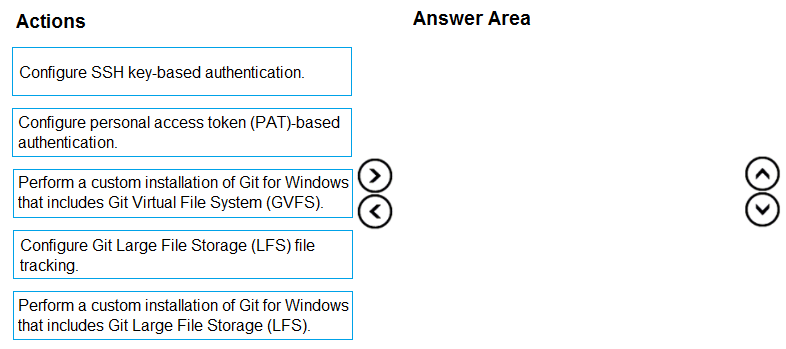
Which three actions should you perform in sequence on each developer’s device? To answer, move the appropriate actions from the list of actions to the answer area and arrange them in the correct order.
Show Answer
Correct Answer: Perform a custom installation of Git for Windows that includes Git Large File Storage (LFS).
Configure personal access token (PAT)-based authentication.
Configure Git Large File Storage (LFS) file tracking.
Explanation: Git LFS is required to store large binaries outside the repository while keeping pointer files in Git. Install Git with LFS first, then configure authentication to Azure DevOps, and finally enable LFS tracking for the required file types in the repository.
Question 187
You have a GitHub Enterprise account.
You need to enable push protection for secret scanning of the account repositories.
What should you do first?
A. Purchase a GitHub Advanced Security license.
B. Purchase Premium Plus support.
C. Enforce multi-factor authentication (MFA).
D. Create an access policy for secrets.
Show Answer
Correct Answer: A
Explanation: Push protection for secret scanning is a GitHub Advanced Security feature. For GitHub Enterprise repositories, the prerequisite is having a GitHub Advanced Security license before you can enable push protection. Premium Support, MFA enforcement, and secret access policies are not the required first step.
Question 188
You have an Azure subscription linked to an Azure Active Directory Premium Plan 1 tenant.
A security review indicates that too many users have privileged access to resources.
You need to deploy a privileged access management solution that meets the following requirements:
• Enforces time limits on the use of privileged access
• Requires approval to activate privileged access
• Minimizes costs
What should you do first?
A. Configure notifications when privileged roles are activated.
B. Configure alerts for the activation of privileged roles.
C. Enforce Azure Multi-Factor Authentication (MFA) for role activation.
D. Upgrade the license of the Azure Active Directory (Azure AD) tenant.
Show Answer
Correct Answer: D
Explanation: The required capabilities—time-limited privileged access and approval-based activation—are provided by Azure AD Privileged Identity Management (PIM), which requires Microsoft Entra ID (formerly Azure AD) Premium P2. The tenant currently has Premium P1, so the first step is to upgrade the tenant license. After P2 is available, PIM can be configured with approval workflows, activation time limits, MFA, notifications, and alerts as needed. This also minimizes costs by upgrading only to the required licensing level rather than implementing other solutions.
$19
Get all 541 questions with detailed answers and explanations
Instant download HTML + PDF delivered the moment payment clears.
Secure Stripe checkout we never see or store your card details.
7-day refund if files are defective see our refund policy.