You have two Azure subscriptions named Sub1 and Sub2.
Sub1 contains a virtual machine named VM1 and a storage account named storage1.
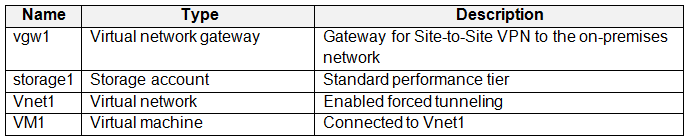
VM1 is associated to the resources shown in the following table.
You need to move VM1 to Sub2.
Which resources should you move to Sub2?
A. VM1, Disk1, and NetInt1 only
B. VM1, Disk1, and VNet1 only
C. VM1, Disk1, and storage1 only
D. VM1, Disk1, NetInt1, and VNet1
Show Answer
Correct Answer: D
Explanation: Move VM1 together with its managed OS disk (Disk1), network interface (NetInt1), and virtual network (VNet1), which provides the NIC’s subnet. storage1 is not listed as a dependency because Disk1 is a managed disk, not a VHD stored in that account.
Question 32
Note: This question is part of a series of questions that present the same scenario. Each question in the series contains a unique solution that might meet the stated goals. Some question sets might have more than one correct solution, while others might not have a correct solution.
After you answer a question in this section, you will NOT be able to return to it. As a result, these questions will not appear in the review screen.
You need to ensure that an Azure Active Directory (Azure AD) user named Admin1 is assigned the required role to enable Traffic Analytics for an Azure subscription.
Solution: You assign the Traffic Manager Contributor role at the subscription level to Admin1.
Does this meet the goal?
A. Yes
B. No
Show Answer
Correct Answer: B
Explanation: No. Enabling Traffic Analytics requires an eligible subscription-level role such as Owner, Contributor, or Network Contributor. Traffic Manager Contributor is for managing Traffic Manager profiles and does not grant the required permissions.
Question 32
HOTSPOT
-
You have a Microsoft Entra tenant that is linked to the subscriptions shown in the following table.
You have the resource groups shown in the following table.
You assign roles to users as shown in the following table.
For each of the following statements, select Yes if the statement is true. Otherwise, select No.
NOTE: Each correct selection is worth one point.
Show Answer
Correct Answer: Yes
No
Yes
Explanation: Contributor at MG2 inherits to Sub3/RG3/VM1, allowing VM resize. Storage Account Contributor scoped only to the storage1 resource cannot create a new storage account in RG1. User Access Administrator at the Tenant Root Group can manage RBAC role assignments across descendant scopes, including assigning Owner on RG3.
Question 33
You have an Azure subscription that has the public IP addresses shown in the following table.
You plan to deploy an Azure Bastion Basic SKU host named Bastion1.
Which IP addresses can you use?
A. IP1 only
B. IP1 and IP2 only
C. IP3, IP4, and IP5 only
D. IP1, IP2, IP4, and IP5 only
E. IP1, IP2, IP3, IP4, and IP5
Show Answer
Correct Answer: A
Explanation: Azure Bastion Basic requires a static, IPv4 public IP address with the Standard SKU and Regional tier. Only IP1 meets all of these requirements; IP2 is Global, while IP3, IP4, and IP5 do not meet the SKU or IP-version requirements.
Question 33
HOTSPOT -
You have an Azure subscription named Sub1 that contains the Azure resources shown in the following table.
You assign an Azure policy that has the following settings:
✑ Scope: Sub1
✑ Exclusions: Sub1/RG1/VNET1
✑ Policy definition: Append a tag and its value to resources
✑ Policy enforcement: Enabled
✑ Tag name: Tag4
✑ Tag value: value4
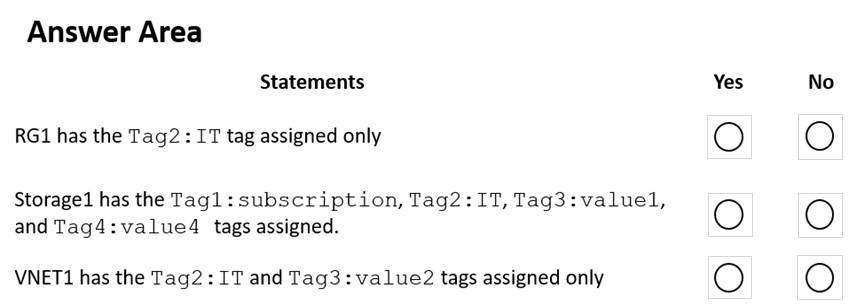
You assign tags to the resources as shown in the following table.
For each of the following statements, select Yes if the statement is true. Otherwise, select No.
NOTE: Each correct selection is worth one point.
Hot Area:
Show Answer
Correct Answer: RG1: Yes
storage1: No
VNET1: No
Explanation: The policy applies to resources, not resource groups, so RG1 keeps only Tag2. Tags are not inherited: storage1 has Tag3 and the appended Tag4. VNET1 is excluded from the policy and keeps only Tag3.
Question 34
You plan to deploy several Azure virtual machines that will run Windows Server 2022 in a virtual machine scale set by using an Azure Resource Manager template.
You need to ensure that NGINX is available on all the virtual machines after they are deployed.
What should you use?
A. Azure Custom Script Extension
B. Deployment Center in Azure App Service
C. Microsoft Entra Application Proxy
D. the Publish-AzVMDscConfiguration cmdlet
Show Answer
Correct Answer: A
Explanation: Azure Custom Script Extension is the appropriate choice for installing software such as NGINX on all virtual machines in a VM scale set after deployment from an ARM template. Deployment Center is for App Service, Microsoft Entra Application Proxy publishes on-premises apps, and Publish-AzVMDscConfiguration only publishes a DSC configuration to Azure Automation rather than applying it to the VMs.
Question 34
You have an Azure subscription that contains the resources shown in the following table.
You need to assign User1 the Storage File Data SMB Share Contributor role for share1.
What should you do first?
A. Enable identity-based data access for the file shares in storage1.
B. Modify the security profile for the file shares in storage1.
C. Select Default to Azure Active Directory authorization in the Azure portal for storage1.
D. Configure Access control (IAM) for share1.
Show Answer
Correct Answer: A
Explanation: Enable identity-based data access for the file shares in storage1 first. Azure Files SMB share data roles are used with identity-based authentication; once it is enabled, you can assign User1 the role at share1’s Access control (IAM).
Question 34
You create an Azure Storage account named contosostorage.
You plan to create a file share named data.
Users need to map a drive to the data file share from home computers that run Windows 10.
Which outbound port should you open between the home computers and the data file share?
A. 80
B. 443
C. 445
D. 3389
Show Answer
Correct Answer: C
Explanation: Azure Files shares use the SMB protocol for Windows drive mapping, and SMB traffic uses outbound TCP port 445.
Question 35
Note: This question is part of a series of questions that present the same scenario. Each question in the series contains a unique solution that might meet the stated goals. Some question sets might have more than one correct solution, while others might not have a correct solution.
After you answer a question in this section, you will NOT be able to return to it. As a result, these questions will not appear in the review screen.
You have an Azure Storage account named storage1.
You need to enable a user named User1 to list and regenerate storage account keys for storage1.
Solution: You assign the Storage Account Key Operator Service Role to User1.
Does this meet the goal?
A. Yes
B. No
Show Answer
Correct Answer: A
Explanation: The built-in Azure RBAC role 'Storage Account Key Operator Service Role' permits listing and regenerating storage account access keys. Assigning this role to User1 satisfies the requirement to list and regenerate the storage account keys for storage1.
Question 35
Your on-premises network contains a VPN gateway.
You have an Azure subscription that contains the resources shown in the following table.
You need to ensure that all the traffic from VM1 to storage1 travels across the Microsoft backbone network.
What should you configure?
A. Azure Application Gateway
B. private endpoints
C. a network security group (NSG)
D. Azure Virtual WAN
Show Answer
Correct Answer: B
Explanation: Configure a private endpoint for storage1. It gives the storage account a private IP address in VNet1, so traffic from VM1 reaches it over Azure Private Link and the Microsoft backbone rather than using the public endpoint. An NSG or Application Gateway does not provide this private service connectivity; Virtual WAN is not required.
$19
Get all 558 questions with detailed answers and explanations
Instant download HTML + PDF delivered the moment payment clears.
Secure Stripe checkout we never see or store your card details.
7-day refund if files are defective see our refund policy.