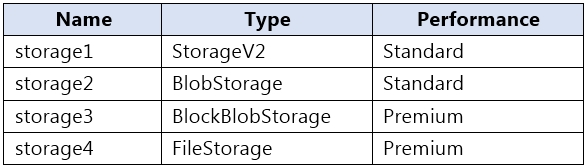
You have an Azure subscription that contains the storage accounts shown in the following table.
You plan to manage the data stored in the accounts by using lifecycle management rules.
To which storage accounts can you apply lifecycle management rules?
A. storage1 only
B. storage1 and storage2 only
C. storage3 and storage4 only
D. storage1, storage2, and storage3 only
E. storage1, storage2, storage3, and storage4
Show Answer
Correct Answer: D
Explanation: Lifecycle management rules can be applied to standard StorageV2, standard BlobStorage, and premium BlockBlobStorage accounts. They aren’t supported for premium FileStorage accounts, so storage4 is excluded.
Question 70
HOTSPOT -
You have an Azure subscription that contains a storage account named storage1. The storage1 account contains blobs in a container named container1.
You plan to share access to storage1.
You need to generate a shared access signature (SAS). The solution must meet the following requirements:
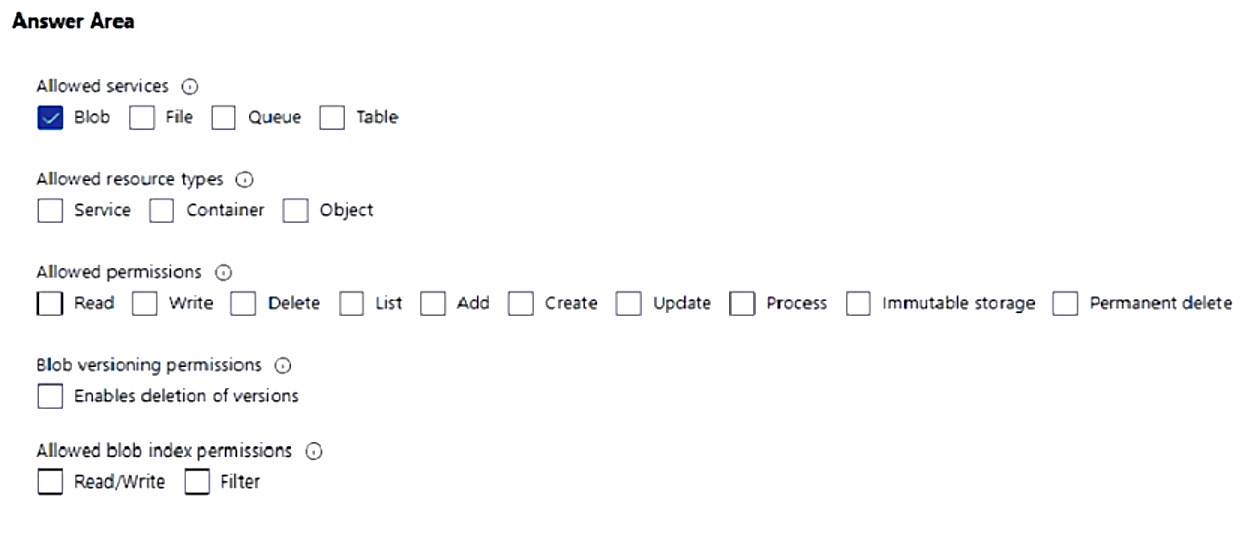
• Ensure that the SAS can only be used to enumerate and download blobs stored in container1.
• Use the principle of least privilege.
Which three settings should you enable? To answer, select the appropriate settings in the answer area.
Explanation: Blob limits the SAS to blob service. Container scope allows listing blobs within the specific container. Read permits downloading blobs, and List permits enumerating blobs. This satisfies least privilege for the stated requirements.
Question 70
Note: This question is part of a series of questions that present the same scenario. Each question in the series contains a unique solution that might meet the stated goals. Some question sets might have more than one correct solution, while others might not have a correct solution.
After you answer a question in this section, you will NOT be able to return to it. As a result, these questions will not appear in the review screen.
You have an app named App1 that is installed on two Azure virtual machines named VM1 and VM2. Connections to App1 are managed by using an Azure Load
Balancer.
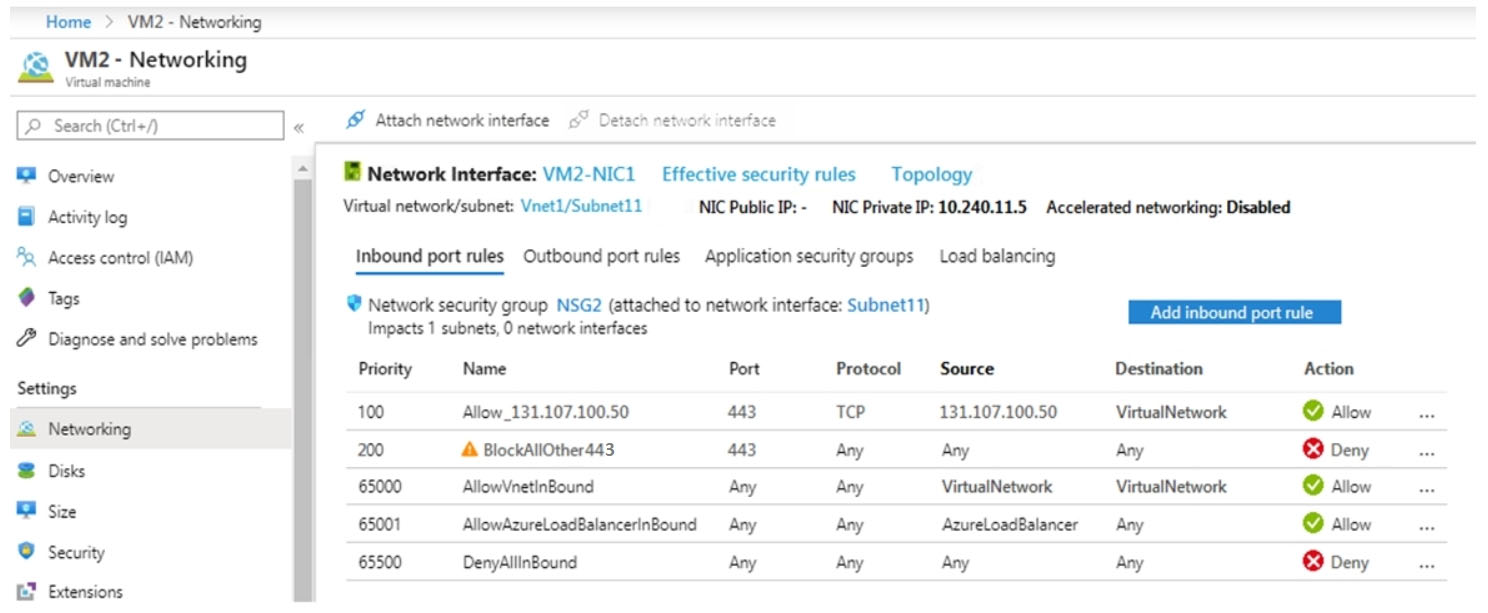
The effective network security configurations for VM2 are shown in the following exhibit.
You discover that connections to App1 from 131.107.100.50 over TCP port 443 fail.
You verify that the Load Balancer rules are configured correctly.
You need to ensure that connections to App1 can be established successfully from 131.107.100.50 over TCP port 443.
Solution: You modify the priority of the Allow_131.107.100.50 inbound security rule.
Does this meet the goal?
A. Yes
B. No
Show Answer
Correct Answer: B
Explanation: No. The Allow_131.107.100.50 rule already has priority 100, the highest possible NSG priority, and it takes precedence over the deny rule at priority 200. Changing its priority cannot resolve the connection failure.
Question 71
HOTSPOT
-
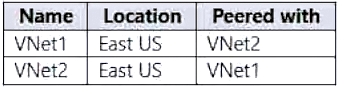
You have an Azure subscription that contains the virtual networks shown in the following table.
Each virtual network has 50 connected virtual machines.
You need to implement Azure Bastion. The solution must meet the fallowing requirements:
• Support host scaling.
• Support uploading and downloading files.
• Support the virtual machines on both VNet1 and VNet2.
• Minimize the number of addresses on the Azure Bastion subnet.
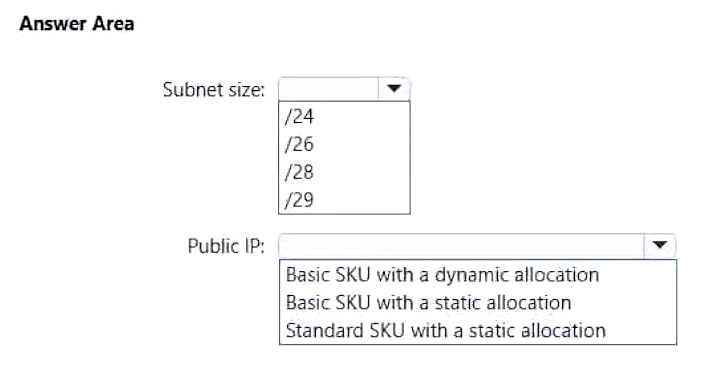
How should you configure Azure Bastion? To answer, select the options in the answer area.
NOTE: Each correct answer is worth one point.
Show Answer
Correct Answer: Subnet size: /26
Public IP: Standard SKU with a static allocation
Explanation: Azure Bastion Standard is required for host scaling and file upload/download. Bastion requires a Standard static public IP. To minimize addresses while supporting host scaling, use the minimum supported AzureBastionSubnet size of /26.
Question 71
Note: This question is part of a series of questions that present the same scenario. Each question in the series contains a unique solution that might meet the stated goals. Some question sets might have more than one correct solution, while others might not have a correct solution.
After you answer a question in this section, you will NOT be able to return to it. As a result, these questions will not appear in the review screen.
You have an Azure subscription that contains the virtual machines shown in the following table.
You deploy a load balancer that has the following configurations:
✑ Name: LB1
✑ Type: Internal
✑ SKU: Standard
✑ Virtual network: VNET1
You need to ensure that you can add VM1 and VM2 to the backend pool of LB1.
Solution: You create a Standard SKU public IP address, associate the address to the network interface of VM1, and then stop VM2.
Does this meet the goal?
A. Yes
B. No
Show Answer
Correct Answer: B
Explanation: No. VM2 still has a Basic SKU public IP address attached. A Standard Load Balancer cannot use a backend VM with a Basic SKU public IP; stopping VM2 does not remove or change that public IP. VM1's Standard public IP does not resolve the incompatibility.
Question 72
HOTSPOT
-
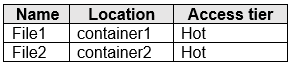
You have an Azure subscription. The subscription contains a storage account named storage1 that has the lifecycle management rules shown in the following table.
On June 1, you store two blobs in storage1 as shown in the following table.
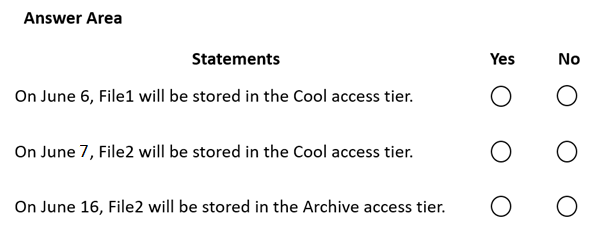
For each of the following statements, select Yes if the statement is true. Otherwise, select No.
NOTE: Each correct selection is worth one point.
Show Answer
Correct Answer: No
Yes
No
Explanation: Rule 2 (no prefix) applies to all blobs after more than 5 days unless a cheaper applicable action overrides it. File1 is already archived by the container1 rule, so it is not in Cool on June 6. File2 moves to Cool after more than 5 days, then is deleted after more than 10 days by the container2 delete rule, so it never reaches Archive on June 16.
Question 72
Note: This question is part of a series of questions that present the same scenario. Each question in the series contains a unique solution that might meet the stated goals. Some question sets might have more than one correct solution, while others might not have a correct solution.
After you answer a question in this section, you will NOT be able to return to it. As a result, these questions will not appear in the review screen.
You have an app named App1 that is installed on two Azure virtual machines named VM1 and VM2. Connections to App1 are managed by using an Azure Load
Balancer.
The effective network security configurations for VM2 are shown in the following exhibit.
You discover that connections to App1 from 131.107.100.50 over TCP port 443 fail.
You verify that the Load Balancer rules are configured correctly.
You need to ensure that connections to App1 can be established successfully from 131.107.100.50 over TCP port 443.
Solution: You create an inbound security rule that denies all traffic from the 131.107.100.50 source and has a cost of 64999.
Does this meet the goal?
A. Yes
B. No
Show Answer
Correct Answer: B
Explanation: No. The priority-200 rule denies TCP port 443 traffic, including the load balancer’s health probes. The proposed deny rule at priority 64999 has lower precedence and would not fix the blocked probes. The existing priority-100 allow rule already permits traffic from 131.107.100.50.
Question 73
Note: This question is part of a series of questions that present the same scenario. Each question in the series contains a unique solution that might meet the stated goals. Some question sets might have more than one correct solution, while others might not have a correct solution.
After you answer a question in this section, you will NOT be able to return to it. As a result, these questions will not appear in the review screen.
You have an Azure subscription that contains the virtual machines shown in the following table.
You deploy a load balancer that has the following configurations:
✑ Name: LB1
✑ Type: Internal
✑ SKU: Standard
✑ Virtual network: VNET1
You need to ensure that you can add VM1 and VM2 to the backend pool of LB1.
Solution: You create a Basic SKU public IP address, associate the address to the network interface of VM1, and then start VM1.
Does this meet the goal?
A. Yes
B. No
Show Answer
Correct Answer: B
Explanation: No. A Standard Load Balancer requires backend VMs to have either no public IP or a Standard SKU public IP. The solution gives VM1 a Basic SKU public IP, and VM2 already has a Basic SKU public IP, so the VMs cannot be added to LB1’s backend pool.
Question 74
Note: This question is part of a series of questions that present the same scenario. Each question in the series contains a unique solution that might meet the stated goals. Some question sets might have more than one correct solution, while others might not have a correct solution.
After you answer a question in this section, you will NOT be able to return to it. As a result, these questions will not appear in the review screen.
You have an app named App1 that is installed on two Azure virtual machines named VM1 and VM2. Connections to App1 are managed by using an Azure Load
Balancer.
The effective network security configurations for VM2 are shown in the following exhibit.
You discover that connections to App1 from 131.107.100.50 over TCP port 443 fail.
You verify that the Load Balancer rules are configured correctly.
You need to ensure that connections to App1 can be established successfully from 131.107.100.50 over TCP port 443.
Solution: You create an inbound security rule that allows any traffic from the AzureLoadBalancer source and has a cost of 150.
Does this meet the goal?
A. Yes
B. No
Show Answer
Correct Answer: A
Explanation: Yes. Assuming “cost” means priority, the new allow rule at priority 150 is evaluated before the deny rule at priority 200. It permits Azure Load Balancer health probes, allowing VM2 to be considered healthy. The existing priority-100 rule already allows TCP 443 from 131.107.100.50.
Question 75
You have an Azure virtual machine named VM1.
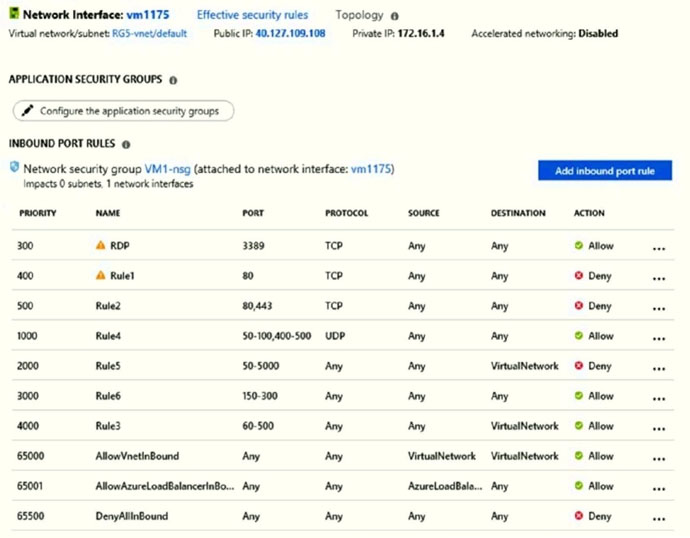
The network interface for VM1 is configured as shown in the exhibit. (Click the Exhibit tab.)
You deploy a web server on VM1, and then create a secure website that is accessible by using the HTTPS protocol. VM1 is used as a web server only.
You need to ensure that users can connect to the website from the Internet.
What should you do?
A. Modify the protocol of Rule4
B. Delete Rule1
C. For Rule5, change the Action to Allow and change the priority to 401
D. Create a new inbound rule that allows TCP protocol 443 and configure the rule to have a priority of 501.
Show Answer
Correct Answer: C
Explanation: Rule2 denies TCP ports 80 and 443 at priority 500. Changing Rule5 to Allow and setting its priority to 401 makes it process before Rule2, so HTTPS traffic on port 443 is allowed. This rule also allows a broader port range than necessary, but it is the listed option that permits HTTPS. Option D’s priority of 501 is lower precedence than Rule2, so the deny rule would still block HTTPS.
$19
Get all 558 questions with detailed answers and explanations
Instant download HTML + PDF delivered the moment payment clears.
Secure Stripe checkout we never see or store your card details.
7-day refund if files are defective see our refund policy.