HOTSPOT -
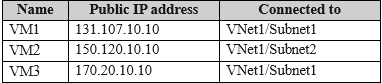
You have an Azure subscription that contains the virtual machines shown in the following table.
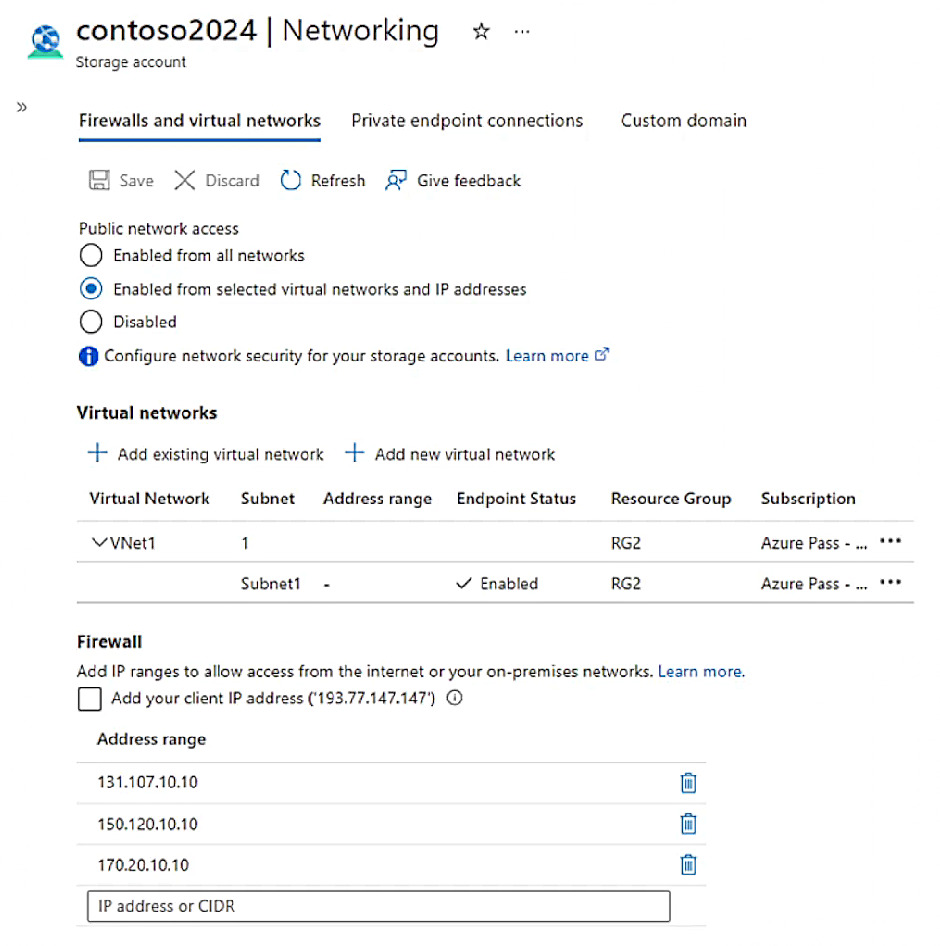
The subscription contains a storage account named contoso2024 as shown in the following exhibit.
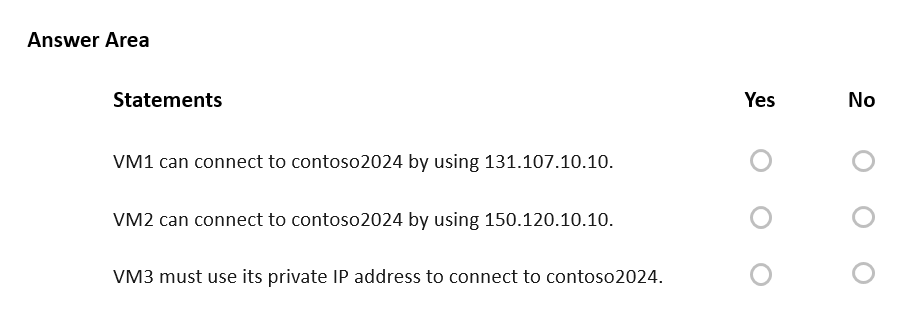
For each of the following statements, select Yes if the statement is true. Otherwise, select No.
Show Answer
Correct Answer: Yes
Yes
No
Explanation: Subnet1 is allowed via a virtual network rule, so VM1 can access the storage account. Public IP firewall rules also allow explicitly listed public IPs, so VM2 can connect using its listed public IP despite being in Subnet2. VM3 is not required to use its private IP because no private endpoint is configured; 'must' is false.
Question 43
You have an on-premises network.
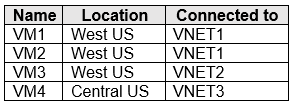
You have an Azure subscription that contains three virtual networks named VNET1. VNET2. and VNET3. The virtual networks are peered and connected to the on-premises network. The subscription contains the virtual machines shown in the following table.
You need to monitor connectivity between the virtual machines and the on-premises network by using Connection Monitor.
What is the minimum number of connection monitors you should deploy?
A. 1
B. 2
C. 3
D. 4
Show Answer
Correct Answer: B
Explanation: Deploy two connection monitors—one for the VMs in West US and one for the VM in Central US. A connection monitor is regional, so the VMs in the same region can share a monitor; the number of peered virtual networks does not increase the count.
Question 43
You have a general-purpose v1 Azure Storage account named storage1 that uses locally-redundant storage (LRS).
You need to ensure that the data in the storage account is protected if a zone fails. The solution must minimize costs and administrative effort.
What should you do first?
A. Create a new storage account.
B. Configure object replication rules.
C. Upgrade the account to general-purpose v2.
D. Modify the Replication setting of storage1.
Show Answer
Correct Answer: C
Explanation: Zone-redundant storage (ZRS) protects data against a zone failure, but it isn’t supported for general-purpose v1 accounts. First upgrade storage1 to general-purpose v2; then change its replication setting to ZRS.
Question 44
HOTSPOT
-
You have an Azure subscription that uses Azure Container Instances.
You have a computer that has Azure Command-Line Interface (CLI) and Docker installed.
You create a container image named image1.
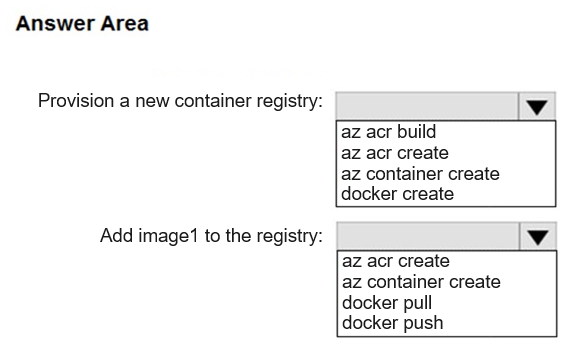
You need to provision a new Azure container registry and add image1 to the registry.
Which command should you run for each requirement? To answer, select the options in the answer area.
NOTE: Each correct answer is worth one point.
Show Answer
Correct Answer: Provision a new container registry: az acr create
Add image1 to the registry: docker push
Explanation: Use 'az acr create' to create an Azure Container Registry. After tagging the local image for the registry, use 'docker push' to upload image1 to the registry.
Question 44
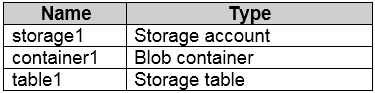
You have an Azure subscription that contains the resources shown in the following table.
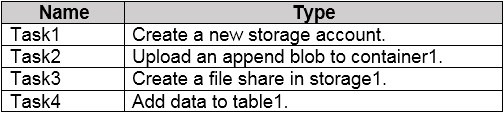
You need to perform the tasks shown in the following table.
Which tasks can you perform by using Azure Storage Explorer?
A. Task1 and Task3 only
B. Task1, Task2, and Task3 only
C. Task1, Task3, and Task4 only
D. Task2, Task3, and Task4 only
E. Task1, Task2, Task3, and Task4
Show Answer
Correct Answer: D
Explanation: Azure Storage Explorer can upload an append blob to an existing blob container, create a file share in an existing storage account, and add data to an existing table. It cannot create a new storage account, so Task1 is excluded.
Question 45
You have an Azure virtual network named VNet1 that contains the following settings:
• IPv4 address space: 172.16.10.0/24
• Subnet name: Subnet1
• Subnet address range: 172.16.10.0/25
What is the maximum number of virtual machines that can connect to Subnet1?
A. 24
B. 25
C. 123
D. 128
E. 251
Show Answer
Correct Answer: C
Explanation: A /25 subnet contains 128 IP addresses. In Azure, 5 IP addresses in each subnet are reserved, leaving 123 usable IP addresses for virtual machines and other resources. Therefore, the maximum number of VMs that can connect to the subnet is 123.
Question 45
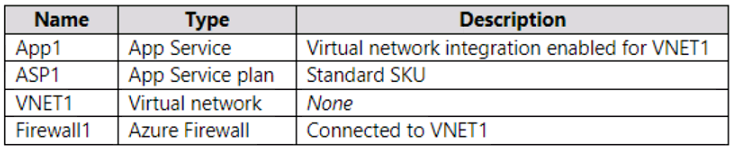
You have an Azure subscription that contains the resources shown in the following table.
You need to manage outbound traffic from VNET1 by using Firewall1.
What should you do first?
A. Configure the Hybrid Connection Manager.
B. Upgrade ASP1 to the Premium SKU.
C. Create a route table.
D. Create an Azure Network Watcher.
Show Answer
Correct Answer: C
Explanation: Create a user-defined route table first. You can then add a route directing outbound traffic to Firewall1 and associate the route table with the subnet used by VNET1’s App Service integration.
Question 45
HOTSPOT -
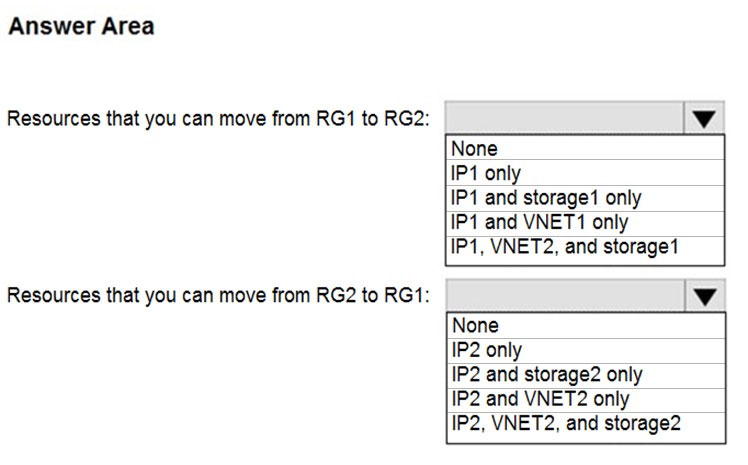
You have an Azure subscription that contains the resource groups shown in the following table.
RG1 contains the resources shown in the following table.
You need to identify which resources you can move from RG1 to RG2, and which resources you can move from RG2 to RG1.
Which resources should you identify? To answer, select the appropriate options in the answer area.
NOTE: Each correct selection is worth one point.
Hot Area:
Show Answer
Correct Answer: RG1 to RG2: IP1, VNET2, and storage1
RG2 to RG1: IP2, VNET2, and storage2
Explanation: The delete lock on RG2 and the locks on individual resources do not prevent these resource-group moves. The question’s tables appear to omit or mislabel some resources; the selections follow the available answer options.
Question 46
DRAG DROP -
You have a Microsoft Entra tenant.
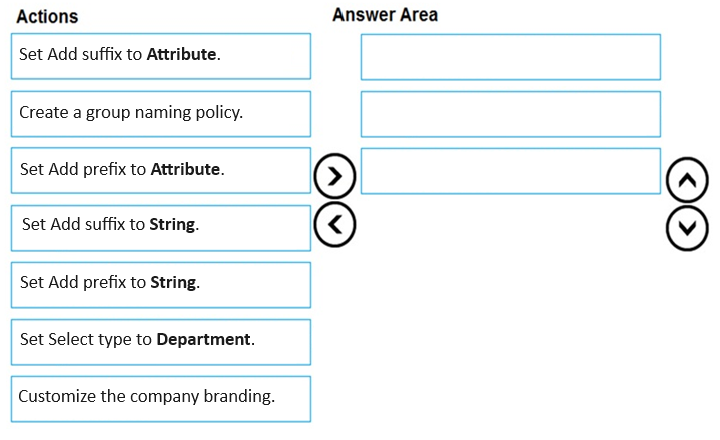
You need to ensure that when a new Microsoft 365 group is created, the group name is automatically formatted as follows:
Which three actions should you perform in sequence in the Microsoft Entra admin center? To answer, move the appropriate actions from the list of actions to the answer area and arrange them in the correct order.
Show Answer
Correct Answer: Create a group naming policy.
Set Add prefix to Attribute.
Set Select type to Department.
Explanation: A Microsoft Entra group naming policy supports using user attributes as prefixes/suffixes. To achieve <Department><Group name>, create the naming policy, configure the prefix as an attribute, then choose the Department attribute.
Question 46
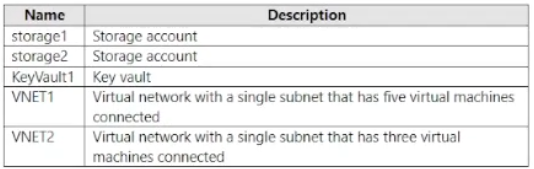
You have an Azure subscription that contains eight virtual machines and the resources shown in the following table.
You need to configure access for VNET1. The solution must meet the following requirements:
• The virtual machines connected to VNET1 must be able to communicate with the virtual machines connected to VNET2 by using the Microsoft backbone.
• The virtual machines connected to VNET1 must be able to access storage1, storage2, and Azure AD by using the Microsoft backbone.
What is the minimum number of service endpoints you should add to VNET1?
A. 1
B. 2
C. 3
D. 5
Show Answer
Correct Answer: A
Explanation: Add one Microsoft.Storage service endpoint to VNET1’s subnet; it can serve both storage accounts. VNET1-to-VNET2 communication uses virtual network peering, not a service endpoint. Azure AD does not require a service endpoint for ordinary access.
Sources:
https://learn.microsoft.com/en-us/answers/questions/5573500/accessing-vms-in-multiple-resource-groups-via-a-si
$19
Get all 558 questions with detailed answers and explanations
Instant download HTML + PDF delivered the moment payment clears.
Secure Stripe checkout we never see or store your card details.
7-day refund if files are defective see our refund policy.