HOTSPOT
-
Your network contains an on-premises Active Directory Domain Services (AD DS) domain.
The domain contains the identities shown in the following table.
You have an Azure subscription that contains a storage account named storage1. The file shares in storage1 have an identity source of AD DS and Default share-level permissions set to Enable permissions for all authenticated users and groups.
You create an Azure Files share named share1 that has the roles shown in the following table.
You have a Microsoft Entra tenant that contains a cloud-only user named User3.
You use Microsoft Entra Connect to sync OU1 from the AD DS domain to the Microsoft Entra tenant.
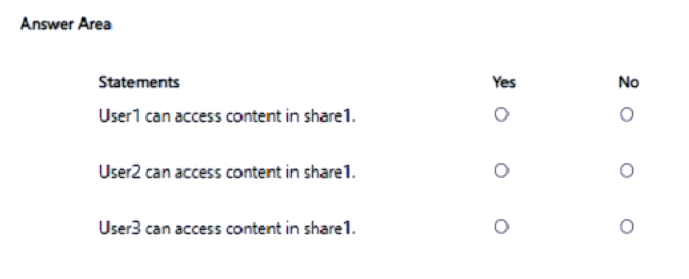
For each of the following statements, select Yes if the statement is true. Otherwise, select No.
NOTE: Each correct selection is worth one point.
Show Answer
Correct Answer: No
Yes
No
Explanation: Azure Files share-level RBAC is evaluated using Microsoft Entra identities. Only OU1 is synchronized, so User2 and Group1 are synced, but User1 (in OU2) is not. A synced group cannot grant Azure access to a user that has no corresponding synced Entra identity. User2 has the Reader role directly. User3 is cloud-only and has no assigned share role; the default share-level setting only applies to the configured identity source (AD DS authenticated identities), not to an unrelated cloud-only user.
Question 52
You have an Azure Subscription that contains a storage account named storageacct1234 and two users named User1 and User2.
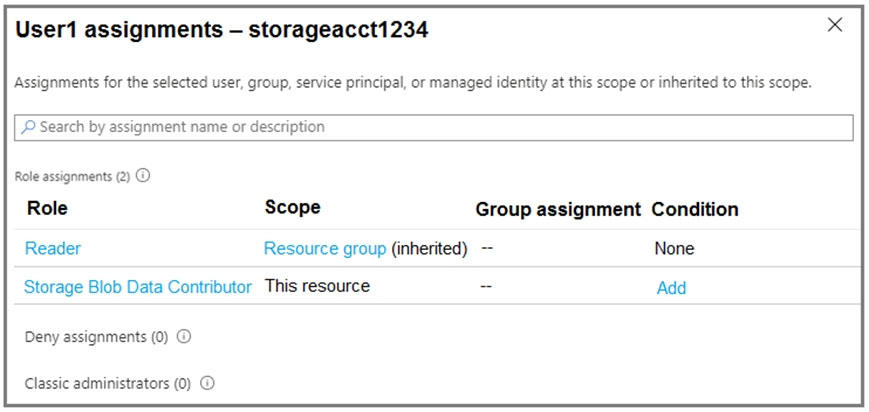
You assign User1 the roles shown in the following exhibit.
Which two actions can User1 perform? Each correct answer presents a complete solution.
NOTE: Each correct selection is worth one point.
A. Assign roles to User2 for storageacct1234.
B. Upload blob data to storageacct1234.
C. Modify the firewall of storageacct1234.
D. View blob data in storageacct1234.
E. View file shares in storageacct1234.
Show Answer
Correct Answer: B, D
Explanation: Storage Blob Data Contributor grants User1 read and write access to blob data, so they can upload blobs and view blob contents. The inherited Reader role allows viewing resource information but does not grant access to file-share data or permission to change the storage account firewall or assign roles.
Question 52
HOTSPOT -
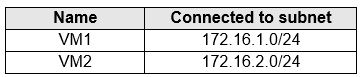
You have an Azure subscription that contains the Azure virtual machines shown in the following table.
You add inbound security rules to a network security group (NSG) named NSG1 as shown in the following table.
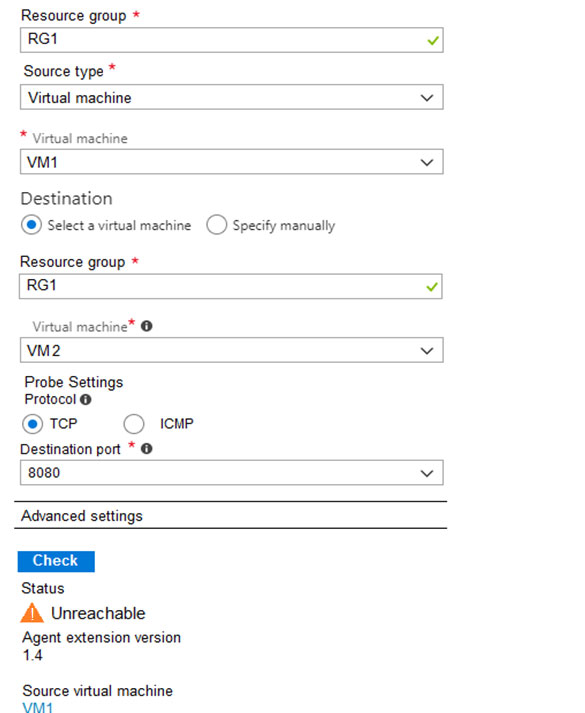
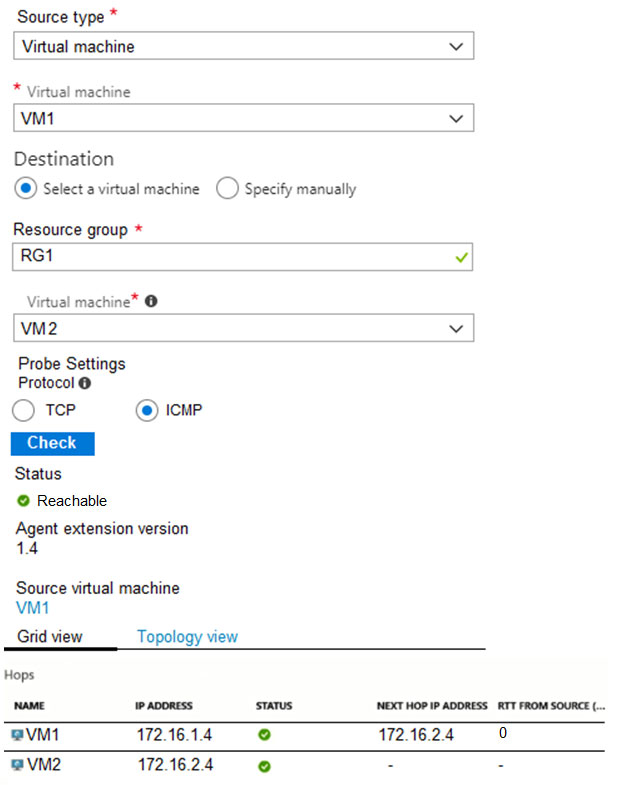
You run Azure Network Watcher as shown in the following exhibit.
You run Network Watcher again as shown in the following exhibit.
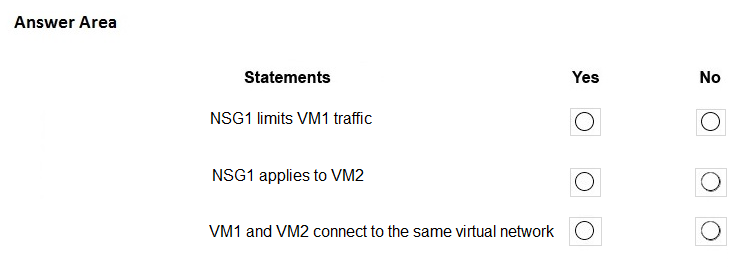
For each of the following statements, select Yes if the statement is true. Otherwise, select No.
NOTE: Each correct selection is worth one point.
Hot Area:
Show Answer
Correct Answer: NSG1 limits VM1 traffic: No
NSG1 applies to VM2: Yes
VM1 and VM2 connect to the same virtual network: Yes
Explanation: NSG1’s inbound rules target VM2’s subnet, not VM1’s. The direct next hop to VM2 indicates that the VMs share a virtual network. The failed TCP 8080 test does not necessarily mean NSG1 blocked it; VM2 might not have a service listening on that port.
Question 53
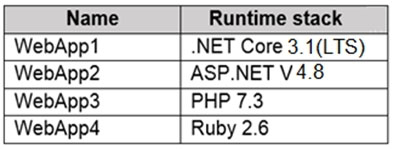
You plan to create the Azure web apps shown in the following table.
What is the minimum number of App Service plans you should create for the web apps?
A. 1
B. 2
C. 3
D. 4
Show Answer
Correct Answer: B
Explanation: Create two App Service plans: one Windows plan for ASP.NET v4.8 (and the apps whose runtimes support Windows), and one Linux plan for Ruby 2.6. A single plan cannot host both Windows and Linux apps.
Question 53
HOTSPOT -
You have Azure subscription that includes following Azure file shares:
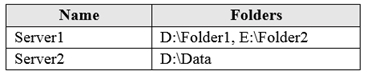
You have the following on-premises servers:
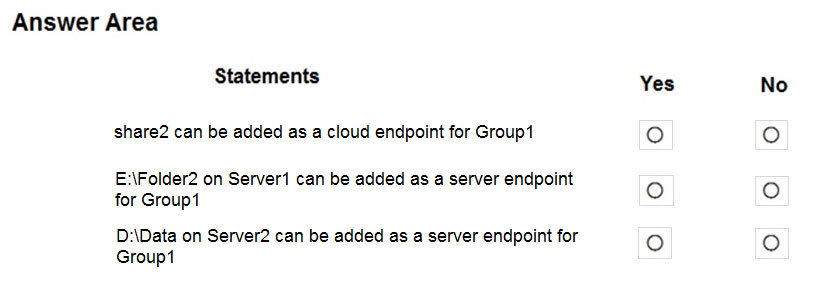
You create a Storage Sync Service named Sync1 and an Azure File Sync group named Group1. Group1 uses share1 as a cloud endpoint.
You register Server1 and Server2 in Sync1. You add D:\Folder1 on Server1 as a server endpoint of Group1.
For each of the following statements, select Yes if the statement is true. Otherwise, select No.
NOTE: Each correct selection is worth one point.
Hot Area:
Show Answer
Correct Answer: share2: No
E:\Folder2 on Server1: No
D:\Data on Server2: Yes
Explanation: A sync group has only one cloud endpoint and allows only one server endpoint per registered server. Group1 already uses share1 and has an endpoint on Server1, but Server2 can be added.
Question 54
Note: This question is part of a series of questions that present the same scenario. Each question in the series contains a unique solution that might meet the stated goals. Some question sets might have more than one correct solution, while others might not have a correct solution.
After you answer a question in this section, you will NOT be able to return to it. As a result, these questions will not appear in the review screen.
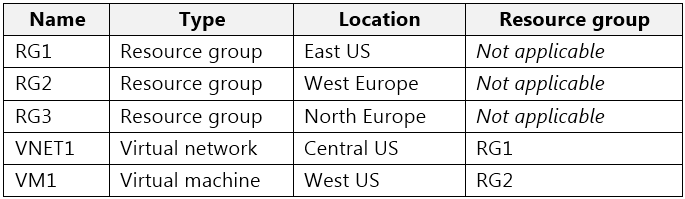
You have an Azure subscription named Subscription1 that contains the resources shown in the following table.
Subscription1 also includes a virtual network named VNET2. VM1 connects to a virtual network named VNET2 by using a network interface named NIC1.
You need to create a new network interface named NIC2 for VM1.
Solution: You create NIC2 in RG2 and Central US.
Does this meet the goal?
A. Yes
B. No
Show Answer
Correct Answer: B
Explanation: No. NIC2 must be in the same Azure region as VM1, which is West US. Creating it in Central US does not meet that requirement.
Question 54
You have a Recovery Service vault that you use to test backups. The test backups contain two protected virtual machines.
You need to delete the Recovery Services vault.
What should you do first?
A. From the Recovery Service vault, delete the backup data.
B. Modify the disaster recovery properties of each virtual machine.
C. Modify the locks of each virtual machine.
D. From the Recovery Service vault, stop the backup of each backup item.
Show Answer
Correct Answer: D
Explanation: First stop the backup for each protected VM from the Recovery Services vault. This stops ongoing protection; you can then delete the backup data and proceed with deleting the vault.
Question 55
You have an Azure subscription that contains an Azure container registry named ContReg1.
You enable the Admin user for ContReg1.
Which username can you use to sign in to ContReg1?
A. root
B. admin
C. administrator
D. ContReg1
Show Answer
Correct Answer: D
Explanation: When the Azure Container Registry admin user is enabled, the username used for basic authentication is the registry name itself, and the password is one of the admin access keys. Therefore, for a registry named ContReg1, the username is ContReg1.
Question 55
Note: This question is part of a series of questions that present the same scenario. Each question in the series contains a unique solution that might meet the stated goals. Some question sets might have more than one correct solution, while others might not have a correct solution.
After you answer a question in this section, you will NOT be able to return to it. As a result, these questions will not appear in the review screen.
You have an Azure subscription named Subscription1 that contains the resources shown in the following table.
Subscription1 also includes a virtual network named VNET2. VM1 connects to a virtual network named VNET2 by using a network interface named NIC1.
You need to create a new network interface named NIC2 for VM1.
Solution: You create NIC2 in RG1 and West US.
Does this meet the goal?
A. Yes
B. No
Show Answer
Correct Answer: A
Explanation: Yes. NIC2 is created in West US, the same region as VM1. The resource group’s location does not determine the location of resources in it, and the NIC does not need to be in the same resource group as the VM.
Question 56
Note: This question is part of a series of questions that present the same scenario. Each question in the series contains a unique solution that might meet the stated goals. Some question sets might have more than one correct solution, while others might not have a correct solution.
After you answer a question in this section, you will NOT be able to return to it. As a result, these questions will not appear in the review screen.
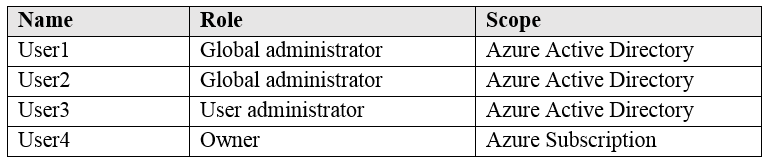
You have an Azure subscription that contains the following users in an Azure Active Directory tenant named contoso.onmicrosoft.com:
User1 creates a new Azure Active Directory tenant named external.contoso.onmicrosoft.com.
You need to create new user accounts in external.contoso.onmicrosoft.com.
Solution: You instruct User4 to create the user accounts.
Does that meet the goal?
A. Yes
B. No
Show Answer
Correct Answer: B
Explanation: No. User4 is an Owner of the Azure subscription, which grants Azure resource permissions but not permissions to manage users in the new Microsoft Entra tenant. User1, as the tenant creator, has access to that tenant and would need to grant User4 an appropriate directory role first.
$19
Get all 558 questions with detailed answers and explanations
Instant download HTML + PDF delivered the moment payment clears.
Secure Stripe checkout we never see or store your card details.
7-day refund if files are defective see our refund policy.