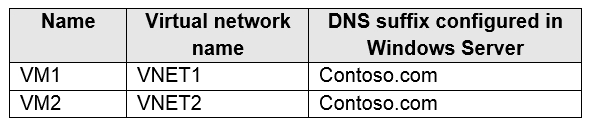
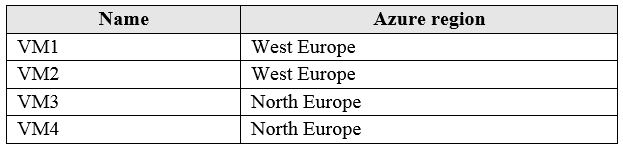
You have Azure virtual machines that run Windows Server 2019 and are configured as shown in the following table.
You create a public Azure DNS zone named adatum.com and a private Azure DNS zone named contoso.com.
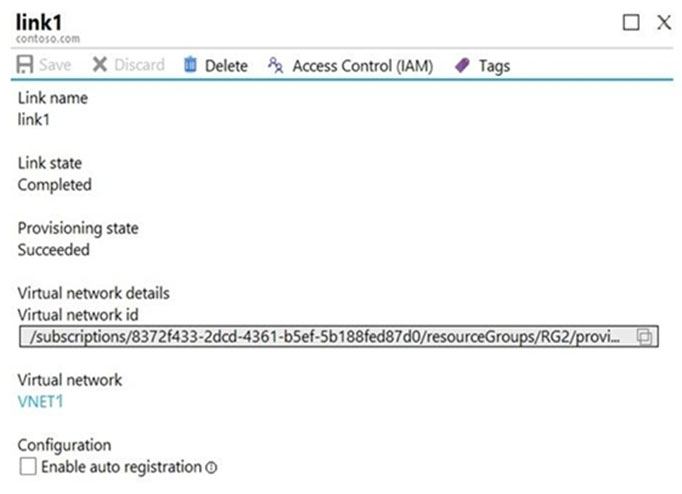
For controso.com, you create a virtual network link named link1 as shown in the exhibit. (Click the Exhibit tab.)
You discover that VM1 can resolve names in contoso.com but cannot resolve names in adatum.com. VM1 can resolve other hosts on the Internet.
You need to ensure that VM1 can resolve host names in adatum.com.
What should you do?
A. Update the DNS suffix on VM1 to be adatum.com
B. Configure the name servers for adatum.com at the domain registrar
C. Create an SRV record in the contoso.com zone
D. Modify the Access control (IAM) settings for link1
Show Answer
Correct Answer: B
Explanation: Because adatum.com is a public Azure DNS zone, its authoritative Azure DNS name servers must be delegated at the domain registrar. Updating VM1’s DNS suffix affects only unqualified name lookups; it does not establish public DNS delegation.
Question 82
You have an Azure subscription named Subscription1 that contains the storage accounts shown in the following table:
You plan to use the Azure Import/Export service to export data from Subscription1.
You need to identify which storage account can be used to export the data.
What should you identify?
A. storage1
B. storage2
C. storage3
D. storage4
Show Answer
Correct Answer: D
Explanation: Azure Import/Export can export data from Azure Blob Storage, but not Azure Files, Tables, or Queues. Only storage4 contains Blob data, so identify storage4.
Question 83
HOTSPOT -
You purchase a new Azure subscription.
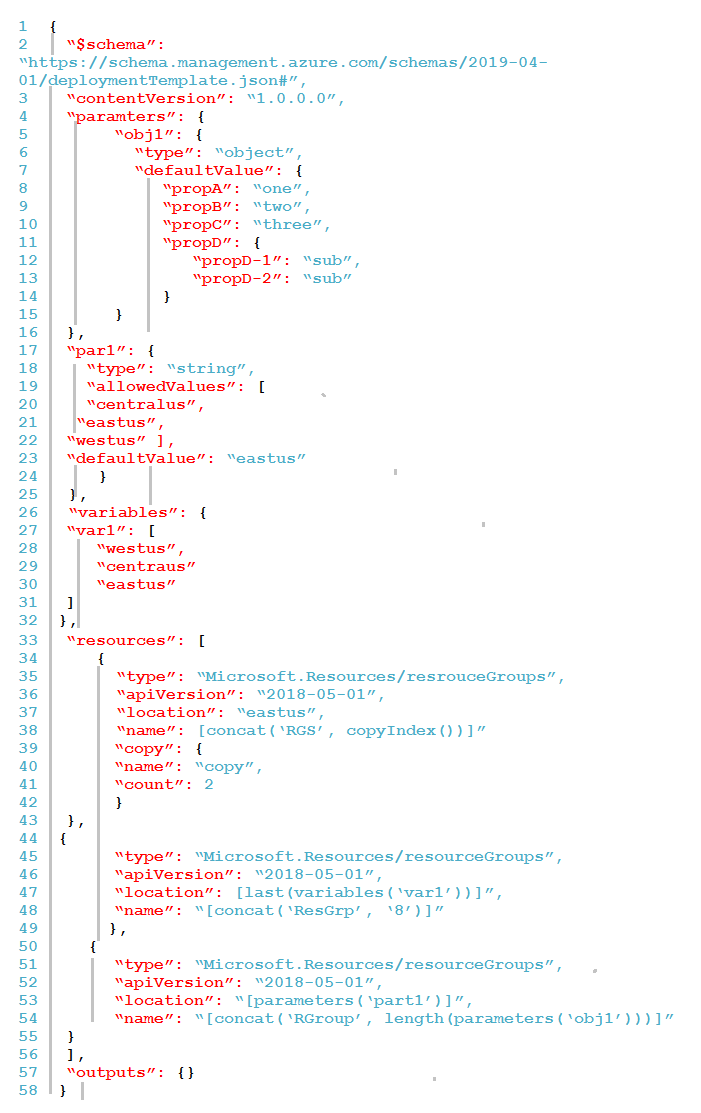
You create an Azure Resource Manager (ARM) template named deploy.json as shown in the following exhibit.
You connect to the subscription and run the following command.
New-AzDeployment –Location westus –TemplateFile “deploy.json”
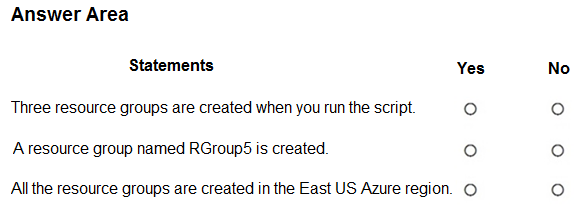
For each of the following statements, select Yes if the statement is true. Otherwise, select No.
NOTE: Each correct selection is worth one point.
Show Answer
Correct Answer: No
No
Yes
Explanation: The copy loop creates two resource groups (RGS0 and RGS1), plus ResGrp8 and RGroup4 (the object has four top-level properties), for a total of four resource groups. The deployment location (westus) is only where the subscription deployment metadata is stored; all resource group locations defined in the template resolve to East US.
Question 83
You have an Azure subscription that contains a resource group named TestRG.
You use TestRG to validate an Azure deployment.
TestRG contains the following resources:
You need to delete TestRG.
What should you do first?
A. Modify the backup configurations of VM1 and modify the resource lock type of VNET1
B. Remove the resource lock from VNET1 and delete all data in Vault1
C. Turn off VM1 and remove the resource lock from VNET1
D. Turn off VM1 and delete all data in Vault1
Show Answer
Correct Answer: B
Explanation: Remove the Delete lock on VNET1, which would otherwise prevent its deletion, and delete the backup data in Vault1, which must be cleared before the Recovery Services vault can be deleted. Turning off VM1 is not required.
Question 84
You have an Azure subscription. The subscription contains 10 virtual machines that run Windows Server. Each virtual machine hosts a website in IIS and has the Azure Monitor Agent installed.
You need to collect the IIS logs from each virtual machine and store them in a Log Analytics workspace.
What should you configure first?
A. a data collection endpoint
B. an Azure Monitor Private Link Scope (AMPLS)
C. Diagnostic settings
D. VM insights
E. a private endpoint
Show Answer
Correct Answer: A
Explanation: The correct choice is A. With the Azure Monitor Agent, collecting IIS logs from Windows VMs is configured through Data Collection Rules (DCRs). IIS logs are one of the data sources that require a Data Collection Endpoint (DCE) as the ingestion endpoint before configuring the DCR. Diagnostic settings are used for Azure resource platform logs and metrics, not guest IIS log files on VMs. VM Insights, AMPLS, and private endpoints are not the first required configuration for this scenario.
Question 84
You have the Azure virtual machines shown in the following table:
You have a Recovery Services vault that protects VM1 and VM2.
You need to protect VM3 and VM4 by using Recovery Services.
What should you do first?
A. Create a new Recovery Services vault
B. Create a storage account
C. Configure the extensions for VM3 and VM4
D. Create a new backup policy
Show Answer
Correct Answer: A
Explanation: The existing Recovery Services vault protects VMs in West Europe, while VM3 and VM4 are in North Europe. A Recovery Services vault must be in the same region as the VMs it protects, so first create a new vault in North Europe.
Question 85
You have an Azure subscription that has Traffic Analytics configured.
You deploy a new virtual machine named VM1 that has the following settings:
• Region: East US
• Virtual network: VNet1
• NIC network security group: NSG1
You need to monitor VM1 traffic by using Traffic Analytics.
Which settings should you configure?
A. Diagnostic settings for VM1
B. NSG flow logs for NSG1
C. Diagnostic settings for NSG1
D. Insights for VM1
Show Answer
Correct Answer: B
Explanation: Traffic Analytics analyzes NSG flow logs (or virtual network flow logs). Since VM1 is associated with NSG1 at the NIC level, you must enable NSG flow logs for NSG1 so Traffic Analytics has traffic data to process. Diagnostic settings for the VM or NSG alone and VM Insights do not provide the required flow log data.
Question 85
You create an Azure VM named VM1 that runs Windows Server 2019.
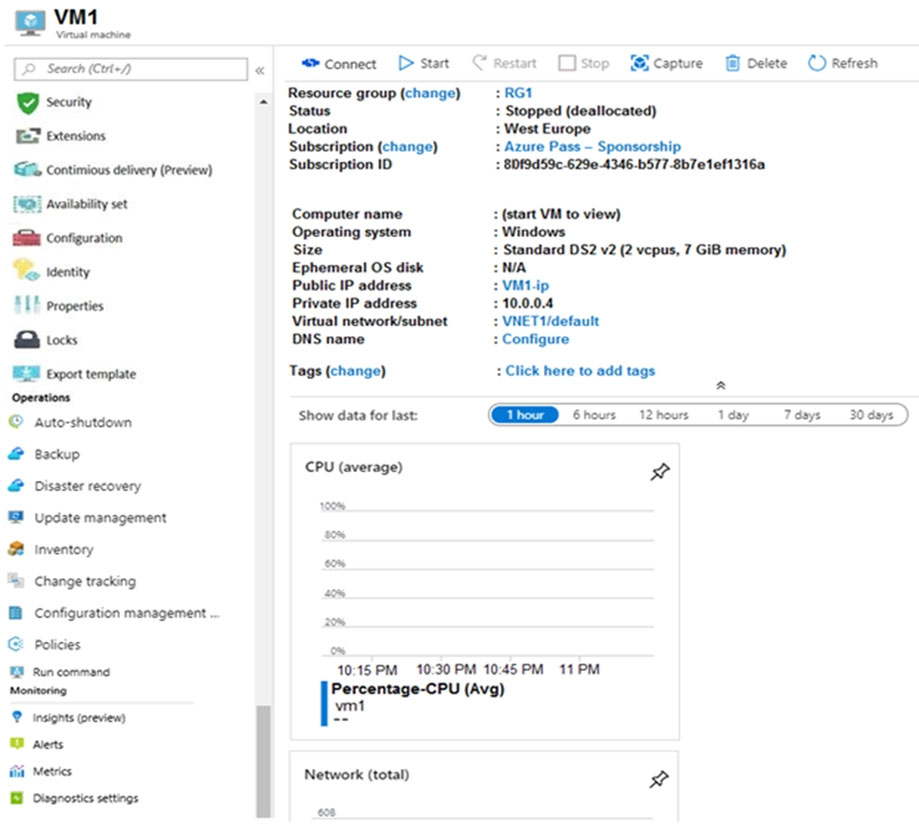
VM1 is configured as shown in the exhibit. (Click the Exhibit tab.)
You need to enable Desired State Configuration for VM1.
What should you do first?
A. Connect to VM1.
B. Start VM1.
C. Capture a snapshot of VM1.
D. Configure a DNS name for VM1.
Show Answer
Correct Answer: B
Explanation: VM1 is stopped (deallocated). Start it first so the VM is running and can receive the Desired State Configuration extension.
Question 86
You have an Azure subscription that contains the resources in the following table.
To which subnets can you apply NSG1?
A. the subnets on VNet1 only
B. the subnets on VNet2 and VNet3 only
C. the subnets on VNet2 only
D. the subnets on VNet3 only
E. the subnets on VNet1, VNet2, and VNet3
Show Answer
Correct Answer: D
Explanation: An NSG can be associated with subnets only in a virtual network in the same Azure region. NSG1 and VNet3 are in East US; VNet1 and VNet2 are in West US. Therefore, NSG1 can be applied to the subnets on VNet3 only.
Question 87
You have an Azure subscription. The subscription contains virtual machines that run Windows Server.
You have a data collection rule (DCR) named Rule1.
You plan to use the Azure Monitor Agent to collect events from Windows System event logs.
You only need to collect system events that have an ID of 1001.
Which type of query should you use for the data source in Rule1?
A. SQL
B. XPath
C. KQL
Show Answer
Correct Answer: B
Explanation: For Windows Event Logs collected by the Azure Monitor Agent, the Data Collection Rule (DCR) data source uses XPath queries (xPathQueries) to filter which events are collected. KQL is used to query data after ingestion in Log Analytics, not to define Windows event log collection filters. SQL is not applicable.
$19
Get all 558 questions with detailed answers and explanations
Instant download HTML + PDF delivered the moment payment clears.
Secure Stripe checkout we never see or store your card details.
7-day refund if files are defective see our refund policy.