Note: This question is part of a series of questions that present the same scenario. Each question in the series contains a unique solution that might meet the stated goals. Some question sets might have more than one correct solution, while others might not have a correct solution.
After you answer a question in this section, you will NOT be able to return to it. As a result, these questions will not appear in the review screen.
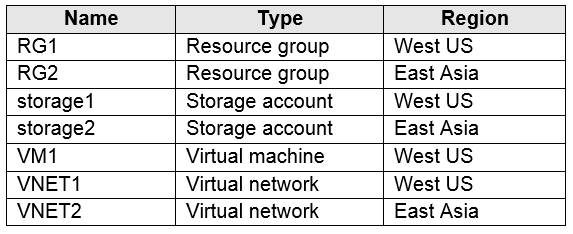
You have an Azure subscription that contains the resources shown in the following table.
VM1 connects to VNET1.
You need to connect VM1 to VNET2.
Solution: You turn off VM1, and then you add a new network interface to VM1.
Does this meet the goal?
A. Yes
B. No
Show Answer
Correct Answer: B
Explanation: No. A VM’s network interfaces must be connected to the same virtual network, and VNET2 is also in a different region from VM1. Turning off the VM does not let you attach a NIC connected to VNET2.
Question 99
DRAG DROP
-
You have an Azure subscription that contains a resource group named RG1.
You plan to create an Azure Resource Manager (ARM) template to deploy a new virtual machine named VM1. VM1 must support the capture of performance data.
You need to specify resource dependencies for the ARM template.
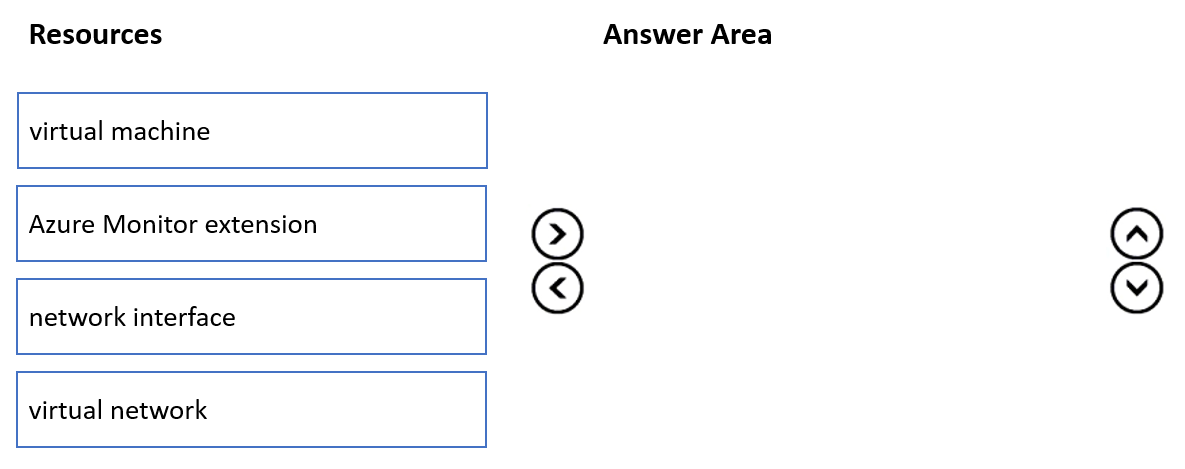
In which order should you deploy the resources? To answer, move all resources from the list of resources to the answer area and arrange them in the correct order.
Explanation: A network interface depends on the virtual network, the virtual machine depends on the network interface, and the Azure Monitor VM extension can only be installed after the VM exists.
Question 99
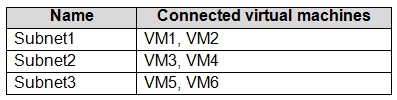
You have an Azure subscription that contains a virtual network named VNET1. VNET1 contains the subnets shown in the following table.
Each virtual machine uses a static IP address.
You need to create network security groups (NSGs) to meet following requirements:
✑ Allow web requests from the internet to VM3, VM4, VM5, and VM6.
✑ Allow all connections between VM1 and VM2.
✑ Allow Remote Desktop connections to VM1.
✑ Prevent all other network traffic to VNET1.
What is the minimum number of NSGs you should create?
A. 1
B. 3
C. 4
D. 12
Show Answer
Correct Answer: A
Explanation: One NSG can be associated with all three subnets. Rules targeting the VMs’ static IP addresses can allow web traffic to VM3–VM6, RDP to VM1, and connections between VM1 and VM2. Higher-priority deny rules can block all other inbound traffic, including traffic that the NSG’s default virtual-network rule would otherwise allow.
Sources:
https://learn.microsoft.com/en-us/answers/questions/58755/azure-nsg-same-subnet-same-adresses-in-source-and
Question 100
You have the Azure virtual networks shown in the following table.
To which virtual networks can you establish a peering connection from VNet1?
A. VNet2 andVNet3 only
B. VNet2 only
C. VNet3 and VNet4 only
D. VNet2, VNet3, and VNet4
Show Answer
Correct Answer: C
Explanation: VNet1’s address space (10.11.0.0/16) overlaps VNet2’s (10.11.0.0/17), so they cannot be peered. VNet3 and VNet4 have non-overlapping address spaces with VNet1, and peering can be established across regions. Therefore, VNet1 can be peered with VNet3 and VNet4 only.
Question 101
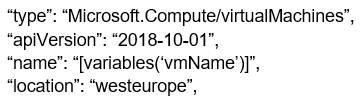
You have an Azure Resource Manager template named Template1 that is used to deploy an Azure virtual machine.
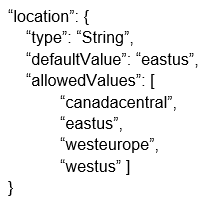
Template1 contains the following text:
The variables section in Template1 contains the following text:
"location": "westeurope"
The resources section in Template1 contains the following text:
You need to deploy the virtual machine to the West US location by using Template1.
What should you do?
A. Modify the location in the resources section to westus
B. Select West US during the deployment
C. Modify the location in the variables section to westus
Show Answer
Correct Answer: A
Explanation: The VM resource’s `location` is explicitly set to `westeurope` in the resources section. Change that value to `westus` to deploy the VM in West US; changing the variable alone would not affect the resource unless the resource refers to it.
Question 102
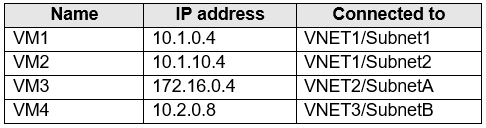
You have the Azure virtual machines shown in the following table.
A DNS service is installed on VM1.
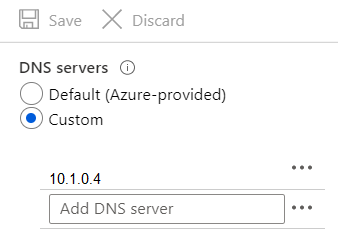
You configure the DNS servers settings for each virtual network as shown in the following exhibit.
You need to ensure that all the virtual machines can resolve DNS names by using the DNS service on VM1.
What should you do?
A. Configure a conditional forwarder on VM1
B. Add service endpoints on VNET1
C. Add service endpoints on VNET2 and VNET3
D. Configure peering between VNET1, VNET2, and VNET3
Show Answer
Correct Answer: D
Explanation: Configure virtual network peering so VM3 and VM4 can reach VM1’s private IP address (10.1.0.4) across virtual networks. Service endpoints provide access to Azure services, not connectivity to a VM-hosted DNS server, and a conditional forwarder is not needed for clients to query VM1 directly.
Question 103
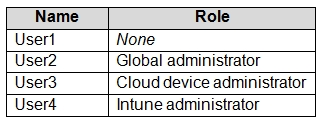
You have an Azure Active Directory (Azure AD) tenant named adatum.com that contains the users shown in the following table.
Adatum.com has the following configurations:
✑ Users may join devices to Azure AD is set to User1.
✑ Additional local administrators on Azure AD joined devices is set to None.
You deploy Windows 10 to a computer named Computer1. User1 joins Computer1 to adatum.com.
You need to identify the local Administrator group membership on Computer1.
Which users are members of the local Administrators group?
A. User1 only
B. User2 only
C. User1 and User2 only
D. User1, User2, and User3 only
E. User1, User2, User3, and User4
Show Answer
Correct Answer: C
Explanation: User1 is a local administrator because they joined Computer1 to Azure AD. User2 is a Global Administrator, which is also added to the local Administrators group by default. User3’s Cloud Device Administrator role and User4’s Intune Administrator role do not grant this local-admin membership. With additional local administrators set to None, only User1 and User2 are members.
Question 104
HOTSPOT -
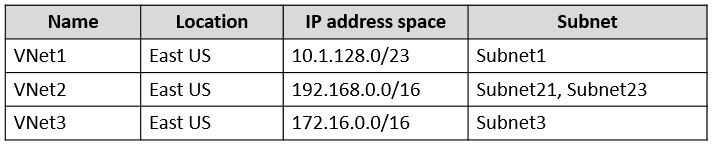
You have an Azure subscription that contains the virtual networks shown in the following table.
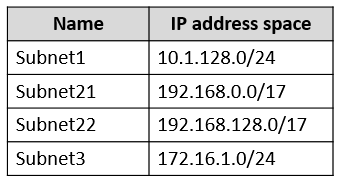
The subnets have the IP address spaces shown in the following table.
You plan to create a container app named contapp1 in the East US Azure region.
You need to create a container app environment named con-env1 that meets the following requirements:
• Uses its own virtual network.
• Uses its own subnet.
• Is connected to the smallest possible subnet.
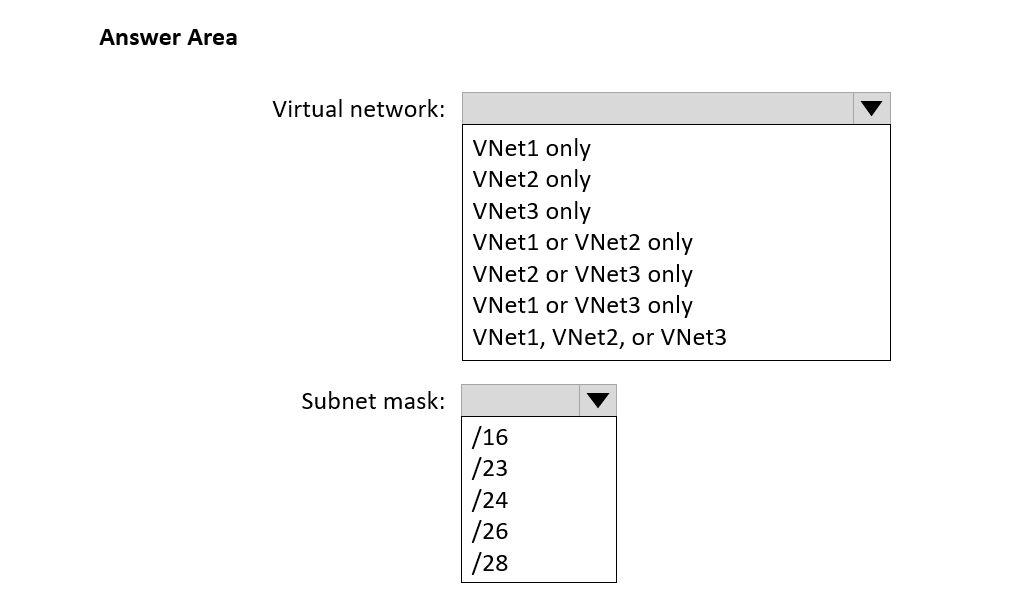
To which virtual networks can you connect con-env1, and which subnet mask should you use? To answer, select the appropriate options in the answer area.
NOTE: Each correct selection is worth one point.
Show Answer
Correct Answer: Virtual network: VNet3 only
Subnet mask: /23
Explanation: Azure Container Apps environment (consumption) requires a dedicated subnet with a minimum size of /23. VNet1 has only a /24 worth of free space remaining, VNet2 is fully allocated by its existing /17 subnets, and only VNet3 has sufficient unallocated address space to create a new dedicated /23 subnet.
Question 104
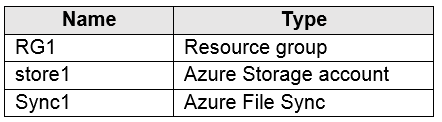
You have an Azure subscription that contains the resources in the following table.
Store1 contains a file share named data. Data contains 5,000 files.
You need to synchronize the files in the file share named data to an on-premises server named Server1.
Which three actions should you perform? Each correct answer presents part of the solution.
NOTE: Each correct selection is worth one point.
A. Create a container instance
B. Register Server1
C. Install the Azure File Sync agent on Server1
D. Download an automation script
E. Create a sync group
Show Answer
Correct Answer: B, C, E
Explanation: Install the Azure File Sync agent on Server1, register the server with the Storage Sync Service, and create a sync group. Configure the Azure file share as the cloud endpoint and a Server1 path as the server endpoint in that group so they synchronize.
Question 105
You have an Azure subscription named Subscription1.
You have 5 TB of data that you need to transfer to Subscription1.
You plan to use an Azure Import/Export job.
What can you use as the destination of the imported data?
A. Azure Data Factory
B. the Azure File Sync Storage Sync Service
C. Azure File Storage
D. Azure SQL Database
Show Answer
Correct Answer: C
Explanation: Azure Import/Export supports importing data from shipped drives into Azure Blob Storage or Azure Files. Among the options provided, Azure File Storage (Azure Files) is the supported destination. Azure Data Factory, Azure File Sync Storage Sync Service, and Azure SQL Database are not import destinations for the Import/Export service.
$19
Get all 558 questions with detailed answers and explanations
Instant download HTML + PDF delivered the moment payment clears.
Secure Stripe checkout we never see or store your card details.
7-day refund if files are defective see our refund policy.