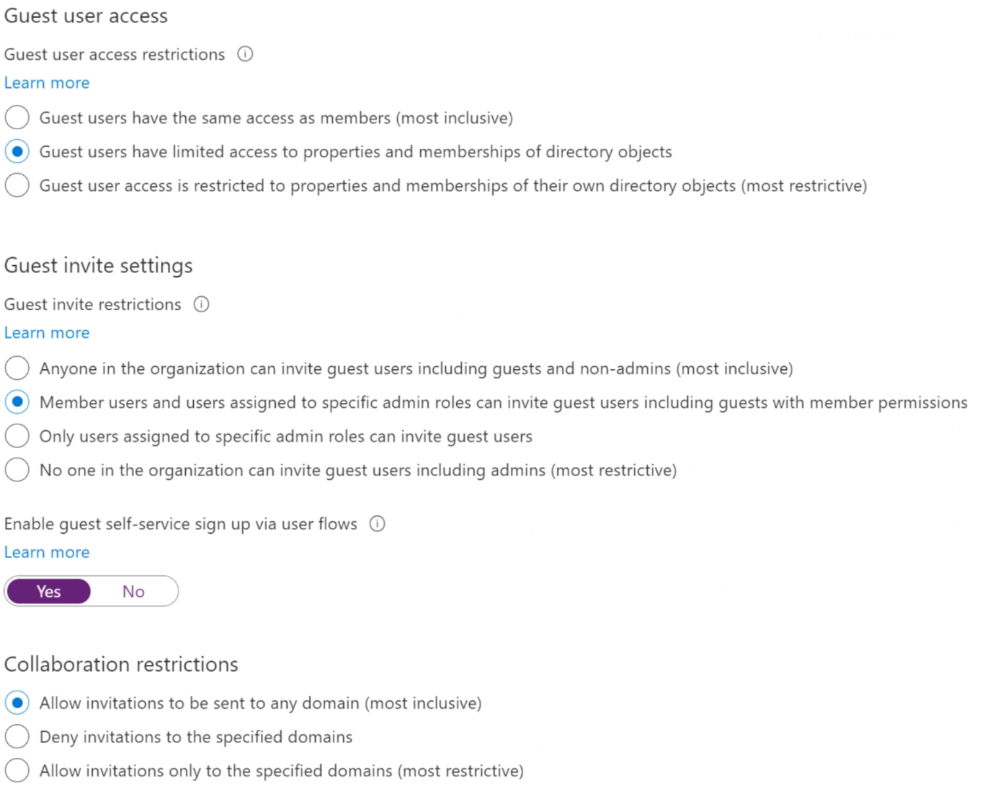
You have a Microsoft 365 tenant that uses the domain named fabrikam.com. The Guest invite settings for Azure Active Directory (Azure AD) are configured as shown in the exhibit. (Click the Exhibit tab.)
A user named
shares a Microsoft SharePoint Online document library to the users shown in the following table.
Which users will be emailed a passcode?
A. User2 only
B. User1 only
C. User1 and User2 only
D. User1, User2, and User3
Show Answer
Correct Answer: B
Explanation: User1 is the external guest who can be emailed a one-time passcode to access the shared library. User2 can sign in with a Microsoft account (@outlook.com), while User3 is a user in the fabrikam.com tenant.
Question 26
HOTSPOT
-
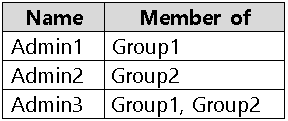
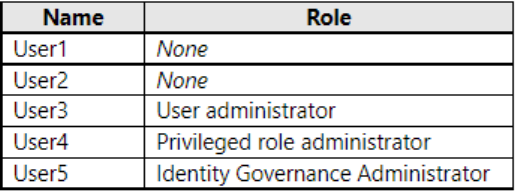
You have a Microsoft Entra tenant that contains the users shown in the following table.
You add the following assignment for the User Administrator role:
• Scope type: Directory
• Selected members: Group1
• Assignment type: Active
• Assignments starts: August 15, 2022
• Assignment ends: December 15, 2022
You add the following assignment for the Exchange Administrator role:
• Scope type: Directory
• Selected members: Group2
• Assignment type: Eligible
• Assignments starts: October 15, 2022
• Assignment ends: January 15, 2023
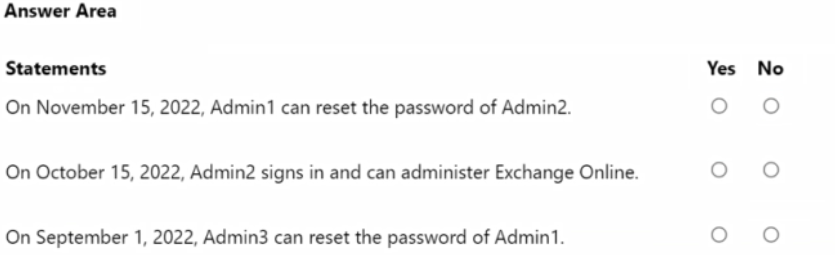
For each of the following statements, select Yes if the statement is true. Otherwise, select No.
NOTE: Each correct selection is worth one point.
Show Answer
Correct Answer: Yes
No
No
Explanation: Admin1 has an active User Administrator assignment, while Admin2’s Exchange Administrator assignment is only eligible, not active. Admin2 must activate that role before administering Exchange Online. Admin3 cannot reset Admin1’s password because Admin1 holds an active privileged role.
Question 26
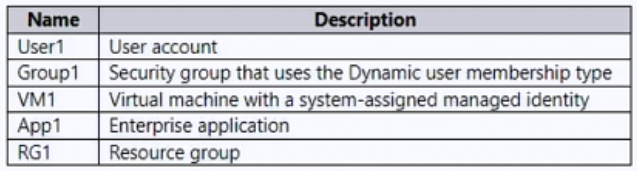
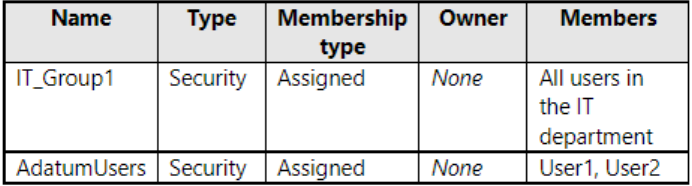
You have the Azure resources shown in the following table.
To which identities can you assign the Contributor role for RG1?
A. User1 only
B. User1 and Group1 only
C. User1 and VM1 only
D. User1, VM1, and App1 only
E. User1, Group1, VM1, and App1
Show Answer
Correct Answer: E
Explanation: Azure RBAC Contributor can be assigned at RG1’s scope to a user, a security group (including one with dynamic membership), a VM’s system-assigned managed identity, or an enterprise application’s service principal. The restriction on assigning roles to dynamic groups applies to Microsoft Entra roles, not Azure RBAC roles.
Sources:
https://learn.microsoft.com/azure/role-based-access-control/role-assignments-steps
Question 26
You have a Microsoft 365 E5 subscription.
You create an access review named Review1. Review1 requires that every six months, Microsoft 365 group owners review guest user access to their groups.
You need to ensure that if the group owners fail to review the membership of Review1, guest users are removed automatically.
Which settings should you configure for Review1?
A. Reviewers
B. General
C. Advanced settings
D. Upon completion settings
Show Answer
Correct Answer: D
Explanation: Configure the 'Upon completion settings' to automatically apply review results and specify that if reviewers do not respond, guest users are removed. This setting controls the action taken after the access review completes, including automatic removal when no review is performed.
Question 27
You have a Microsoft 365 subscription.
You need to ensure that users can grant enterprise applications access to their profile. The solution must ensure that the users can consent only to the User.Read and profile delegated permissions.
What should you configure first?
A. Identity Protection settings
B. Permission classifications
C. Admin consent settings
D. Security defaults
Show Answer
Correct Answer: B
Explanation: To allow users to consent only to specific low-risk delegated permissions such as User.Read and profile, you first configure permission classifications. Those classifications are then used by the user consent policy to limit which permissions users may grant. Identity Protection and Security Defaults are unrelated, and Admin consent settings govern administrator consent rather than defining the permission classifications required for this scenario.
Question 27
Case Study -
Overview -
ADatum Corporation is a consulting company in Montreal.
ADatum recently acquired a Vancouver-based company named Litware, Inc.
Existing Environment. ADatum Environment
The on-premises network of ADatum contains an Active Directory Domain Services (AD DS) forest named adatum.com.
ADatum has a Microsoft 365 E5 subscription. The subscription contains a verified domain that syncs with the adatum.com AD DS domain by using Azure AD Connect.
ADatum has an Azure Active Directory (Azure AD) tenant named adatum.com. The tenant has Security defaults disabled.
The tenant contains the users shown in the following table.
The tenant contains the groups shown in the following table.
Existing Environment. Litware Environment
Litware has an AD DS forest named litware.com
Existing Environment. Problem Statements
ADatum identifies the following issues:
• Multiple users in the sales department have up to five devices. The sales department users report that sometimes they must contact the support department to join their devices to the Azure AD tenant because they have reached their device limit.
• A recent security incident reveals that several users leaked their credentials, a suspicious browser was used for a sign-in, and resources were accessed from an anonymous IP address.
• When you attempt to assign the Device Administrators role to IT_Group1, the group does NOT appear in the selection list.
• Anyone in the organization can invite guest users, including other guests and non-administrators.
• The helpdesk spends too much time resetting user passwords.
• Users currently use only passwords for authentication.
Requirements. Planned Changes -
ADatum plans to implement the following changes:
• Configure self-service password reset (SSPR).
• Configure multi-factor authentication (MFA) for all users.
• Configure an access review for an access package named Package1.
• Require admin approval for application access to organizational data.
• Sync the AD DS users and groups of litware.com with the Azure AD tenant.
• Ensure that only users that are assigned specific admin roles can invite guest users.
• Increase the maximum number of devices that can be joined or registered to Azure AD to 10.
Requirements. Technical Requirements
ADatum identifies the following technical requirements:
• Users assigned the User administrator role must be able to request permission to use the role when needed for up to one year.
• Users must be prompted to register for MFA and provided with an option to bypass the registration for a grace period.
• Users must provide one authentication method to reset their password by using SSPR. Available methods must include:
- Email
- Phone
- Security questions
- The Microsoft Authenticator app
• Trust relationships must NOT be established between the adatum.com and litware.com AD DS domains.
• The principle of least privilege must be used.
You need implement the planned changes for application access to organizational data.
What should you configure?
A. authentication methods
B. the User consent settings
C. access packages
D. an application proxy
Show Answer
Correct Answer: B
Explanation: Configure the User consent settings to prevent users from granting application consent themselves, so an administrator must approve apps requesting access to organizational data. The admin consent workflow can also be enabled to let users submit approval requests.
Question 28
Case Study -
Overview -
ADatum Corporation is a consulting company in Montreal.
ADatum recently acquired a Vancouver-based company named Litware, Inc.
Existing Environment. ADatum Environment
The on-premises network of ADatum contains an Active Directory Domain Services (AD DS) forest named adatum.com.
ADatum has a Microsoft 365 E5 subscription. The subscription contains a verified domain that syncs with the adatum.com AD DS domain by using Azure AD Connect.
ADatum has an Azure Active Directory (Azure AD) tenant named adatum.com. The tenant has Security defaults disabled.
The tenant contains the users shown in the following table.
The tenant contains the groups shown in the following table.
Existing Environment. Litware Environment
Litware has an AD DS forest named litware.com
Existing Environment. Problem Statements
ADatum identifies the following issues:
• Multiple users in the sales department have up to five devices. The sales department users report that sometimes they must contact the support department to join their devices to the Azure AD tenant because they have reached their device limit.
• A recent security incident reveals that several users leaked their credentials, a suspicious browser was used for a sign-in, and resources were accessed from an anonymous IP address.
• When you attempt to assign the Device Administrators role to IT_Group1, the group does NOT appear in the selection list.
• Anyone in the organization can invite guest users, including other guests and non-administrators.
• The helpdesk spends too much time resetting user passwords.
• Users currently use only passwords for authentication.
Requirements. Planned Changes -
ADatum plans to implement the following changes:
• Configure self-service password reset (SSPR).
• Configure multi-factor authentication (MFA) for all users.
• Configure an access review for an access package named Package1.
• Require admin approval for application access to organizational data.
• Sync the AD DS users and groups of litware.com with the Azure AD tenant.
• Ensure that only users that are assigned specific admin roles can invite guest users.
• Increase the maximum number of devices that can be joined or registered to Azure AD to 10.
Requirements. Technical Requirements
ADatum identifies the following technical requirements:
• Users assigned the User administrator role must be able to request permission to use the role when needed for up to one year.
• Users must be prompted to register for MFA and provided with an option to bypass the registration for a grace period.
• Users must provide one authentication method to reset their password by using SSPR. Available methods must include:
- Email
- Phone
- Security questions
- The Microsoft Authenticator app
• Trust relationships must NOT be established between the adatum.com and litware.com AD DS domains.
• The principle of least privilege must be used.
You need to modify the settings of the User administrator role to meet the technical requirements.
Which two actions should you perform for the role? Each correct answer presents part of the solution.
NOTE: Each correct selection is worth one point.
A. Select Require justification on activation.
B. Select Require ticket information on activation.
C. Modify the Expire eligible assignments after setting.
D. Set all assignments to Eligible.
E. Set all assignments to Active.
Show Answer
Correct Answer: C, D
Explanation: Set all User administrator role assignments to Eligible so users can activate the role only when needed, supporting least privilege. Modify the eligible-assignment expiration setting to allow eligibility for up to one year. Requiring justification or ticket information is not required by the stated requirements.
Question 29
DRAG DROP -
You have a Microsoft 365 E5 subscription. The subscription contains 500 devices that run Windows.
You deploy the Global Secure Access client to the devices.
You need to prevent users from accessing https://contoso.com from the devices.
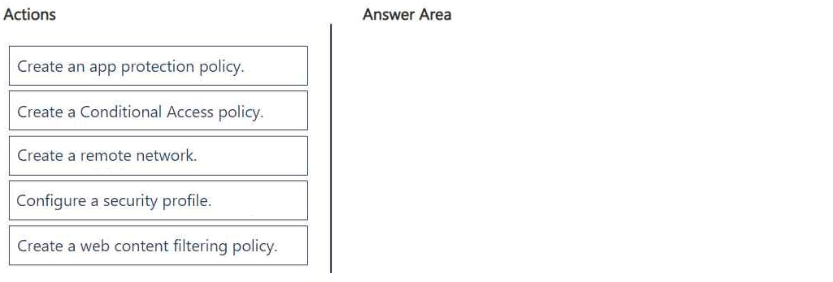
Which three actions should you perform in sequence? To answer move the appropriate actions from the list of actions to the answer area and arrange them in the correct order.
Show Answer
Correct Answer: 1. Create a web content filtering policy.
2. Configure a security profile.
3. Create a Conditional Access policy.
Explanation: Block contoso.com in the filtering policy, add that policy to a security profile, then use Conditional Access to apply the profile to users. The devices already have the Global Secure Access client, so a remote network isn't needed.
Question 29
Case Study -
Overview -
ADatum Corporation is a consulting company in Montreal.
ADatum recently acquired a Vancouver-based company named Litware, Inc.
Existing Environment. ADatum Environment
The on-premises network of ADatum contains an Active Directory Domain Services (AD DS) forest named adatum.com.
ADatum has a Microsoft 365 E5 subscription. The subscription contains a verified domain that syncs with the adatum.com AD DS domain by using Azure AD Connect.
ADatum has an Azure Active Directory (Azure AD) tenant named adatum.com. The tenant has Security defaults disabled.
The tenant contains the users shown in the following table.
The tenant contains the groups shown in the following table.
Existing Environment. Litware Environment
Litware has an AD DS forest named litware.com
Existing Environment. Problem Statements
ADatum identifies the following issues:
• Multiple users in the sales department have up to five devices. The sales department users report that sometimes they must contact the support department to join their devices to the Azure AD tenant because they have reached their device limit.
• A recent security incident reveals that several users leaked their credentials, a suspicious browser was used for a sign-in, and resources were accessed from an anonymous IP address.
• When you attempt to assign the Device Administrators role to IT_Group1, the group does NOT appear in the selection list.
• Anyone in the organization can invite guest users, including other guests and non-administrators.
• The helpdesk spends too much time resetting user passwords.
• Users currently use only passwords for authentication.
Requirements. Planned Changes -
ADatum plans to implement the following changes:
• Configure self-service password reset (SSPR).
• Configure multi-factor authentication (MFA) for all users.
• Configure an access review for an access package named Package1.
• Require admin approval for application access to organizational data.
• Sync the AD DS users and groups of litware.com with the Azure AD tenant.
• Ensure that only users that are assigned specific admin roles can invite guest users.
• Increase the maximum number of devices that can be joined or registered to Azure AD to 10.
Requirements. Technical Requirements
ADatum identifies the following technical requirements:
• Users assigned the User administrator role must be able to request permission to use the role when needed for up to one year.
• Users must be prompted to register for MFA and provided with an option to bypass the registration for a grace period.
• Users must provide one authentication method to reset their password by using SSPR. Available methods must include:
- Email
- Phone
- Security questions
- The Microsoft Authenticator app
• Trust relationships must NOT be established between the adatum.com and litware.com AD DS domains.
• The principle of least privilege must be used.
You need to resolve the issue of the sales department users.
What should you configure for the Azure AD tenant?
A. the Device settings
B. the User settings
C. the Access reviews settings
D. Security defaults
Show Answer
Correct Answer: A
Explanation: Configure the tenant’s Device settings and increase the maximum number of devices each user can join or register to Azure AD to 10. This addresses the sales users reaching their device limit.
Question 29
SIMULATION
-
Use the following login credentials as needed:
To enter your username, place your cursor in the Sign in box and click on the username below.
To enter your password, place your cursor in the Enter password box and click on the password below.
Microsoft 365 Username:
Microsoft 365 Password: =1122334455667788
If the Microsoft 365 portal does not load successfully in the browser, press CTRL-K to reload the portal in a new browser tab.
The following information is for technical support purposes only:
Lab Instance: 99999999
-
You need to ensure that all users can consent to apps that require permission to read their user profile. Users must be prevented from consenting to apps that require any other permissions.
To complete this task, sign in to the appropriate admin center.
Show Answer
Correct Answer: Microsoft Entra admin center → Enterprise applications → Consent and permissions → User consent settings → select “Allow user consent for apps from verified publishers, for selected permissions” → Save.
Explanation: This permits user consent only for low-impact selected permissions (including reading the signed-in user's profile) while preventing consent for apps requesting other permissions.
$19
Get all 410 questions with detailed answers and explanations
Instant download HTML + PDF delivered the moment payment clears.
Secure Stripe checkout we never see or store your card details.
7-day refund if files are defective see our refund policy.