HOTSPOT
-
You have a Microsoft Entra tenant that contains the users shown in the following table.
The tenant contains the identities shown in the following table.
Which users can create custom security attributes, and to which identities can the attributes be assigned? To answer, select the appropriate options in the answer area.
NOTE: Each correct selection is worth one point.
Show Answer
Correct Answer: User2 only
Service1 only
Explanation: Only the Attribute Definition Administrator role can create custom security attribute definitions by default; Global Administrator does not inherently have this permission. Custom security attributes are assignable to users and service principals, and among the listed identities only the service principal qualifies.
Question 86
You have a Microsoft Entra tenant named contoso.com that contains an enterprise application named App1.
A contractor uses the credentials of
.
You need to ensure that you can provide the contractor with access to App1. The contractor must be able to authenticate as
.
What should you do?
A. Run the New-MgUser cmdlet.
B. Run the New-MgInvitation cmdlet.
C. Configure the External collaboration settings.
D. Implement Microsoft Entra Connect sync.
Show Answer
Correct Answer: B
Explanation: The correct action is to invite the external contractor as a Microsoft Entra B2B guest user by using the New-MgInvitation cmdlet. This creates a guest invitation so the contractor can authenticate with their existing external identity and be granted access to the enterprise application. New-MgUser creates a new user in the tenant rather than inviting an external identity, External collaboration settings only control whether B2B invitations are allowed and do not perform the invitation, and Entra Connect is for synchronizing on-premises identities, not onboarding external contractors.
Question 87
SIMULATION
-
Use the following login credentials as needed:
To enter your username, place your cursor in the Sign in box and click on the username below.
To enter your password, place your cursor in the Enter password box and click on the password below.
Microsoft 365 Username:
Microsoft 365 Password: =1122334455667788
If the Microsoft 365 portal does not load successfully in the browser, press CTRL-K to reload the portal in a new browser tab.
The following information is for technical support purposes only:
Lab Instance: 99999999
-
You need to configure Microsoft Entra Identity Protection to meet the following requirements:
• Require multi-factor authentication (MFA) for any sign-ins at the high risk level.
• Apply the configuration to all users except for Mod Administrator.
To complete this task, sign in to the appropriate admin center.
Show Answer
Correct Answer: Microsoft Entra admin center → Identity Protection → Sign-in risk policy
Include: All users
Exclude: Mod Administrator
Sign-in risk: High
Access: Allow access, Require multifactor authentication
Enable the policy.
Explanation: Configure a Sign-in risk policy targeting all users except Mod Administrator, trigger on High sign-in risk, and require MFA by selecting Allow access with Require multifactor authentication, then enable the policy.
Question 88
You have a management group named Group1 that contains two Azure subscriptions named Sub1 and Sub2. The subscriptions are linked to a Microsoft Entra tenant that contains a user named User1.
You need to ensure that User1 can onboard Sub1 to Permissions Management. The solution must follow the principle of least privilege.
Which permission should you grant to User1?
A. Microsoft.Authorization/roleAssignments/read for Sub1
B. Microsoft.Authorization/roleAssignments/write for Group1
C. MicrosoftAuthorization/roleAssignments/write for Sub1
D. Microsoft.Authorization/roleAssignments/read for Group1
Show Answer
Correct Answer: C
Explanation: Onboarding an Azure subscription to Microsoft Entra Permissions Management requires the ability to create the required role assignments, which requires the Microsoft.Authorization/roleAssignments/write permission. Applying this permission at the Sub1 scope satisfies the principle of least privilege because it grants only the necessary permission on the single subscription being onboarded, rather than at the management group scope.
Question 89
HOTSPOT -
Your on-premises network contains an Active Directory domain that uses Microsoft Entra Connect sync to sync with a Microsoft Entra tenant.
You need to configure Microsoft Entra Connect sync to meet the following requirements:
• Microsoft Entra sign-ins must be authenticated by an Active Directory domain controller.
• Active Directory domain users must be able to use Microsoft Entra self-service password reset (SSPR).
• Minimize administrative effort.
What should you use for each requirement? To answer, select the appropriate options in the answer area.
NOTE: Each correct selection is worth one point.
Show Answer
Correct Answer: Authentication by the domain controller: Pass-through authentication
SSPR: Password writeback
Explanation: Pass-through authentication validates sign-ins against on-premises Active Directory domain controllers without requiring AD FS, minimizing administration. Password writeback enables Microsoft Entra self-service password reset to update passwords back to on-premises Active Directory.
Question 90
HOTSPOT -
You have an Azure subscription named Sub1 that contains three users named User1, User2, and User3. Sub1 has a storage account named storage1 that contains the resources shown in the following table.
Sub1 contains the users shown in the following table.
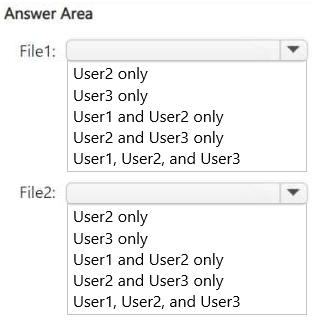
Which users can read File1, and which users can read File2? To answer, select the appropriate options in the answer area.
NOTE: Each correct selection is worth one point.
Show Answer
Correct Answer: File1: User2 and User3 only
File2: User3 only
Explanation: Reader is a management-plane role and cannot read storage data. Storage Blob Data Reader grants blob data access (File1 in a blob container) but not Azure Files. Storage Contributor can manage the storage account and access account keys, enabling access to both blob and file-share data.
Question 91
HOTSPOT
-
You have a Microsoft Entra tenant named contoso.com that contains an administrative unit named AU1 and two users named User1 and User2. User1 is a member of AU1.
You need to perform the following role assignments:
• User1: Security Administrator
• User2: User Administrator
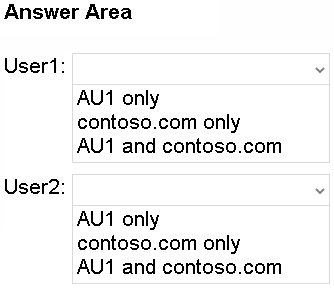
For which scopes can each user be assigned the role? To answer, select the appropriate options in the answer area.
NOTE: Each correct selection is worth one point.
Show Answer
Correct Answer: User1: contoso.com only
User2: AU1 and contoso.com
Explanation: Security Administrator is not supported for administrative unit–scoped assignments, so it must be tenant-wide. User Administrator supports both tenant-wide and administrative unit scope, and the assignee does not need to be a member of the administrative unit.
Question 93
HOTSPOT
-
You have a Microsoft Entra tenant that contains two groups named Group1 and Group2 and the users shown in the following table.
Group2 is a member of Group1.
You configure an access review that has the following settings:
• Name: Review1
• Select what to review: Teams + Groups
• Review scope: Select Teams + groups
• Group: Group1
• Scope: Guest users only
• Select reviewers: Group owners(s)
For each of the following statements, select Yes if the statement is true. Otherwise, select No.
NOTE: Each correct selection is worth one point.
Show Answer
Correct Answer: No
No
Yes
Explanation: The review targets Group1 with scope limited to guest users. The reviewer is the owner of Group1 (User3). User1 and User4 are members, not guests, so they are not in scope. Guest users in nested groups are included in the review (flattened), so User5 can be reviewed, although removal would not automatically remove nested-group membership.
Question 94
SIMULATION
-
Use the following login credentials as needed:
To enter your username, place your cursor in the Sign in box and click on the username below.
To enter your password, place your cursor in the Enter password box and click on the password below.
Microsoft 365 Username:
Microsoft 365 Password: =1122334455667788
If the Microsoft 365 portal does not load successfully in the browser, press CTRL-K to reload the portal in a new browser tab.
The following information is for technical support purposes only:
Lab Instance: 99999999
-
You need to configure the Group Administrator role to meet the following requirements:
• Ensure that Allan Deyoung can approve and reject requests to activate the role.
• Ensure that Christie Cline can request activation of the role.
• Use the principle of least privilege.
To complete this task, sign in to the appropriate admin center.
Show Answer
Correct Answer: Sign in to the Microsoft Entra admin center.
Identity Governance → Privileged Identity Management → Microsoft Entra roles → Group Administrator.
Add Christie Cline as an Eligible assignment.
Configure the role settings/activation and add Allan Deyoung as an Approver.
Explanation: Using PIM with an Eligible assignment allows Christie Cline to request activation, while configuring Allan Deyoung as an activation approver enables approval/rejection requests with least privilege.
Question 95
SIMULATION
-
Use the following login credentials as needed:
To enter your username, place your cursor in the Sign in box and click on the username below.
To enter your password, place your cursor in the Enter password box and click on the password below.
Microsoft 365 Username:
Microsoft 365 Password: =1122334455667788
If the Microsoft 365 portal does not load successfully in the browser, press CTRL-K to reload the portal in a new browser tab.
The following information is for technical support purposes only:
Lab Instance: 99999999
-
You need to implement a process to review guest users who have access to the Salesforce app. The review must meet the following requirements:
• The reviews must occur monthly.
• The manager of each guest user must review the access.
• If the reviews are NOT completed within five days, access must be removed.
• If the guest user does not have a manager, Megan Bowen must review the access.
To complete this task, sign in to the appropriate admin center.
Show Answer
Correct Answer: Microsoft Entra admin center → Identity → Governance → Access reviews → New access review
Review: Applications
Application: Salesforce
Reviewers: Users' managers
Fallback reviewer: Megan Bowen
Recurrence: Monthly
Auto-apply results: Enabled
If reviewers don't respond: Remove access
Review duration: 5 days
Explanation: Create an access review targeting the Salesforce enterprise application. Configure monthly recurring reviews, assign guest users' managers as reviewers with Megan Bowen as the fallback reviewer, set the review duration to 5 days, and automatically remove application access when reviews are not completed.
$19
Get all 410 questions with detailed answers and explanations
Instant download HTML + PDF delivered the moment payment clears.
Secure Stripe checkout we never see or store your card details.
7-day refund if files are defective see our refund policy.