HOTSPOT
-
You have a Microsoft 365 E5 subscription that contains a Microsoft Teams team named Team1 and two Microsoft 365 groups named Group1 and Group2. The subscription contains the users shown in the following table.
You create an access package that has the following settings:
• Name: Package1
• Resource roles:
o Team1: Owner
• Users who can request access: For users in your directory
o Specific Users and Groups: Group1
• Require approval: Yes
o Require requestor justification: No
o How many stages: 1
o First Approver: Team1, User3
o Require approver justification: Yes
• Enable new requests: Yes
• Expiration:
o Access package assignments expire: 7 days
o Users can request specific timeline: Yes
For each of the following statements, select Yes if the statement is true. Otherwise, select No.
NOTE: Each correct selection is worth one point.
Show Answer
Correct Answer: Yes
No
No
Explanation: Only members of Group1 can request the package; User1 is in Group1, User2 is not. Although User3 is an approver, approvers cannot approve their own access package requests.
Question 61
HOTSPOT -
A user named User1 attempts to sign in to the tenant by entering the following incorrect passwords:
✑ Pa55w0rd12
✑ Pa55w0rd12
✑ Pa55w0rd12
✑ Pa55w.rd12
✑ Pa55w.rd123
✑ Pa55w.rd123
✑ Pa55w.rd123
✑ Pa55word12
✑ Pa55word12
✑ Pa55word12
✑ Pa55w.rd12
You need to identify how many sign-in attempts were tracked for User1, and how User1 can unlock her account before the 300-second lockout duration expires.
What should identify? To answer, select the appropriate
NOTE: Each correct selection is worth one point.
Hot Area:
Explanation: Smart lockout does not increment its counter for repeated bad passwords among the recently tracked hashes. A successful SSPR can clear the lockout before its duration expires.
Question 62
HOTSPOT -
You need to meet the technical requirements for the probability that user identities were compromised.
What should the users do first, and what should you configure? To answer, select the appropriate options in the answer area.
NOTE: Each correct selection is worth one point.
Hot Area:
Show Answer
Correct Answer: The users must first: Register for self-service password reset (SSPR).
You must configure: A user risk policy.
Explanation: User risk measures the probability that an identity has been compromised. A user risk policy can require affected users to change their passwords, which requires SSPR registration.
Question 62
You have an Azure subscription. The subscription contains 50 virtual machines that run Windows Server.
You enable Microsoft Entra login for the virtual machines.
Users report that they cannot sign in to the virtual machines by using their Microsoft Entra credentials.
You need to ensure that the users can sign in to the virtual machines.
What should you do first?
A. From the Microsoft Entra admin center, delete the device registrations of the virtual machines.
B. Revoke the primary refresh token.
C. Enable SSH client support for OpenSSH.
D. Ensure that the virtual machines can access https://enterpriseregistration.windows.net.
Show Answer
Correct Answer: D
Explanation: Microsoft Entra login for Windows VMs depends on the VM being able to reach Microsoft Entra device registration and authentication endpoints. If users cannot sign in after enabling Microsoft Entra login, the first step is to verify network connectivity to the required endpoint, including https://enterpriseregistration.windows.net. Deleting device registrations, revoking a primary refresh token, or enabling OpenSSH client support do not address the fundamental sign-in prerequisite for Windows VM Microsoft Entra login.
Question 64
HOTSPOT
-
You have a Microsoft Entra tenant that contains a user named User1.
You have an Azure subscription named Sub1. User1 is assigned the Owner role for Sub1.
You need to ensure that User1 can onboard Sub1 to Permissions Management. The solution must follow the principle of least privilege.
Which role should you assign for Sub1, and which role should you assign to User1 for the tenant? To answer, select the appropriate options in the answer area.
NOTE: Each correct selection is worth one point.
Show Answer
Correct Answer: Sub1: User Access Administrator
Tenant: Permissions Management Administrator
Explanation: To onboard an Azure subscription to Microsoft Entra Permissions Management with least privilege, assign the Azure RBAC role that can manage access assignments (User Access Administrator) at the subscription, and the Microsoft Entra role specifically intended for Permissions Management administration (Permissions Management Administrator) at the tenant.
Question 65
HOTSPOT
-
You have a Microsoft 365 subscription.
You configure a Global Secure Access security profile named SecurityProfile1.
You need to create a Conditional Access policy named CAPolicy1 that will use SecurityProfile1.
Which two settings should you configure to ensure that CAPolicy1 uses SecurityProfile1? To answer, select the appropriate settings in the answer area.
NOTE: Each correct selection is worth one point.
Show Answer
Correct Answer: Target resources
Session
Explanation: To apply a Global Secure Access security profile in a Conditional Access policy, scope the policy to the desired Target resources and configure the Session control to use the specified Global Secure Access security profile (SecurityProfile1).
Question 67
HOTSPOT
-
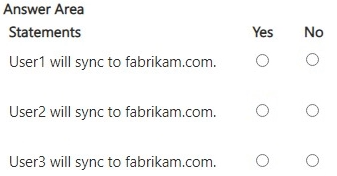
You have two Microsoft Entra tenants named contoso.com and fabrikam.com.
Contoso.com contains the users shown in the following table.
Contoso.com contains the groups shown in the following table.
You configure cross-tenant synchronization from contoso.com to fabrikam.com and enable cross-tenant synchronization for User3 and Group2.
For each of the following statements, select Yes if the statement is true. Otherwise, select No.
NOTE: Each correct selection is worth one point.
Show Answer
Correct Answer: User1: No
User2: Yes
User3: No
Explanation: Cross-tenant synchronization scoped to a group includes only direct user members; nested group membership does not cascade. User2 is a direct member of Group2, User1 is only in nested Group1, and guest users are not synchronized as source users.
Question 68
HOTSPOT -
You have an Azure subscription named Sub1 that contains two storage accounts named storage1 and storage2 and the blob containers shown in the following table.
Sub1 contains the users shown in the following table.
Condition1 has the following definition:
NOTE: Each correct selection is worth one point.
Show Answer
Correct Answer: 1. No
2. Yes
3. Yes
Explanation: Condition1 permits blob read only when the container name is cont1. User1 can read blobs in cont1 (blob1 and blob3), but not blob2 in cont2. Condition2 restricts only write operations matching the path pattern; it does not restrict read access, so the Storage Blob Data Owner role still allows reading blob1.
Question 69
You have a Microsoft 365 E5 subscription that contains a Microsoft SharePoint Online site named Site1.
You need to enable Microsoft Defender for Cloud Apps session control for Site1.
Which type of policy should you create first?
A. access
B. app governance
C. session
D. Conditional Access
Show Answer
Correct Answer: D
Explanation: Microsoft Defender for Cloud Apps session control is initiated through a Microsoft Entra Conditional Access policy by selecting 'Use Conditional Access App Control' under Session controls for the target cloud app (such as SharePoint Online). After that, session policies can be created in Defender for Cloud Apps to enforce monitoring or restrictions. Therefore, the first policy that must be created is a Conditional Access policy.
Question 70
You have an Azure subscription that contains two virtual machines named VM1 and VM2 and an Azure SQL managed instance named SQL1.
You need to ensure that VM1 and VM2 can retrieve data from SQL1.
The solution must minimize administrative effort.
What should you create first?
A. a certificate
B. a shared access signature (SAS) token
C. a managed identity
D. a Microsoft Entra user account
Show Answer
Correct Answer: C
Explanation: Create a managed identity for the virtual machines first. A managed identity allows Azure VMs to authenticate to Azure SQL Managed Instance through Microsoft Entra ID without storing or managing credentials, minimizing administrative effort. Certificates require lifecycle management, SAS tokens are for Azure Storage rather than SQL authentication, and a regular Microsoft Entra user account is intended for users rather than Azure workloads.
$19
Get all 410 questions with detailed answers and explanations
Instant download HTML + PDF delivered the moment payment clears.
Secure Stripe checkout we never see or store your card details.
7-day refund if files are defective see our refund policy.