You have a Microsoft Entra tenant that uses Microsoft Entra ID Premium licenses.
You plan to configure a terms of use (ToU) for the tenant.
You need to upload the ToU document.
Which format should you use for the document?
A. HTML
B. RTF
C. PDF
D. DOCX
Show Answer
Correct Answer: C
Explanation: Microsoft Entra terms of use documents must be uploaded in PDF format.
Question 40
You have an Azure Active Directory (Azure AD) tenant that contains a user named User1 and the conditional access policies shown in the following table.
You need to evaluate which policies will be applied to User1 when User1 attempts to sign-in from various IP addresses.
Which feature should you use?
A. Access reviews
B. Identity Secure Score
C. The What If tool
D. the Microsoft 365 network connectivity test tool
Show Answer
Correct Answer: C
Explanation: Use the Conditional Access What If tool to simulate User1’s sign-in from different IP addresses and see which policies would apply. It can evaluate enabled and report-only policies against the specified sign-in conditions.
Question 41
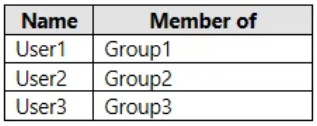
You have an Azure Active Directory (Azure AD) tenant that contains the users shown in the following table.
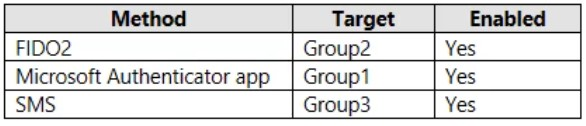
The tenant has the authentication methods shown in the following table.
Which users will sign in to cloud apps by matching a number shown in the app with a number shown on their phone?
A. User1 only
B. User2 only
C. User3 only
D. User1 and User2 only
E. User2 and User3 only
Show Answer
Correct Answer: A
Explanation: User1 is the only user assigned Microsoft Authenticator. Number matching is an Authenticator push-notification feature in which the user enters the number shown during sign-in into the app. FIDO2 and SMS do not provide this number-matching flow.
Question 41
You have a Microsoft Entra tenant that contains 1,000 users. The users are assigned Microsoft Entra Suite licenses.
You are deploying Global Secure Access.
You need to ensure that connections to www.microsoft.com are bypassed by Global Secure Access.
Which profiles should you update?
A. Intemet access profile only
B. Microsoft traffic profile only
C. Microsoft traffic profile and Internet access profile only
D. Microsoft traffic profile, Private access profile, and Internet access profile
Show Answer
Correct Answer: B
Explanation: www.microsoft.com is classified under the Microsoft traffic profile. In Global Secure Access, destinations covered by the Microsoft traffic profile are not included in the Internet access profile. Configuring a bypass rule in the Microsoft traffic profile causes that Microsoft traffic to bypass Global Secure Access acquisition, so there is no need to also update the Internet access profile. The Private access profile is only for private resources.
Question 42
You have multiple on-premises devices that run either Windows or Linux.
You have a Microsoft 365 E5 subscription.
You configure Microsoft Entra Internet Access.
You need to ensure that all the on-premises devices access the internet by using Global Secure Access.
What should you do in the Microsoft Entra admin center?
A. Create a remote network.
B. Create a named location.
C. Create an access package.
D. Deploy the Global Secure Access client.
Show Answer
Correct Answer: A
Explanation: The requirement is for all on-premises devices, including Linux, to access the internet through Global Secure Access. The Global Secure Access client is not available for Linux, so deploying the client cannot satisfy the requirement for all devices. Configuring a remote network allows traffic from an entire site or network (via supported edge/network devices) to use Microsoft Entra Internet Access without requiring a client on each endpoint. Named locations and access packages are unrelated to routing internet traffic through Global Secure Access.
Question 42
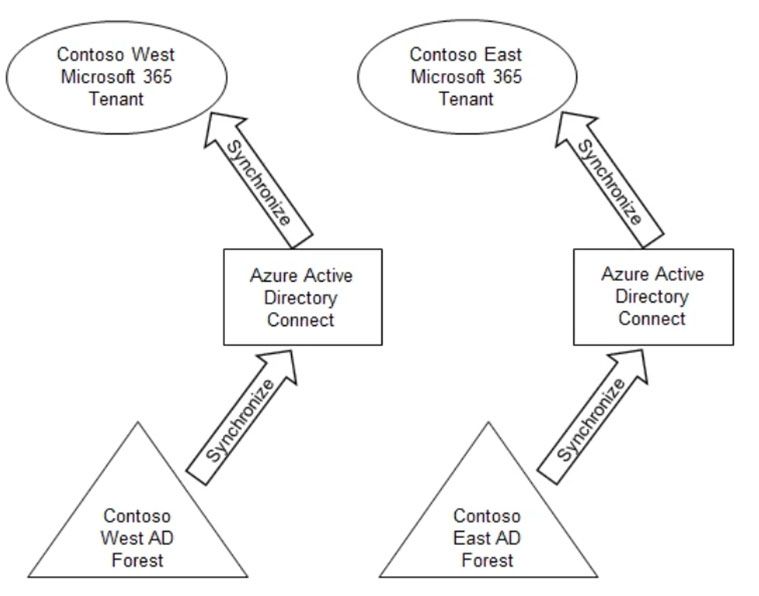
Your company has two divisions named Contoso East and Contoso West. The Microsoft 365 identity architecture for both divisions is shown in the following exhibit.
You need to assign users from the Contoso East division access to Microsoft SharePoint Online sites in the Contoso West tenant. The solution must not require additional Microsoft 365 licenses.
What should you do?
A. Configure Azure AD Application Proxy in the Contoso West tenant.
B. Invite the Contoso East users as guests in the Contoso West tenant.
C. Deploy a second Azure AD Connect server to Contoso East and configure the server to sync the Contoso East Active Directory forest to the Contoso West tenant.
D. Configure the existing Azure AD Connect server in Contoso East to sync the Contoso East Active Directory forest to the Contoso West tenant.
Show Answer
Correct Answer: B
Explanation: Invite the Contoso East users as guest users in the Contoso West tenant using Microsoft Entra B2B collaboration. The guests can then be granted access to the West tenant’s SharePoint Online sites without assigning them additional Microsoft 365 licenses. Application Proxy is for publishing on-premises applications, and syncing the East forest into the West tenant is unnecessary for this access.
Question 43
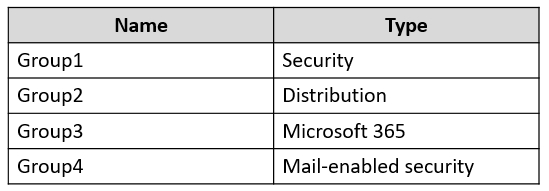
The Azure Active Directory (Azure AD) tenant contains the groups shown in the following table.
In Azure AD, you add a new enterprise application named App1.
Which groups can you assign to App1?
A. Group1 only
B. Group2 only
C. Group3 only
D. Group1 and Group4
E. Group1 and Group3
Show Answer
Correct Answer: D
Explanation: Group1 is a security group, and Group4 is a mail-enabled security group; both are security-enabled and can be assigned to an enterprise application. Group2 is a distribution group and cannot. A Microsoft 365 group such as Group3 is assignable only if its SecurityEnabled setting is True, which the question does not specify.
Question 43
You have three Azure subscriptions that are linked to a single Microsoft Entra tenant.
You need to evaluate and remediate the risks associated with highly privileged accounts. The solution must minimize administrative effort.
What should you use?
A. Global Secure Access
B. Privileged Identity Management (PIM)
C. Microsoft Entra Permissions Management
D. Microsoft Entra Verified ID
Show Answer
Correct Answer: B
Explanation: Privileged Identity Management (PIM) helps assess and reduce the risk of highly privileged accounts by reviewing privileged access and replacing standing role assignments with just-in-time access. It can manage privileged roles for the Microsoft Entra tenant and its linked Azure subscriptions.
Sources:
https://learn.microsoft.com/en-us/entra/architecture/secure-single-tenant
Question 44
You have an Azure Active Directory (Azure AD) tenant that contains the users shown in the following table.
User1 is the owner of Group1.
You create an access review that has the following settings:
✑ What to review: Teams + Groups
✑ Scope: All users
✑ Group: Group1
✑ Reviewers: Users review their own access
Which users can perform access reviews for User3?
A. User1 only
B. User3 only
C. User1 and User2 only
D. User1, User2, and User3
Show Answer
Correct Answer: B
Explanation: The review is configured so users review their own access. User3 is a member of Group1, so User3 can review their own membership. User1’s ownership of the group does not make them a reviewer under this setting.
Question 44
HOTSPOT
-
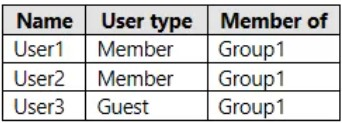
You have two Microsoft Entra tenants named contoso.com and fabrikam.com. Contoso.com contains the users shown in the following table.
You configure cross-tenant synchronization from contoso.com to fabrikam.com by using the following settings:
• Users and groups: Group1
• Provisioning Mode: Automatic
• Attribute Mappings
o Source Object Scope: Filter1, Filter2
Filter1 is configured as shown in the following table.
Filter2 is configured as shown in the following table.
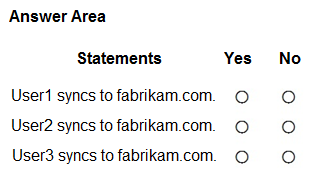
For each of the following statements, select Yes if the statement is true. Otherwise, select No.
NOTE: Each correct selection is worth one point.
Show Answer
Correct Answer: Yes
No
Yes
Explanation: Only members of Group1 are in scope. Multiple clauses within a filter use AND logic; multiple filters use OR logic. User1 matches Filter1 (IT and job title present). User2 is not in Group1. User3 matches Filter2 because city 'Montreal' includes 'M'.
$19
Get all 410 questions with detailed answers and explanations
Instant download HTML + PDF delivered the moment payment clears.
Secure Stripe checkout we never see or store your card details.
7-day refund if files are defective see our refund policy.