You have a Microsoft 365 E5 subscription that uses Microsoft Defender for Cloud Apps and Conditional Access policies.
You need to block access to cloud apps when a user is assessed as high risk.
Which type of policy should you create in the Microsoft Defender for Cloud Apps?
A. app discovery policy
B. OAuth app policy
C. activity policy
D. access policy
Show Answer
Correct Answer: D
Explanation: Create an access policy. Access policies can block access to cloud apps based on conditions such as a user’s risk level.
Question 17
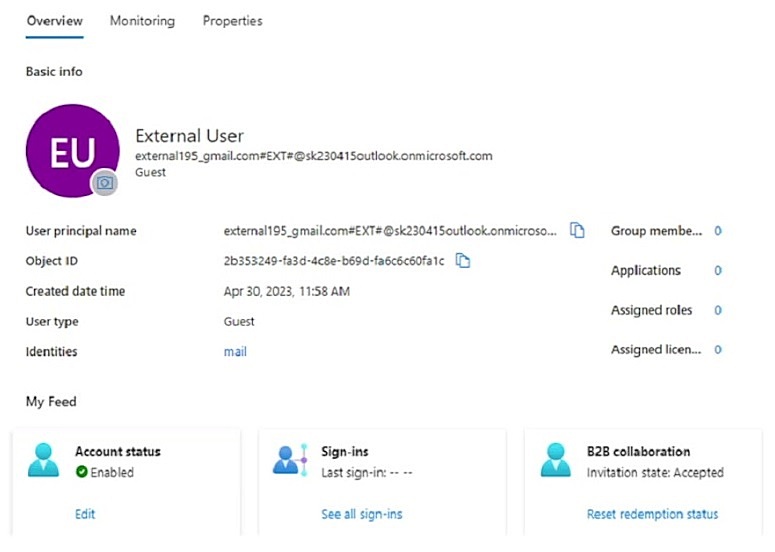
You have an Azure AD tenant that contains the external user shown in the following exhibit.
You update the email address of the user.
You need to ensure that the user can authenticate by using the updated email address.
What should you do for the user?
A. Modify the Authentication methods settings.
B. Reset the password.
C. Revoke the active sessions.
D. Reset the redemption status.
Show Answer
Correct Answer: D
Explanation: Reset the user’s redemption status. This lets the external user redeem the invitation again using the updated email address, while retaining the existing guest user object and its assignments.
Question 17
You have an Azure subscription that contains a user named User1 and an Azure key vault named Vault1.
You need to ensure that User1 can read the metadata of certificates, keys, and secrets stored in Vault1. The solution must follow the principle of least privilege.
Which role should you assign to User1?
A. Key Vault Secrets User
B. Key Vault Crypto User
C. Key Vault Reader
D. Key Vault Crypto Officer
Show Answer
Correct Answer: C
Explanation: Assign **Key Vault Reader**. It allows User1 to view metadata for certificates, keys, and secrets without granting access to their values or the ability to manage them, following least privilege.
Question 18
You have a Microsoft 365 tenant.
An on-premises Active Directory domain is configured to sync with the Azure AD tenant. The domain contains the servers shown in the following table.
The domain controllers are prevented from communicating to the internet.
You implement Azure AD Password Protection on Server1 and Server2.
You deploy a new server named Server4 that runs Windows Server 2022.
You need to ensure that Azure AD Password Protection will continue to work if a single server fails.
What should you implement on Server4?
A. Azure AD Connect
B. Azure AD Application Proxy
C. Password Change Notification Service (PCNS)
D. the Azure AD Password Protection proxy service
Show Answer
Correct Answer: D
Explanation: Implement the Azure AD Password Protection proxy service on Server4. Because the domain controllers cannot access the internet, they rely on proxy servers to communicate with Microsoft Entra ID. Adding another proxy provides redundancy if one proxy server fails.
Question 18
HOTSPOT
-
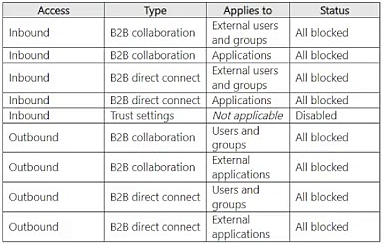
You have a Microsoft Entra tenant named contoso.com that has cross-tenant access configured as shown in the following table.
You have two partner organizations named Fabrikam, Inc. and A. Datum Corporation. Fabrikam has a Microsoft 365 domain named fabrikam.com. A. Datum has a Microsoft 365 domain named adatum.com.
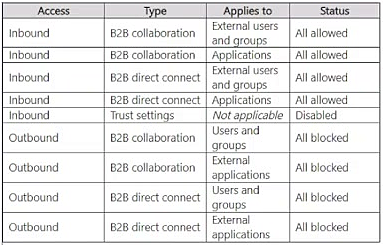
You configure cross-tenant access for fabrikam.com as shown in the following table.
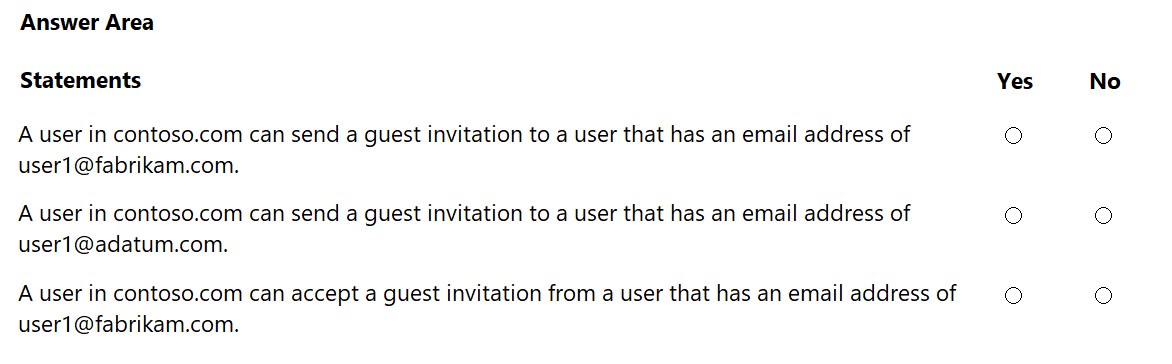
For each of the following statements, select Yes if the statement is true. Otherwise, select No.
NOTE: Each correct selection is worth one point.
Show Answer
Correct Answer: Yes
No
No
Explanation: Default cross-tenant settings block everything. A partner-specific configuration for fabrikam.com overrides defaults and allows inbound B2B collaboration, so Fabrikam users can be invited into Contoso. Outbound B2B collaboration from Contoso to partners remains blocked, so invitations to A. Datum are blocked and Contoso users cannot use B2B collaboration outbound to accept/access Fabrikam invitations.
Question 18
HOTSPOT
-
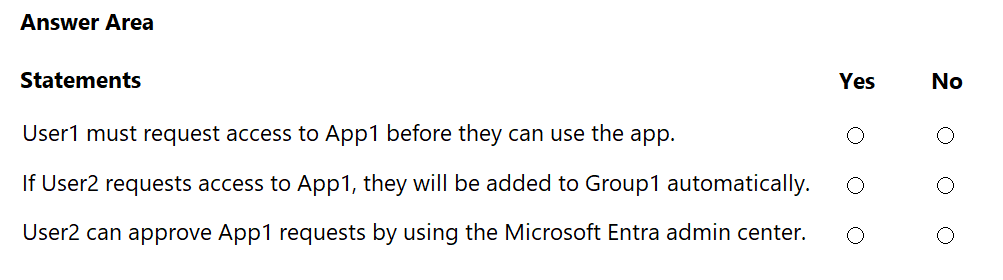
You have an Azure subscription that contains a group named Group1 and two users named User1 and User2. User1 is a member of Group1.
You register an enterprise application named App1.
You enable self-service application access for App1 and configure the following settings:
• Allow users to request access to this application: Yes
• To which group should assigned users be added: Group1
• Require approval before granting access to this application: Yes
• Who is allowed to approve access to this application: User2
For each of the following statements, select Yes if the statement is true. Otherwise, select No.
NOTE: Each correct selection is worth one point.
Show Answer
Correct Answer: 1. No
2. Yes
3. No
Explanation: User1 already belongs to the group assigned to App1. As the designated approver, User2’s own request is automatically approved and adds them to Group1. App1 access requests are approved through My Apps, not the Microsoft Entra admin center.
Question 19
You have a Microsoft 365 E5 subscription that contains three users named User1, User2, and User3 and a Microsoft SharePoint Online site named Site1.
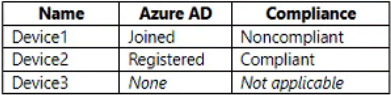
The subscription contains the devices shown in the following table.
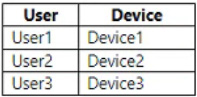
The users sign in to the devices as shown in the following table.
You have a Conditional Access policy that has the following settings:
• Name: CA1
• Assignments
o Users and groups: User1, User2, User3
o Cloud apps or actions: SharePoint - Site1
• Access controls
o Session: Use app enforced restrictions
From the SharePoint admin center, you configure Access control for unmanaged devices to allow limited, web-only access.
Which users will have full access to Site1?
A. User1 only
B. User2 only
C. User3only
D. User1 and User2 only
E. User1, User2, and User3
Show Answer
Correct Answer: B
Explanation: SharePoint treats a device as managed if it is hybrid Azure AD joined or marked compliant in Intune. Device2 is compliant, so User2 has full access. Device1 is noncompliant and Device3 is neither joined nor compliant, so Users1 and 3 get limited, web-only access under the SharePoint setting.
Question 19
SIMULATION
Use the following login credentials as needed:
To enter your username, place your cursor in the Sign in box and click on the username below.
To enter your password, place your cursor in the Enter password box and click on the password below.
Microsoft 365 Username:
Microsoft 365 Password: =1122334455667788
If the Microsoft 365 portal does not load successfully in the browser, press CTRL-K to reload the portal in a new browser tab.
The following information is for technical support purposes only:
Lab Instance: 99999999
You need to enforce multi-factor authentication (MFA) for users in the Executives group when they connect to Microsoft Office 365 apps. The solution must affect only the users in the Executives group.
To complete this task, sign in to the appropriate admin center.
Show Answer
Correct Answer: In the Microsoft Entra admin center, go to Protection > Conditional Access > Create new policy.
Include only the Executives group under Users.
Select Office 365 under Target resources.
Under Grant, choose Grant access and Require multifactor authentication.
Set the policy to On and create it.
Explanation: The policy requires MFA for Office 365 access while limiting its scope to members of the Executives group.
Question 20
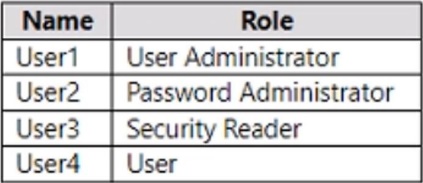
You have an Azure AD tenant that contains the users shown in the following table.
You enable self-service password reset (SSPR) for all the users and configure SSPR to require security questions as the only authentication method.
Which users must use security questions when resetting their password?
A. User4 only
B. User3 and User4 only
C. User1 and User4 only
D. User1, User3, and User4 only
E. User1, User2, User3, and User4
Show Answer
Correct Answer: B
Explanation: User1 (User Administrator) and User2 (Password Administrator) are subject to the administrator reset policy, which requires two authentication methods and does not allow security questions. Security Reader is not one of the roles subject to that policy, so User3 and the regular user, User4, follow the configured SSPR method and must use security questions.
Question 20
You have a Microsoft Entra tenant.
You need to add the Facebook social identity provider to the tenant. What should you do first?
A. Add a custom domain
B. Add a WS-Fed identity provider.
C. Add a SAML identity provider.
D. Set Enable guest self-service sign up via user flows to Yes.
Show Answer
Correct Answer: D
Explanation: Before adding the built-in Facebook social identity provider for external identities, guest self-service sign-up via user flows must be enabled in the Microsoft Entra tenant. Adding a custom domain or configuring WS-Fed/SAML providers is not the required first step for Facebook.
$19
Get all 410 questions with detailed answers and explanations
Instant download HTML + PDF delivered the moment payment clears.
Secure Stripe checkout we never see or store your card details.
7-day refund if files are defective see our refund policy.