This is the free Microsoft SC-200 practice question bank —
200 of 389 total questions, each with a full explanation, free to
read with no signup required. Updated 2026-10-13.
Every answer is verified against official Microsoft documentation —
see our methodology.
Question 1
You have a Microsoft 365 subscription that uses Microsoft Security Copilot.
You have the files shown in the following table.
Each file contains a copy of your company's compliance policy.
You need to ensure that Security Copilot responses are informed by the compliance policy.
Which files can be uploaded to Security Copilot?
A. File1.docx only
B. File3.txt only
C. File1.docx and File3.txt only
D. File2.pdf and File3.txt only
E. File1.docx, File2.pdf, and File3.txt
Show Answer
Correct Answer: D
Explanation: Security Copilot accepts common text file types such as DOCX, PDF, and TXT, with a maximum size of 3 MB per file. File1.docx is 4 MB and cannot be uploaded; File2.pdf (2 MB) and File3.txt (128 KB) meet the requirements.
Question 1
You have a Windows 11 device named Device1 that is onboarded to Microsoft Defender for Endpoint and has tamper protection enabled.
You are investigating a potential threat on Device1.
You enable troubleshooting mode for Device1.
You need to temporarily disable tamper protection on Device1.
Which PowerShell command should you run on Device1?
A. Set-MpPreference
B. mpcmdrun.exe
C. Get-MpComputerStatus
D. MDELiveAnalyzer.ps1
Show Answer
Correct Answer: A
Explanation: Run `Set-MpPreference` with the `-DisableTamperProtection` parameter to temporarily disable tamper protection while the device is in troubleshooting mode.
Question 2
You have a Microsoft 365 subscription.
You have the devices shown in the following table.
All the devices are onboarded to Microsoft Defender for Endpoint.
You are investigating a potential malware exploit on the devices.
You need to review the system log of each device. The solution must minimize disruptions to the devices.
What should you do for each device first in the Microsoft Defender portal?
A. Isolate the device.
B. Collect an investigation package.
C. Initiate an automated investigation.
D. Initiate a live response session.
Show Answer
Correct Answer: B
Explanation: For each device, first collect an investigation package. This lets you review diagnostic and system information with minimal disruption; isolating devices or opening a live response session is unnecessary for this initial review.
Question 2
You have an Azure subscription that contains a Microsoft Sentinel workspace and a virtual machine named VM1. VM1 runs Linux and hosts a log forwarder that receives Syslog and Common Event Format (CEF) messages from network appliances on TCP/UDP port 514. VM1 has the Azure Monitor Agent installed and is associated with a single data collection rule (DCR) that collects Syslog facilities.
You discover that when the appliances send CEF messages by using the local0 facility, the events are ingested into both the CommonSecurityLog table and the Syslog table.
You need to prevent the CEF messages from being ingested into the Syslog table. The solution must ensure that the CEF messages are still ingested into CommonSecurityLog.
What should you use?
A. a KQL function
B. an analytics rule in Microsoft Sentinel
C. an ingestion-time transformation
D. a table-level retention setting
Show Answer
Correct Answer: C
Explanation: Use an ingestion-time transformation in the data collection rule to filter CEF-formatted events from being written to the Syslog table while still allowing the CEF connector to ingest them into CommonSecurityLog. KQL functions and analytics rules operate after ingestion and cannot prevent storage in Syslog, while retention settings only control data lifecycle after ingestion.
Question 2
You have Microsoft 365 subscription that contains a Windows device named Device1 and two users named User1 and User2. Device1 is onboarded to Microsoft Defender for Endpoint.
Automatic attack disruption is triggered on Device1, and User1 is contained during the disruption.
You need to ensure that User2 can undo the containment of User1. The solution must follow the principle of least privilege.
Which role should you assign to User2?
A. User Administrator
B. Security Administrator
C. Security Reader
D. Global Administrator
Show Answer
Correct Answer: D
Explanation: Assign the Global Administrator role. Undoing a user-containment action requires that role, so the other listed roles do not provide the required permission—even though Global Administrator is broader than the principle of least privilege would normally favor.
Question 3
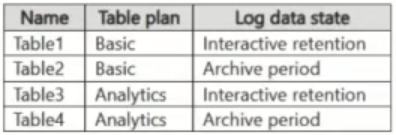
You have a Microsoft Sentinel workspace that contains the following tables.
You need to investigate the log data by using a search.
Which tables can you search?
A. Table3 only
B. Table1 and Table3 only
C. Table3 and Table4 only
D. Table1, Table3, and Table4 only
E. Table1, Table2, Table3, and Table4
Show Answer
Correct Answer: E
Explanation: A Microsoft Sentinel search job can search data in both Basic and Analytics tables, including data in interactive retention and the archive period. Therefore, all four tables can be searched.
Question 3
You have a Microsoft Sentinel workspace named Workspace1.
In Workspace1, you create a Microsoft Sentinel workbook named WB1.
You need to add a query to WB1 that will return a list of all the watchlists in Workspace1.
To what should you set Data source for the query?
A. SQL database
B. Logs (Analytics)
C. Storage account
D. Azure Resource Graph
Show Answer
Correct Answer: D
Explanation: To enumerate Microsoft Sentinel watchlists themselves in a workbook, the query should use Azure Resource Graph because watchlists are Azure resource metadata. Logs (Analytics) is used to query Log Analytics data, including the contents of a known watchlist via functions such as _GetWatchlist(), not to list watchlist resources. SQL database and Storage account are not appropriate data sources for this task.
Question 3
You have a Microsoft Sentinel workspace that is connected to the Microsoft Sentinel data lake.
In Microsoft Visual Studio Code, you plan to run Jupyter notebooks by using a GitHub Copilot agent that hunts for threats. The agent will search for relevant tables and query long-term data in the data lake by using natural language queries.
You need to connect the GitHub Copilot agent to the Microsoft Sentinel Model Context Protocol (MCP) collection endpoint.
Which URL should you use?
A. https://sentinel.microsoft.com/mcp/triage
B. https://sentinel.microsoft.com/mcp/data-exploration
C. https://sentinel.microsoft.com/mcp/graph
D. https://sentinel.microsoft.com/mcp/security-copilot-agent-creation
Show Answer
Correct Answer: B
Explanation: Use the data-exploration collection endpoint. It supports discovering relevant tables and querying long-term Microsoft Sentinel data lake data using natural language.
Question 4
You have a Microsoft 365 E5 subscription.
You have the following KQL query.
You need to use the query to create a Microsoft Defender XDR custom detection rule that can isolate an onboarded device.
How should you modify the query?
A. Add the AccountUpn and Timestamp columns to the project operator.
B. Add a distinct operator.
C. Add a summarize operator.
D. Add the DeviceId and Timestamp columns to the project operator.
Show Answer
Correct Answer: D
Explanation: Add DeviceId and Timestamp to the project operator. The custom detection rule needs the device identifier to target the onboarded device for isolation, and the event timestamp to associate the detection with the relevant activity.
Question 4
You have a Microsoft Sentinel workspace named Workspace1 and a firewall named FW1. FW1 logs are ingested into Workspace1. Typically, firewall events are ingested approximately two minutes after the event occurs, and occasionally up to five minutes after.
A scheduled analytics rule runs every five minutes and queries the TimeGenerated value for the last five minutes.
You need to minimize missed detections caused by ingestion delays and prevent duplicate alerts across rule runs.
How should you change the analytics rule query?
A. Increase the rule frequency to one minute and keep the lookback window on TimeGenerated at five minutes.
B. Keep the lookback window on TimeGenerated at five minutes and add | where ingestion_time() > ago(5m).
C. Increase the lookback window on TimeGenerated to 10 minutes and add | where ingestion_time() > ago(5m).
D. Increase the lookback window on TimeGenerated to 10 minutes and do NOT add ingestion_time() filter.
Show Answer
Correct Answer: C
Explanation: To avoid missing late-arriving events, extend the TimeGenerated lookback beyond the rule interval to cover the maximum expected ingestion delay. To avoid duplicate processing across overlapping lookback windows, filter on ingestion_time() so each rule run only evaluates records newly ingested since the previous run. A 10-minute TimeGenerated window with ingestion_time() > ago(5m) matches a 5-minute schedule and up to 5-minute ingestion delay.
$19
Get all 389 questions with detailed answers and explanations
Instant download HTML + PDF delivered the moment payment clears.
Secure Stripe checkout we never see or store your card details.
7-day refund if files are defective see our refund policy.