You have a Microsoft 365 E5 subscription.
Automated investigation and response (AIR) is enabled in Microsoft Defender for Office 365 and devices use full automation in Microsoft Defender for Endpoint.
You have an incident involving a user that received malware-infected email messages on a managed device.
Which action requires manual remediation of the incident?
A. soft deleting the email message
B. hard deleting the email message
C. isolating the device
D. containing the device
Show Answer
Correct Answer: B
Explanation: With Microsoft Defender for Office 365 AIR, the automated remediation action for malicious email clusters is soft delete. Hard delete is not an automated AIR remediation action and requires manual action/approval. Defender for Endpoint full automation can automate endpoint remediation, so the email hard delete is the action that requires manual remediation.
Sources:
https://learn.microsoft.com/en-us/defender-office-365/air-about
https://learn.microsoft.com/en-us/defender-xdr/m365d-configure-auto-investigation-response
https://jeffreyappel.nl/defender-for-office-365-auto-remediation-of-malicious-messages-air
Question 129
HOTSPOT
-
You have a Microsoft Sentinel workspace that contains a custom workbook named Workbook1.
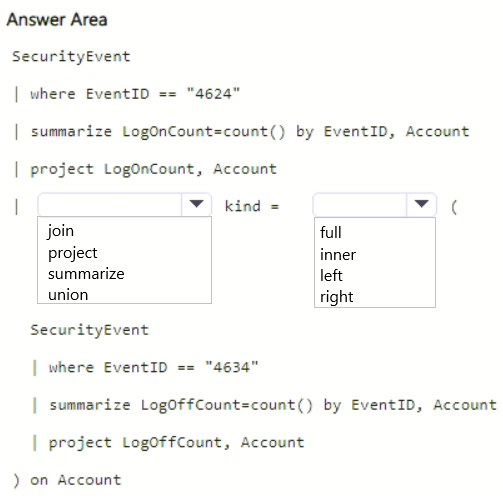
You need to create a visual in Workbook1 that will display the logon count for accounts that have logon event IDs of 4624 and 4634.
How should you complete the query? To answer, select the appropriate options in the answer area.
NOTE: Each correct selection is worth one point.
Show Answer
Correct Answer: join
inner
Explanation: Create separate summaries for EventID 4624 and 4634, then combine them by Account. An inner join on Account returns accounts present in both datasets, allowing LogonCount and LogoffCount to be displayed together.
Question 130
HOTSPOT
-
You have an Azure subscription that uses Microsoft Defender for Cloud.
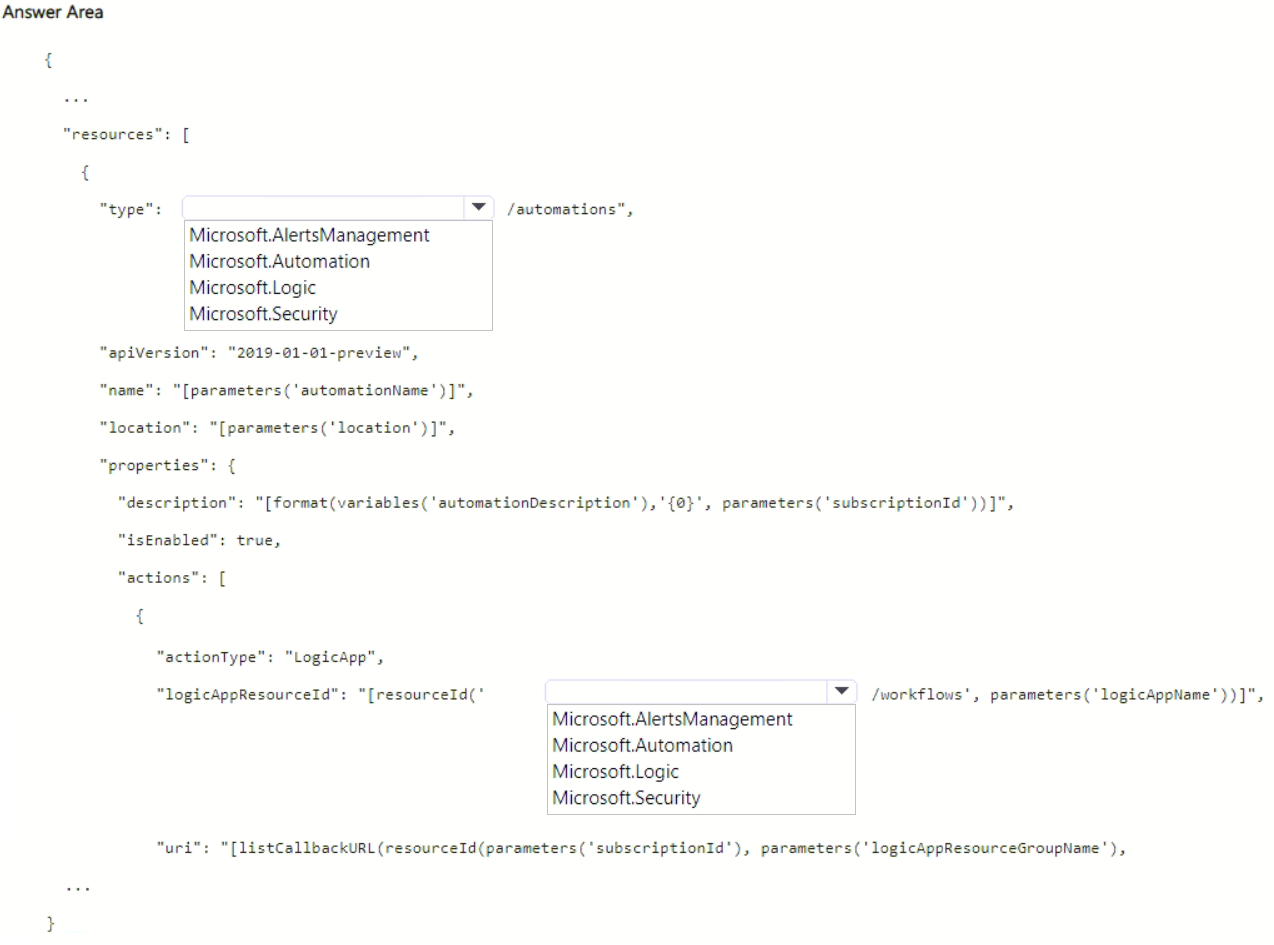
You need to use an Azure Resource Manager (ARM) template to create a workflow automation that will trigger a logic app when specific alerts are received by Microsoft Defender for Cloud.
How should you complete the template? To answer, select the appropriate options in the answer area.
NOTE: Each correct selection is worth one point.
Explanation: Defender for Cloud workflow automation ARM resources use the Microsoft.Security/automations resource type, and Logic Apps are referenced as Microsoft.Logic/workflows.
Question 131
Note: This question is part of a series of questions that present the same scenario. Each question in the series contains a unique solution that might meet the stated goals. Some question sets might have more than one correct solution, while others might not have a correct solution.
After you answer a question in this section, you will NOT be able to return to it. As a result, these questions will not appear in the review screen.
You have an Azure subscription that uses Microsoft Defender XDR.
From the Microsoft Defender portal, you perform an audit search and export the results as a file named File1.csv that contains 10,000 rows.
You use Microsoft Excel to perform Get & Transform Data operations to parse the AuditData column from File1.csv. The operations fail to generate columns for specific JSON properties.
You need to ensure that Excel generates columns for the specific JSON properties in the audit search results.
Solution: From Defender, you modify the search criteria of the audit search to increase the number of returned records, and then you export the results. From Excel, you perform the Get & Transform Data operations by using the new export.
Does this meet the requirement?
A. Yes
B. No
Show Answer
Correct Answer: B
Explanation: Excel's Get & Transform infers JSON properties from the first portion of the exported data (notably the first 1,000 rows when expanding the AuditData JSON). Increasing the number of returned records does not ensure the desired properties are discovered. The recommended approach is to narrow the audit search so fewer records are returned, increasing the likelihood that the needed JSON properties appear within the sampled rows.
Question 132
You have an Azure subscription that contains a resource group named RG1. RG1 contains a Microsoft Sentinel workspace. The subscription is linked to a Microsoft Entra tenant that contains a user named User1.
You need to ensure that User1 can deploy and customize Microsoft Sentinel workbook templates. The solution must follow the principle of least privilege.
Which role should you assign to User1 for RG1?
A. Microsoft Sentinel Contributor
B. Workbook Contributor
C. Microsoft Sentinel Automation Contributor
D. Contributor
Show Answer
Correct Answer: B
Explanation: The Workbook Contributor built-in Azure Monitor role includes permissions to create, update, read, and delete both workbooks and workbook templates (Microsoft.Insights/workbooktemplates/*). This is sufficient to deploy and customize Microsoft Sentinel workbook templates while following least privilege. Microsoft Sentinel Contributor and Contributor grant broader permissions than necessary, and Microsoft Sentinel Automation Contributor is unrelated to workbook management.
Question 133
HOTSPOT
-
You have a Microsoft 365 subscription that uses Microsoft Defender XDR.
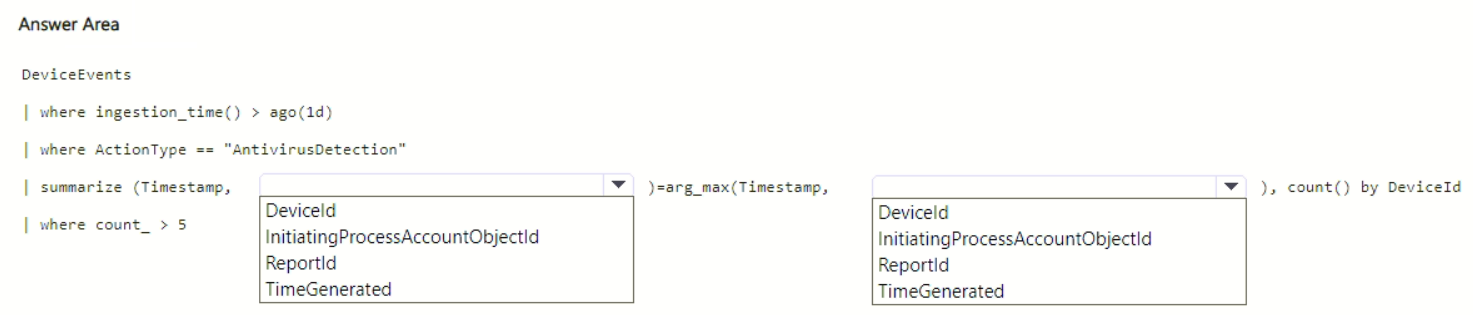
You need to create a custom detection rule that will identify devices that had more than five antivirus detections within the last 24 hours.
How should you complete the query? To answer, select the appropriate options in the answer area.
NOTE: Each correct selection is worth one point.
Show Answer
Correct Answer: ReportId
ReportId
Explanation: Use arg_max(Timestamp, ReportId) and assign the returned columns as (Timestamp, ReportId). Then count by DeviceId and filter where count_ > 5.
Question 134
HOTSPOT
-
You have a Microsoft 365 subscription that uses Microsoft Purview and contains a Microsoft SharePoint Online site named Site1.
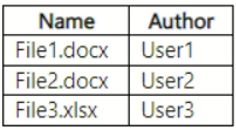
Site1 contains the files shown in the following table.
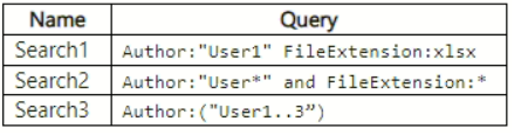
From Microsoft Purview, you create the content search queries shown in the following table.
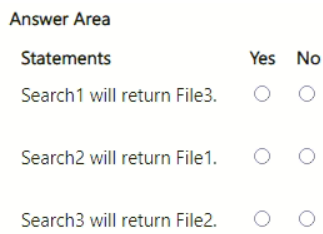
For each of the following statements, select Yes if the statement is true. Otherwise, select No.
NOTE: Each correct selection is worth one point.
Show Answer
Correct Answer: No
Yes
No
Explanation: Search1 uses a space between property expressions, which is treated as OR, so it would return .xlsx files including File3. Search2 uses quoted wildcard and lowercase 'and'; the quoted wildcard is literal, but FileExtension:* matches all files, so File1 is returned. Search3 quotes the range expression, making it a literal string rather than a range, so it won't match User2.
Question 135
HOTSPOT
-
You have a Microsoft 365 subscription that uses Microsoft Defender for Endpoint Plan 2 and contains a Windows device named Device1.
Twenty files on Device1 are quarantined by custom indicators as part of an investigation.
You need to release the 20 files from quarantine.
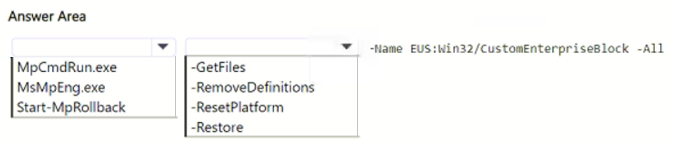
How should you complete the command? To answer, select the appropriate options in the answer area.
NOTE: Each correct selection is worth one point.
Show Answer
Correct Answer: MpCmdRun.exe
-Restore
Explanation: Use the Microsoft Defender command-line utility (MpCmdRun.exe) with the -Restore option to restore quarantined files. The name parameter specifies the quarantine resource (EUS:Win32/CustomEnterpriseBlock) and -All restores all matching quarantined files.
Question 136
You have a Microsoft 365 subscription that uses Microsoft Defender for Endpoint Plan 2 and contains 500 Windows devices.
As part of an incident investigation, you identify the following suspected malware files:
• sys
• pdf
• docx
• xlsx
You need to create indicator hashes to block users from downloading the files to the devices.
Which files can you block by using the indicator hashes?
A. File1.sys only
B. File1.sys and File3.docx only
C. File1.sys, File3.docx, and File4.xlsx only
D. File2.pdf, File3.docx, and File4.xlsx only
E. File1.sys, File2.pdf, File3.docx, and File4.xlsx
Show Answer
Correct Answer: A
Explanation: Microsoft Defender for Endpoint file indicators (hash indicators) for blocking downloads are limited to Portable Executable (PE) files. A .sys file is a PE file, whereas .pdf, .docx, and .xlsx are not supported by this indicator type. Therefore, only the .sys file can be blocked using file hash indicators in this scenario.
Question 137
You have a Microsoft 365 E5 subscription that uses Microsoft Defender XDR.
The security team at your company detects command and control (C2) agent traffic on the network. Agents communicate once every 50 hours.
You need to create a Microsoft Defender XDR custom detection rule that will identify compromised devices and establish a pattern of communication. The solution must meet the following requirements:
• Identify all the devices that have communicated during the past 14 days.
• Minimize how long it takes to identify the devices.
To what should you set the detection frequency for the rule?
A. Every 12 hours
B. Every 24 hours
C. Every three hours
D. Every hour
Show Answer
Correct Answer: B
Explanation: Microsoft Defender XDR custom detection rule frequency determines the lookback window. A rule running every 24 hours uses a 30-day lookback, which easily covers the required past 14 days and ensures devices that beacon every 50 hours are included. Shorter frequencies have much shorter lookback windows (48 hours, 12 hours, and 4 hours), which are not sufficient to reliably establish the 50-hour communication pattern across the required 14-day period.
$19
Get all 389 questions with detailed answers and explanations
Instant download HTML + PDF delivered the moment payment clears.
Secure Stripe checkout we never see or store your card details.
7-day refund if files are defective see our refund policy.