You have a Microsoft 365 E5 subscription that contains a device named Device1. Device1 is enrolled in Microsoft Defender for Endpoint.
Device1 reports an incident that includes a file named File1.exe as evidence.
You initiate the Collect Investigation Package action and download the ZIP file.
You need to identify the first and last time File1.exe was executed.
What should you review in the investigation package?
A. Processes
B. Autoruns
C. Security event log
D. Scheduled tasks
E. Prefetch files
Show Answer
Correct Answer: E
Explanation: Prefetch files record application execution metadata, including execution count and timestamps that can be used to determine the first and most recent execution of an executable. The investigation package includes prefetch data, making it the appropriate artifact to review for File1.exe execution history.
Question 171
You have a Microsoft 365 subscription that uses Microsoft Defender for Endpoint Plan 2 and contains a macOS device named Device1.
You need to investigate a Defender for Endpoint agent alert on Device1. The solution must meet the following requirements:
• Identify all the active network connections on Device1.
• Identify all the running processes on Device1.
• Retrieve the login history of Device1.
• Minimize administrative effort.
What should you do first from the Microsoft Defender portal?
A. From Devices, click Collect investigation package for Device1.
B. From Advanced features in Endpoints, enable Live Response unsigned script execution.
C. From Devices, initiate a live response session on Device1.
D. From Advanced features in Endpoints, disable Authenticated telemetry.
Show Answer
Correct Answer: A
Explanation: Collecting an investigation package from the device is the best first step because it automatically gathers forensic artifacts including running processes, active network connections, system and user information (including login-related artifacts), minimizing administrative effort compared to an interactive Live Response session. Enabling unsigned script execution or disabling authenticated telemetry are unrelated to the stated requirements.
Question 172
Your on-premises network contains an Active Directory Domain Services (AD DS) forest.
You have a Microsoft Entra tenant that uses Microsoft Defender for Identity. The AD DS forest syncs with the tenant.
You need to create a hunting query that will identify LDAP simple binds to the AD DS domain controllers.
Which table should you query?
A. AADServicePrincipalRiskEvents
B. AADDomainServicesAccountLogon
C. SigninLogs
D. IdentityLogonEvents
Show Answer
Correct Answer: D
Explanation: The IdentityLogonEvents table in Microsoft Defender for Identity contains on-premises Active Directory authentication activity, including LDAP protocol details such as simple binds. AADDomainServicesAccountLogon is for Microsoft Entra Domain Services, SigninLogs is for Microsoft Entra sign-ins, and AADServicePrincipalRiskEvents is unrelated to LDAP authentication.
Question 173
HOTSPOT -
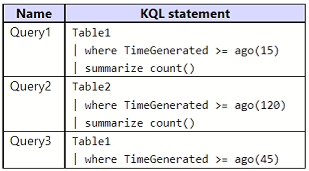
You have a Microsoft Sentinel workspace that has a default data retention period of 30 days. The workspace contains two custom tables as shown in the following table.
Each table ingested two records per day during the past 365 days.
You build KQL statements for use in analytic rules as shown in the following table.
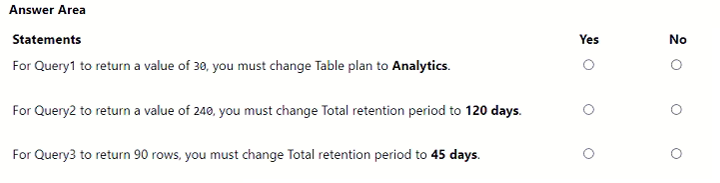
For each of the following statements, select Yes if the statement is true. Otherwise, select No.
NOTE: Each correct selection is worth one point.
Show Answer
Correct Answer: No
No
No
Explanation: Interactive retention, not total retention, determines what standard KQL queries can access. Table1 can return 15 days of data without changing to Analytics. Query2 already has sufficient total retention but lacks extended interactive retention; changing total retention alone does not help. Query3 also requires longer interactive access, not merely increasing total retention.
Question 174
DRAG DROP
-
You have a Microsoft 365 E5 subscription that uses Microsoft Exchange Online.
You need to identify phishing email messages.
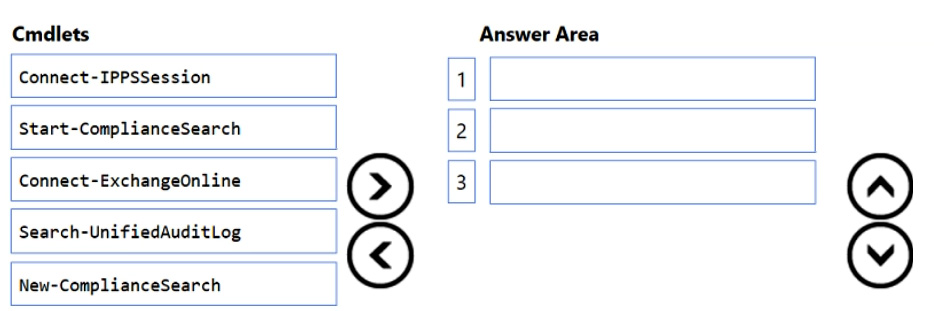
Which three cmdlets should you run in sequence? To answer, move the appropriate cmdlets from the list of cmdlets to the answer area and arrange them in the correct order.
Explanation: Connect to the Security & Compliance PowerShell session, create a compliance search to locate phishing messages, then start the search.
Question 175
You have an Azure subscription that contains a Microsoft Sentinel workspace named WS1 and 100 virtual machines that run Windows Server.
You need to configure the collection of Windows Security event logs for ingestion to WS1. The solution must meet the following requirements:
• Capture a full user audit trail including user sign-in and user sign-out events.
• Minimize the volume of events.
• Minimize administrative effort.
Which event set should you select?
A. Minimal
B. Common
C. All events
D. Custom
Show Answer
Correct Answer: B
Explanation: The correct choice is Common. The Common event set is designed to provide a full user audit trail, including user sign-in (4624) and sign-out (4634) events, while filtering out many lower-value events to reduce ingestion volume. Minimal does not include the complete audit trail, All events generates unnecessary volume, and Custom requires additional administrative effort, which conflicts with the requirements.
Question 176
HOTSPOT -
You have an Azure subscription that contains a Microsoft Sentinel workspace named WS1.
You need to ensure that the incidents in WS1 include a list of actions that must be performed. The solution must meet the following requirements:
• Ensure that you can build a tailored list of actions for each type of incident.
• Minimize administrative effort.
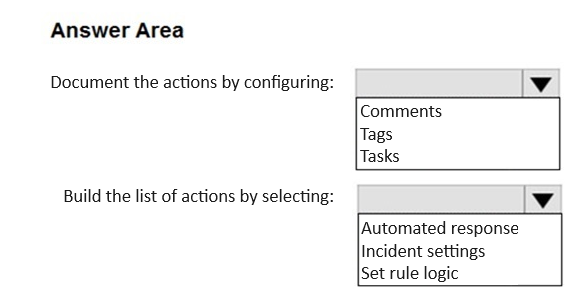
What should you do? To answer, select the appropriate options in the answer area.
NOTE: Each correct selection is worth one point.
Show Answer
Correct Answer: Tasks
Automated response
Explanation: Use incident Tasks to document required analyst actions. To minimize administration while tailoring actions by incident type, configure automation (automated response/automation rules) to add the appropriate task list automatically.
Question 177
You have a Microsoft 365 subscription that contains the following resources:
• 100 users that are assigned a Microsoft 365 E5 license
• 100 Windows 11 devices that are joined to the Microsoft Entra tenant
The users access their Microsoft Exchange Online mailbox by using Outlook on the web.
You need to ensure that if a user account is compromised, the Outlook on the web session token can be revoked. What should you configure?
A. security defaults in Microsoft Entra
B. Microsoft Entra Verified ID
C. a Conditional Access policy in Microsoft Entra
D. Microsoft Entra ID Protection
Show Answer
Correct Answer: C
Explanation: Conditional Access can enforce sign-in frequency and, when combined with user/session controls, causes existing refresh tokens/sessions to be invalidated after a revoke session action or risk-based enforcement. ID Protection detects user risk but does not itself provide the session control; Verified ID and security defaults do not address Outlook on the web session token revocation.
Question 178
HOTSPOT
-
You have an Azure DevOps organization that contains an Azure Repos repository named Repo1 and is onboarded to Microsoft Defender for DevOps.
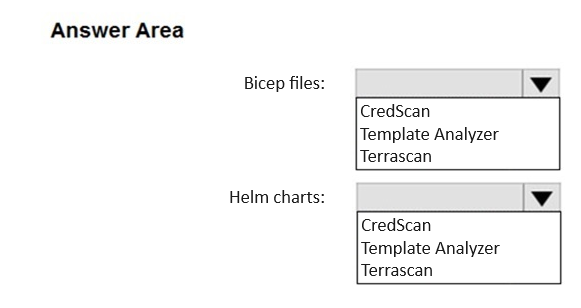
You create infrastructure as code (IaC) files and store them in Repo1. The IaC files are formatted as Bicep files and Helm charts.
You need to configure Defender for DevOps to identify misconfigurations in the IaC files.
Which scanning tool should you use for each type of files? To answer, select the appropriate options in the answer area.
NOTE: Each correct selection is worth one point.
Explanation: Template Analyzer analyzes ARM/Bicep templates, while Terrascan supports Helm chart IaC scanning. CredScan is for detecting secrets, not IaC misconfigurations.
Question 179
You have an Azure subscription that uses Microsoft Defender for Cloud.
You need to configure Defender for Cloud to mitigate the following risks:
• Vulnerabilities within the application source code
• Exploitation toolkits in declarative templates
• Operations from malicious IP addresses
• Exposed secrets
Which two Defender for Cloud services should you use? Each correct answer presents part of the solution.
NOTE: Each correct answer is worth one point.
A. Microsoft Defender for Resource Manager
B. Microsoft Defender for DNS
C. Microsoft Defender for App Service
D. Microsoft Defender for Servers
E. Microsoft Defender for DevOps
Show Answer
Correct Answer: A, E
Explanation: Microsoft Defender for DevOps scans application source code, infrastructure-as-code (declarative templates), and repositories for vulnerabilities and exposed secrets. Microsoft Defender for Resource Manager detects suspicious Azure Resource Manager operations, including activities from malicious IP addresses and exploitation attempts targeting ARM deployments, complementing DevOps coverage to address the listed risks.
$19
Get all 389 questions with detailed answers and explanations
Instant download HTML + PDF delivered the moment payment clears.
Secure Stripe checkout we never see or store your card details.
7-day refund if files are defective see our refund policy.