You have a Microsoft 365 E3 subscription that contains two users named User1 and User2.
A phishing alert indicates that User1 might have been compromised 240 days ago.
User2 performs an audit search of User1 activity and does NOT find any MailItemsAccessed events for User1.
You need to ensure that User2 can query the audit data of User1 for future events that are up to 240 days old. The solution must minimize costs.
What should you do?
A. Assign User1 a Microsoft 365 E5 license.
B. Assign User1 and User2 a Microsoft 365 E5 license.
C. Add User2 to the Audit Reader role group.
D. Assign User2 a Microsoft 365 E5 license.
Show Answer
Correct Answer: A
Explanation: Assign User1 a Microsoft 365 E5 license. Audit Premium retention of up to one year applies to the licensed user whose activity is being audited, allowing User2 to search events up to 240 days old. User2 does not need an E5 license for this retention; assigning User1 an E5 license is the lowest-cost option.
Question 5
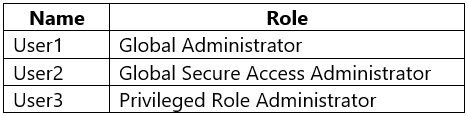
You have a Microsoft 365 E5 subscription that contains the users shown in the following table.
You configure Microsoft Entra Internet Access.
Which users can manage Microsoft Entra Internet Access?
A. User1 only
B. User2 only
C. User3 only
D. User1 and User2 only
E. User1, User2 and User3
Show Answer
Correct Answer: D
Explanation: User1, as a Global Administrator, and User2, as a Global Secure Access Administrator, can manage Microsoft Entra Internet Access. User3’s Privileged Role Administrator role can manage role assignments, but does not itself grant permission to manage Internet Access settings.
Question 5
You have a Microsoft 365 subscription that uses Microsoft Defender XDR. All client computers run Windows 11 and are onboarded to Microsoft Defender for Endpoint.
You have an Azure subscription that contains a Microsoft Sentinel workspace.
You need to ensure that when malware is detected on a Windows 11 computer, an investigation package is collected. The solution must minimize administrative effort.
What should you configure?
A. an automation rule
B. an automated alert response in Defender for Endpoint
C. an endpoint security policy
D. a custom detection rule
Show Answer
Correct Answer: B
Explanation: Automated investigation and response (AIR) in Microsoft Defender for Endpoint can automatically respond to malware alerts and collect an investigation package from the affected device. This is the native capability for malware-triggered investigation package collection and requires less administrative effort than orchestrating it through Microsoft Sentinel automation. Endpoint security policies configure protection settings, and custom detection rules create detections rather than handling built-in malware response.
Question 5
DRAG DROP
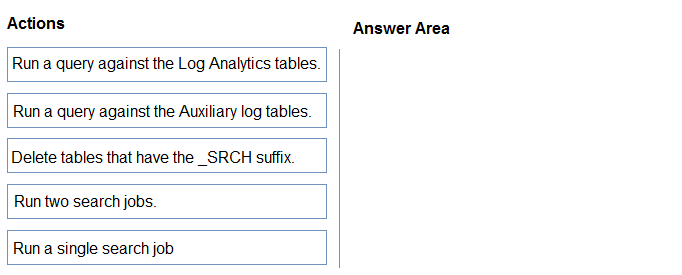
You have a Microsoft Sentinel workspace named Workspace1 that has a retention period of 12 years. Workspace1 contains two custom auxiliary tables named Table1 and Table2.
You need to correlate the data between Table1 and Table2 from the past six months by using a JOIN operation. The solution must minimize administrative effort and costs.
Which three actions should you perform in sequence? To answer, move the appropriate actions from the list of actions to the answer area and arrange them in the correct order.
Show Answer
Correct Answer: 1. Run two search jobs.
2. Run a query against the Log Analytics tables.
3. Delete tables that have the _SRCH suffix.
Explanation: Auxiliary tables do not support JOIN queries. Search each table separately to create queryable _SRCH tables, join those results, then delete the temporary tables to avoid ongoing costs.
Question 6
You have a Microsoft 365 subscription.
You have the following KQL query.
You need to ensure that you can create a Microsoft Defender XDR custom detection rule by using the query.
What should you add to the query?
A. | summarize (Timestamp, ReportId)=arg_max(Timestamp, ReportId), count() by DeviceId
B. | summarize (ReportId)=make_set(ReportId), count() by DeviceId
C. | summarize (Timestamp, DeviceName)=arg_min(Timestamp, DeviceName), count() by DeviceId
D. | summarize (Timestamp)=range(Timestamp), count() by DeviceId
Show Answer
Correct Answer: A
Explanation: Custom detection queries must include the event’s `Timestamp` and `ReportId`. `arg_max(Timestamp, ReportId)` retains those fields from the latest event in each `DeviceId` group, so option A adds the required columns.
Question 6
You have a Microsoft Sentinel workspace.
You are investigating a multi-stage security attack on your environment.
You need to identify the MITRE ATT&CK phases of the tactics and techniques used by the attacker. The solution must minimize administrative effort.
What should you do?
A. From Microsoft Sentinel in the Microsoft Defender portal, select Threat management, an then use the MITRE ATT&CK node.
B. Use the Microsoft Security Compliance Toolkit
C. From Investigation & response in the Microsoft Defender portal, select Incident & alerts, and then use the Incidents node.
D. From Microsoft Sentinel in the Microsoft Defender portal, select Threat management, and then use the Hunting node.
Show Answer
Correct Answer: A
Explanation: Use the MITRE ATT&CK node in Microsoft Sentinel to view tactics and techniques mapped to the attack, with minimal administrative effort.
Question 7
You have a Microsoft 365 E5 subscription that uses Microsoft Copilot for Security.
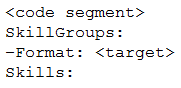
You plan to run the following code to create a custom Copilot for Security plugin.
You need to specify a format and complete the code segment.
Which format should you use for the
variable?
A. API
B. GPT
C. KQL
D. SQL
Show Answer
Correct Answer: C
Explanation: Use KQL for the SkillGroups format when the custom plugin skill is defined as a Kusto query. API is not the format for this skill-group code segment.
Question 7
You have a Microsoft 365 subscription that contains a group named Group1. The subscription uses Microsoft Defender for Endpoint.
You have 500 devices that run Windows 11. The devices are managed by using Microsoft Intune and are members of Group1.
You implement security baselines for the devices.
You discover that some devices fail to receive the security baselines.
You need to identify which devices failed to receive the security baselines and which baselines were NOT received. The solution must minimize administrative effort
Which node should you use in the Microsoft Intune admin center?
A. Endpoint security
B. Apps
C. Devices
D. Groups
Show Answer
Correct Answer: A
Explanation: The Endpoint security node provides centralized management and reporting for security baselines. From there, you can view baseline assignment status and reports to identify which devices failed to receive a baseline and which specific baselines were not applied, minimizing administrative effort. The Devices, Groups, and Apps nodes do not provide the same baseline-focused reporting.
Question 7
DRAG DROP
-
You have a Microsoft Sentinel workspace named Workspace.
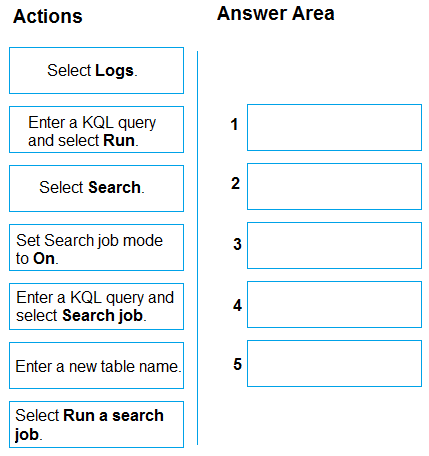
You need to run a KQL query as a search job.
Which five actions should you perform in Workspace1 in sequence? To answer, move the appropriate actions from the list of actions to the answer area and arrange them in the correct order.
Show Answer
Correct Answer: 1. Select Search.
2. Enter a KQL query and select Run.
3. Set Search job mode to On.
4. Enter a new table name.
5. Select Run a search job.
Explanation: In the Search experience, run the query, enable search job mode, then name the results table and start the job.
Question 8
HOTSPOT
-
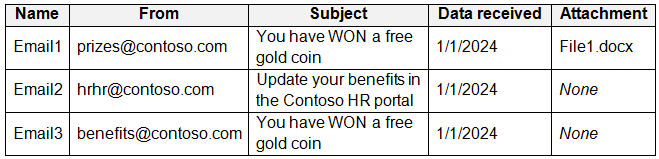
You have a Microsoft 365 E5 subscription that uses Microsoft Exchange Online.
You identify the suspicious emails shown in the following table.
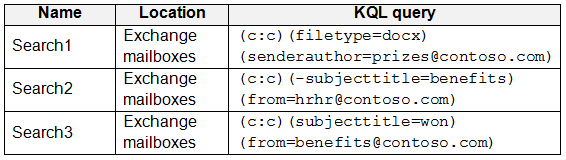
In Microsoft Purview, you create the content searches shown in the following table.
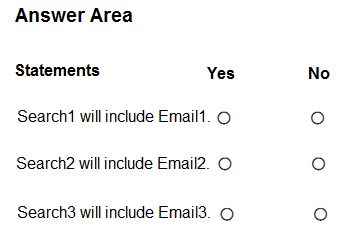
For each of the following statements, select Yes if the statement is true. Otherwise, select No.
NOTE: Each correct selection is worth one point.
Show Answer
Correct Answer: Search1 will include Email1: Yes
Search2 will include Email2: No
Search3 will include Email3: Yes
Explanation: Email1 has a DOCX attachment and the specified sender. Email2 is excluded because its subject contains “benefits,” which Search2 negates. Email3 has the specified sender and “WON” in its subject; the search is case-insensitive.
$19
Get all 389 questions with detailed answers and explanations
Instant download HTML + PDF delivered the moment payment clears.
Secure Stripe checkout we never see or store your card details.
7-day refund if files are defective see our refund policy.