You have 500 on-premises Windows 11 devices that use Microsoft Defender for Endpoint.
You enable Network device discovery.
You need to create a hunting query that will identify discovered network devices and return the identity of the onboarded device that discovered each network device.
Which built-in function should you use?
A. SeenBy()
B. DeviceFromIP()
C. next()
D. current_cluster_endpoint()
Show Answer
Correct Answer: A
Explanation: The built-in SeenBy() function in Microsoft Defender XDR advanced hunting returns the onboarded device(s) that observed a discovered network device, making it the correct choice for identifying discovered network devices and the identity of the device that discovered each one.
Question 139
HOTSPOT
-
You have a Microsoft 365 E5 subscription that uses Microsoft Defender XDR and contains a Windows device named Device1.
You investigate Device1 for malicious activity and discover a suspicious file named File1.exe. You collect an investigation package from Device1.
You need to review the following forensic data points:
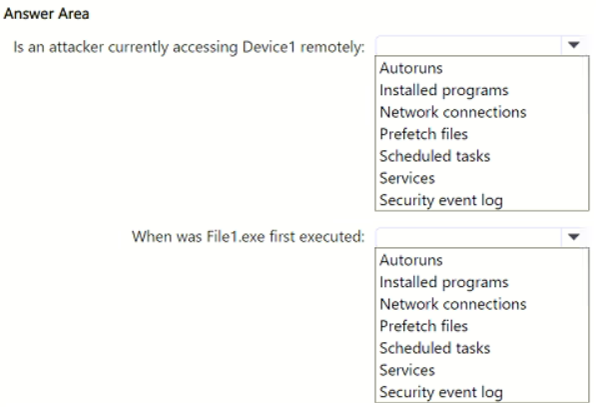
• Is an attacker currently accessing Device1 remotely?
• When was File1.exe first executed?
Which folder in the investigation package should you review for each data point? To answer, select the appropriate options in the answer area.
NOTE: Each correct selection is worth one point.
Show Answer
Correct Answer: Is an attacker currently accessing Device1 remotely? — Network connections
When was File1.exe first executed? — Prefetch files
Explanation: Active remote access is determined from current network connection data. Windows Prefetch artifacts record executable execution history and can be used to determine the first execution time of File1.exe.
Question 140
You have a Microsoft Sentinel workspace named SW1.
You need to identify which anomaly rules are enabled in SW1.
What should you review in Microsoft Sentinel?
A. Content hub
B. Entity behavior
C. Analytics
D. Settings
Show Answer
Correct Answer: C
Explanation: Anomaly rules in Microsoft Sentinel are managed and viewed from the Analytics page. The Analytics area includes an Anomalies tab that lists anomaly detection rules and indicates whether they are enabled or disabled. Content hub is for solution management, Entity behavior is for investigation context, and Settings does not list enabled anomaly rules.
Question 141
You have an Azure subscription named Sub1 that uses Microsoft Defender for Cloud.
You need to assign the PCI DSS 4.0 initiative to Sub1 and have the initiative displayed in the Defender for Cloud Regulatory compliance dashboard.
From Security policies in the Environment settings, you discover that the option to add more industry and regulatory standards is unavailable.
What should you do first?
A. Configure the Continuous export settings for Log Analytics.
B. Enable the Cloud Security Posture Management (CSPM) plan for the subscription.
C. Configure the Continuous export settings for Azure Event Hubs.
D. Disable the Microsoft Cloud Security Benchmark (MCSB) assignment.
Show Answer
Correct Answer: B
Explanation: The ability to add additional industry and regulatory standards in Microsoft Defender for Cloud depends on the Defender CSPM plan. If the option to add standards such as PCI DSS 4.0 is unavailable under Environment settings > Security policies, the Cloud Security Posture Management (CSPM) plan must first be enabled for the subscription. Continuous export settings and disabling the Microsoft Cloud Security Benchmark assignment do not enable regulatory standards management.
Question 142
You have a Microsoft 365 subscription that uses Microsoft Defender for Endpoint and contains a user named User1 and a Microsoft 365 group named Group1. All users are assigned a Defender for Endpoint Plan 1 license.
You enable Microsoft Defender XDR Unified role-based access control (RBAC) for Endpoints & Vulnerability Management.
You need to ensure that User1 can configure alerts that will send email notifications to Group1. The solution must follow the principle of least privilege.
Which permissions should you assign to User1?
A. Defender Vulnerability Management - Remediation handling
B. Alerts investigation
C. Live response capabilities: Basic
D. Manage security settings
Show Answer
Correct Answer: D
Explanation: To configure Microsoft Defender XDR email notifications for alerts, the required permission is 'Manage security settings'. The 'Alerts investigation' permission allows managing alerts, but configuring global email notification settings is a security configuration task. Following least privilege, assign only the specific 'Manage security settings' permission needed.
Question 143
HOTSPOT
-
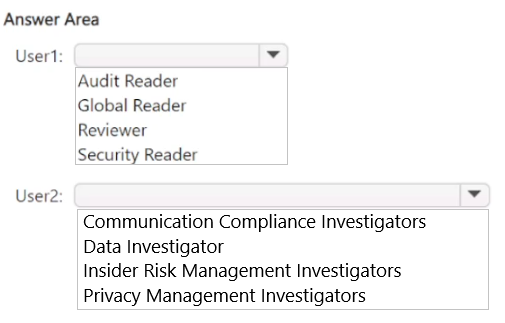
You have a Microsoft 365 E5 subscription that uses Microsoft Defender XDR and contains two users named User1 and User2.
You need to ensure that the users can perform searches by using the Microsoft Purview portal. The solution must meet the following requirements:
• Ensure that User1 can search the Microsoft Purview Audit service logs and review the Microsoft Purview Audit service configuration.
• Ensure that User2 can search Microsoft Exchange Online mailboxes.
• Follow the principle of least privilege.
To which Microsoft Purview role group should you add each user? To answer, select the appropriate options in the answer area
NOTE: Each correct selection is worth one point.
Show Answer
Correct Answer: User1: Audit Reader
User2: Data Investigator
Explanation: Audit Reader provides permission to search Microsoft Purview Audit logs and view audit configuration with least privilege. Data Investigator allows searching Exchange Online mailboxes for investigations without broader administrative permissions.
Question 144
HOTSPOT
-
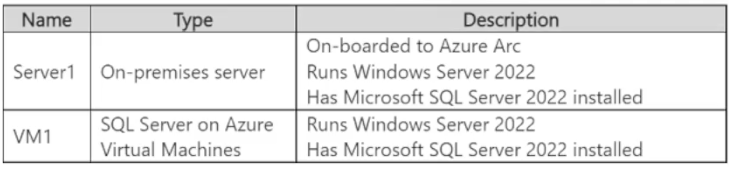
You have the resources shown in the following table.
You have an Azure subscription that uses Microsoft Defender for Cloud.
You need to use Defender for Cloud to protect VM1 and Server1. The solution must meet the following requirements:
• Support Advanced Threat Protection and vulnerability assessment.
• Register each SQL Server 2022 instance as a SQL virtual machine.
• Minimize implementation and administrative effort.
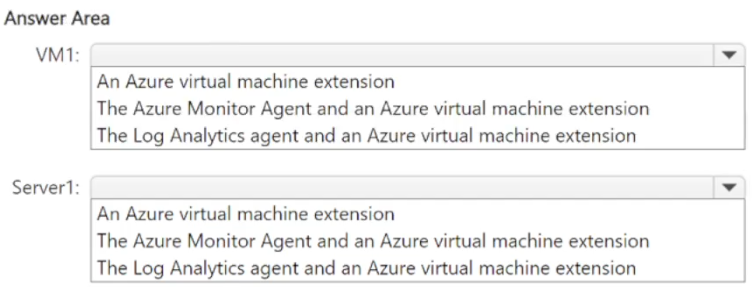
What should you deploy to each server? To answer, select the appropriate options in the answer area.
NOTE: Each correct selection is worth one point.
Show Answer
Correct Answer: VM1: The Azure Monitor Agent and an Azure virtual machine extension
Server1: The Azure Monitor Agent and an Azure virtual machine extension
Explanation: Azure Monitor Agent is the current supported agent for both Azure and Arc-enabled servers. Combined with the required VM/Arc extension, it supports Microsoft Defender for Cloud capabilities such as Defender for SQL (Advanced Threat Protection), vulnerability assessment, and SQL Server registration while minimizing administration. The Log Analytics agent is deprecated.
Question 145
HOTSPOT
-
You have a Microsoft 365 subscription that uses Microsoft Defender for Endpoint Plan 2 and contains a Windows device named Device1.
You initiate a live response session on Device1 and launch an executable file named File1.exe in the background.
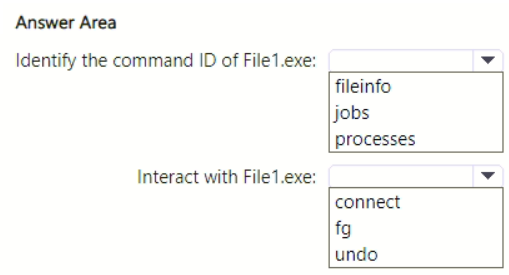
You need to perform the following actions:
• Identify the command ID of File1.exe.
• Interact with File1.exe.
Which live response command should you run for each action? To answer, select the appropriate options in the answer area.
NOTE: Each correct selection is worth one point.
Show Answer
Correct Answer: Identify the command ID of File1.exe: jobs
Interact with File1.exe: fg
Explanation: The jobs command lists background jobs with their command IDs. The fg command brings the specified background job to the foreground for interaction using that command ID.
Question 146
You have a Microsoft 365 subscription that uses Microsoft Defender XDR and contains a Windows device named Device1.
The timeline of Device1 includes three files named File1.ps1, File2.exe, and File3.dll.
You need to submit files for deep analysis in Microsoft Defender XDR.
Which files can you submit?
A. File1.ps1 only
B. File2.exe only
C. File3.dll only
D. File2.exe and File3.dll only
E. File1.ps1 and File2.exe only
F. File1.ps1, File2.exe, and File3.dll
Show Answer
Correct Answer: D
Explanation: Microsoft Defender XDR deep analysis supports Portable Executable (PE) files, including .exe and .dll files. A .ps1 PowerShell script is not a PE file and cannot be submitted for deep analysis. Therefore, File2.exe and File3.dll are supported, while File1.ps1 is not.
Question 147
HOTSPOT
-
You have on-premises servers that run Windows Server.
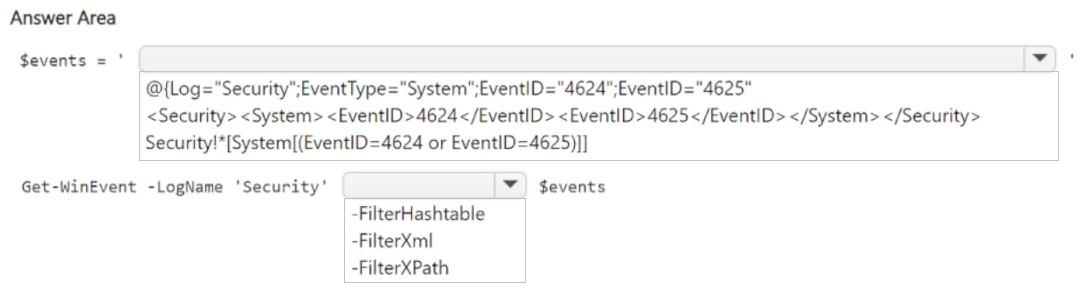
You have a Microsoft Sentinel workspace named SW1. SW1 is configured to collect Windows Security log entries from the servers by using the Azure Monitor Agent data connector.
You plan to limit the scope of collected events to events 4624 and 4625 only.
You need to use a PowerShell script to validate the syntax of the filter applied to the connector.
How should you complete the script? To answer, select the appropriate options in the answer area.
NOTE: Each correct selection is worth one point.
Explanation: Azure Monitor Agent Windows event filters use XPath syntax. To validate the same filter in PowerShell, pass the XPath expression to Get-WinEvent with the -FilterXPath parameter.
$19
Get all 389 questions with detailed answers and explanations
Instant download HTML + PDF delivered the moment payment clears.
Secure Stripe checkout we never see or store your card details.
7-day refund if files are defective see our refund policy.