You have a Microsoft 365 E5 subscription that contains a device named Device1.
From the Microsoft Defender portal, you discover that an alert was triggered for Device1.
From the Device inventory page, you isolate Device1.
You need to collect a list of installed programs on Device1.
What should you do?
A. Run an advanced hunting query against the DeviceProcessEvents table.
B. Run an advanced hunting query against the DeviceTvmSoftwareInventory table.
C. Initiate an automated investigation and view the results in the Action center.
D. Initiate a live response session and run the processes command.
Show Answer
Correct Answer: B
Explanation: The DeviceTvmSoftwareInventory advanced hunting table contains the Defender Vulnerability Management software inventory for devices, including installed applications and versions. DeviceProcessEvents records process execution rather than installed software, automated investigation is for threat remediation, and the live response 'processes' command lists running processes, not all installed programs.
Question 71
HOTSPOT
-
You have a Microsoft 365 E5 subscription that uses Microsoft Defender XDR.
You are implementing a deception rule.
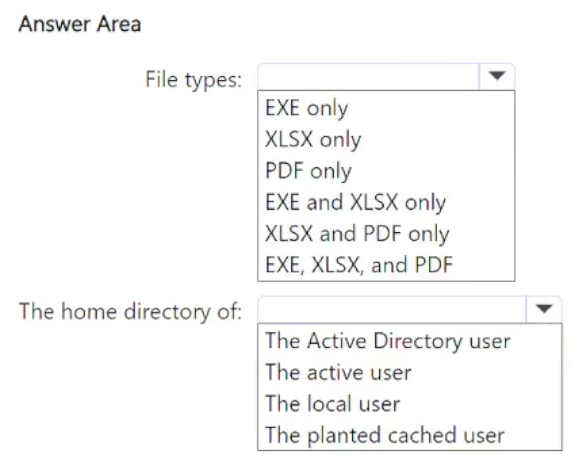
You need to provide a custom lure file.
For the custom lure, you set Planting path to HOME.
Which types of files can you use for the custom lure, and in which home directory should the file be located on a device? To answer, select the appropriate options in the answer area.
NOTE: Each correct selection is worth one point.
Show Answer
Correct Answer: XLSX and PDF only
The active user
Explanation: Microsoft Defender XDR custom lure files can be any file type except executable (.EXE) and .DLL files. With Planting path set to {HOME}, the location resolves to the active user's home directory.
Question 72
HOTSPOT
-
You have an Azure subscription that uses Microsoft Defender for Cloud.
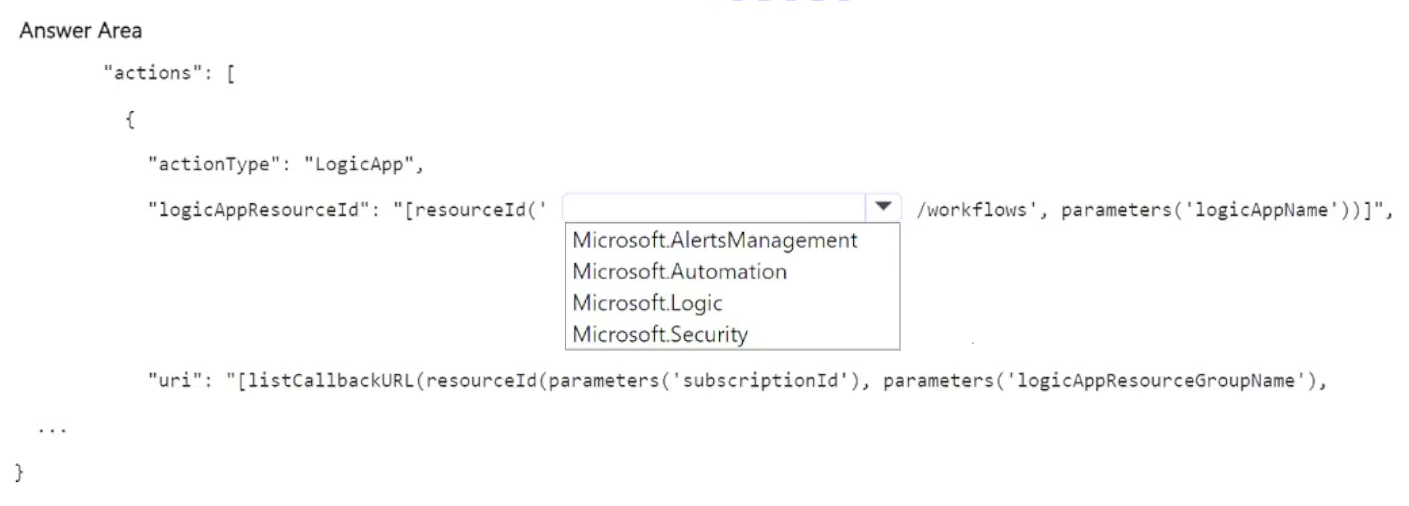
You need to use an Azure Resource Manager (ARM) template to create a workflow automation that will trigger a logic app when specific alerts are received by Microsoft Defender for Cloud.
How should you complete the template? To answer, select the appropriate options in the answer area.
NOTE: Each correct selection is worth one point.
Show Answer
Correct Answer: Microsoft.Logic
Explanation: The ARM resource ID for a Logic App workflow uses the Microsoft.Logic resource provider with the workflows resource type: resourceId('Microsoft.Logic/workflows', logicAppName).
Question 73
HOTSPOT
-
You have an Azure subscription named Sub1 that is linked to a Microsoft Entra tenant named contoso.com. Contoso.com contains a user named User1. Sub1 contains a Microsoft Sentinel workspace.
You provision a Microsoft Copilot for Security capacity.
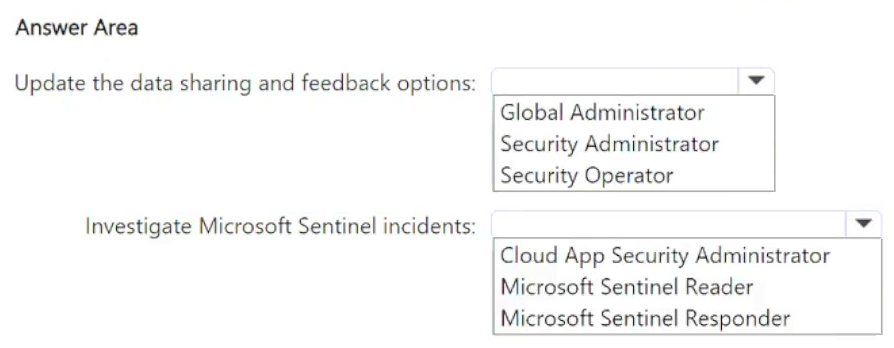
You need to ensure that User1 can use Copilot for Security to perform the following tasks:
• Update the data sharing and feedback options.
• Investigate Microsoft Sentinel incidents.
The solution must follow the principle of least privilege.
Which role should you assign to User1 for each task? To answer, select the appropriate options in the answer area.
NOTE: Each correct selection is worth one point.
Show Answer
Correct Answer: Update the data sharing and feedback options: Security Administrator
Investigate Microsoft Sentinel incidents: Microsoft Sentinel Reader
Explanation: Security Administrator inherits the Copilot owner capabilities needed to update data sharing and feedback settings. For investigating Sentinel incidents, the Reader role is the least-privileged role that allows incident investigation without response actions.
Question 74
HOTSPOT
-
You have an Azure subscription named Sub1 that contains a resource group named RG1. RG1 contains two Azure key vaults named KV1 and KV2 that use Azure role-based access control (Azure RBAC).
The subscription contains the users shown in the following table.
KV1 contains a secret named Secret1. KV2 contains a secret named Secret2.
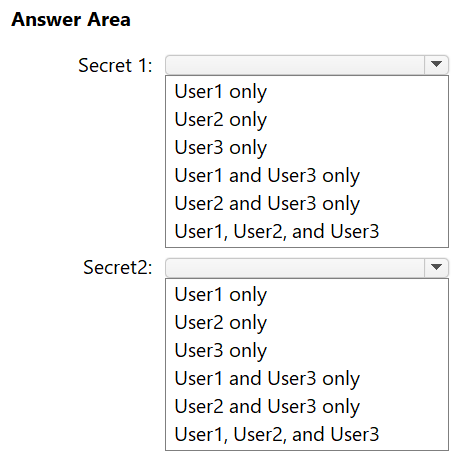
Which users can read the values of each secret? To answer, select the appropriate options in the answer area.
NOTE: Each correct selection is worth one point.
Show Answer
Correct Answer: Secret1: User1 and User3 only
Secret2: User1 only
Explanation: Key Vault Administrator at the subscription scope can manage and read secrets in both vaults. Key Vault Reader can view vault metadata but cannot read secret values. Key Vault Secrets User can read secret values only in the assigned vault (KV1).
Question 76
HOTSPOT
-
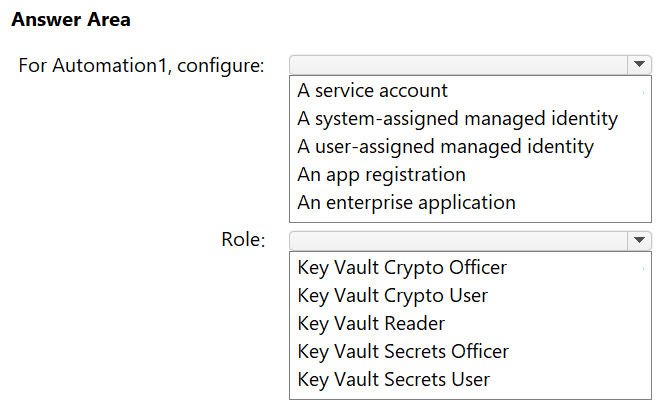
You have an Azure subscription named Sub1 that contains an Azure key vault named Vault1 and an Azure Automation account named Automation1.
You need to ensure that Automation1 can access Vault1. The solution1 must meet the following requirements:
• Ensure that if Automation1 is deleted, the permissions granted for Vault1 will be removed automatically.
• Ensure that runbooks created in Automation1 can read secret values stored in Vault1.
• Follow the principle of least privilege.
What should you configure for Automation1, and which built-in role should Automation1 use to access Vault1? To answer, select the appropriate options in the answer area.
NOTE: Each correct answer is worth one point.
Show Answer
Correct Answer: A system-assigned managed identity
Key Vault Secrets User
Explanation: A system-assigned managed identity is tied to the Automation account lifecycle, so deleting the Automation account removes the identity and its permissions. The Key Vault Secrets User role provides the least-privileged access required to read secret values from Key Vault.
Question 78
HOTSPOT
-
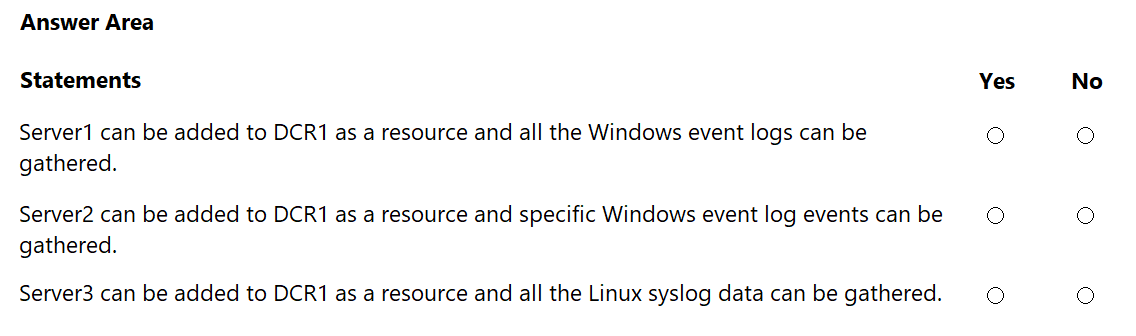
Your on-premises network contains a Hyper-V cluster. The cluster contains the virtual machines shown in the following table.
You have a Microsoft Sentinel workspace named SW1.
You have a data collection rule (DCR) that has the following configurations:
• Name: DCR1
• Destination: SW1
• Platform type: All
• Data collection endpoint: None
• Data source: Windows event logs, Linux syslog
For each of the following statements, select Yes if the statement is true. Otherwise, select No.
NOTE: Each correct selection is worth one point.
Show Answer
Correct Answer: Server1: No
Server2: No
Server3: No
Explanation: For on-premises machines, Data Collection Rules target Azure resources (typically Azure Arc-enabled servers) and data collection requires the Azure Monitor Agent (AMA). Machines without Azure Arc can't be added as DCR resources, and machines without AMA can't collect/send the configured logs.
Question 79
HOTSPOT
-
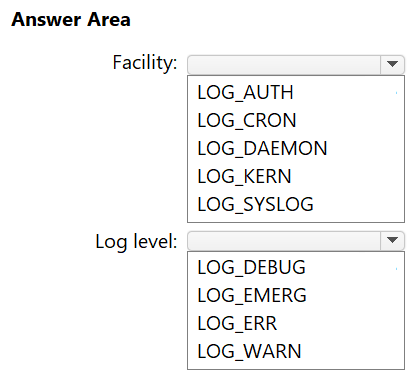
You have an on-premises Linux server that runs a background process named App1 and has the Azure Connected Machine agent installed.
You have a Microsoft Sentinel workspace named WS1.
You need to configure a data collection rule (DCR) named DCR1 that will use the Syslog via AMA connector to collect messages related to App1. The solution must meet the following requirements:
• Only collect messages that have a priority level of critical.
• Minimize the volume of data collected.
Which facility and log level should you configure for DCR1? To answer, select the appropriate options in the answer area.
NOTE: Each correct selection is worth one point.
Explanation: A background application is typically logged under the DAEMON facility. With Syslog via AMA, the configured log level acts as a minimum severity threshold (collecting that severity and more severe). Since LOG_CRIT is not available, LOG_ERR is the closest option that still includes critical messages while minimizing additional data.
Question 80
You have a Microsoft 365 subscription that uses Microsoft Copilot for Security.
You create a promptbook named Book1.
For Book1, you need to create a prompt that contains an input named IncidentID.
How should you format IncidentID?
A.
B. ##IncidentID##
C. [IncidentID]
D. $IncidentID$
Show Answer
Correct Answer: A
Explanation: In Microsoft Copilot for Security promptbooks, required input variables are specified using angle brackets. Therefore the input named IncidentID should be formatted as <IncidentID>. The other placeholder styles (##IncidentID##, [IncidentID], and $IncidentID$) are not the documented promptbook input syntax.
Question 81
You have a Microsoft 365 E5 subscription that contains a Microsoft SharePoint Online site named Site1.
You need to enable Microsoft Defender for Cloud Apps session control for Site1.
Which type of policy should you create first?
A. access
B. session
C. app governance
D. Conditional Access
Show Answer
Correct Answer: D
Explanation: Microsoft Defender for Cloud Apps session control is enabled by integrating with Microsoft Entra Conditional Access. The first step is to create a Conditional Access policy that routes SharePoint Online sessions through Conditional Access App Control. After that, session policies can be created and applied within Defender for Cloud Apps.
$19
Get all 389 questions with detailed answers and explanations
Instant download HTML + PDF delivered the moment payment clears.
Secure Stripe checkout we never see or store your card details.
7-day refund if files are defective see our refund policy.