DRAG DROP
-
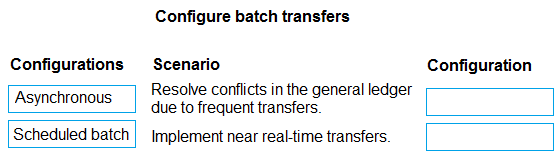
A company uses Dynamics 365 Finance. The company plans to use batch transfers to improve business processes.
The company has the following requirements based on different scenarios it has experienced:
• Resolve conflicts in the general ledger that are due to frequent transfers.
• Implement near real-time transfers from the subledger to the general ledger.
You need to configure transfer settings for batch transfers to meet the requirements.
Which configurations should you recommend for each scenario? To answer, move the appropriate configurations to the correct scenarios. You may use each configuration once, more than once, or not at all. You may need to move the split bar between panes or scroll to view content.
NOTE: Each correct selection is worth one point.
Show Answer
Correct Answer: Resolve conflicts in the general ledger due to frequent transfers. → Asynchronous
Implement near real-time transfers. → Asynchronous
Explanation: Asynchronous transfer reduces posting conflicts caused by frequent transfers and is the recommended option for near real-time subledger-to-general ledger transfers. Scheduled batch is mainly for transferring at specific planned times, not near real time.
Question 16
You author a budget plan template in Microsoft Word as part of the budget planning process.
You attempt to upload the document to Dynamics 365 Finance and the upload fails.
You need to include an entity in the budget plan template.
Which entity should you include?
A. BudgetPlanWorksheetEntity
B. BudgetPlanJustification
C. BudgetPlanProposed Project
D. BudgetPlanLineFieldActiveViewMapping
Show Answer
Correct Answer: A
Explanation: For Microsoft Dynamics 365 Finance budget planning, Word budget plan templates must be based on the BudgetPlanWorksheetEntity data entity so the system can populate and upload worksheet data. The other options are supporting artifacts or views rather than the required template data entity.
Question 17
Note: This question is part of a series of questions that present the same scenario. Each question in the series contains a unique solution that might meet the stated goals. Some question sets might have more than one correct solution, while others might not have a correct solution.
After you answer a question in this section, you will NOT be able to return to it. As a result, these questions will not appear in the review screen.
A company uses Dynamics 365 Finance. The company sells extended warranty services that use a project fee journal.
You need to recognize unearned revenue for the extended warranty service over time.
Solution: Configure the project ledger posting for the fee category to post to the unearned revenue account, set up an accrual scheme, and use the general journal with the accrual scheme to recognize the unearned revenue.
Does the solution meet the goal?
A. Yes
B. No
Show Answer
Correct Answer: B
Explanation: The solution does not meet the goal. Posting project fees to an unearned revenue account is appropriate, but using a general journal accrual scheme is not the standard mechanism to recognize deferred project fee revenue over time in Dynamics 365 Finance. Revenue recognition for project-related transactions should use the appropriate project revenue recognition/deferral functionality rather than manual general journal accrual schemes.
Question 18
DRAG DROP
-
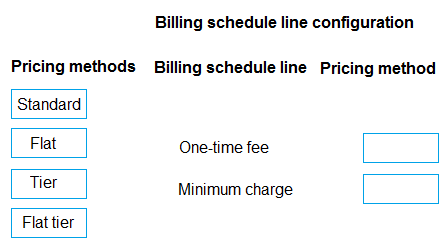
A company uses Dynamics 365 Finance for its recurring contract billing.
The company bills its customers a one-time fee when customers fist set up services. The company bills customers a minimum charge plus actual usage based on tiered pricing.
The company configures service items for fees, minimum charges, and usage with the sales price in released product along with the trade agreement for the pricing.
The company must be able to manage pricing through trade agreements and released product sales price.
You need to configure the billing schedule line for each service item.
How should you complete the setup? To answer, move the appropriate pricing methods to the correct billing schedule lines. You may use each pricing method once, more than once, or not at all. You may need to move the split bar between panes or scroll to view content.
NOTE: Each correct selection is worth one point.
Explanation: Standard uses the released product sales price/trade agreements for a one-time service fee. Flat tier supports a minimum (flat) charge together with tier-based usage pricing.
Question 19
A company uses Dynamics 365 Finance for accounts receivable.
The company plans to offer the following cash discounts to customers:
• Ten percent discount when the amount is paid within 7 days.
• Five percent discount when the amount is paid within 14 days.
• Two percent discount when the amount is paid within 21 days.
You configure the cash discount codes 7D10%, 14D5%, and 21D2%,
You need to assign the cash discounts in the Customer account setup.
Which three actions should you perform? Each correct answer presents part of the solution.
NOTE: Each correct selection is worth one point.
A. Assign 21D2% as the next discount code for 7D10%.
B. Assign 7D10% as cash discount.
C. Assign 14D5% as the next discount code for 7D10%.
D. Assign 21D2% as cash discount.
E. Assign 21D2% as the next discount code for 14D5%.
Show Answer
Correct Answer: B, C, E
Explanation: In Dynamics 365 Finance, a customer account can have only one cash discount code assigned directly. To support multiple discount periods, configure the earliest/highest discount as the customer's cash discount and chain subsequent discounts using the Next discount code field: assign 7D10% to the customer, set 14D5% as the next discount for 7D10%, and set 21D2% as the next discount for 14D5%.
Question 20
DRAG DROP
-
A company uses Dynamics 365 Finance.
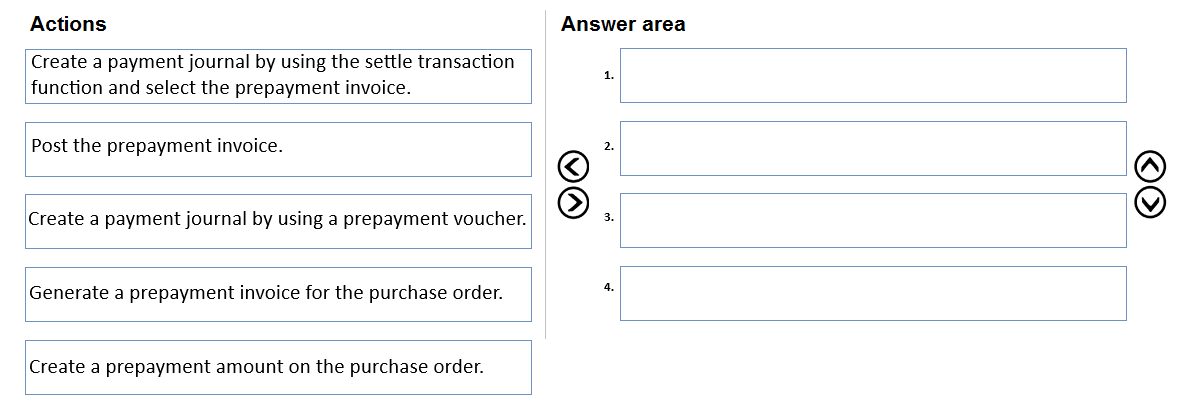
The company requires prepayment for a purchase order.
You need to create a prepayment that is associated with the purchase order.
Which four actions should you perform in sequence? To answer, move the appropriate actions from the list of actions to the answer area and arrange them in the correct order.
Show Answer
Correct Answer: 1. Create a prepayment amount on the purchase order.
2. Generate a prepayment invoice for the purchase order.
3. Post the prepayment invoice.
4. Create a payment journal by using the settle transaction function and select the prepayment invoice.
Explanation: In Dynamics 365 Finance, you first define the prepayment on the PO, then generate and post the linked prepayment invoice, and finally create and settle the payment against that prepayment invoice. The prepayment voucher option is not the PO prepayment process.
Question 21
Note: This question is part of a series of questions that present the same scenario. Each question in the series contains a unique solution that might meet the stated goals. Some question sets might have more than one correct solution, while others might not have a correct solution.
After you answer a question in this section, you will NOT be able to return to it. As a result, these questions will not appear in the review screen.
A company operates in multiple currencies. The company is setting up currency revaluation posting profiles for General ledger, Accounts payable, Bank and Accounts receivable.
The company requires currency revaluation posting profiles to post unrealized and realized gains or losses to the correct accounts for applicable currencies.
You need to configure the currency revaluation posting profiles.
Solution:
• Configure realized gains posting profiles for a specific main account and unrealized gains for all main accounts.
• Configure realized and unrealized gains or losses for all vendors.
• Configure unrealized and realized gains or losses posting profiles for all customers.
• Configure realized and unrealized gains or losses posting profiles for each bank account.
Does the solution meet the goal?
A. Yes
B. No
Show Answer
Correct Answer: B
Explanation: The solution does not fully meet the requirement. For General ledger currency revaluation posting profiles, realized and unrealized gain/loss accounts are configured by currency and main account as needed, and using a specific main account for realized gains but all main accounts for unrealized gains is not a correct or consistent configuration to satisfy the requirement. The other configurations are generally appropriate for vendors, customers, and bank accounts, but the General ledger configuration makes the overall solution incorrect.
Question 22
Note: This question is part of a series of questions that present the same scenario. Each question in the series contains a unique solution that might meet the stated goals. Some question sets might have more than one correct solution, while others might not have a correct solution.
After you answer a question in this section, you will NOT be able to return to it. As a result, these questions will not appear in the review screen.
A company operates in multiple currencies. The company is setting up currency revaluation posting profiles for General ledger, Accounts payable, Bank and Accounts receivable.
The company requires currency revaluation posting profiles to post unrealized and realized gains or losses to the correct accounts for applicable currencies.
You need to configure the currency revaluation posting profiles.
Solution:
• Configure posting profiles for unrealized gains and loses for all main accounts.
• Configure realized gain accounts for each currency
• Configure unrealized gains and losses for each vendor account.
• Set up a realized gains and losses posting profile for each customer group an bank account.
Does the solution meet the goal?
A. Yes
B. No
Show Answer
Correct Answer: A
Explanation: The described configuration matches how Dynamics 365 Finance currency revaluation posting profiles are configured: unrealized gains/losses are defined for general ledger main accounts and vendor accounts, while realized gains/losses are configured for currencies, customer groups, and bank accounts as applicable, satisfying the requirement to post realized and unrealized exchange differences to the correct accounts.
Question 24
A company uses Dynamics 365 Finance.
A customer invoice is due on or before the tenth day of the following month.
You need to configure the payment setup.
Which payment configuration should you use?
A. Payment method: Net - Month: 1 - Days: 10 - Payment days: 10th -
B. Payment method: Net - Month: 1 - Days: 0 - Payment days: 10th -
C. Payment method: Current month - Month: 0 - Days: 0 - Payment days: 10th -
D. Payment method: Net - Month: 0 - Days: 10 - Payment days: blank
Show Answer
Correct Answer: B
Explanation: To make invoices due on or before the 10th day of the following month, use the Net payment method with Month = 1 and Days = 0, then specify Payment days = 10th. The one-month offset moves the due month to the following month, while the payment day constrains the due date to the 10th of that month. Adding 10 net days would instead shift the due date beyond the intended fixed payment day.
Question 25
A company uses Dynamics 365 Finance for its budget control processes. The default over-budget option for all user groups is Prevent over budget processing.
A purchasing agent must create a purchase order with multiple lines. However, when the agent adds the last line, an error appears that states that the financial dimension value is over budget.
You need to configure the system so the purchasing agent can process purchase orders with this financial dimension value.
What should you do?
A. Create a new user group for the purchasing agent and define a rule where the group has a budget threshold less than 100.
B. Create a new user group for the purchasing agent and define user group permissions to prevent over-budget processing.
C. Define the collection of financial dimensions to pool the budgets for a secondary budget check.
D. Create a new user group for the purchasing agent and define user group permissions to allow over-budget processing.
Show Answer
Correct Answer: D
Explanation: The default over-budget behavior is set to prevent over-budget processing. To allow a specific purchasing agent to continue creating purchase orders that exceed the budget, assign the agent to a user group with permissions that allow over-budget processing. Changing thresholds does not grant permission to exceed the budget, preventing over-budget processing does the opposite of the requirement, and pooling financial dimensions affects budget checking logic rather than overriding user permissions.
$19
Get all 357 questions with detailed answers and explanations
Instant download HTML + PDF delivered the moment payment clears.
Secure Stripe checkout we never see or store your card details.
7-day refund if files are defective see our refund policy.