This is the free Microsoft PL-400 practice question bank —
210 of 410 total questions, each with a full explanation, free to
read with no signup required. Updated 2026-10-13.
Every answer is verified against official Microsoft documentation —
see our methodology.
Question 1
A company is testing a solution that you built by using access team templates.
Users report that they are unable to access rows.
You need to ensure that the solution works as expected.
What should you do?
A. Assign the rows to the team.
B. Add the users to the Access Team Members subgrid.
C. Share the affected rows.
D. Assign a security role to the users.
Show Answer
Correct Answer: B
Explanation: Add the users to the Access Team Members subgrid for the affected rows. Access Team Templates grant their configured permissions to users who are members of the record-specific access team; access teams do not own rows.
Question 1
You create a custom API as part of a solution that will be made available on Microsoft AppSource.
You need to prevent others from using Dataverse code generation tools that create classes and use the messages for your custom API.
What should you do?
A. Set Is Private to Yes.
B. Set Is Function to Yes.
C. Set Allowed Custom Processing Step Type to None.
D. Set Allow Customizations to No.
Show Answer
Correct Answer: A
Explanation: Setting Is Private to Yes makes the custom API private so it is not exposed in the service metadata used by Dataverse code generation tools to generate message classes. Other options control function semantics, plug-in extensibility, or solution customization rather than code generation exposure.
Sources:
https://learn.microsoft.com/en-us/power-apps/developer/data-platform/create-custom-api-with-code
Question 1
You are developing a canvas app that connects to Microsoft Dataverse. You add the Accounts table as a data source to the app. You implement a gallery that will display information from the Accounts table.
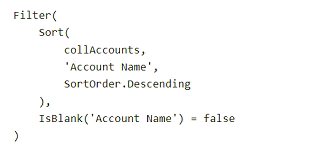
The Accounts table is stored and cached locally as a collection named collAccounts. Data in the gallery must always display accounts that have a name value. The gallery uses the following Power Fx formula:
You deploy the app to production.
Users report that the expected number of Account rows in the app does not appear.
You need to resolve the user issue.
How should you modify the Power Fx formula?
A. Sort(Accounts, 'Account Name', SortOrder.Descending)
B. Sort(collAccounts, 'Account Name', SortOrder.Descending)
C. Filter(Sort(Accounts, 'Account Name', SortOrder.Descending), IsBlank('Account Name') = false)
D. collAccounts
Show Answer
Correct Answer: C
Explanation: Use the Dataverse Accounts table rather than the locally cached collection, which may contain only a limited number of rows. The filter excludes accounts without a name, and the sort orders the remaining results.
Question 2
You are developing a model-driven app for a company that sells sporting goods. You add a button to a page that displays information for a product.
The button must copy information for the selected product and create a record in the data source. You add the following code to the button. (Line numbers are included for reference only.)
You need to complete the code.
Which function should you insert at line 01?
A. UpdateContext(
B. IsMatch(
C. LoadData(
D. Patch(
E. SaveData(
Show Answer
Correct Answer: D
Explanation: Use `Patch(`. With `Defaults(Products)` as the base record, `Patch` creates a new record in the Products data source using the selected product’s values.
Question 2
DRAG DROP
-
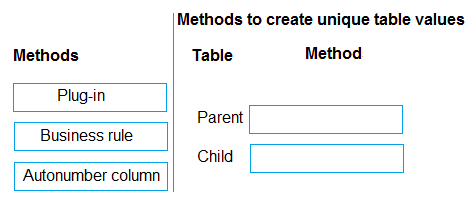
You have two custom tables that have a parent-child relationship.
The parent table value is formed by the fixed prefix ABC followed by a six-digit, auto-incrementing number.
Each child table value appends a three-digit sequence starting at 001 to its associated parent table value, incrementing with each new child record. Child records are always linked to a parent.
Each table requires a column that has a unique value, Low-code functionality must be used when possible.
You need to implement the method that will create each unique value.
Which method should you use? To answer, move the appropriate methods to the correct tables. You may use each method once, more than once, or not at all. You may need to move the split bar between panes or scroll to view content.
NOTE: Each correct selection is worth one point.
Explanation: An autonumber column can generate the fixed prefix and six-digit sequence. The child's sequence must restart for each parent and incorporate that parent's value, which requires plug-in logic.
Question 3
A company uses Microsoft Power Platform for development.
Developers for the company spend many hours deploying customizations in a single solution to several downstream environments. Developers do not have access to any Microsoft or third-party integrated developer environments (IDEs).
You need to recommend a solution that automates deployment to the environment.
What should you recommend?
A. Use production environments.
B. Use Azure DevOps.
C. Use the maker portal.
D. Create a configuration migration package.
Show Answer
Correct Answer: B
Explanation: Use Azure DevOps to create an automated deployment pipeline that promotes the solution across downstream environments. A configuration migration package moves configuration data; it does not automate solution deployment.
Question 3
You are a Power App maker.
You are developing an app in a development environment. You create the following custom forms in the Account entity:
FormB contains a message that appears in the OnLoad function of the form.
✑ FormC contains a message that appears in the OnSave function of the form.
You add the forms to a solution and export the solution as managed. Importing the managed solution into the test environment produces an error indicating the solution is missing a component.
You need to identify the issue.
What is the cause of the import error?
A. The web resources were not added to the form before adding the form to the solution.
B. The solution must be exported as an unmanaged solution.
C. The web resources were not added to the solution before exporting.
D. A copy of the form must be made before adding to the solution.
Show Answer
Correct Answer: C
Explanation: The OnLoad and OnSave messages are implemented by JavaScript web resources referenced by the forms. Adding the forms to the solution does not necessarily include those web resources, so they must be added to the solution before export. Otherwise, the managed solution import can fail because a referenced component is missing.
Question 3
Note: This question is part of a series of questions that present the same scenario. Each question in the series contains a unique solution that might meet the stated goals. Some question sets might have more than one correct solution, while others might not have a correct solution.
After you answer a question in this section, you will NOT be able to return to it. As a result, these questions will not appear on the review screen.
You have two tables, account and contact, with a parent-child relationship. Records in the account table can be created in the UI or from an external system integrated with Dataverse by using an Azure Function.
When a user creates a record in the account table, a default record in the contact table must be created automatically.
You need to implement a process to create the contact records.
Solution: Create a JavaScript function that runs when the account record form is saved. Use the Web API in the JavaScript function to create the contact record.
Does the solution meet the goal?
A. Yes
B. No
Show Answer
Correct Answer: B
Explanation: The requirement applies to account records created either through the UI or by an external system via Dataverse. A JavaScript function on the form save event only runs for interactive users in the model-driven app and will not execute when records are created through the external integration. Therefore it does not guarantee creation of the related contact for all account records. A server-side approach such as a Dataverse plug-in or Power Automate cloud flow would meet the requirement.
Question 4
A global company based in North America maintains several Dataverse instances, including instances based in Europe. A single Microsoft Entra ID tenant is used by the organization, with the default location of North America. Compliance rules dictate that data must remain within the European Union data boundary.
You develop a plugin for the company.
Users encounter an issue with the plug-in within an environment located in Germany. You are unable to replicate the issue in any other environment.
You need to debug the issue in a separate environment in the default region of the company and adhere to all necessary compliance rules.
What should you do?
A. Copy the environment.
B. Create a new developer environment. Register the plug-in.
C. Back up and restore the environment.
D. Create a new sandbox environment Register the plug-in.
Show Answer
Correct Answer: D
Explanation: Create a separate sandbox environment in the company’s default region and register the plug-in there. Do not copy or restore the German environment’s data into North America; use synthetic or otherwise non-EU test data to investigate the plug-in. This keeps EU data within the EU boundary.
Question 4
You are creating a Power Apps Component Framework (PCF) component.
You add the following markup to the component manifest. (Line numbers are included for reference only.)
You need to complete the component manifest.
Which XML markup segment should you insert at line 03?
A. <control DisplayNameKey="PowerContoso" constructor="CtlProducts" version="0.0.10" display-name-key="CtlProducts" description-key="CtlProducts" control-type="standard">
B. <control namespace="PowerContoso" constructor="CtlProducts" version="0.0.10" display-name-key="CtlProducts" description-key="CtlProducts" control- type="standard">
C. <control code="PowerContoso" constructor="CtlProducts" version="0.0.10" display-name-key="CtlProducts" description-key="CtlProducts" control- type="standard">
D. <control name="PowerContoso" constructor="CtlProducts" version="0.0.10" display-name-key="CtlProducts" description-key="CtlProducts" control- type="standard">
E. <control _value="PowerContoso" constructor="CtlProducts" version="0.0.10" display-name-key="CtlProducts" description-key="CtlProducts" control- type="standard">
Show Answer
Correct Answer: B
Explanation: A PCF control element requires the `namespace`, `constructor`, `version`, `display-name-key`, `description-key`, and `control-type` attributes. Option B supplies these; the space in `control- type` is a line-wrap artifact, and the attribute should be `control-type`.
$19
Get all 410 questions with detailed answers and explanations
Instant download HTML + PDF delivered the moment payment clears.
Secure Stripe checkout we never see or store your card details.
7-day refund if files are defective see our refund policy.