An organization uses Dynamics 365 Sales. The organization has accounting and customer service departments.
You must restrict users in customer service from being able to change the value of the balance field on the Contact records. The accounting team must be the only team able to edit this field.
You need to create the appropriate solution without any customizations.
What should you do first?
A. Enable field security for the balance field and grant the customer service team read and update permissions.
B. Create a customer service form and role and a business rule that enables the balance field.
C. Enable field security for the balance field and grant the customer service team read permissions.
D. Enable field security for the balance field and grant the accounting team read permissions.
Show Answer
Correct Answer: C
Explanation: Use field-level security. The first step is to enable field security on the balance field and assign the customer service users (via a field security profile) Read permission only, without Update. Accounting can then be granted Update permission in its profile. Granting customer service Update would defeat the requirement, and granting accounting only Read would not allow them to edit the field.
Question 110
HOTSPOT
-
You manage two Microsoft Power Platform managed solutions.
You must update the solutions and import them into an environment that has no customizations.
Solution A
-
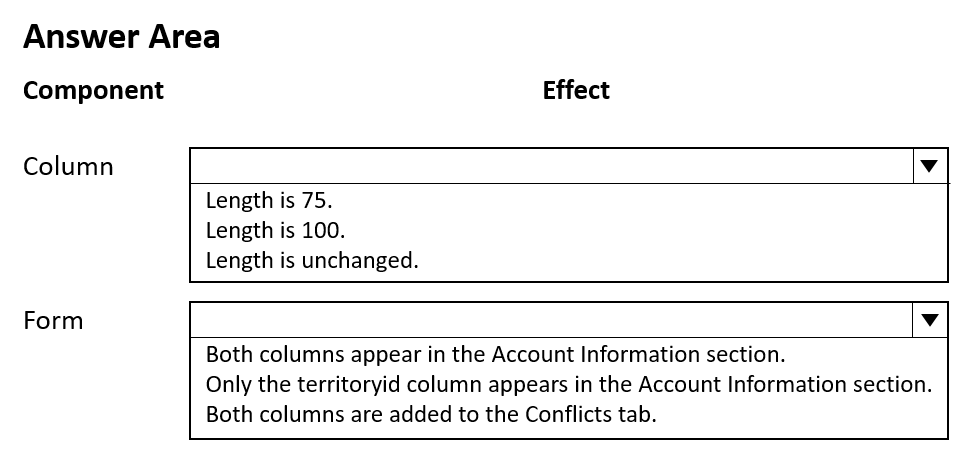
• Changes the length of the name column to 75
• Adds the categoryid column at the top of the Account Information section of the Account form
Solution B
-
• Changes the length of the name column to 100
• Adds the territoryid column at the top of the Account Information section of the Account form
Solution A must be imported before Solution B.
You need to determine what state the components are in after importing the solutions.
Which effect does each component exhibit? To answer, select the appropriate options in the answer area.
NOTE: Each correct selection is worth one point.
Show Answer
Correct Answer: Column: Length is 100.
Form: Only the territoryid column appears in the Account Information section.
Explanation: Managed solution component conflicts follow a last-imported-wins behavior for shared component changes. The later managed solution sets the name column length to 100. Form customizations are stored as the form definition, so the later imported managed solution's form layout replaces the earlier one, leaving only the territoryid addition.
Question 111
HOTSPOT -
Case Study -
This is a case study. Case studies are not timed separately. You can use as much exam time as you would like to complete each case. However, there may be additional case studies and sections on this exam. You must manage your time to ensure that you are able to complete all questions included on this exam in the time provided.
To answer the questions included in a case study, you will need to reference information that is provided in the case study. Case studies might contain exhibits and other resources that provide more information about the scenario that is described in the case study. Each question is independent of the other questions in this case study.
At the end of this case study, a review screen will appear. This screen allows you to review your answers and to make changes before you move to the next section of the exam. After you begin a new section, you cannot return to this section.
To start the case study -
To display the first question in this case study, click the Next button. Use the buttons in the left pane to explore the content of the case study before you answer the questions. Clicking these buttons displays information such as business requirements, existing environment, and problem statements. When you are ready to answer a question, click the Question button to return to the question.
Background -
Proseware, Inc. is an industry leading software company with several thousand employees. The company has had some trouble recruiting talented employees. Top-level candidates interview with the company but go on to work for competitors.
Feedback from candidates show that some offers were not accepted because the interview scheduling process was unpleasant. The company does not have a system to keep track of the candidates that were not selected.
Current Environment -
The recruiting process starts when an individual applies for a position on the company website. The individual may have found the position on their own, they may have been officially referred by an employee, or in some cases were contacted directly by a hiring manager and encouraged to apply.
Recruiters schedule an interview with a hiring manager and interviews with two senior team members. Each interview results in feedback about the candidate and a recommendation whether to hire or not.
The recruiting team manages all information by using a model-driven application.
The company has the following Microsoft Dataverse tables and columns:
• JobPosting
- Hiring Manager - lookup to SystemUser
- Recruiter Assigned - lookup to SystemUser
• Contact (Job Applicant)
- Contact identifier
- First name
- Last name
- Time-Zone Offset
- Person of Interest - Yes/No (default)
• Application proapplication
- Contact identifier, Contact - lookup to Contact
- Job Posting - lookup to JobPosting
- pro_recruiterassignedid
• Interview
- Application - lookup to Application
- Job Posting - lookup to JobPosting
- Recommend - Choice (Yes (0), No (1), and null (default) are the available values)
- Person of Interest - Yes/No, No is the default value
• Referral
- Contact - lookup to Contact
- Referrer - lookup to SystemUser
- Job Posting - lookup to JobPosting
• SystemUser
- Manager - lookup to SystemUser
- Time-Zone Offset
• Recruiter
- Recruiter identifier
- Recruiter name
Applications -
There may be multiple applications associated with each job posting. Applications are linked to an employee record if an employee referred the applicant for a position. The same individual can be an applicant for multiple job postings.
Interviews -
Each interview is performed by an employee and is related to a single application.
The interview scheduling process may force potential candidates to accept interviews at unusual times with the senior team members due to time-zone differences.
Requirements. Interview Scheduling
The system must provide recruiters with a list of team members and their time-zone information. You must create a Microsoft Power Apps Component Framework (PCF) control for the Job Application form to display a list of senior team members who report directly to a hiring manager.
• The control must display the current time in each team member's local time.
• The control must be bound so that it minimizes the amount of code that must be written.
• You must display the list of team members and sort the list to show team members who reside in time zones closest to the applicant's time zone first.
You must develop a second PCF control that displays the time-zone name and current time on the Job Application form. You must display the data in the candidate’s local time.
Requirements. Historical Information Tracking
You must create a process to identify individuals as a person of interest that the company should consider hiring. You must assign each individual a score based on their past interactions.
• You must be able to determine the following information about a candidate:
- The number of interviews in the past two years and whether team members provided recommendations
- The number of hiring manager referrals and employee referrals in the past two years
- Whether the individual has any of the 12 designations or certifications that the company considers significant
• Only a single referral can be made per job application. The system must be able to support multiple referrals for a candidate.
• The system must track referrals even if an application is not completed.
Requirements. Historical Information Scoring
The automated process must run weekly to assess all candidates. The process must also run automatically when historical information is updated. You must be able to perform scoring by selecting a command button on the contact form.
• This new command button must only be visible to employees who belong to a security role assigned named Recruiter. The command button must not be visible to anyone unless the contact form is in Update mode.
• A person of interest is defined as having a score of 15 or more based on the following historical information criteria:
- Each interview with a recommendation adds two to the score.
- Each interview without a recommendation subtracts two from the score.
- Each employee or manager referral adds one to the score.
- Each designation or certification adds one to the score.
• All scoring elements must be recalculated when changes occur. You must assign the score to the Person of interest field.
• Values representing totals or scores must be stored in their own numeric fields.
• Plug-ins must be used to keep the Person of Interest field on active interview records associated with the Contact.
• Plug-ins registered on the update of the Person of interest field must send an email notification when the candidate named in the email is a person of interest. Recruiters must receive the message when the field is updated on the Contact record.
• Interviewers must get an email notification when the Person of Interest field on the interview record is successfully updated.
Requirements. Design Guidelines -
The following design guidelines must be followed:
• Schema changes must be made using the method requiring the least amount of storage to meet the requirement.
• Out-of-the-box functionality must be used when possible.
• Any code required to calculate scores must be able to be run from a single point.
• Email notifications need to be kept to a minimum.
Issues -
• Recruiters report that the command button to score a candidate is not working. You debug the code and observe that the context input parameter is null.
• The system does not support associating designations and certifications with candidates.
• The value for the field used by the PCF control to display local time is saved to Microsoft Dataverse each time an active application record is opened.
• Interviewers report that they do not receive email notifications when interview records are created for an existing person of interest.
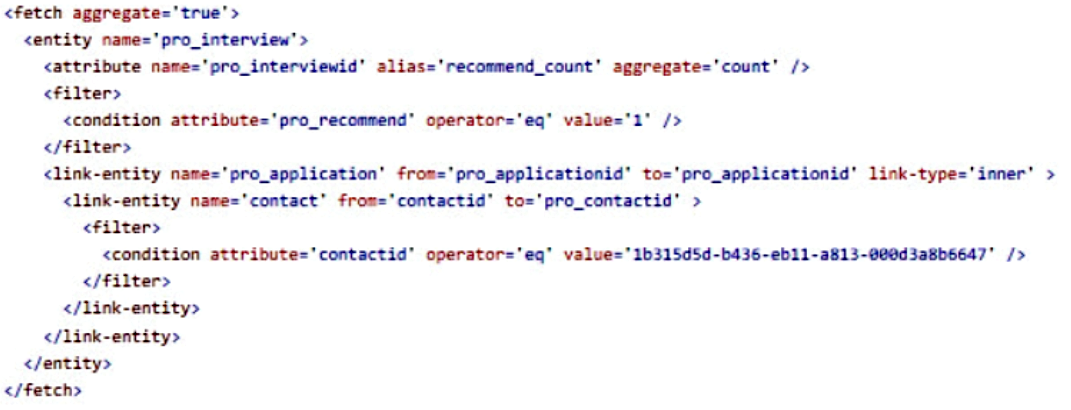
You create the following Fetch XML query to determine the number of interviews where there are no recommendations for an applicant.
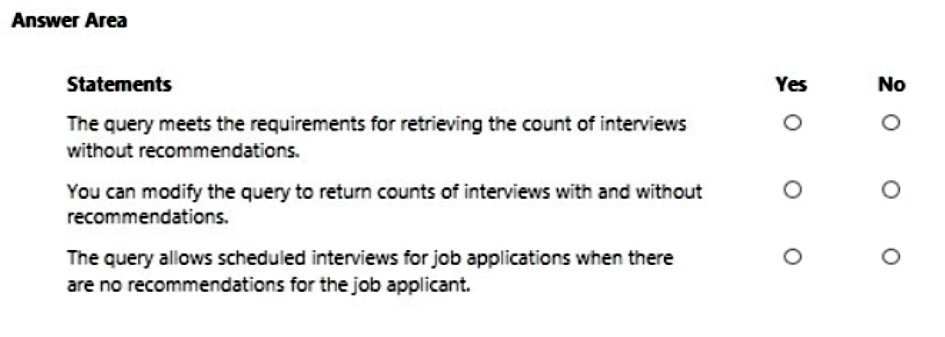
For each of the following statements, select Yes if the statement is true. Otherwise, select No.
NOTE: Each correct selection is worth one point.
Show Answer
Correct Answer: No
Yes
No
Explanation: The query filters only Recommend = No (value 1) and excludes null, so it does not capture all interviews without a recommendation. Aggregate FetchXML can be extended with grouping or separate aggregates to return counts for different recommendation values. The query uses an inner join, so it does not return applications without matching interview records.
Question 112
HOTSPOT
-
Case Study
-
This is a case study. Case studies are not timed separately. You can use as much exam time as you would like to complete each case. However, there may be additional case studies and sections on this exam. You must manage your time to ensure that you are able to complete all questions included on this exam in the time provided.
To answer the questions included in a case study, you will need to reference information that is provided in the case study. Case studies might contain exhibits and other resources that provide more information about the scenario that is described in the case study. Each question is independent of the other questions in this case study.
At the end of this case study, a review screen will appear. This screen allows you to review your answers and to make changes before you move to the next section of the exam. After you begin a new section, you cannot return to this section.
To start the case study
-
To display the first question in this case study, click the Next button. Use the buttons in the left pane to explore the content of the case study before you answer the questions. Clicking these buttons displays information such as business requirements, existing environment, and problem statements. When you are ready to answer a question, click the Question button to return to the question.
Background
-
Proseware, Inc. is an industry leading software company with several thousand employees. The company has had some trouble recruiting talented employees. Top-level candidates interview with the company but go on to work for competitors.
Feedback from candidates show that some offers were not accepted because the interview scheduling process was unpleasant. The company does not have a system to keep track of the candidates that were not selected.
Current Environment
-
The recruiting process starts when an individual applies for a position on the company website. The individual may have found the position on their own, they may have been officially referred by an employee, or in some cases were contacted directly by a hiring manager and encouraged to apply.
Recruiters schedule an interview with a hiring manager and interviews with two senior team members. Each interview results in feedback about the candidate and a recommendation whether to hire or not.
The recruiting team manages all information by using a model-driven application.
The company has the following Microsoft Dataverse tables and columns:
• JobPosting
- Hiring Manager - lookup to SystemUser
- Recruiter Assigned - lookup to SystemUser
• Contact (Job Applicant)
- Contact identifier
- First name
- Last name
- Time-Zone Offset
- Person of Interest - Yes/No (default)
• Application proapplication
- Contact identifier, Contact - lookup to Contact
- Job Posting - lookup to JobPosting
- pro_recruiterassignedid
• Interview
- Application - lookup to Application
- Job Posting - lookup to JobPosting
- Recommend - Choice (Yes (0), No (1), and null (default) are the available values)
- Person of Interest - Yes/No, No is the default value
• Referral
- Contact - lookup to Contact
- Referrer - lookup to SystemUser
- Job Posting - lookup to JobPosting
• SystemUser
- Manager - lookup to SystemUser
- Time-Zone Offset
• Recruiter
- Recruiter identifier
- Recruiter name
Applications
-
There may be multiple applications associated with each job posting. Applications are linked to an employee record if an employee referred the applicant for a position. The same individual can be an applicant for multiple job postings.
Interviews
-
Each interview is performed by an employee and is related to a single application.
The interview scheduling process may force potential candidates to accept interviews at unusual times with the senior team members due to time-zone differences.
Requirements. Interview Scheduling
The system must provide recruiters with a list of team members and their time-zone information. You must create a Microsoft Power Apps Component Framework (PCF) control for the Job Application form to display a list of senior team members who report directly to a hiring manager.
• The control must display the current time in each team member's local time.
• The control must be bound so that it minimizes the amount of code that must be written.
• You must display the list of team members and sort the list to show team members who reside in time zones closest to the applicant's time zone first.
You must develop a second PCF control that displays the time-zone name and current time on the Job Application form. You must display the data in the candidate’s local time.
Requirements. Historical Information Tracking
You must create a process to identify individuals as a person of interest that the company should consider hiring. You must assign each individual a score based on their past interactions.
• You must be able to determine the following information about a candidate:
- The number of interviews in the past two years and whether team members provided recommendations
- The number of hiring manager referrals and employee referrals in the past two years
- Whether the individual has any of the 12 designations or certifications that the company considers significant
• Only a single referral can be made per job application. The system must be able to support multiple referrals for a candidate.
• The system must track referrals even if an application is not completed.
Requirements. Historical Information Scoring
The automated process must run weekly to assess all candidates. The process must also run automatically when historical information is updated. You must be able to perform scoring by selecting a command button on the contact form.
• This new command button must only be visible to employees who belong to a security role assigned named Recruiter. The command button must not be visible to anyone unless the contact form is in Update mode.
• A person of interest is defined as having a score of 15 or more based on the following historical information criteria:
- Each interview with a recommendation adds two to the score.
- Each interview without a recommendation subtracts two from the score.
- Each employee or manager referral adds one to the score.
- Each designation or certification adds one to the score.
• All scoring elements must be recalculated when changes occur. You must assign the score to the Person of interest field.
• Values representing totals or scores must be stored in their own numeric fields.
• Plug-ins must be used to keep the Person of Interest field on active interview records associated with the Contact.
• Plug-ins registered on the update of the Person of interest field must send an email notification when the candidate named in the email is a person of interest. Recruiters must receive the message when the field is updated on the Contact record.
• Interviewers must get an email notification when the Person of Interest field on the interview record is successfully updated.
Requirements. Design Guidelines
The following design guidelines must be followed:
• Schema changes must be made using the method requiring the least amount of storage to meet the requirement.
• Out-of-the-box functionality must be used when possible.
• Any code required to calculate scores must be able to be run from a single point.
• Email notifications need to be kept to a minimum.
Issues
-
• Recruiters report that the command button to score a candidate is not working. You debug the code and observe that the context input parameter is null.
• The system does not support associating designations and certifications with candidates.
• The value for the field used by the PCF control to display local time is saved to Microsoft Dataverse each time an active application record is opened.
• Interviewers report that they do not receive email notifications when interview records are created for an existing person of interest.
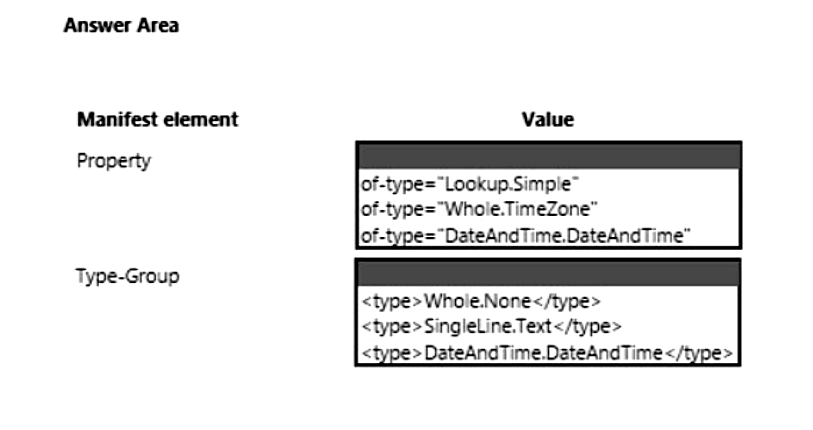
You need to configure elements in the manifest for the PCF control used to display local time.
Which values should you use? To answer, select the appropriate options in the answer area.
NOTE: Each correct selection is worth one point.
Explanation: The control displays local time based on a stored time-zone offset. In the PCF manifest, bind to the Dataverse Whole Number TimeZone type (Whole.TimeZone). The corresponding type-group is Whole.None because TimeZone is a specialization of a whole number. This lets the control compute/display the current local time without persisting a calculated DateTime value back to Dataverse.
Question 113
Case study -
This is a case study. Case studies are not timed separately. You can use as much exam time as you would like to complete each case. However, there may be additional case studies and sections on this exam. You must manage your time to ensure that you are able to complete all questions included on this exam in the time provided.
To answer the questions included in a case study, you will need to reference information that is provided in the case study. Case studies might contain exhibits and other resources that provide more information about the scenario that is described in the case study. Each question is independent of the other questions in this case study.
At the end of this case study, a review screen will appear. This screen allows you to review your answers and to make changes before you move to the next section of the exam. After you begin a new section, you cannot return to this section.
To start the case study -
To display the first question in this case study, click the Next button. Use the buttons in the left pane to explore the content of the case study before you answer the questions. Clicking these buttons displays information such as business requirements, existing environment, and problem statements. If the case study has an All Information tab, note that the information displayed is identical to the information displayed on the subsequent tabs. When you are ready to answer a question, click the Question button to return to the question.
Background -
Northwind Traders uses Microsoft Dynamics 365 Sales to manage its sales process. To better understand its customers, Northwind Traders invests in a team of researchers who gather data from multiple sources. The company stores the data it collects in a Microsoft Azure SQL Database. The company plans to use the data to enrich account records and make the sales team more effective.
Current environment -
Environment -
• The company has three Microsoft Power Platform environments with Dynamics 365 Sales installed. The environments are named development, test, and production.
• Each environment has an application user that can be used for integrations.
• The company must use solutions to perform all customization and configuration deployment.
Data -
• Researchers are responsible for creating account records.
• Researchers have permissions on the Account table to create records, read all records, and update records they own.
• A synchronous plug-in runs when an account record is created and could reassign the record to a different user.
• Users must access data as themselves to enforce security and audit changes.
• A column named new_dataid is added to the Account table. The column uniquely identifies which data it should receive.
• Researchers have researched only the top 20 percent of account records.
Web API -
• The company creates an Azure Function to run a RESTful .NET Web API.
• Data can be retrieved by placing a GET request to the URL https://dataservice-[ENVIRONMENTNAME].azurewebsites.net/enrich/[DATAID].
• [ENVIRONMENTNAME] is the name of the Microsoft Power Platform environment that requests the data.
• [DATAID] is the new_dataid column in the Account table.
• The Web API response will return a 200 response plus data if the DataId is found. Otherwise, a 404 response is returned.
• Developers plan to create a custom connector from the Web API to make it accessible from Microsoft Power Platform.
Requirements -
Custom connector -
• The Web API definition used to create the custom connector must be generated based on a low-code technology.
• The URL used by the custom connector must incorporate the current environment name without hardcoding values.
• Errors generated by the custom connector must not cause downstream processes to fail.
• Text descriptions and field placeholder text that describe the use of the custom connector must appear for non-developers.
Process -
• All account records must be updated with data from the Web API once automatically.
• Only account records that contain a DataId should be updated by the Web API.
• Researchers must create Power Automate flows to specify data analysis priority.
• The researchers require a process that repurposes a set of identical steps of parameterized Microsoft Dataverse queries from a Power Automate flow for use in other flows that have different parameters. The researchers want to avoid recreating the steps manually each time they create a flow to save time and avoid errors.
Issues -
• A tester attempts to connect to the production instance of the Web API with a DataId that should return data. The tester receives an error stating that the remote name could not be resolved.
• A missing component causes an error to occur when importing the solution that contains the Power Automate flow to update account records in a test environment.
You need to ensure data returned from the Web API corresponds to the correct environment.
What should you use?
A. system settings
B. plug-in secure configurations
C. records in a new configuration table
D. environment variables
Show Answer
Correct Answer: D
Explanation: Use environment variables to store environment-specific configuration such as the base URL or environment name. They are solution-aware, support different values per environment during deployment, and avoid hardcoding. This ensures the custom connector or related components use the correct environment-specific endpoint while remaining portable across development, test, and production.
Question 115
HOTSPOT -
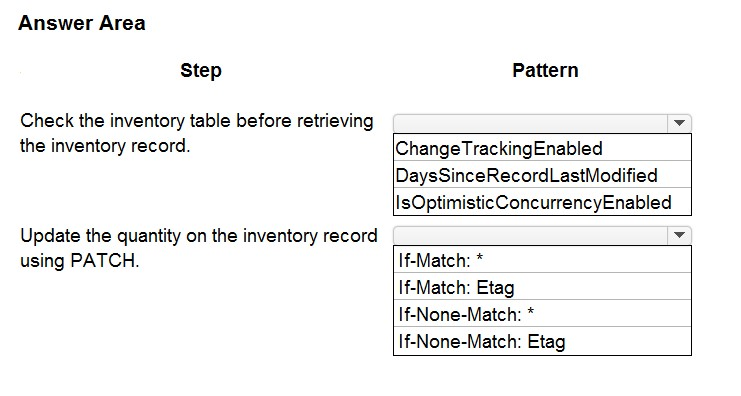
An online store has a custom web page that allows customers to place their orders against a Microsoft Dataverse database that uses custom products. The custom web page uses Web API patterns to create and update records.
Customers report that orders can be placed for out-of-stock items.
You need to update the page code to ensure that inventory is available before confirming an order.
Which pattern should you use for each step? To answer, select the appropriate options in the answer area.
NOTE: Each correct selection is worth one point.
Hot Area:
Show Answer
Correct Answer: Check the inventory table before retrieving the inventory record: IsOptimisticConcurrencyEnabled
Update the quantity on the inventory record using PATCH: If-Match: Etag
Explanation: Use optimistic concurrency on the table so updates can detect conflicting changes. When updating with PATCH, send the current ETag in the If-Match header so the update only succeeds if the record has not changed since it was read.
Question 116
DRAG DROP
-
Case study
-
This is a case study. Case studies are not timed separately. You can use as much exam time as you would like to complete each case. However, there may be additional case studies and sections on this exam. You must manage your time to ensure that you are able to complete all questions included on this exam in the time provided.
To answer the questions included in a case study, you will need to reference information that is provided in the case study. Case studies might contain exhibits and other resources that provide more information about the scenario that is described in the case study. Each question is independent of the other questions in this case study.
At the end of this case study, a review screen will appear. This screen allows you to review your answers and to make changes before you move to the next section of the exam. After you begin a new section, you cannot return to this section.
To start the case study
-
To display the first question in this case study, click the Next button. Use the buttons in the left pane to explore the content of the case study before you answer the questions. Clicking these buttons displays information such as business requirements, existing environment, and problem statements. If the case study has an All Information tab, note that the information displayed is identical to the information displayed on the subsequent tabs. When you are ready to answer a question, click the Question button to return to the question.
Background
-
Northwind Traders uses Microsoft Dynamics 365 Sales to manage its sales process. To better understand its customers, Northwind Traders invests in a team of researchers who gather data from multiple sources. The company stores the data it collects in a Microsoft Azure SQL Database. The company plans to use the data to enrich account records and make the sales team more effective.
Current environment
-
Environment
-
• The company has three Microsoft Power Platform environments with Dynamics 365 Sales installed. The environments are named development, test, and production.
• Each environment has an application user that can be used for integrations.
• The company must use solutions to perform all customization and configuration deployment.
Data
-
• Researchers are responsible for creating account records.
• Researchers have permissions on the Account table to create records, read all records, and update records they own.
• A synchronous plug-in runs when an account record is created and could reassign the record to a different user.
• Users must access data as themselves to enforce security and audit changes.
• A column named new_dataid is added to the Account table. The column uniquely identifies which data it should receive.
• Researchers have researched only the top 20 percent of account records.
Web API
-
• The company creates an Azure Function to run a RESTful .NET Web API.
• Data can be retrieved by placing a GET request to the URL https://dataservice-[ENVIRONMENTNAME].azurewebsites.net/enrich/[DATAID].
• [ENVIRONMENTNAME] is the name of the Microsoft Power Platform environment that requests the data.
• [DATAID] is the new_dataid column in the Account table.
• The Web API response will return a 200 response plus data if the DataId is found. Otherwise, a 404 response is returned.
• Developers plan to create a custom connector from the Web API to make it accessible from Microsoft Power Platform.
Requirements
-
Custom connector
-
• The Web API definition used to create the custom connector must be generated based on a low-code technology.
• The URL used by the custom connector must incorporate the current environment name without hardcoding values.
• Errors generated by the custom connector must not cause downstream processes to fail.
• Text descriptions and field placeholder text that describe the use of the custom connector must appear for non-developers.
Process
-
• All account records must be updated with data from the Web API once automatically.
• Only account records that contain a DataId should be updated by the Web API.
• Researchers must create Power Automate flows to specify data analysis priority.
• The researchers require a process that repurposes a set of identical steps of parameterized Microsoft Dataverse queries from a Power Automate flow for use in other flows that have different parameters. The researchers want to avoid recreating the steps manually each time they create a flow to save time and avoid errors.
Issues
-
• A tester attempts to connect to the production instance of the Web API with a DataId that should return data. The tester receives an error stating that the remote name could not be resolved.
• A missing component causes an error to occur when importing the solution that contains the Power Automate flow to update account records in a test environment.
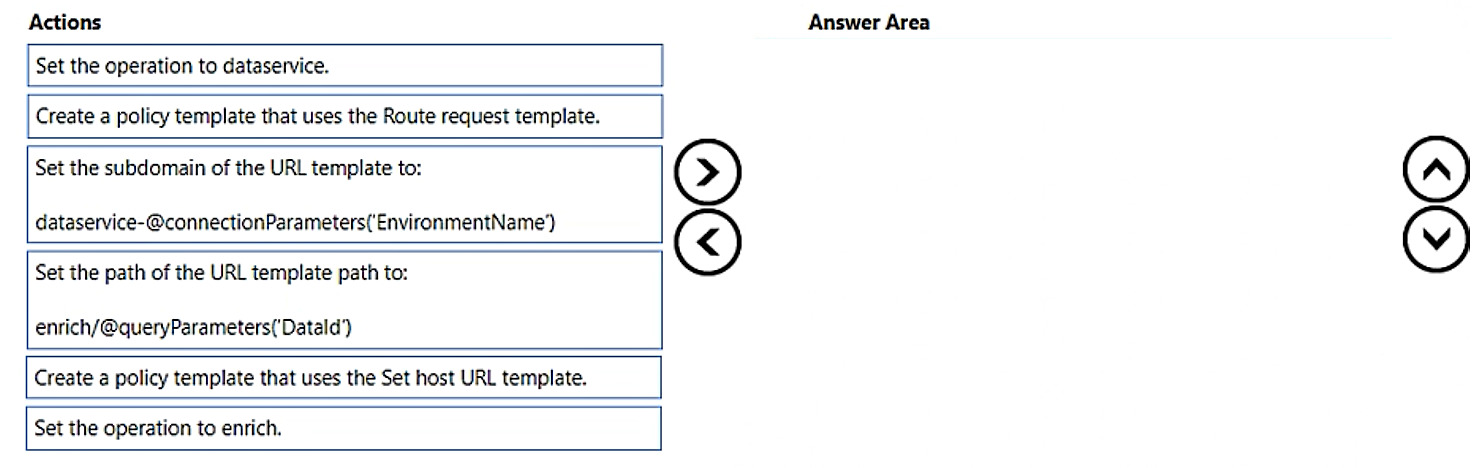
You need to configure the custom connector to incorporate the environment name and DataId in the Web API URL.
Which four actions should you perform in sequence? To answer, move the appropriate actions from the list of actions to the answer area and arrange them in the correct order.
NOTE: More than one order of answer choices is correct. You will receive credit for any of the correct orders you select.
Show Answer
Correct Answer: Create a policy template that uses the Set host URL template.
Set the subdomain of the URL template to: dataservice-@connectionParameters('EnvironmentName').
Set the operation to enrich.
Set the path of the URL template path to: enrich/@queryParameters('DataId').
Explanation: Use a Set host URL policy so the environment-specific hostname comes from a connection parameter, then configure the enrich operation and route its path with the DataId parameter.
Question 117
HOTSPOT -
Case study -
This is a case study. Case studies are not timed separately. You can use as much exam time as you would like to complete each case. However, there may be additional case studies and sections on this exam. You must manage your time to ensure that you are able to complete all questions included on this exam in the time provided.
To answer the questions included in a case study, you will need to reference information that is provided in the case study. Case studies might contain exhibits and other resources that provide more information about the scenario that is described in the case study. Each question is independent of the other questions in this case study.
At the end of this case study, a review screen will appear. This screen allows you to review your answers and to make changes before you move to the next section of the exam. After you begin a new section, you cannot return to this section.
To start the case study -
To display the first question in this case study, click the Next button. Use the buttons in the left pane to explore the content of the case study before you answer the questions. Clicking these buttons displays information such as business requirements, existing environment, and problem statements. If the case study has an All Information tab, note that the information displayed is identical to the information displayed on the subsequent tabs. When you are ready to answer a question, click the Question button to return to the question.
Background -
Northwind Traders uses Microsoft Dynamics 365 Sales to manage its sales process. To better understand its customers, Northwind Traders invests in a team of researchers who gather data from multiple sources. The company stores the data it collects in a Microsoft Azure SQL Database. The company plans to use the data to enrich account records and make the sales team more effective.
Current environment -
Environment -
• The company has three Microsoft Power Platform environments with Dynamics 365 Sales installed. The environments are named development, test, and production.
• Each environment has an application user that can be used for integrations.
• The company must use solutions to perform all customization and configuration deployment.
Data -
• Researchers are responsible for creating account records.
• Researchers have permissions on the Account table to create records, read all records, and update records they own.
• A synchronous plug-in runs when an account record is created and could reassign the record to a different user.
• Users must access data as themselves to enforce security and audit changes.
• A column named new_dataid is added to the Account table. The column uniquely identifies which data it should receive.
• Researchers have researched only the top 20 percent of account records.
Web API -
• The company creates an Azure Function to run a RESTful .NET Web API.
• Data can be retrieved by placing a GET request to the URL https://dataservice-[ENVIRONMENTNAME].azurewebsites.net/enrich/[DATAID].
• [ENVIRONMENTNAME] is the name of the Microsoft Power Platform environment that requests the data.
• [DATAID] is the new_dataid column in the Account table.
• The Web API response will return a 200 response plus data if the DataId is found. Otherwise, a 404 response is returned.
• Developers plan to create a custom connector from the Web API to make it accessible from Microsoft Power Platform.
Requirements -
Custom connector -
• The Web API definition used to create the custom connector must be generated based on a low-code technology.
• The URL used by the custom connector must incorporate the current environment name without hardcoding values.
• Errors generated by the custom connector must not cause downstream processes to fail.
• Text descriptions and field placeholder text that describe the use of the custom connector must appear for non-developers.
Process -
• All account records must be updated with data from the Web API once automatically.
• Only account records that contain a DataId should be updated by the Web API.
• Researchers must create Power Automate flows to specify data analysis priority.
• The researchers require a process that repurposes a set of identical steps of parameterized Microsoft Dataverse queries from a Power Automate flow for use in other flows that have different parameters. The researchers want to avoid recreating the steps manually each time they create a flow to save time and avoid errors.
Issues -
• A tester attempts to connect to the production instance of the Web API with a DataId that should return data. The tester receives an error stating that the remote name could not be resolved.
• A missing component causes an error to occur when importing the solution that contains the Power Automate flow to update account records in a test environment.
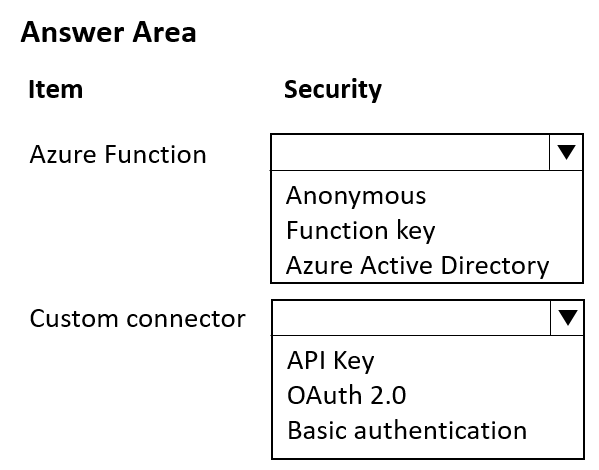
You need to configure security for the Azure Function and custom connector.
Which security tool should you configure for each item? To answer, select the appropriate options in the answer area.
NOTE: Each correct selection is worth one point.
Show Answer
Correct Answer: Azure Function: Function key
Custom connector: API Key
Explanation: Secure the Azure Function with a function-level key. The custom connector then authenticates by supplying that function key as an API key, which is the standard pattern for Azure Functions protected by function keys.
Question 118
HOTSPOT
-
Case study
-
This is a case study. Case studies are not timed separately. You can use as much exam time as you would like to complete each case. However, there may be additional case studies and sections on this exam. You must manage your time to ensure that you are able to complete all questions included on this exam in the time provided.
To answer the questions included in a case study, you will need to reference information that is provided in the case study. Case studies might contain exhibits and other resources that provide more information about the scenario that is described in the case study. Each question is independent of the other questions in this case study.
At the end of this case study, a review screen will appear. This screen allows you to review your answers and to make changes before you move to the next section of the exam. After you begin a new section, you cannot return to this section.
To start the case study
-
To display the first question in this case study, click the Next button. Use the buttons in the left pane to explore the content of the case study before you answer the questions. Clicking these buttons displays information such as business requirements, existing environment, and problem statements. If the case study has an All Information tab, note that the information displayed is identical to the information displayed on the subsequent tabs. When you are ready to answer a question, click the Question button to return to the question.
Background
-
Northwind Traders uses Microsoft Dynamics 365 Sales to manage its sales process. To better understand its customers, Northwind Traders invests in a team of researchers who gather data from multiple sources. The company stores the data it collects in a Microsoft Azure SQL Database. The company plans to use the data to enrich account records and make the sales team more effective.
Current environment
-
Environment
-
• The company has three Microsoft Power Platform environments with Dynamics 365 Sales installed. The environments are named development, test, and production.
• Each environment has an application user that can be used for integrations.
• The company must use solutions to perform all customization and configuration deployment.
Data
-
• Researchers are responsible for creating account records.
• Researchers have permissions on the Account table to create records, read all records, and update records they own.
• A synchronous plug-in runs when an account record is created and could reassign the record to a different user.
• Users must access data as themselves to enforce security and audit changes.
• A column named new_dataid is added to the Account table. The column uniquely identifies which data it should receive.
• Researchers have researched only the top 20 percent of account records.
Web API
-
• The company creates an Azure Function to run a RESTful .NET Web API.
• Data can be retrieved by placing a GET request to the URL https://dataservice-[ENVIRONMENTNAME].azurewebsites.net/enrich/[DATAID].
• [ENVIRONMENTNAME] is the name of the Microsoft Power Platform environment that requests the data.
• [DATAID] is the new_dataid column in the Account table.
• The Web API response will return a 200 response plus data if the DataId is found. Otherwise, a 404 response is returned.
• Developers plan to create a custom connector from the Web API to make it accessible from Microsoft Power Platform.
Requirements
-
Custom connector
-
• The Web API definition used to create the custom connector must be generated based on a low-code technology.
• The URL used by the custom connector must incorporate the current environment name without hardcoding values.
• Errors generated by the custom connector must not cause downstream processes to fail.
• Text descriptions and field placeholder text that describe the use of the custom connector must appear for non-developers.
Process
-
• All account records must be updated with data from the Web API once automatically.
• Only account records that contain a DataId should be updated by the Web API.
• Researchers must create Power Automate flows to specify data analysis priority.
• The researchers require a process that repurposes a set of identical steps of parameterized Microsoft Dataverse queries from a Power Automate flow for use in other flows that have different parameters. The researchers want to avoid recreating the steps manually each time they create a flow to save time and avoid errors.
Issues
-
• A tester attempts to connect to the production instance of the Web API with a DataId that should return data. The tester receives an error stating that the remote name could not be resolved.
• A missing component causes an error to occur when importing the solution that contains the Power Automate flow to update account records in a test environment.
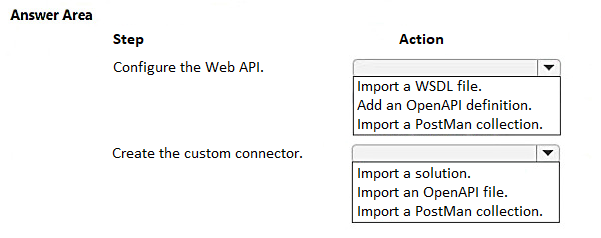
You need to configure the Web API and create the custom connector.
Which action should you perform for each step? To answer, select the appropriate options in the answer area.
NOTE: Each correct selection is worth one point.
Show Answer
Correct Answer: Configure the Web API: Add an OpenAPI definition.
Create the custom connector: Import an OpenAPI file.
Explanation: The requirement is to generate the API definition using a low-code standard supported by Power Platform. Custom connectors are created by importing an OpenAPI (Swagger) definition. WSDL is for SOAP, and Postman collections are not the intended source here.
Question 119
Note: This question is part of a series of questions that present the same scenario. Each question in the series contains a unique solution. Determine whether the solution meets the stated goals. Some question sets might have more than once correct solution, while others might not have a correct solution.
After you answer a question in this section, you will NOT be able to return to it. As a result, these questions will not appear in the review screen.
A company designs data integration with an external system by using virtual tables.
You need to implement the virtual tables.
Solution: Implement an OData v4 provider as the data source.
Does the solution meet the goal?
A. Yes
B. No
Show Answer
Correct Answer: A
Explanation: Yes. Dataverse virtual tables support external data through data providers, and the built-in OData v4 data provider is specifically intended for external systems that expose an OData v4 endpoint. Implementing an OData v4 provider as the data source meets the goal.
$19
Get all 410 questions with detailed answers and explanations
Instant download HTML + PDF delivered the moment payment clears.
Secure Stripe checkout we never see or store your card details.
7-day refund if files are defective see our refund policy.