Case study -
This is a case study. Case studies are not timed separately. You can use as much exam time as you would like to complete each case. However, there may be additional case studies and sections on this exam. You must manage your time to ensure that you are able to complete all questions included on this exam in the time provided.
To answer the questions included in a case study, you will need to reference information that is provided in the case study. Case studies might contain exhibits and other resources that provide more information about the scenario that is described in the case study. Each question is independent of the other questions in this case study.
At the end of this case study, a review screen will appear. This screen allows you to review your answers and to make changes before you move to the next section of the exam. After you begin a new section, you cannot return to this section.
To start the case study -
To display the first question in this case study, click the Next button. Use the buttons in the left pane to explore the content of the case study before you answer the questions. Clicking these buttons displays information such as business requirements, existing environment, and problem statements. If the case study has an All Information tab, note that the information displayed is identical to the information displayed on the subsequent tabs. When you are ready to answer a question, click the Question button to return to the question.
Background -
Lamna Healthcare Company provides health care services to communities across the region. The company provides telehealth services only and does not offer in-person appointments. The company has staff that speak English and Spanish.
The company is open from 8 AM to midnight Monday through Friday to provide services. Patients can make appointments by calling or using the internet. All appointments are conducted by phone or by using a computer.
Current environment. Services -
Lamna provides two types of appointments: wellness and sick. A doctor and a nurse are scheduled for each sick appointment. A doctor or a nurse are scheduled for wellness appointments.
Current environment. Employees -
General -
Employees are located in the Pacific and Eastern time zones.
Case representatives -
Case representatives handle incoming calls, provide information to patients for appointments, and schedule follow-up calls with doctors. Case representatives can also help with people who want to chat online.
All case representatives work eight-hour shifts. Case representatives typically focus on cases that involve one type of illness. The case representatives may back up others when call volumes are large.
Several case representatives speak both Spanish and English. The only company holidays the case representatives have off are New Year's eve and New Year's Day.
Customer satisfaction and escalation
Customer satisfaction representatives monitor all activity and ensure that there is a uniform process for all calls. Case managers schedule shifts and are a point of escalation.
Requirements. System and resources
• Each employee must use the system.
• Case managers must be users in the system but must not be available for the scheduling rotation or manually assigned.
• Patients must be offered at least three alternative times to schedule an appointment.
Requirements. Cases -
• The system must support live chats, texting, and Twitter.
• Case representatives must be able to chat, text, and tweet without exiting the system they use to track calls.
• Case representatives must be able to chat live only with customers whose calls are routed or assigned to them.
• Managers must be able to monitor all communication as well as add or delete quick replies.
• Customer satisfaction representatives must be able to read agent scripts and workflows.
• A live chat must pop up each time someone fills out the form to register for an appointment. The live chat must automatically be sent to the case representative who is best qualified to answer the question.
• There are two types of queues: regular and escalated.
• Tickets must be routed to the most qualified representative for the illness.
• Tickets assigned to a representative must be automatically placed in that representative's queue.
Requirements. Chat escalation process
• Each division must have one manager for escalations.
• Patients who request an escalation from the website must automatically be routed to a chatbot. The patient will answer predefined questions and will be alerted that someone will call them back. Chat transcripts must be sent to the appropriate manager.
• Only escalations must go to the chat bot.
• You must create two types of Omnichannel queues: regular and escalated.
• Only managers must be able to access the Omnichannel Insights dashboard.
Requirements. Managers -
• Managers must be able to review weekly productivity reports for representatives by using Omnichannel Insights dashboards.
• Managers must be able to monitor patient moods during patients’ conversations with representatives.
• Managers must be able to determine whether a patient is feeling negative during a live chat with a representative.
Requirements. Appointments -
• Representatives must be able to schedule appointments and see everyone's free/busy time during their scheduled working hours.
• Appointments must be scheduled by representatives in open time slots for nurses and doctors.
• Nurses and doctors must be booked for 30-minute time slots.
• Patients must be offered at least three alternative times to schedule an appointment.
Requirements. Analytics -
• You must implement Customer Insights to keep track of how well representatives are managing customers’ requests.
• Analytics must be viewable only in the production environment.
• You must ensure that only escalation managers can create workspaces and control access to workspaces
• Case representatives must be rated on knowledge of their primary specialty and their backup specialty.
• Case representatives must only be able to view workspaces.
• Managers must be able to review dashboards in the Chat channel to ensure that case representatives are meeting their objectives.
You need to configure the system to meet the workspace requirements for case representatives.
Which role should you assign to case representatives?
A. Owner
B. Maker
C. Viewer
D. Customer Service Schedule Administrator
E. CSR Manager
Show Answer
Correct Answer: C
Explanation: The requirement is specifically about workspace access. The case study states that case representatives must only be able to view workspaces, while only escalation managers can create workspaces and control access. The Viewer role matches read-only workspace access. Scheduling appointments is a separate capability and is not what this question asks about.
Sources:
https://quizlet.com/1161498570/md-101-flash-cards
Question 41
HOTSPOT
-
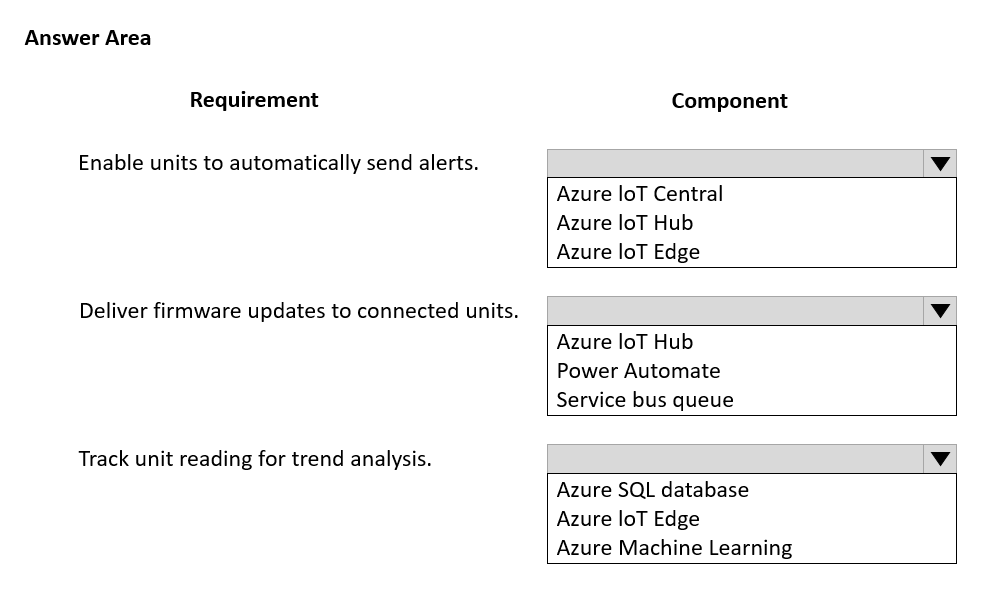
A company that manufactures industrial heating, ventilation, and air conditioning (HVAC) equipment is implementing Dynamics 365 Connected Customer Service.
The solution must meet the following requirements:
• Track and report changes in readings that come from the units.
• Send alerts when readings are outside of set tolerances.
• Provide historical tracking of readings for trend analysis.
• Send firmware updates as needed.
You need to configure the required component.
Which component should you use? To answer, select the appropriate options in the answer area.
NOTE: Each correct selection is worth one point.
Show Answer
Correct Answer: Enable units to automatically send alerts. → Azure IoT Central
Deliver firmware updates to connected units. → Azure IoT Hub
Track unit reading for trend analysis. → Azure SQL database
Explanation: Azure IoT Central provides rules and alerts from device telemetry. Azure IoT Hub supports device management including firmware updates. Azure SQL Database stores historical telemetry for reporting and trend analysis.
Question 42
A company that owns hundreds of subsidiaries uses Dynamics 365 Customer Service. Each subsidiary has its own business models and serves different industries.
You configure Connected Customer Service for Azure IoT Central.
For which three use cases should you use Connected Customer Service? Each correct answer presents a complete solution.
NOTE: Each correct selection is worth one point.
A. Create work orders to replace IoT-enabled traffic lights when the light bulb fails.
B. Create cases to update entitlements support terms for IoT devices when customers reach the end of their entitlement term.
C. Create cases to moderate social media when users leave poor ratings about an IoT sensor.
D. Create cases to ship new medication when an IoT sensor reports that the temperature of the medication’s packing material has exceeded its usable threshold.
E. Create work orders to repair IoT-enabled fiber optic connection boxes when a connection cannot be established for a week.
Show Answer
Correct Answer: A, D, E
Explanation: Connected Customer Service for Azure IoT Central is designed to automatically create cases or Field Service work orders from IoT alerts. It is appropriate for predictive maintenance and service actions triggered by device telemetry. Replacing failed IoT-enabled traffic lights and repairing fiber optic connection boxes are Field Service work order scenarios. Shipping replacement medication after a temperature threshold breach is a service case triggered by IoT monitoring. Updating entitlement terms and moderating social media are not IoT alert-driven Connected Customer Service use cases.
Question 43
A company that manufactures industrial heating, ventilation, and air conditioning units (HVAC) implements the Dynamics 365 Connected Customer Service (IoT) add-in to its environment.
The company must enable the system to receive alerts from HVAC units sold to customers who purchased an extended warranty and monitoring service.
You need to enable the device alerts.
Which two actions should you perform? Each correct answer presents part of the solution.
NOTE: Each correct selection is worth one point.
A. Associate the device with a customer account.
B. Associate the device with a service level agreement (SLA).
C. Add the device to Azure IoT Hub.
D. Add the device to Azure IoT Central.
Show Answer
Correct Answer: A, D
Explanation: To receive Connected Customer Service IoT alerts, the device must be registered with the supported IoT application (Azure IoT Central in this scenario) and associated with the customer account in Dynamics 365 so alerts can be linked to the correct customer and assets. Associating a device with an SLA is not required to enable alerts, and adding directly to Azure IoT Hub is not the required configuration when using the IoT Central integration.
Question 44
DRAG DROP -
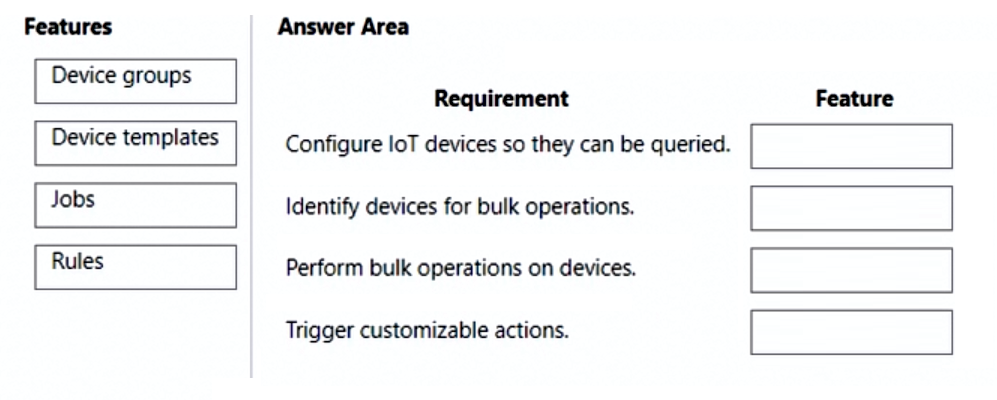
You create an IoT Central application to integrate with Dynamics 365 Customer Service Connected Customer Experience.
You need to configure the application.
Which features should you use? To answer, drag the appropriate features to the correct requirements. Each feature may be used once, more than once, or not at all. You may need to drag the split bar between panes or scroll to view content.
NOTE: Each correct selection is worth one point.
Show Answer
Correct Answer: Configure IoT devices so they can be queried. → Device templates
Identify devices for bulk operations. → Device groups
Perform bulk operations on devices. → Jobs
Trigger customizable actions. → Rules
Explanation: Device templates define device capabilities and schema, device groups identify sets of devices for targeting, jobs execute bulk operations across devices, and rules monitor conditions and trigger customizable actions.
Question 45
A company uses Dynamics 365 Customer Service.
Customer service representatives note that when they use customer workspaces to work on cases, they are unable to communicate with customers.
You need to resolve the issue.
Which two actions should you perform? Each correct answer presents part of the solution.
NOTE: Each correct selection is worth one point.
A. Create a session template.
B. Set the Communication panel mode to Docked.
C. Set the Communication panel mode to Minimized.
D. Use the Chat session template.
E. Use the Case entity session template.
Show Answer
Correct Answer: B, E
Explanation: Customer communication in the Customer Service workspace requires the communication panel to be available, which is achieved by using the Docked communication panel mode. Cases should use the Case entity session template so case sessions support the workspace experience and integrated communication features. A generic session template creation is not the specific fix, the Chat session template is for chat conversations rather than case work, and a minimized communication panel does not resolve the inability to communicate.
Question 46
A company uses Dynamics 365 Customer Service. The company plans to enable in-app notifications to improve agent productivity.
Agents must be notified 15 minutes prior to any scheduled customer calls. The agents can dismiss the notification if needed.
You need to enable the notification.
Which notification type should you use?
A. SMS
B. toast
C. missed
D. alert
Show Answer
Correct Answer: B
Explanation: Use a toast notification. Toast notifications are in-app, temporary, and dismissible, making them appropriate for reminding agents 15 minutes before scheduled customer calls. SMS is an external messaging channel, missed notifications are intended for missed interactions, and alerts are not the best fit for a dismissible reminder.
Question 47
DRAG DROP
-
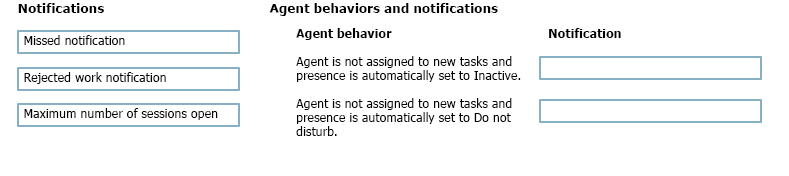
A company uses Dynamics 365 Customer Service. The administrator enables in-app notifications.
Agents observe notifications in the app but are unsure which behavior triggers them.
You need to identify which notification will appear based on the activity of the agent.
Which notification belongs to each behavior? To answer, move the appropriate notifications to the correct agent behaviors. You may use each notification once, more than once, or not at all. You may need to move the split bar between panes or scroll to view content.
NOTE: Each correct selection is worth one point.
Show Answer
Correct Answer: Inactive → Missed notification
Do not disturb → Rejected work notification
Explanation: When automatic presence updates are enabled, missed work changes presence to Inactive and generates a missed notification, while repeated rejected work changes presence to Do not disturb and generates a rejected work notification.
Question 48
DRAG DROP
-
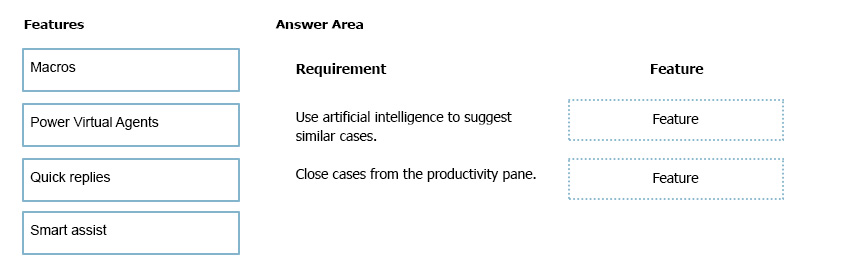
A company is implementing Dynamics 365 Customer Service for its contact center.
The implementation must meet the following requirements:
• Use artificial intelligence to suggest similar cases.
• Close cases from the productivity pane.
You need to configure the feature for each requirement.
Which features should you configure? To answer, drag the appropriate features to the correct requirements. Each feature may be used once, more than once, or not at all. You may need to drag the split bar between panes or scroll to view content.
NOTE: Each correct selection is worth one point.
Show Answer
Correct Answer: Use artificial intelligence to suggest similar cases. → Smart assist
Close cases from the productivity pane. → Macros
Explanation: Smart assist uses AI to recommend relevant/similar cases and knowledge. Macros can automate actions such as closing a case directly from the productivity pane.
Question 49
HOTSPOT
-
You are an Omnichannel supervisor for a company.
The support team is unable to respond to all customer chats.
You need to configure workstreams to ensure that no chats are missed.
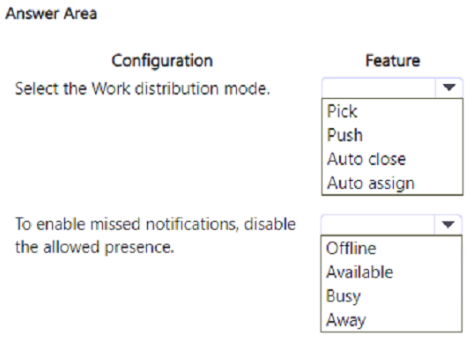
Which features should you select? To answer select the appropriate options in the answer area.
NOTE: Each correct selection is worth one point.
Show Answer
Correct Answer: Work distribution mode: Push
Disable allowed presence: Away
Explanation: Missed notifications are supported with Push work distribution because work is actively offered to agents. To enable missed notifications, Away must not be an allowed presence in the workstream.
$19
Get all 313 questions with detailed answers and explanations
Instant download HTML + PDF delivered the moment payment clears.
Secure Stripe checkout we never see or store your card details.
7-day refund if files are defective see our refund policy.