DRAG DROP
-
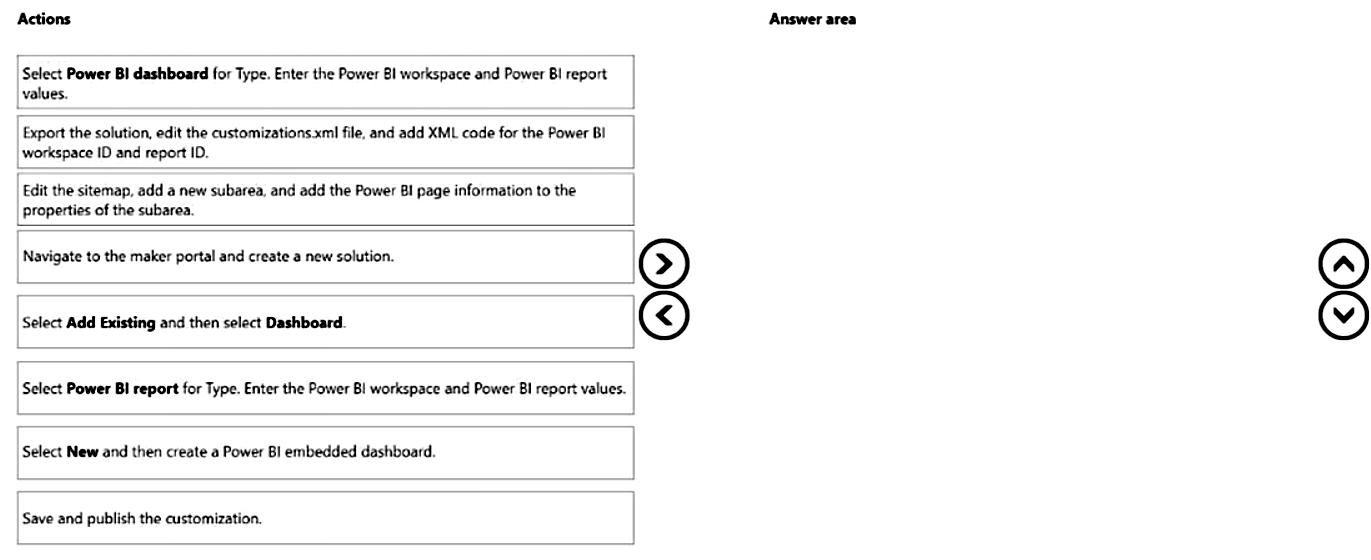
A company creates a single-page Power BI visualization to show how a Power Virtual Agents chatbot is performing.
Users must be able to navigate to the charts from anywhere within the Customer Service workspace.
You need to add the Power BI information to the Customer Service workspace app.
Which five actions should you perform in sequence? To answer, move the appropriate actions from the list of actions to the answer area and arrange them in the correct order.
Show Answer
Correct Answer: Navigate to the maker portal and create a new solution.
Select New and then create a Power BI embedded dashboard.
Select Power BI dashboard for Type. Enter the Power BI workspace and Power BI report values.
Edit the sitemap, add a new subarea, and add the Power BI page information to the properties of the subarea.
Save and publish the customization.
Explanation: A single-page Power BI visualization is embedded as a Power BI dashboard page in a model-driven app. After creating the embedded dashboard, configure the Power BI workspace/report, add it to the app sitemap for navigation, then publish.
Question 136
You are customizing an Omnichannel for Customer Service implementation.
You need to configure the escalation process to a human agent.
Which three actions should you perform? Each correct answer presents part of the solution.
NOTE: Each correct selection is worth one point.
A. In the Power Virtual Agent topic, add the Transfer to agent node.
B. Add a context variable in Power Virtual Agents to escalate the conversation.
C. Select a context variable in Omnichannel and update the information from Power Virtual Agents.
D. Add a bot user to the Omnichannel queue.
E. Set the operating hours to escalate a conversation.
Show Answer
Correct Answer: A, C, D
Explanation: To enable escalation from a Power Virtual Agents bot to a human agent in Omnichannel, you add the Transfer to agent node in the bot topic, configure the context variables in Omnichannel so information from the bot is passed during handoff, and add the bot user to the Omnichannel queue so conversations can be routed correctly. Creating a separate context variable specifically for escalation is not required, and operating hours are not a required configuration step for enabling escalation.
Question 137
You need to consider the underlined segment to establish whether it is accurate.
A customer service manager requires the __Append__ access level to add new entitlement templates for customer service representatives.
A. No adjustment required.
B. Organization
C. Business unit
D. Remove
Show Answer
Correct Answer: D
Explanation: The statement is inaccurate because 'Append' is a privilege, not an access level. Access levels in Dynamics 365 security roles are Basic (User), Local (Business Unit), Deep (Parent: Child Business Units), Global (Organization), or None. Therefore, the underlined term should be removed.
Question 138
You are creating a Power Virtual Agents chatbot to handle common customer inquiries.
A manager reports that some inquiries are not routing to the appropriate customer service representatives. You observe that one node is inactive.
You need to determine why the node is inactive.
What should you use?
A. Maker portal
B. Supervisor dashboard
C. Test bot pane
D. Topic checker
Show Answer
Correct Answer: D
Explanation: The Topic checker is used to analyze a Power Virtual Agents topic for authoring issues such as unreachable or inactive nodes, missing paths, and configuration problems. It helps identify why a node is inactive. The Maker portal is for authoring and management, the Test bot pane is for simulating conversations rather than diagnosing inactive nodes, and the Supervisor dashboard is for monitoring conversations, not topic validation.
Question 139
HOTSPOT
-
A company uses Omnichannel for Customer Service.
The company has the following requirements for their agents' conversations with customers:
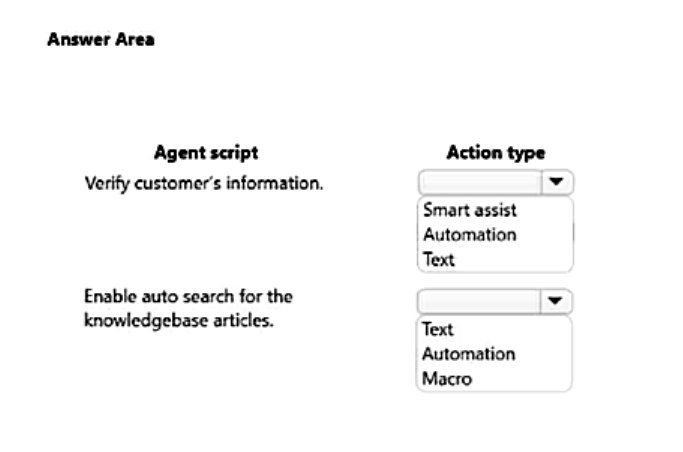
• Agents must verify a customer's information when a chat starts.
• Auto search must be enabled for knowledgebase articles based on case title.
You need to enable agent scripts.
Which action types should you use? To answer, select the appropriate options in the answer area.
NOTE: Each correct selection is worth one point.
Show Answer
Correct Answer: Verify customer's information: Text
Enable auto search for the knowledgebase articles: Macro
Explanation: Use a Text action to display scripted verification instructions to the agent. Use a Macro action to execute the knowledge search automation based on the case title.
Question 140
HOTSPOT
-
A credit card company uses Dynamics 365 Customer Service. Agents receive conversations through Omnichannel for Customer Service.
A browser-based internal application provides a history of a customer's payments and credit scores. You create an application tab template for the internal application.
If a customer requests a credit limit increase, the agent must use the internal application within Omnichannel for Customer Service to determine eligibility.
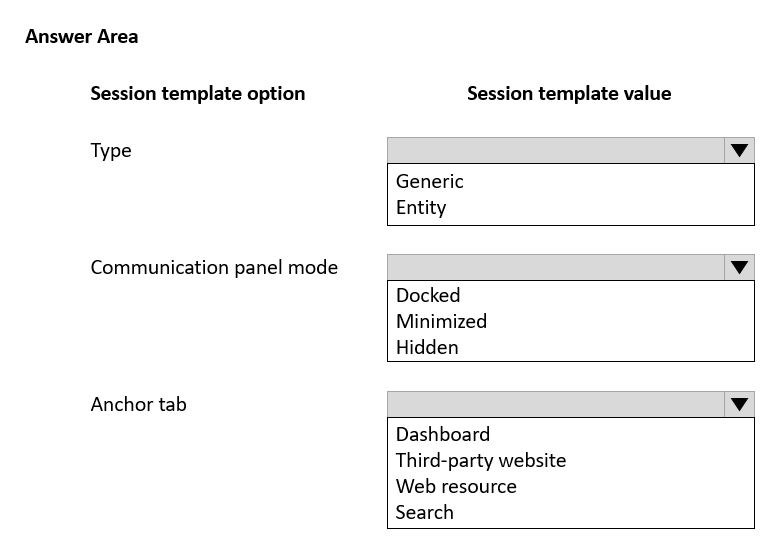
Because the internal application requires maximum screen space, communications with customers must remain hidden. The internal application must be displayed on the anchor tab.
Once an eligibility check is performed, the agent must be able to chat with the customer again.
You need to create a session template for the company.
How should you configure each area of the template? To answer, select the appropriate options in the answer area.
NOTE: Each correct selection is worth one point.
Explanation: Use a Generic session because the browser-based internal application is not tied to a Dynamics 365 entity. Set the communication panel to Hidden to maximize screen space while allowing the agent to reopen chat later. Configure the anchor tab as a Third-party website for the external application.
Question 142
DRAG DROP
-
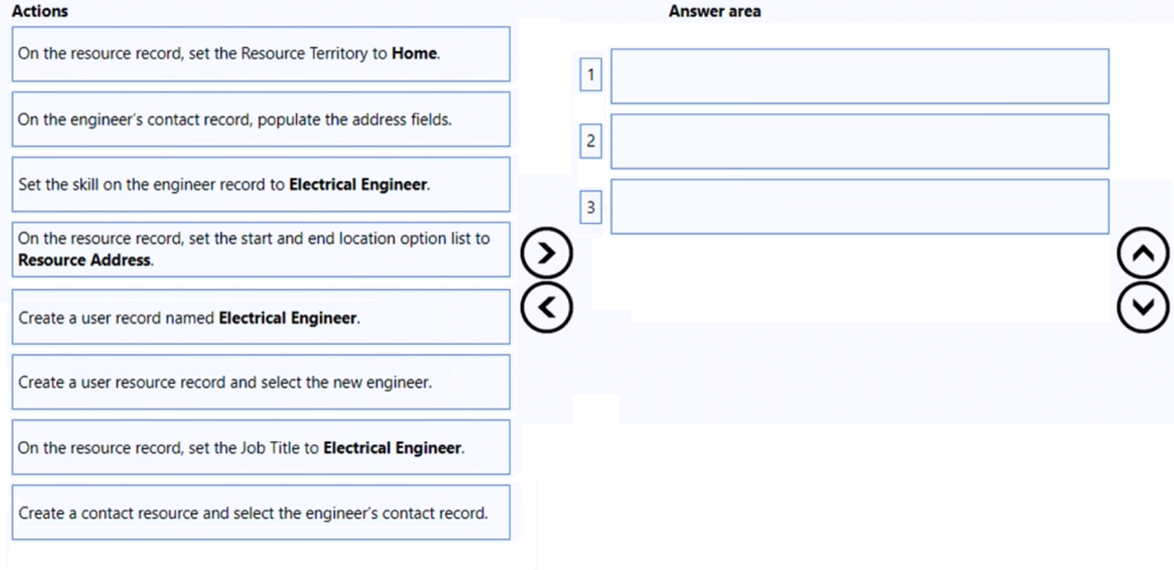
You are a customer service schedule administrator for a company. The company hires an electrical engineer who will work remotely.
You need to set the resource to enable the engineer to work remotely.
Which three actions should you perform next in sequence? To answer, move the appropriate actions from the list of actions to the answer area and arrange them in the correct order.
Show Answer
Correct Answer: Create a contact resource and select the engineer's contact record.
On the engineer’s contact record, populate the address fields.
On the resource record, set the start and end location option list to Resource Address.
Explanation: For a remote/bookable resource using a contact, create the resource, ensure the contact has an address, then configure the resource to start/end from the resource address.
Question 143
HOTSPOT
-
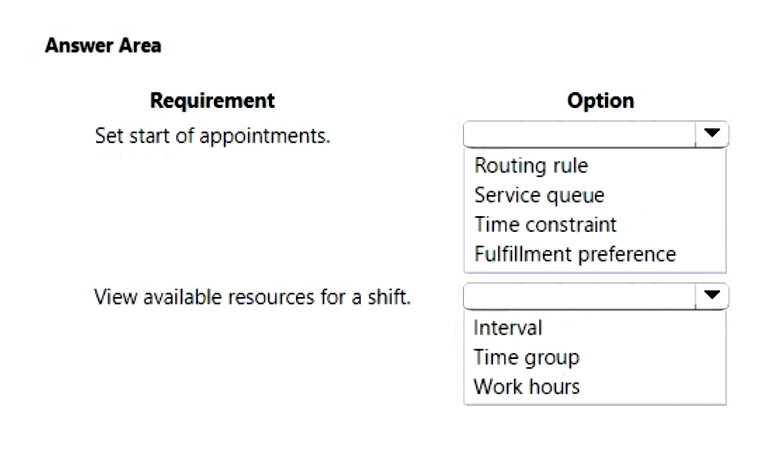
A company is implementing Dynamics 365 Customer Service. The company installs and services air filtering units for industrial manufacturing plants.
Schedulers must be able to do the following:
• Schedule resources to start appointments every 90 minutes.
• View available resources within the first, second, and third shifts.
You need to configure the system to optimize work scheduling.
What should you configure? To answer, select the appropriate options in the answer area.
NOTE: Each correct selection is worth one point.
Show Answer
Correct Answer: Set start of appointments: Fulfillment preference
View available resources for a shift: Time group
Explanation: Fulfillment preferences control scheduling constraints such as appointment start intervals (e.g. every 90 minutes). Time groups define shifts (first, second, third) for viewing resource availability.
Question 144
You are using Dynamics 365 Customer Service to create and activate entitlements.
Customer service representatives state that the entitlement status is set to Waiting, and they cannot use the entitlement. You must ensure customer service representatives can use the entitlement.
You need to identify the entitlement issue.
What is the cause of the issue?
A. The Products or Contact field values have not been configured before activation.
B. The start date of the entitlement is in the future.
C. The entitlement has expired and is awaiting renewal.
D. The end date of the entitlement has been incorrectly configured to a date that has already passed.
Show Answer
Correct Answer: B
Explanation: An entitlement in the Waiting state is typically not yet active because its start date has not been reached. Customer service representatives can only use an entitlement once it becomes Active. If the start date is in the future, activation results in a Waiting status until that date arrives. Missing Products/Contact values do not cause the Waiting state, and expired or past end dates result in an Expired state rather than Waiting.
Question 145
DRAG DROP
-
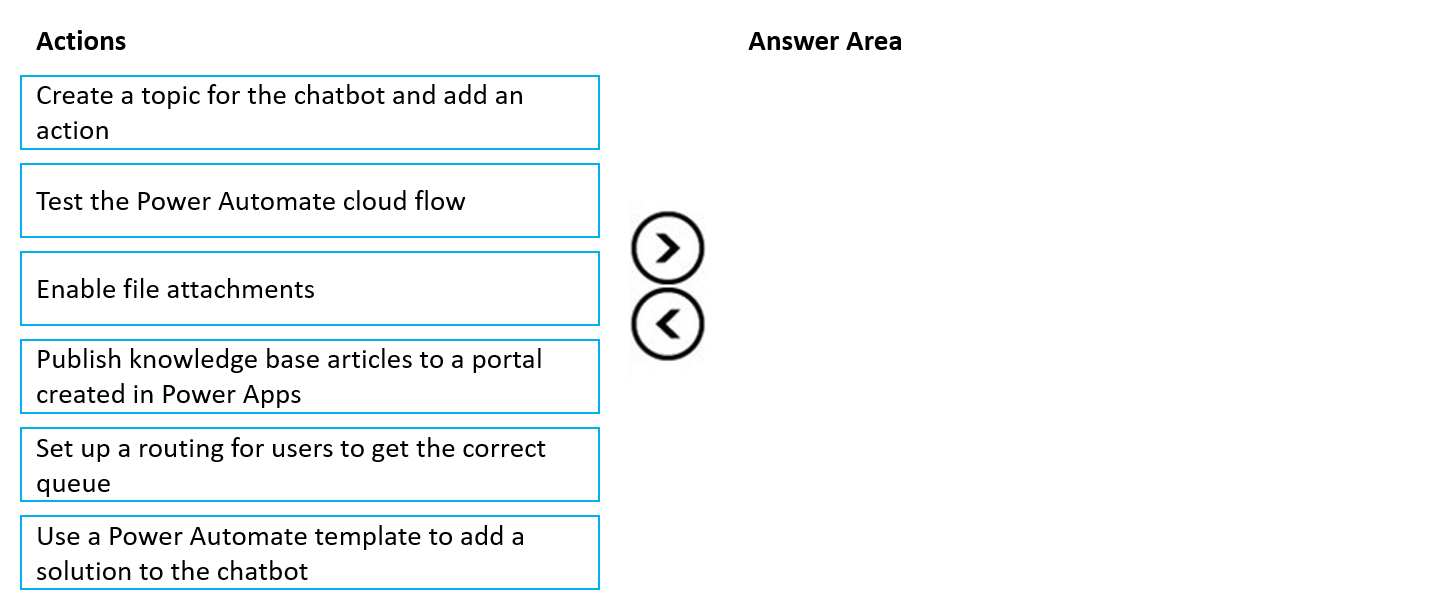
A company wants to use Power Virtual Agents chatbots to enable customers to solve their own issues whenever possible. You create knowledge base articles.
You must ensure that the new articles are available through the chatbot.
You need to define the steps to integrate knowledge management with the chatbot.
Which four actions should you perform in sequence? To answer, move the appropriate actions from the list of actions to the answer area and arrange them in the correct order.
Show Answer
Correct Answer: 1. Publish knowledge base articles to a portal created in Power Apps
2. Use a Power Automate template to add a solution to the chatbot
3. Test the Power Automate cloud flow
4. Create a topic for the chatbot and add an action
Explanation: Knowledge articles must first be published to a Power Apps portal. Then add the knowledge integration via the provided Power Automate template, verify the generated flow, and finally invoke it from a chatbot topic by adding the action.
$19
Get all 313 questions with detailed answers and explanations
Instant download HTML + PDF delivered the moment payment clears.
Secure Stripe checkout we never see or store your card details.
7-day refund if files are defective see our refund policy.