You have a Fabric warehouse that contains a table named Table1. Table1 contains three columns named SalesAmount, ProductCategory, and TransactionDate.
You need to create a Microsoft Power BI query that will calculate the total sales amount of each product category for transactions that occurred during the last quarter.
Which two actions should you perform in the visual query editor? Each correct answer presents part of the solution.
NOTE: Each correct selection is worth one point.
A. For the TransactionDate column, select Remove duplicates.
B. For the TransactionDate column, select Keep top rows and set Number of rows to 90.
C. For the TransactionDate column, select Filter rows and set the value to last quarter.
D. For the ProductCategory column, select Group by and sum the SalesAmount column.
E. For the SalesAmount column, select Transformation number column - Standard, select Add, and then set the value to 90.
Show Answer
Correct Answer: C, D
Explanation: Filter TransactionDate to the dynamic relative period 'last quarter' so only the required transactions remain, then group by ProductCategory and aggregate SalesAmount using Sum to calculate total sales per category.
Question 25
HOTSPOT
-
You have a Fabric warehouse named Warehouse1 that contains a table named TaxiTrips.
TaxiTrips contains the following columns.
You need to create a query that shows the top three taxi companies based on the total miles traveled.
How should you complete the T-SQL statement? To answer, select the appropriate options in the answer area.
NOTE: Each correct selection is worth one point.
Show Answer
Correct Answer: TOP (3)
GROUP BY company
ORDER BY SUM(tripDistance) DESC
Explanation: Use TOP (3) to return three rows, aggregate total distance by company with GROUP BY company, then sort by the aggregated SUM(tripDistance) in descending order to get the top companies by miles traveled.
Question 26
DRAG DROP
-
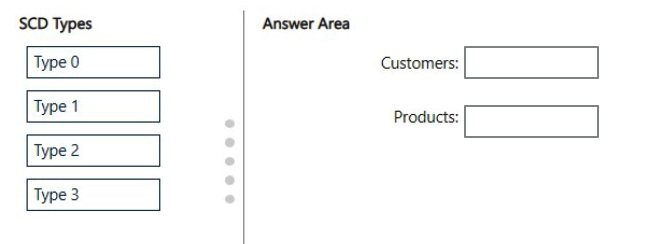
You are implementing two dimension tables named Customers and Products in a Fabric warehouse.
You need to create two slowly changing dimensions that meet the requirements shown in the following table.
Which type of SCD should you use for each table? To answer, drag the appropriate SCD types to the correct tables. Each SCD type may be used once, more than once, or not at all. You may need to drag the split bar between panes or scroll to view content.
NOTE: Each correct selection is worth one point.
Show Answer
Correct Answer: Customers: Type 2
Products: Type 1
Explanation: Type 2 creates a new row and preserves history. Type 1 overwrites the existing value in the current record without retaining historical versions.
Question 27
You have a Fabric tenant that contains 30 CSV files in OneLake. The files are updated daily.
You create a Microsoft Power BI semantic model named Model1 that uses the CSV files as a data source. You configure incremental refresh for Model1 and publish the model to an F64 capacity in the Fabric tenant.
When you initiate a refresh of Model1, the refresh fails after running out of resources.
What is a possible cause of the failure?
A. XMLA Endpoint is set to Read Only.
B. Query folding is occurring.
C. The data type of the column used to partition the data has changed.
D. Only refresh complete days is selected.
E. Query folding is NOT occurring.
Show Answer
Correct Answer: E
Explanation: Incremental refresh depends on query folding so that the RangeStart/RangeEnd partition filters are pushed to the data source. If query folding does not occur, the engine may need to read the full dataset for each partition, greatly increasing memory and CPU usage. This can cause refreshes to run out of resources, especially with large datasets. XMLA read-only, 'Only refresh complete days', or query folding occurring would not explain this resource exhaustion, and a changed partition column type would more likely cause refresh or policy errors rather than specifically running out of resources.
Question 29
DRAG DROP
-
You have a Fabric warehouse named Warehouse1 that contains a table named dbo.Product.
dbo.Product contains the following columns.
You need to use a T-SQL query to add a column named PriceRange to dbo.Product. The column must categorize each product based on UnitPrice. The solution must meet the following requirements:
• If UnitPrice is 0, PriceRange is "Not for resale".
• If UnitPrice is less than 50, PriceRange is "Under $50".
• If UnitPrice is between 50 and 250, PriceRange is "Under $250“.
• In all other instances, PriceRange is "$250+".
How should you complete the query? To answer, drag the appropriate values to the correct targets. Each value may be used once, more than once, or not at all. You may need to drag the split bar between panes or scroll to view content.
NOTE: Each correct selection is worth one point.
Show Answer
Correct Answer: CASE
ELSE
END
Explanation: Use a CASE expression to derive PriceRange. The unmatched condition is handled by ELSE '$250+', and the CASE expression is terminated with END.
Question 30
You have a Fabric workspace named Workspace1.
You need to create a semantic model named Model1 and publish Model1 to Workspace1. The solution must meet the following requirements:
• Can revert to previous versions of Model1 as required.
• Identifies differences between saved versions of Model1.
• Uses Microsoft Power Bl=I Desktop to publish to Workspace1.
• Can edit item definition files by using Microsoft Visual Studio Code.
Which two actions should you perform? Each correct answer presents part of the solution.
NOTE: Each correct selection is worth one point.
A. Enable Git integration for Workspace1.
B. Save Model1 in Power BI Desktop as a PBIT file.
C. Enable users to edit data models in the Power BI service.
D. Save Model1 in Power BI Desktop as a PBIP file.
Show Answer
Correct Answer: A, D
Explanation: Enable Git integration for the Fabric workspace to provide source control, version history, the ability to compare changes, and restore previous versions. Save the semantic model as a Power BI Project (PBIP), which stores item definition files in a folder structure that can be edited in Visual Studio Code and works with Git. PBIP can be published from Power BI Desktop to the Fabric workspace. A PBIT is only a template format and does not provide source-controlled project files, and enabling editing in the Power BI service does not satisfy the version-control or VS Code requirements.
Question 31
HOTSPOT
-
You have a Fabric tenant that contains a workspace named Workspace1 and a user named DBUser. Workspace1 contains a lakehouse named Lakehouse1. DBUser does NOT have access to the tenant.
You grant DBUser access to Lakehouse1 as shown in the following exhibit.
Use the drop-down menus to select the answer choice that completes each statement based on the information presented in the graphic.
NOTE: Each correct selection is worth one point.
Show Answer
Correct Answer: OneLake endpoint
a KQL queryset
Explanation: The granted permission is 'Read all Apache Spark', which allows reading lakehouse files through the OneLake endpoint, not the SQL endpoint. Without SQL endpoint permission, SSMS/TDS access is unavailable. KQL querysets can query OneLake data via shortcuts/external access, whereas OneLake File Explorer is not a query tool.
Question 32
HOTSPOT
-
You have a Fabric workspace that contains a warehouse named Warehouse1. Warehouse1 contains the following data.
You need to create a T-SQL statement that will denormalize the tables and include the ContractType and StartDate attributes in the results. The solution must meet the following requirements:
• Include attributes from matching rows in the Contract table.
• Ensure that all the rows from the Employee table are preserved.
• Return the total number of employees per contract type for all the contract types that have more than two employees.
How should you complete the statement? To answer, select the appropriate options in the answer area.
NOTE: Each correct selection is worth one point.
Show Answer
Correct Answer: LEFT OUTER JOIN
HAVING
Explanation: Use a LEFT OUTER JOIN to preserve all rows from Employee while including matching Contract rows. Use HAVING to filter grouped results after GROUP BY so only contract types with more than two distinct employees are returned.
Question 33
You plan to use Fabric to store data.
You need to create a data store that supports the following:
• Writing data by using T-SQL
• Multi-table transactions
• Dynamic data masking
Which type of data store should you create?
A. KQL database
B. lakehouse
C. warehouse
D. semantic model
Show Answer
Correct Answer: C
Explanation: A Microsoft Fabric warehouse supports T-SQL for data writing, ACID transactions across multiple tables, and dynamic data masking. KQL databases are optimized for telemetry and analytics rather than transactional T-SQL workloads, lakehouses do not provide the full combination of these SQL warehouse capabilities, and semantic models are for BI modeling rather than data storage.
Question 34
HOTSPOT
-
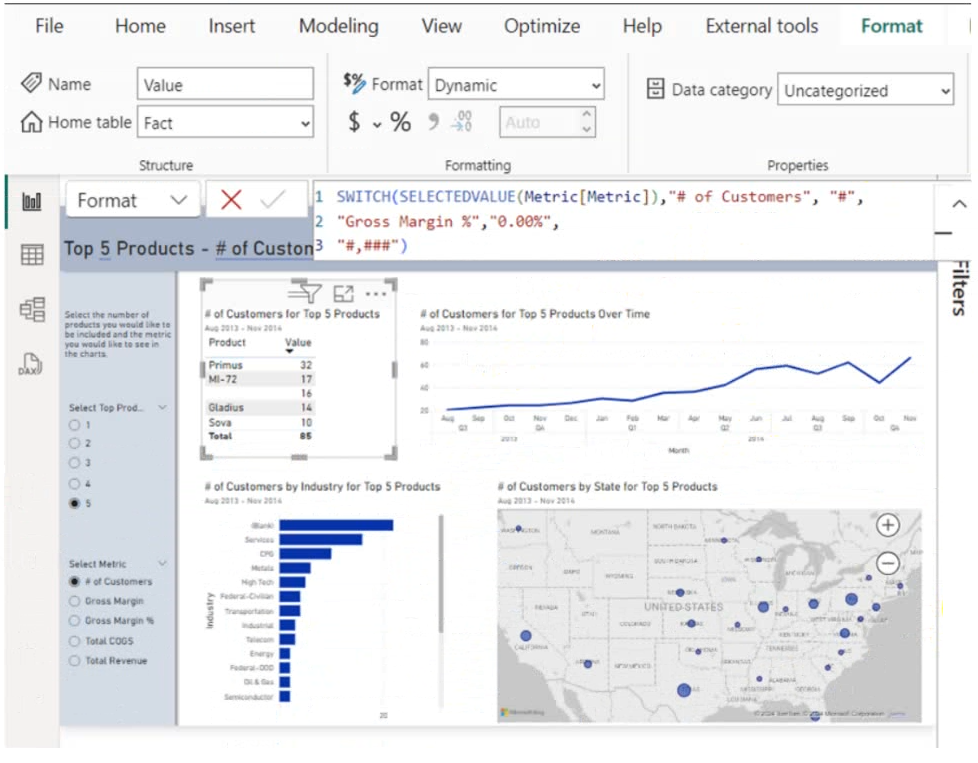
You are creating a report and a semantic model in Microsoft Power BI Desktop.
The Value measure has the expression shown in the following exhibit.
Use the drop-down menus to select the answer choice that completes each statement based on the information presented in the graphic.
NOTE: Each correct selection is worth one point.
Show Answer
Correct Answer: dynamic format string
percentages or whole numbers
Explanation: The expression shown is a Dynamic format string using SWITCH/SELECTEDVALUE to return different format patterns ("#", "0.00%", "#,###") depending on the selected metric. Therefore, the measure can display either percentage values or whole numbers.
$19
Get all 205 questions with detailed answers and explanations
Instant download HTML + PDF delivered the moment payment clears.
Secure Stripe checkout we never see or store your card details.
7-day refund if files are defective see our refund policy.