HOTSPOT
-
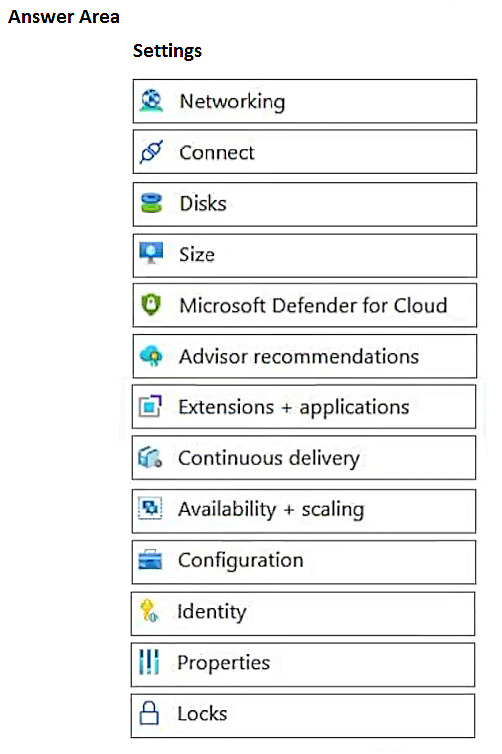
You have an Azure Virtual Desktop deployment that has just-in-time (JIT) VM access enabled.
You need to request access to a session host by using JIT VM access.
Which three virtual machine settings can you use to request access? To answer, select the appropriate settings in the answer area.
NOTE: Each selection is worth one point.
Show Answer
Correct Answer: Connect
Microsoft Defender for Cloud
Configuration
Explanation: JIT VM access requests can be initiated from the VM's Connect page, from Microsoft Defender for Cloud, and from the VM's Configuration page where JIT settings are managed.
Question 161
HOTSPOT
-
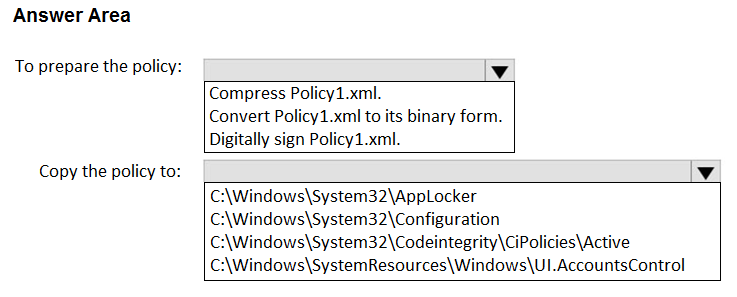
You have an Azure Virtual Desktop host pool that contains 20 Windows 11 session hosts.
You create a Windows Defender Application Control (WDAC) policy named Policy1.xml.
You need to deploy Policy1.xml to the session hosts.
How should you prepare the policy, and to where should you copy the policy? To answer, select the appropriate options in the answer area.
NOTE: Each correct selection is worth one point.
Show Answer
Correct Answer: Convert Policy1.xml to its binary form.
C:\Windows\System32\CodeIntegrity\CiPolicies\Active
Explanation: WDAC policies are deployed as binary .cip files. After converting the XML policy to binary, place it in the CodeIntegrity\CiPolicies\Active directory on the target Windows devices.
Question 163
Case study -
This is a case study. Case studies are not timed separately. You can use as much exam time as you would like to complete each case. However, there may be additional case studies and sections on this exam. You must manage your time to ensure that you are able to complete all questions included on this exam in the time provided.
To answer the questions included in a case study, you will need to reference information that is provided in the case study. Case studies might contain exhibits and other resources that provide more information about the scenario that is described in the case study. Each question is independent of the other questions in this case study.
At the end of this case study, a review screen will appear. This screen allows you to review your answers and to make changes before you move to the next section of the exam. After you begin a new section, you cannot return to this section.
To start the case study -
To display the first question in this case study, click the Next button. Use the buttons in the left pane to explore the content of the case study before you answer the questions. Clicking these buttons displays information such as business requirements, existing environment, and problem statements. If the case study has an All Information tab, note that the information displayed is identical to the information displayed on the subsequent tabs. When you are ready to answer a question, click the Question button to return to the question.
Overview -
Contoso, Ltd. is a law firm that has a main office in Montreal and branch offices in Paris and Seattle. The Seattle branch office opened recently.
Contoso has an Azure subscription and uses Microsoft 365.
Existing Infrastructure. Active Directory
The network contains an on-premises Active Directory domain named contoso.com and an Azure Active Directory (Azure AD) tenant. One of the domain controllers runs as an Azure virtual machine and connects to a virtual network named VNET1. All internal name resolution is provided by DNS server that run on the domain controllers.
The on-premises Active Directory domain contains the organizational units (OUs) shown in the following table.
The on-premises Active Directory domain contains the users shown in the following table.
The Azure AD tenant contains the cloud-only users shown in the following table.
Existing Infrastructure. Network Infrastructure
All the Azure virtual networks are peered. The on-premises network connects to the virtual networks.
A virtual network named VNET4 was recently created are peered to the other virtual networks. VNET4 does NOT contain any AVD virtual machines.
All servers run Windows Server 2019. All laptops and desktop computers run Windows 10 Enterprise.
Since users often work on confidential documents, all the users use their computer as a client for connecting to Remote Desktop Services (RDS).
In the West US Azure region, you have the storage accounts shown in the following table.
Existing Infrastructure. Remote Desktop Infrastructure
Contoso has a Remote Desktop infrastructure shown in the following table.
Requirements. Planned Changes -
Contoso plans to implement the following changes:
• Implement FSLogix profile containers for the Paris offices.
• Deploy an Azure Virtual Desktop host pool named Pool4.
• Migrate the RDS deployment in the Seattle office to Azure Virtual Desktop in the West US Azure region.
Requirements. Pool4 Configuration
Pool4 will have the following settings:
• Host pool type: Pooled
• Max session limit: 7
• Load balancing algorithm: Depth-first
• Images: Windows 10 Enterprise multi-session
• Virtual machine size: Standard D2s v3
• Name prefix: Pool4
• Number of VMs: 5
• Virtual network: VNET4
Requirements. Technical Requirements
Contoso identifies the following technical requirements:
• Before migrating the RDS deployment in the Seattle office, obtain the recommended deployment configuration based on the current RDS utilization.
• For the Azure Virtual Desktop deployment in the Montreal office, disable audio output in the device redirection settings.
• For the Azure Virtual Desktop deployment in the Seattle office, store the FSLogix profile containers in Azure Storage.
• Enable Operator2 to modify the RDP Properties of the Azure Virtual Desktop deployment in the Montreal office.
• From a server named Server1, convert the user profile disks to the FSLogix profile containers.
• Ensure that the Pool1 virtual machines only run during business hours.
• Use the principle of least privilege.
You need to configure the virtual machines that have the Pool1 prefix. The solution must meet the technical requirements.
What should you use?
A. an Azure Virtual Desktop automation task
B. Access control (IAM)
C. Service Health in Azure Monitor
D. Azure Automation
Show Answer
Correct Answer: D
Explanation: The requirement is to ensure the Pool1 session host virtual machines run only during business hours. Azure Automation can schedule start/stop operations for Azure VMs using runbooks, making it the appropriate choice for automating VM uptime. Access control (IAM) manages permissions, Service Health provides health notifications, and Azure Virtual Desktop automation tasks are not the standard mechanism for scheduled VM power management.
Question 164
HOTSPOT
-
Case study
-
This is a case study. Case studies are not timed separately. You can use as much exam time as you would like to complete each case. However, there may be additional case studies and sections on this exam. You must manage your time to ensure that you are able to complete all questions included on this exam in the time provided.
To answer the questions included in a case study, you will need to reference information that is provided in the case study. Case studies might contain exhibits and other resources that provide more information about the scenario that is described in the case study. Each question is independent of the other questions in this case study.
At the end of this case study, a review screen will appear. This screen allows you to review your answers and to make changes before you move to the next section of the exam. After you begin a new section, you cannot return to this section.
To start the case study
-
To display the first question in this case study, click the Next button. Use the buttons in the left pane to explore the content of the case study before you answer the questions. Clicking these buttons displays information such as business requirements, existing environment, and problem statements. If the case study has an All Information tab, note that the information displayed is identical to the information displayed on the subsequent tabs. When you are ready to answer a question, click the Question button to return to the question.
Overview
-
Litware, Inc. is a pharmaceutical company that has a main office in Boston, United States, and a remote office in Chennai, India.
Existing Environment. Identity Environment
The network contains an on-premises Active Directory domain named litware.com that syncs to an Azure Active Directory (Azure AD) tenant named litware.com.
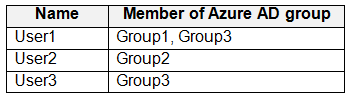
The Azure AD tenant contains the users shown in the following table.
All users are registered for Azure Multi-Factor Authentication (MFA).
Existing Environment. Cloud Services
Litware has a Microsoft 365 E5 subscription associated to the Azure AD tenant. All users are assigned Microsoft 365 Enterprise E5 licenses.
Litware has an Azure subscription associated to the Azure AD tenant. The subscription contains the resources shown in the following table.
Litware uses custom virtual machine images and custom scripts to automatically provision Azure virtual machines and join the virtual machines to the on-premises Active Directory domain.
Existing Environment. Network and DNS
The offices connect to each other by using a WAN link. Each office connects directly to the internet.
All DNS queries for internet hosts are resolved by using DNS servers in the Boston office, which point to root servers on the internet. The Chennai office has caching-only DNS servers that forward queries to the DNS servers in the Boston office.
Requirements. Planned Changes
-
Litware plans to implement the following changes:
• Deploy Azure Virtual Desktop environments to the East US Azure region for the users in the Boston office and to the South India Azure region for the users in the Chennai office.
• Implement FSLogix profile containers.
• Optimize the custom virtual machine images for the Azure Virtual Desktop session hosts.
• Use PowerShell to automate the addition of virtual machines to the Azure Virtual Desktop host pools.
Requirements. Performance Requirements
Litware identifies the following performance requirements:
• Minimize network latency of the Azure Virtual Desktop connections from the Boston and Chennai offices.
• Minimize latency of the Azure Virtual Desktop host authentication in each Azure region.
• Minimize how long it takes to sign in to the Azure Virtual Desktop session hosts.
Requirements. Authentication Requirements
Litware identifies the following authentication requirements:
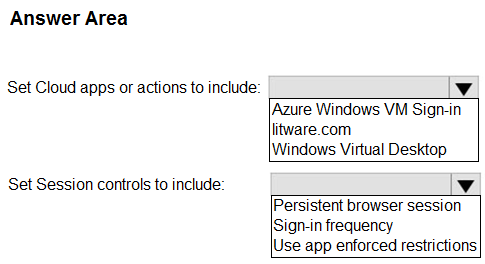
• Enforce Azure MFA when accessing Azure Virtual Desktop apps.
• Force users to reauthenticate if their Azure Virtual Desktop session lasts more than eight hours.
Requirements. Security Requirements
Litware identifies the following security requirements:
• Explicitly allow traffic between the Azure Virtual Desktop session hosts and Microsoft 365.
• Explicitly allow traffic between the Azure Virtual Desktop session hosts and the Azure Virtual Desktop infrastructure.
• Use built-in groups for delegation.
• Delegate the management of app groups to Admin2, including the ability to publish app groups to users and user groups.
• Grant Admin1 permissions to manage workspaces, including listing which apps are assigned to the app groups.
• Minimize administrative effort to manage network security.
• Use the principle of least privilege.
Requirements. Deployment Requirements
Litware identifies the following deployment requirements:
• Use PowerShell to generate the token used to add the virtual machines as session hosts to an Azure Virtual Desktop host pool.
• Minimize how long it takes to provision the Azure Virtual Desktop session hosts based on the custom virtual machine images.
• Whenever possible, preinstall agents and apps in the custom virtual machine images.
User Profile Requirements
-
Litware identifies the following user profile requirements:
• In storage1, store user profiles for the Boston office users.
• Ensure that the user profiles for the Boston office users replicate synchronously between two Azure regions.
• Ensure that Admin1 uses a local profile only when signing in to the Azure Virtual Desktop session hosts.
You need to configure a conditional access policy to meet the authentication requirements.
What should you include in the policy configuration? To answer, select the appropriate options in the answer area.
NOTE: Each correct selection is worth one point.
Show Answer
Correct Answer: Cloud apps: Windows Virtual Desktop
Session controls: Sign-in frequency
Explanation: Apply Conditional Access to Azure Virtual Desktop (Windows Virtual Desktop) to enforce MFA for app access. Use the Sign-in frequency session control and set it to 8 hours to require reauthentication after sessions exceed eight hours.
Question 165
You have an Azure AD tenant that contains a resource group named RG1. RG1 contains the resources shown in the following table.
Your on-premises network has an IP address range of 192.168.10.0/24. Users on Host1 can successfully connect to the resources on the network.
You add a new on-premises network that has an IP address range of 192.168.11.0/24 and contains a subnet. The subnet contains an application server named App1.
Users report that Host1 cannot connect to App1.
You need to ensure that the users on Host1 can access App1.
What should you modify?
A. the Connections settings of VPNGW1
B. the Subnets setting of VNet1
C. the Configuration settings of LNGW1
D. the DNS server settings of VNet1
E. the RDP Properties of the host pool
Show Answer
Correct Answer: C
Explanation: A Local Network Gateway (LNGW) defines the on-premises network address prefixes that Azure routes through the VPN. After adding a new on-premises network (192.168.11.0/24), you must update the Local Network Gateway configuration to include the new address space so traffic from Azure resources (including Host1) is routed correctly. Changing the VPN connection, VNet subnets, DNS settings, or Azure Virtual Desktop RDP properties will not add routing for the new on-premises prefix.
Question 166
HOTSPOT
-
You have an Azure Virtual Desktop deployment that contains two Azure AD-joined session hosts named Host1 and Host2.
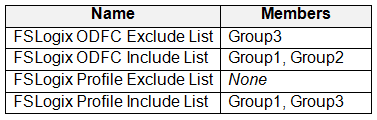
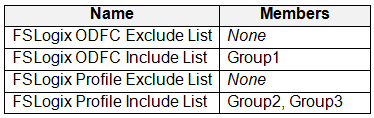
FSLogix Profile Containers and Office Containers have different locations and are used for both session hosts.
You have an Azure AD tenant that contains the users shown in the following table.
Host1 contains the local groups shown in the following table.
Host2 contains the local groups shown in the following table.
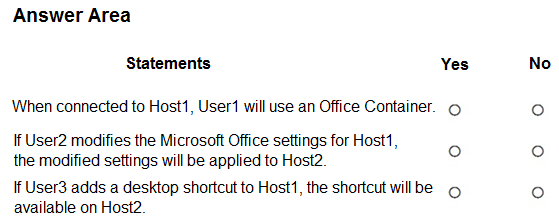
For each of the following statements, select Yes if the statement is true. Otherwise, select No.
NOTE: Each correct selection is worth one point.
Show Answer
Correct Answer: No
No
Yes
Explanation: Exclude group membership overrides Include for FSLogix. User1 is excluded from the Office Container on Host1. User2 uses an Office Container on Host1 but not on Host2, so Office settings do not roam there. User3 is included for Profile Containers on both hosts, so profile items such as desktop shortcuts roam between hosts.
Question 167
You have an Azure Virtual Desktop deployment that contains a host pool named Pool1. Pool1 contains 10 session hosts that were deployed by using an Azure Resource Manager (ARM) template.
You discover that Windows licenses were NOT applied to the session hosts.
You need to use a PowerShell script to update the licenses.
Which cmdlet should you include in the solution?
A. Update-AzVm
B. Update-AzWvdDesktop
C. Update-AzWvdHostPool
D. Update-AzWvdWorkspace
E. Update-AzWvdSessionHost
Show Answer
Correct Answer: A
Explanation: Windows licensing for Azure Virtual Desktop session hosts is applied by updating the Azure VM's LicenseType property (for example, setting it to Windows_Client) and then committing the change with Update-AzVM. The Azure Virtual Desktop cmdlets manage AVD resources such as host pools, workspaces, and session host registrations, not the VM licensing property.
Question 169
HOTSPOT -
You have an Azure subscription that contains the virtual machines shown in the following table.
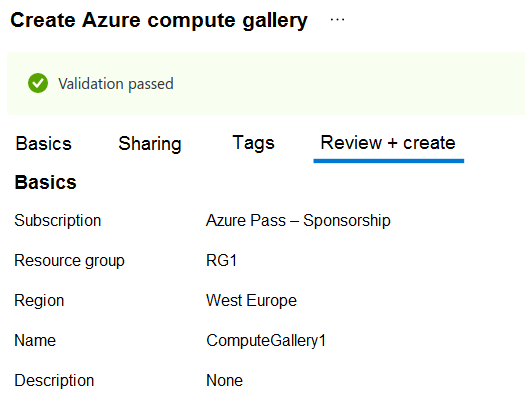
You create an Azure Compute Gallery as shown in the Azure compute gallery exhibit. (Click the Azure compute gallery tab.)
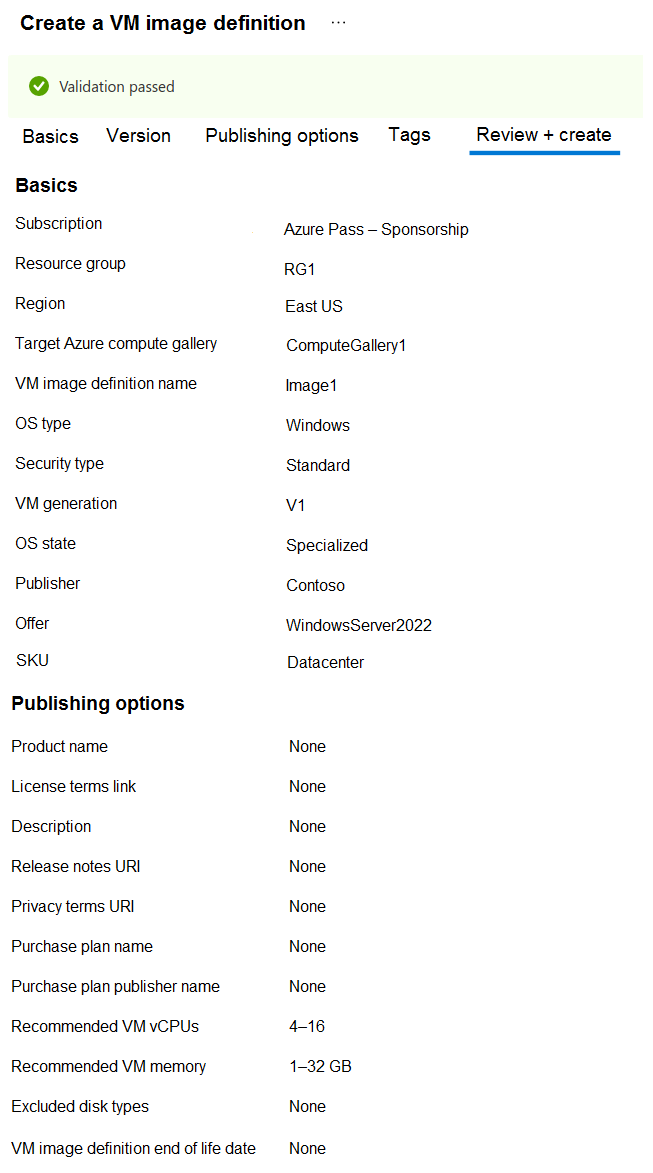
You create a virtual machine image definition as shown in the VM image definition exhibit. (Click the VM image definition tab.)
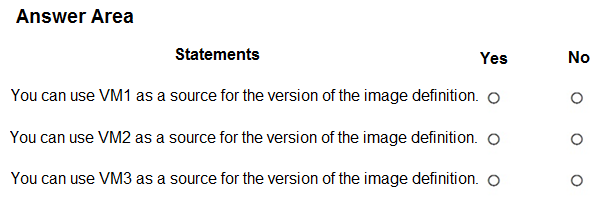
For each of the following statements, select Yes if the statement is true. Otherwise, select No.
NOTE: Each correct selection is worth one point.
Show Answer
Correct Answer: VM1: No
VM2: Yes
VM3: Yes
Explanation: The image definition requires Generation V1. Generation must match. The recommended vCPU range is advisory, not a hard requirement. The image definition's region does not restrict the source VM because image versions have their own region.
Question 170
HOTSPOT -
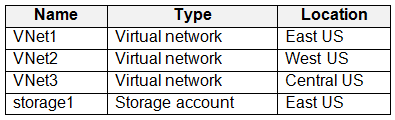
You have an Azure subscription that contains the resources shown in the following table.
You have a virtual machine named Server1 that runs Windows Server and is connected to VNet3.
You need to deploy the Azure Virtual Desktop host pools shown in the following table.
The solution must meet the following requirements:
• The session hosts in Pool1 must access Server1 via the Microsoft backbone network.
• The session hosts in Pool2 must access storage1 via the Microsoft backbone network.
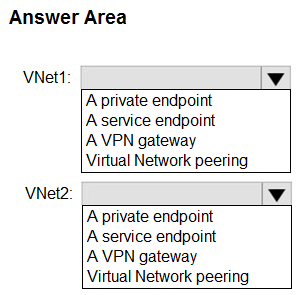
What should you configure on the virtual networks? To answer, select the appropriate options in the answer area.
NOTE: Each correct selection is worth one point.
Show Answer
Correct Answer: VNet1: Virtual Network peering
VNet2: A service endpoint
Explanation: Use virtual network peering (global peering if across regions) so session hosts in VNet1 can reach Server1 in VNet3 over the Azure backbone. For Azure Storage access from VNet2, enable a Microsoft.Storage service endpoint so traffic stays on the Microsoft backbone without requiring a private endpoint.
Question 171
HOTSPOT
-
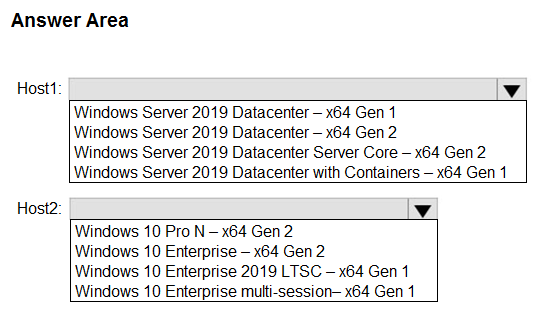
You have an Azure Virtual Desktop deployment that contains a host pool named HostPool1.
You plan to deploy session hosts to HostPool1 as shown in the following table.
Each session host must support up to 15 concurrent users.
You need to recommend which operating system version to deploy from Azure Marketplace to the session hosts.
What should you recommend for each session host? To answer, select the appropriate options in the answer area.
Show Answer
Correct Answer: Host1: Windows Server 2019 Datacenter – x64 Gen 2
Host2: Windows 10 Enterprise multi-session – x64 Gen 1
Explanation: Trusted launch requires Generation 2 VMs, so Host1 must use the Gen2 Datacenter image (not Server Core, which doesn't support the RDS Session Host role). For Azure Virtual Desktop with up to 15 concurrent users on Windows 10, the supported choice is Windows 10 Enterprise multi-session.
$19
Get all 322 questions with detailed answers and explanations
Instant download HTML + PDF delivered the moment payment clears.
Secure Stripe checkout we never see or store your card details.
7-day refund if files are defective see our refund policy.