Case study -
This is a case study. Case studies are not timed separately. You can use as much exam time as you would like to complete each case. However, there may be additional case studies and sections on this exam. You must manage your time to ensure that you are able to complete all questions included on this exam in the time provided.
To answer the questions included in a case study, you will need to reference information that is provided in the case study. Case studies might contain exhibits and other resources that provide more information about the scenario that is described in the case study. Each question is independent of the other questions in this case study.
At the end of this case study, a review screen will appear. This screen allows you to review your answers and to make changes before you move to the next section of the exam. After you begin a new section, you cannot return to this section.
To start the case study -
To display the first question in this case study, click the Next button. Use the buttons in the left pane to explore the content of the case study before you answer the questions. Clicking these buttons displays information such as business requirements, existing environment, and problem statements. If the case study has an All Information tab, note that the information displayed is identical to the information displayed on the subsequent tabs. When you are ready to answer a question, click the Question button to return to the question.
Overview -
Northwind Traders is a manufacturing company based in New York City.
Existing Environment -
Identity Environment -
The on-premises network contains an Active Directory Domain Services (AD DS) domain named northwindtraders.com.
Northwind Traders has a Microsoft Entra tenant and a Microsoft Entra Domain Services managed domain. The northwindtraders.com domain syncs with the Microsoft Entra tenant.
Virtual Machines -
The company has an on-premises Hyper-V virtual machine named VM1 that has the following configurations:
• Generation: 1
• Disk size: 2 TB
• Disk format: VHDX
• Disk type: Dynamically expanding
Cloud Services -
Northwind Traders has a Microsoft 365 E5 subscription. The subscription contains 500 users that are assigned Microsoft 365 E5 licenses.
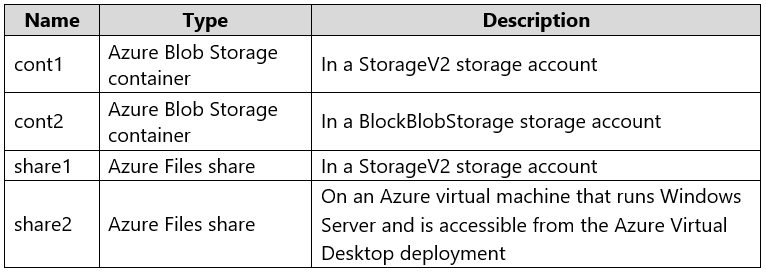
The company has an Azure subscription that contains the resources shown in the following table.
Both subscriptions are linked to the Microsoft Entra tenant.
Requirements -
Planned Changes -
Northwind Traders identifies the following planned changes:
• Deploy an Azure Virtual Desktop host pool that will contain 10 session hosts joined to the Microsoft Entra Domain Services managed domain.
• Configure VM1 as the source image for the Azure Virtual Desktop deployment and upload the image to Azure.
• The Azure Virtual Desktop deployment will provide access to a custom app named App1.
Performance Requirements -
Northwind Traders identifies the following performance requirements:
• Each Azure Virtual Desktop session host must support 15 user sessions.
• Each new user session must be assigned to a single session host until the maximum session limit is reached for that host.
Application Requirements -
Northwind Traders identifies the following application requirements:
• Microsoft OneDrive must launch when users connect to a RemoteApp session in Azure Virtual Desktop.
• App1 requires a desktop resolution of 1280 x 1024.
• Administrative effort must be minimized.
Disaster Recovery Requirements -
Northwind Traders identifies the following disaster recovery requirements for the Azure Virtual Desktop deployment:
• Minimize outages if an Azure region fails.
• Minimize the recovery time objective (RTO).
• Minimize administrative effort in the event of a failover.
Security Requirements -
Northwind Traders identifies the following security requirements:
• When users sign in to the Azure Virtual Desktop deployment by using the Azure Virtual Desktop client, they must authenticate by using their Microsoft Entra username and password only.
• When users sign in to the Azure Virtual Desktop deployment by using a web browser, they must authenticate by using the Microsoft Authenticator app.
• All the Azure Virtual Desktop session hosts deployed by using the VM1 source image must be onboarded to Microsoft Defender for Endpoint.
• The client version and operating system used to connect to the session hosts must be logged.
• The solution must follow the principle of least privilege.
Networking Requirements -
The Azure Virtual Desktop session hosts must be able to access the resources on the on-premises network.
User Profile Requirements -
Northwind Traders identifies the following user profile requirements:
• Users must be able to access share1 by using their Microsoft Entra account.
• Azure Virtual Desktop user profiles must be managed by using FSLogix.
• All user profiles must be stored in share1.
What should you do to ensure that the session hosts meet the application requirements for App1?
A. Modify the Connection information settings for the host pool.
B. Assign a scaling plan to the host pool.
C. Modify the Session behaviour settings for the host pool.
D. Modify the Display settings for the host pool.
Show Answer
Correct Answer: D
Explanation: Modify the host pool’s Display settings to configure the session display resolution required by App1 (1280 × 1024).
Question 5
HOTSPOT
-
You have an Azure Virtual Desktop deployment that contains Windows 11 session hosts.
You have an MSIX package named App1.
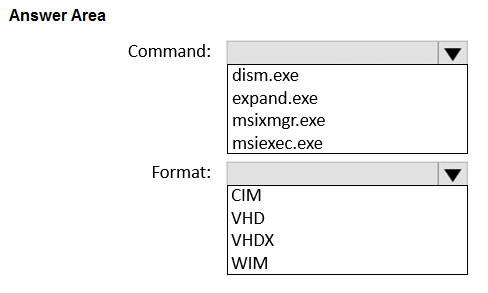
You need to use app attach to deploy an MSIX image based on App1. The solution must optimize performance.
Which command should you run, and which image format should you use? To answer, select the appropriate options in the answer area.
NOTE: Each correct selection is worth one point.
Show Answer
Correct Answer: Command: msixmgr.exe
Format: CIM
Explanation: MSIX app attach images are created from MSIX packages using msixmgr.exe. For Azure Virtual Desktop on Windows 11, the recommended image format for optimal performance is CIM due to faster mount/unmount and lower resource usage.
Question 6
You have an Azure subscription and an Azure Virtual Desktop deployment. The subscription contains the storage locations shown in the following table.
You plan to use app attach to deploy an image named App1.vhdx.
You need to copy App1.vhdx to a storage location.
To which locations can you copy App1.vhdx?
A. share2 only
B. share1 or share2 only
C. cont1 or cont2 only
D. cont1 or share1 only
E. cont1, cont2, share1, or share2
Show Answer
Correct Answer: B
Explanation: App Attach images must be stored on an accessible SMB file share. Both share1 and share2 are Azure Files shares; cont1 and cont2 are Blob containers and aren’t SMB file shares.
Question 6
You have an Azure Virtual Desktop deployment.
You plan to use FSLogix profile containers.
You need to recommend a solution that will be used to store the containers. The solution must meet the following requirements:
* The containers must be stored on solid-state drives (SSDs)
* Minimize administrative effort
* Minimize cost
What should you recommend?
A. Azure NetApp Files
B. Azure Files Standard
C. Azure Blob Storage Premium
D. Azure Files Premium
Show Answer
Correct Answer: D
Explanation: Azure Files Premium uses SSD-based storage and is a managed file-share service, minimizing administration. It is generally more cost-effective for this scenario than Azure NetApp Files. Azure Files Standard is HDD-based, and Blob Storage is not suitable for FSLogix profile containers.
Question 6
HOTSPOT
-
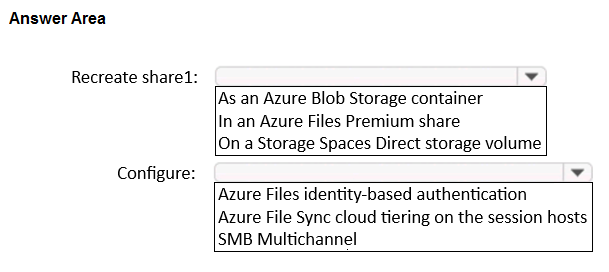
You have an Azure subscription that contains an Azure Virtual Desktop host pool named Pool1 and a standard storage account named account1. Pool1 contains two session hosts and uses FSLogix profile containers. account1 contains an Azure Files share named share1 that stores the profile containers.
Users report that signing in to the session hosts is slow.
You need to reduce how long it takes to sign in to the session hosts. The solution must minimize administrative effort.
What should you do? To answer, select the appropriate options in the answer area.
NOTE: Each correct selection is worth one point.
Show Answer
Correct Answer: Recreate share1: In an Azure Files Premium share
Configure: SMB Multichannel
Explanation: Premium Azure Files provides lower latency and higher IOPS for FSLogix profile containers, and SMB Multichannel improves SMB throughput and resiliency, reducing profile load/sign-in time with minimal administration.
Question 7
HOTSPOT -
You have an Azure Virtual Desktop deployment that contains two users named User1 and User2 and the storage accounts shown in the following table.
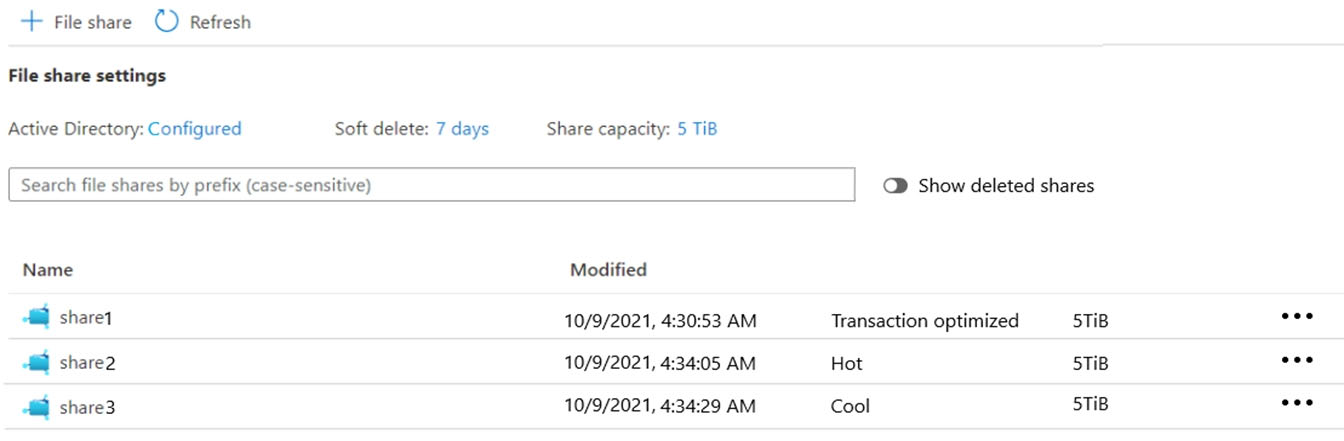
The File share settings for storage1 are configured as shown in the following exhibit.
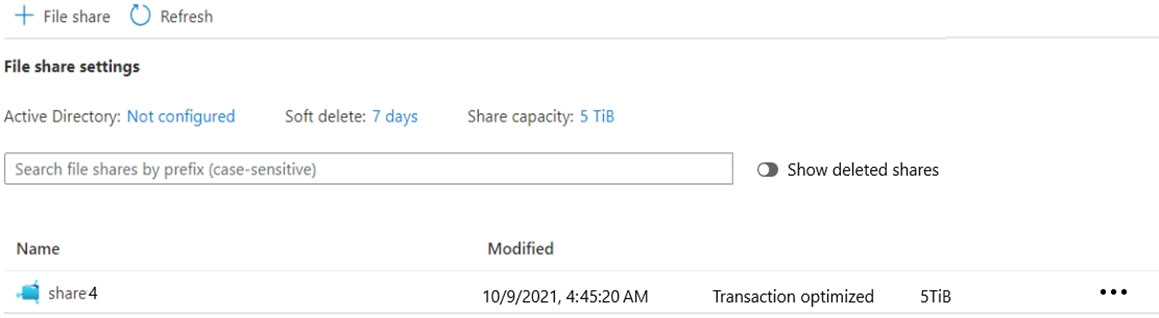
The File share settings for storage2 are configured as shown in the following exhibit.
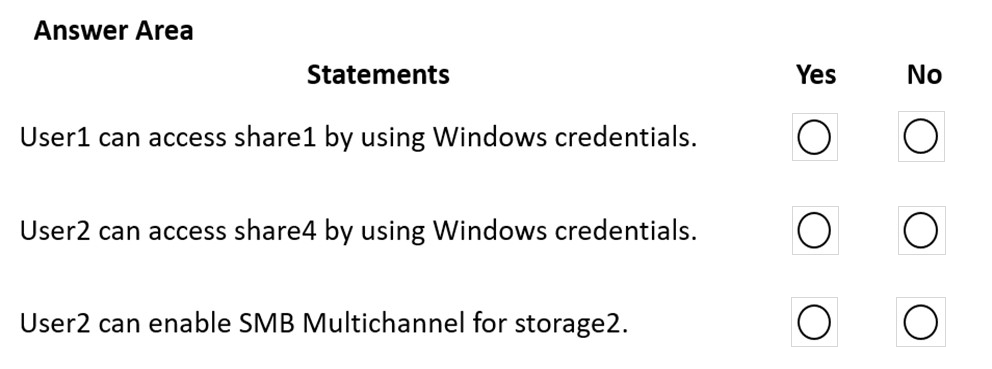
For each of the following statements, select Yes if the statement is true. Otherwise, select No.
NOTE: Each correct selection is worth one point.
Hot Area:
Show Answer
Correct Answer: User1 can access share1: Yes
User2 can access share4: No
User2 can enable SMB Multichannel for storage2: No
Explanation: Storage1 has Active Directory authentication configured, and User1 has an SMB share access role. Storage2 has no Active Directory authentication, so User2 cannot use Windows credentials. Its transaction-optimized share is not a premium file share, and SMB Multichannel requires premium Azure Files.
Question 7
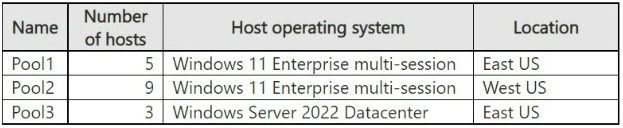
You have an Azure Virtual Desktop deployment that contains the host pools shown in the following table.
You need to configure private access for the deployment.
What is the minimum number of private endpoints that you should create?
A. 1
B. 2
C. 3
D. 17
Show Answer
Correct Answer: C
Explanation: Create one private endpoint for the connection subresource of each host pool. There are three host pools, so the minimum is 3; the number of session hosts, their operating systems, and their locations do not change this count.
Question 7
You have an Azure subscription that contains an Azure Virtual Desktop session host named VM1.
You plan to deploy an app named App1 that will process Personally Identifiable Information (PII) data.
You need to ensure that App1 is deployed to a confidential virtual machine. The solution must minimize administrative effort.
What should you do?
A. On VM1, enable Azure Disk Encryption for the operating system disk. Install App1 on the operating system disk.
B. Deploy a new virtual machine and install App1.
C. On VM1, enable File Integrity Monitoring (FIM) and install App1.
D. On VM1, attach a new data disk and enable BitLocker Drive Encryption (BitLocker). Install App1 on the new disk.
Show Answer
Correct Answer: B
Explanation: A confidential virtual machine must be created using a supported confidential VM SKU with AMD SEV-SNP/Intel TDX-based confidential computing features. An existing Azure Virtual Desktop session host cannot be converted into a confidential VM by enabling Azure Disk Encryption, BitLocker, or File Integrity Monitoring. Therefore, the required approach is to deploy a new confidential-capable VM and install the application. This is the only option that satisfies the requirement while minimizing administrative effort.
Question 8
HOTSPOT
-
You have an on-premises root certification authority (CA) named AdatumCA.
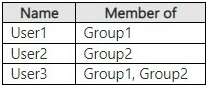
You have an Azure subscription that contains an Azure Virtual Desktop deployment. The subscription is linked to a Microsoft Entra tenant that contains the users shown in the following table.
All the users have been granted permission to connect to the Azure Virtual Desktop deployment and have AdatumCA-issued certificates installed on their devices.
You create a Conditional Access policy named CAPolicy1 that has the following settings:
• Assignments
o Users: Group 1
o Target resources: Azure Virtual Desktop
• Access controls
o Grant: Require multifactor authentication
• Enable policy: On
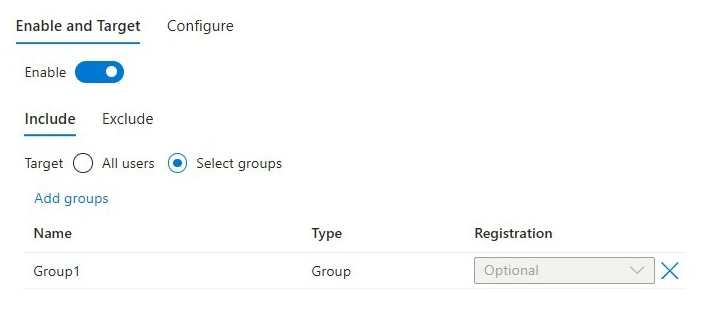
The certificate-based authentication method policy has the Enable and Target settings shown in the Enable and Target exhibit. (Click the Enable and Target tab.)
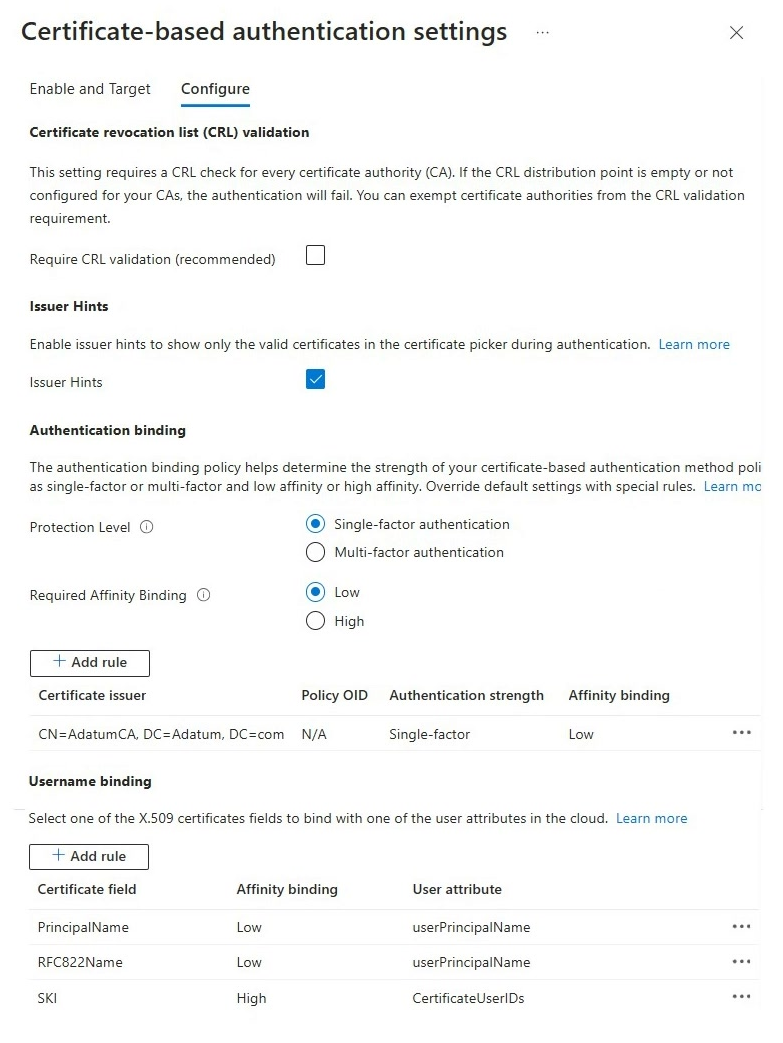
The certificate-based authentication method policy has the Configure settings shown in the Configure exhibit. (Click the Configure tab.)
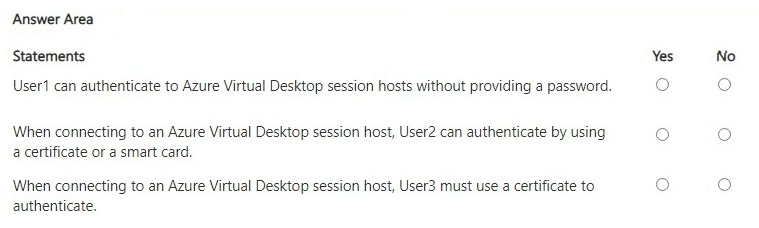
For each of the following statements, select Yes if the statement is true. Otherwise, select No.
Show Answer
Correct Answer: Yes
No
No
Explanation: CBA is enabled only for Group1 and configured as single-factor. User1 can sign in without a password using a certificate. User2 is not targeted for CBA. User3 is not required to use a certificate; the CA policy requires MFA, which single-factor CBA alone does not satisfy.
Question 8
Case study -
This is a case study. Case studies are not timed separately. You can use as much exam time as you would like to complete each case. However, there may be additional case studies and sections on this exam. You must manage your time to ensure that you are able to complete all questions included on this exam in the time provided.
To answer the questions included in a case study, you will need to reference information that is provided in the case study. Case studies might contain exhibits and other resources that provide more information about the scenario that is described in the case study. Each question is independent of the other questions in this case study.
At the end of this case study, a review screen will appear. This screen allows you to review your answers and to make changes before you move to the next section of the exam. After you begin a new section, you cannot return to this section.
To start the case study -
To display the first question in this case study, click the Next button. Use the buttons in the left pane to explore the content of the case study before you answer the questions. Clicking these buttons displays information such as business requirements, existing environment, and problem statements. If the case study has an All Information tab, note that the information displayed is identical to the information displayed on the subsequent tabs. When you are ready to answer a question, click the Question button to return to the question.
Overview -
Northwind Traders is a manufacturing company based in New York City.
Existing Environment -
Identity Environment -
The on-premises network contains an Active Directory Domain Services (AD DS) domain named northwindtraders.com.
Northwind Traders has a Microsoft Entra tenant and a Microsoft Entra Domain Services managed domain. The northwindtraders.com domain syncs with the Microsoft Entra tenant.
Virtual Machines -
The company has an on-premises Hyper-V virtual machine named VM1 that has the following configurations:
• Generation: 1
• Disk size: 2 TB
• Disk format: VHDX
• Disk type: Dynamically expanding
Cloud Services -
Northwind Traders has a Microsoft 365 E5 subscription. The subscription contains 500 users that are assigned Microsoft 365 E5 licenses.
The company has an Azure subscription that contains the resources shown in the following table.
Both subscriptions are linked to the Microsoft Entra tenant.
Requirements -
Planned Changes -
Northwind Traders identifies the following planned changes:
• Deploy an Azure Virtual Desktop host pool that will contain 10 session hosts joined to the Microsoft Entra Domain Services managed domain.
• Configure VM1 as the source image for the Azure Virtual Desktop deployment and upload the image to Azure.
• The Azure Virtual Desktop deployment will provide access to a custom app named App1.
Performance Requirements -
Northwind Traders identifies the following performance requirements:
• Each Azure Virtual Desktop session host must support 15 user sessions.
• Each new user session must be assigned to a single session host until the maximum session limit is reached for that host.
Application Requirements -
Northwind Traders identifies the following application requirements:
• Microsoft OneDrive must launch when users connect to a RemoteApp session in Azure Virtual Desktop.
• App1 requires a desktop resolution of 1280 x 1024.
• Administrative effort must be minimized.
Disaster Recovery Requirements -
Northwind Traders identifies the following disaster recovery requirements for the Azure Virtual Desktop deployment:
• Minimize outages if an Azure region fails.
• Minimize the recovery time objective (RTO).
• Minimize administrative effort in the event of a failover.
Security Requirements -
Northwind Traders identifies the following security requirements:
• When users sign in to the Azure Virtual Desktop deployment by using the Azure Virtual Desktop client, they must authenticate by using their Microsoft Entra username and password only.
• When users sign in to the Azure Virtual Desktop deployment by using a web browser, they must authenticate by using the Microsoft Authenticator app.
• All the Azure Virtual Desktop session hosts deployed by using the VM1 source image must be onboarded to Microsoft Defender for Endpoint.
• The client version and operating system used to connect to the session hosts must be logged.
• The solution must follow the principle of least privilege.
Networking Requirements -
The Azure Virtual Desktop session hosts must be able to access the resources on the on-premises network.
User Profile Requirements -
Northwind Traders identifies the following user profile requirements:
• Users must be able to access share1 by using their Microsoft Entra account.
• Azure Virtual Desktop user profiles must be managed by using FSLogix.
• All user profiles must be stored in share1.
What should you configure to meet the networking requirements?
A. a Site-to-Site (S2S) VPN connection
B. an on-premises data gateway
C. the Networking settings for the host pool
D. a Point-to-Site (P2S) VPN connection
Show Answer
Correct Answer: A
Explanation: Configure a site-to-site (S2S) VPN connection to connect the Azure virtual network hosting the session hosts to the on-premises network, enabling the session hosts to access on-premises resources. A P2S VPN is for individual client connections, not connectivity for the Azure-hosted session hosts.
$19
Get all 322 questions with detailed answers and explanations
Instant download HTML + PDF delivered the moment payment clears.
Secure Stripe checkout we never see or store your card details.
7-day refund if files are defective see our refund policy.