HOTSPOT
-
You have an Azure Virtual Desktop deployment.
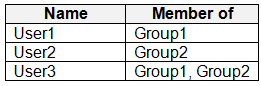
You have a Microsoft Entra tenant that contains the users shown in the following table.
The users have smart devices that have the Microsoft Authenticator app installed.
You create a Conditional Access policy that has the following settings:
• Name: CAPolicy1
• Assignments
o Users or workload identities: Group1
o Target resources: All cloud apps
o Access controls
- Grant access: Require multi-factor authentication
o Enable policy: On
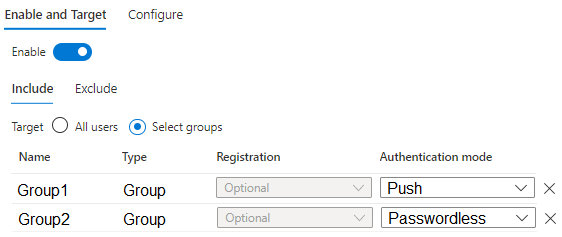
You configure the Microsoft Authenticator settings as shown in the following exhibit.
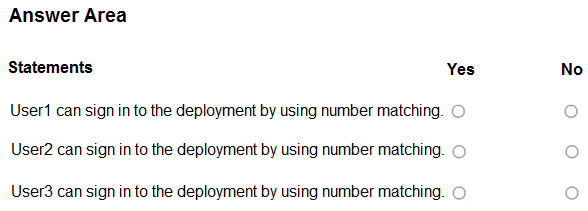
For each of the following statements, select Yes if the statement is true. Otherwise, select No.
NOTE: Each correct selection is worth one point.
Show Answer
Correct Answer: Yes
No
Yes
Explanation: Number matching is used with Microsoft Authenticator push notifications. Group1 is configured for Push, while Group2 is configured for Passwordless. The Conditional Access policy requiring MFA applies only to Group1 members. User1 (Group1) and User3 (Group1 and Group2) can satisfy MFA with Authenticator push using number matching. User2 is not targeted by the Conditional Access policy.
Question 104
Note: This question is part of a series of questions that present the same scenario. Each question in the series contains a unique solution that might meet the stated goals. Some question sets might have more than one correct solution, while others might not have a correct solution.
After you answer a question in this section, you will NOT be able to return to it. As a result, these questions will not appear in the review screen.
You have an Azure Virtual Desktop deployment.
You need to ensure that users are signed out automatically when they disconnect from a session.
Solution: From the Local Group Policy Editor, you configure the Connections settings.
Does this meet the goal?
A. Yes
B. No
Show Answer
Correct Answer: B
Explanation: The goal is to automatically sign out users after they disconnect from an Azure Virtual Desktop session. This is configured through Session Time Limits policies (such as setting a time limit for disconnected sessions and ending the session when the time limit is reached), not the Connections policy settings. Therefore, configuring the Connections settings alone does not meet the goal.
Question 105
You have an Azure Virtual Desktop deployment that contains a host pool named Pool1. All the session hosts in Pool are Microsoft Entra joined.
You have 50 users that will access the deployment by using devices that run Linux.
You need to ensure that the users can sign in to the deployment.
Which custom RDP property should you configure?
A. Targetisaadjoined
B. Enablecredsspsupport
C. securitymode
D. authentication level
Show Answer
Correct Answer: A
Explanation: The correct custom RDP property is targetisaadjoined. This property tells the Remote Desktop client that the destination session host is Microsoft Entra joined, enabling authentication scenarios required for Microsoft Entra joined Azure Virtual Desktop session hosts from supported non-Windows clients such as Linux. The other properties relate to CredSSP, security mode, or authentication level and do not enable Microsoft Entra joined sign-in.
Question 106
You have an Azure subscription that contains an eight-node Storage Spaces Direct cluster named cluster1 and an Azure Virtual Desktop host pool named Pool1. The session hosts in Pool store FSLogix user profiles in cluster1.
You are evaluating the availability of the user profiles in Pool1.
What is the maximum number of nodes that can fail at the same time without users losing access to their user profiles?
A. 2
B. 3
C. 4
D. 5
Show Answer
Correct Answer: A
Explanation: An eight-node Storage Spaces Direct cluster commonly uses three-way mirror resiliency for highly available volumes. Three-way mirroring keeps three copies of each data slab and tolerates the simultaneous failure of up to two servers/drives involved without losing data availability. Therefore, users retain access to FSLogix profiles with at most two node failures; three or more node failures can make some data unavailable.
Question 107
You have an Azure Virtual Desktop session host named Host1.
You need to check the status of Microsoft Defender Antivirus on Host1.
Which PowerShell cmdlet should you run?
A. Get-DscConfigurationStatus
B. Get-MpComputerstatus
C. Get-KdsConfiguration
D. Get-BCStatus
Show Answer
Correct Answer: B
Explanation: Get-MpComputerStatus retrieves the status of Microsoft Defender Antivirus on a Windows machine, including real-time protection, signature versions, scan information, and overall health. The other cmdlets are unrelated: Get-DscConfigurationStatus is for Desired State Configuration, Get-KdsConfiguration is for Key Distribution Service, and Get-BCStatus is for BranchCache.
Question 108
You have an Azure Virtual Desktop deployment that contains a host pool named Pool1. Pool1 contains three session hosts.
You need to implement a private endpoint connection for Pool.
Which two actions should you perform? Each correct answer presents part of the solution.
NOTE: Each correct selection is worth one point.
A. Create a private endpoint by using the global target sub-resource.
B. Reregister the Microsoft.VirtualMachineImages resource provider for the Azure subscription.
C. Reregister the Microsoft.DesktopVirtualization resource provider for the Azure subscription.
D. Create a private endpoint by using the connection target sub-resource.
E. Create a private endpoint by using the feed target sub-resource.
Show Answer
Correct Answer: C, D
Explanation: To implement Azure Virtual Desktop Private Link for a host pool, the Microsoft.DesktopVirtualization resource provider must be reregistered so the subscription supports the required Private Link functionality. When creating the private endpoint for a host pool, the correct target sub-resource is connection. The feed sub-resource is for the feed endpoint, and global is not the host pool connection endpoint.
Question 109
You have an Azure Virtual Desktop host pool that uses FSLogix user profiles. The user profiles are stored in an Azure Files share named share1.
You need to back up share1 by using Azure Backup.
What should you create first? To answer, select the appropriate options in the answer area.
NOTE: Each correct selection is worth one point.
A. an Azure Storage account
B. an Azure Files share
C. an Azure Backup vault
D. an Azure Recovery Services vault
Show Answer
Correct Answer: D
Explanation: Azure Files backups with Azure Backup are configured through a Recovery Services vault. Because the file share (share1) already exists, the associated storage account already exists as well. Therefore, the first resource that must be created is a Recovery Services vault. A Backup vault is used for newer workloads such as Azure Blobs, Azure Disks, and operational backups, not Azure Files in this context.
Question 110
HOTSPOT
-
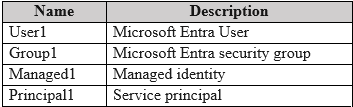
You have an Azure subscription that includes the identities shown in the following table.
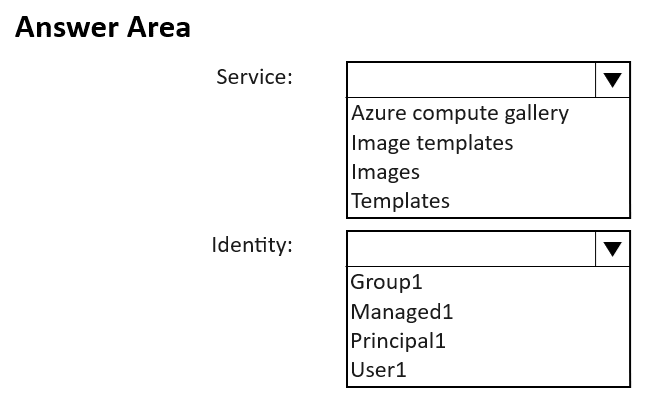
You need to ensure that you can create golden images by using the Azure Image Builder from the Azure portal.
Which Azure service should you use and which identity should the service use? To answer, select the appropriate options in the answer area.
NOTE: Each correct selection is worth one point.
Explanation: Azure Image Builder in the Azure portal is managed through Image Templates. Azure Image Builder uses a user-assigned managed identity to access Azure resources securely during image creation and distribution.
Question 111
You have an Azure Virtual Desktop deployment that contains a pooled host pool named Pool1. Pool1 contains five session hosts.
You plan to deploy two apps named App1 and App2. The solution must meet the following requirements:
• All the session hosts must contain both apps.
• All users must connect to a full desktop session.
• Only users in the sales department must be able to use App1.
• Only users in the research department must be able to use App2.
You need to ensure that the users in each department can see only their assigned app when they connect to Pool1.
What should you use?
A. FSLogix application masking
B. MSIX app attach
C. RemoteApp application groups
D. RemoteApp streaming
Show Answer
Correct Answer: A
Explanation: FSLogix application masking allows both applications to be installed on every session host while controlling application visibility and access based on user or group membership. Because users connect to a full desktop session (not RemoteApp), application masking is the appropriate way to ensure Sales users see only App1 and Research users see only App2. MSIX app attach is an app delivery mechanism, not a per-user visibility control solution, and RemoteApp application groups are for publishing individual remote apps rather than full desktop sessions.
Question 112
HOTSPOT
-
You have an Azure Virtual Desktop host pool named Pool1.
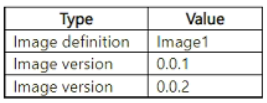
You have an Azure Compute Gallery that contains an image. The image contains the resources shown in the following table.
Pool1 contains a single session host named SH1.
You need to deploy a new session host named SH2 that will be used to perform troubleshooting. The solution must meet the following requirements:
• SH2 must use image version 0.0.1.
• Administrative effort must be minimized.
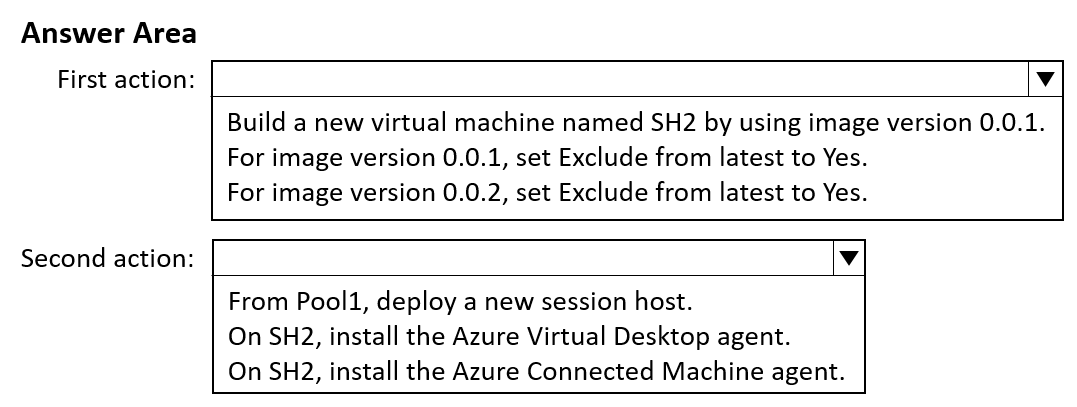
Which two actions should you perform in order? To answer, select the appropriate options in the answer area.
NOTE: Each correct selection is worth one point.
Show Answer
Correct Answer: First action:
For image version 0.0.2, set Exclude from latest to Yes.
Second action:
From Pool1, deploy a new session host.
Explanation: Excluding version 0.0.2 from 'latest' makes version 0.0.1 the latest eligible image. Deploying a new session host from the host pool then automatically uses version 0.0.1, minimizing administrative effort.
$19
Get all 322 questions with detailed answers and explanations
Instant download HTML + PDF delivered the moment payment clears.
Secure Stripe checkout we never see or store your card details.
7-day refund if files are defective see our refund policy.