Your company has a single office and has 40 employees.
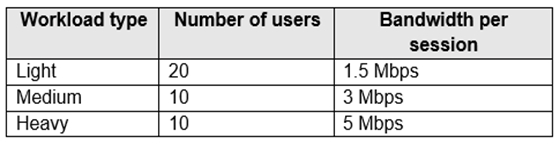
You are planning an Azure Virtual Desktop deployment. The estimated user workloads are shown in the following table.
Half the users of each workload type work from home. All the users who work from home do NOT establish a VPN connection to the office.
Approximately how much bandwidth is needed between the office and Azure to support the planned workloads?
A. 9.5 Mbps
B. 55 Mbps
C. 110 Mbps
D. 220 Mbps
Show Answer
Correct Answer: B
Explanation: Half of each workload group works from home and does not use the office connection, so count the other half: 10 × 1.5 Mbps + 5 × 3 Mbps + 5 × 5 Mbps = 55 Mbps.
Question 53
You have an Azure Virtual Desktop deployment.
You need to implement FSLogix to host user profiles in an Azure Storage account by using Azure file shares. The solution must meet the following requirements:
• Access to a session host must be allowed only if the user profile is available from the storage account.
• Local profiles must NOT be created on the session hosts.
Which FSLogix registry setting should you use?
A. NoProfileContainingFolder
B. PreventLoginWithFailure
C. ProfileType
D. DeleteLocalProfileWhenVHDShouldApply
Show Answer
Correct Answer: B
Explanation: The FSLogix registry setting PreventLoginWithFailure prevents users from signing in if the FSLogix profile container (VHD/VHDX) cannot be attached. This ensures access is allowed only when the profile is available and prevents fallback to creating a local profile. DeleteLocalProfileWhenVHDShouldApply only removes an existing local profile when a profile container should apply; it does not block logon on profile attach failure. The other options do not enforce this behavior.
Question 53
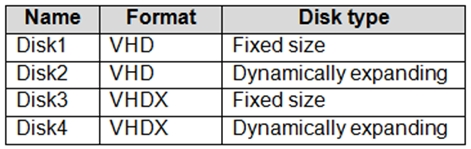
You have an Azure storage account that contains the generalized Windows 10 disk images shown in the following table.
You need to create an image that will be used to deploy an Azure Virtual Desktop session host.
Which disk should you use?
A. Disk1
B. Disk2
C. Disk3
D. Disk4
Show Answer
Correct Answer: A
Explanation: Use Disk1. Azure requires an uploaded Windows disk image to be in fixed-size VHD format; the other disks are either dynamically expanding or VHDX.
Question 54
You have an Azure subscription.
You plan to deploy Azure Virtual Desktop.
You need to maximize network throughput for the session hosts in the deployment.
What will have the largest impact on the network throughput of each session host?
A. the number of network interfaces
B. Accelerated Networking
C. the virtual machine size
D. RDP Shortpath
Show Answer
Correct Answer: C
Explanation: The virtual machine size has the largest impact on the maximum network bandwidth and throughput available to an Azure VM. Larger VM sizes provide higher network performance limits. Adding multiple network interfaces does not increase the VM's aggregate throughput limit, Accelerated Networking reduces latency and CPU overhead but does not change the VM size's maximum bandwidth, and RDP Shortpath optimizes the RDP connection path rather than the session host's overall network throughput.
Question 54
Note: This question is part of a series of questions that present the same scenario. Each question in the series contains a unique solution that might meet the stated goals. Some question sets might have more than one correct solution, while others might not have a correct solution.
After you answer a question in this section, you will NOT be able to return to it. As a result, these questions will not appear in the review screen.
You have the following:
✑ A Microsoft 365 E5 tenant
✑ An on-premises Active Directory domain
✑ A hybrid Azure Active Directory (Azure AD) tenant
✑ An Azure Active Directory Domain Services (Azure AD DS) managed domain
An Azure Virtual Desktop deployment
The Azure Virtual Desktop deployment contains personal desktops that are hybrid joined to the on-premises domain and enrolled in Microsoft Intune.
You need to configure the security settings for the Microsoft Edge browsers on the personal desktops.
Solution: You configure a compliance policy in Intune.
Does this meet the goal?
A. Yes
B. No
Show Answer
Correct Answer: B
Explanation: No. An Intune compliance policy evaluates whether devices meet requirements; it does not configure Microsoft Edge security settings. Use an Intune configuration profile or security baseline to apply those settings.
Question 55
HOTSPOT
-
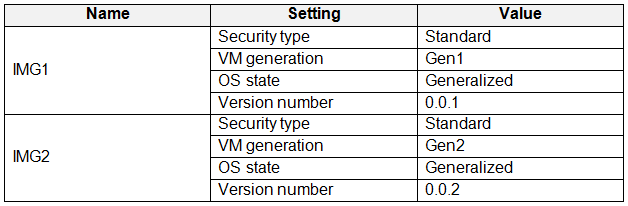
You have an Azure Compute Gallery that contains the virtual machine image definitions shown in the following table.
You create a new Azure virtual machine named VM1 as shown in the following table.
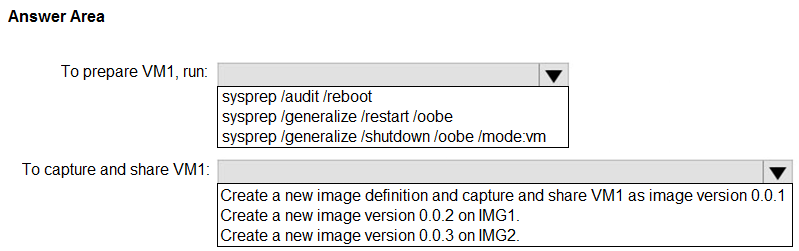
You need to prepare VM1, and then capture and share VM1 to the Azure Compute Gallery. The solution must minimize administrative effort.
What should you do? To answer, select the appropriate options in the answer area.
NOTE: Each correct selection is worth one point.
Show Answer
Correct Answer: To prepare VM1: sysprep /generalize /shutdown /oobe /mode:vm
To capture and share VM1: Create a new image definition and capture and share VM1 as image version 0.0.1
Explanation: VM1 is Gen2 with Trusted Launch, while the existing image definitions are Standard security. Azure Compute Gallery image definitions must match properties such as security type and generation, so a new image definition is required. Sysprep with /generalize /shutdown /oobe /mode:vm is the recommended preparation for Azure VM image capture.
Question 55
You plan to deploy Azure Virtual Desktop to meet the department requirements shown in the following table.
You plan to use Azure Virtual Desktop host pools with load balancing and autoscaling.
You need to recommend a host pool design that meets the requirements. The solution must minimize costs.
What is the minimum number of host pools you should recommend?
A. 1
B. 2
C. 3
D. 4
Show Answer
Correct Answer: C
Explanation: Three host pools are sufficient: one for Research’s single-session desktops, one for Engineering’s GPU-enabled multi-session desktops, and one shared by IT’s multi-session desktops and Finance’s RemoteApps. IT and Finance can use separate application groups in the shared pool, avoiding a fourth pool and minimizing costs.
Question 56
Your company has a main office and two branch offices. Each office connects directly to the internet. The router in each branch office is configured as an endpoint for the following VPNs:
✑ A VPN connection to the main office
✑ A site-to-site VPN to Azure
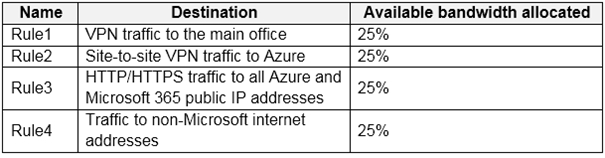
The routers in each branch office have the Quality of Service (QoS) rules shown in the following table.
Users in the branch office report slow responses and connection errors when they attempt to connect to Azure Virtual Desktop resources.
You need to modify the QoS rules on the branch office routers to improve Azure Virtual Desktop performance.
For which rule should you increase the bandwidth allocation?
A. Rule2
B. Rule3
C. Rule4
D. Rule1
Show Answer
Correct Answer: B
Explanation: Increase Rule3. Azure Virtual Desktop normally uses Azure’s public service endpoints, reached over the internet; the mere presence of a site-to-site VPN does not mean AVD traffic traverses that VPN. Rule3 covers HTTP/HTTPS traffic to Azure public IP addresses, so increasing its allocation is the relevant change.
Question 57
HOTSPOT
-
You have an Azure Virtual Desktop deployment that contains a host pool named Pool.
You have a virtual machine named Server1 that runs Windows Server.
You need to add Server1 to Pool1.
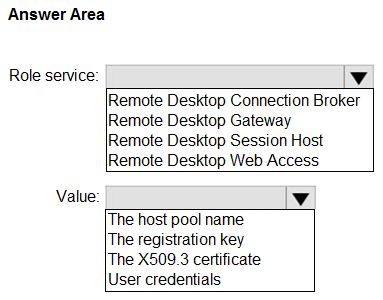
Which role service should you install on Server first, and which value should you provide during the installation of the Azure Virtual Desktop agent? To answer, select the appropriate options in the answer area.
NOTE: Each correct selection is worth one point.
Show Answer
Correct Answer: Role service: Remote Desktop Session Host
Value: The registration key
Explanation: A Windows Server must have the Remote Desktop Session Host role to function as an Azure Virtual Desktop session host. During Azure Virtual Desktop agent installation, use the host pool registration key to register the server with the target host pool.
Question 57
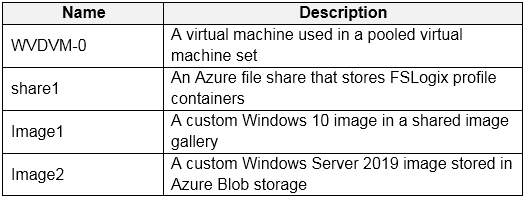
You have an Azure subscription that contains the resources shown in the following table.
Which resources can you back up by using Azure Backup?
A. WVDVM-0 and share1 only
B. WVDVM-0 only
C. WVDVM-0, Image1, and Image2 only
D. WVDVM-0, share1, and Image1 only
E. WVDVM-0, share1, Image1, and Image2
Show Answer
Correct Answer: A
Explanation: Azure Backup can protect the virtual machine WVDVM-0 and the Azure file share share1. Image1 is a Shared Image Gallery image, and Image2 is a VM image stored in Blob storage; neither is backed up directly as an Azure Backup workload. Blob backup applies to supported blob data, not VM images.
$19
Get all 322 questions with detailed answers and explanations
Instant download HTML + PDF delivered the moment payment clears.
Secure Stripe checkout we never see or store your card details.
7-day refund if files are defective see our refund policy.