You are a project coordinator for a small consulting firm.
You are responsible for tracking client communications, managing project timelines, and preparing weekly status updates for internal stakeholders.
You have a Microsoft 365 Copilot license.
You create an agent to help you monitor project milestones, follow up on client emails, and generate weekly summary reports.
With whom can you share the agent?
A. only the people in your organization
B. the people in your organization and people that have personal Microsoft accounts
C. only Microsoft Teams channel members
D. any person who has a valid email address
Show Answer
Correct Answer: A
Explanation: Microsoft 365 Copilot agents are shared within the Microsoft 365 tenant. They can be shared with users in the same organization but are not shareable with external users, personal Microsoft accounts, or arbitrary email addresses unless specifically published through other supported organizational mechanisms.
Question 32
You have several separate Microsoft 365 Copilot conversations.
You need to gather the conversations so that you can find them more easily, and the conversations can share the same reference material.
What is the best solution to achieve the goal? More than one answer choice may achieve the goal. Select the BEST answer.
A. a notebook
B. an agent
C. an app
D. a page
Show Answer
Correct Answer: A
Explanation: Microsoft 365 Copilot Notebooks are designed to organize related Copilot conversations in one place and allow them to share the same reference material (such as files, notes, and pages). This makes the conversations easier to find and provides a common context across them. Agents, apps, and pages do not primarily serve this purpose.
Question 34
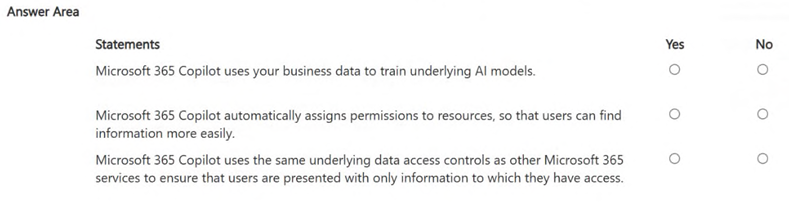
HOTSPOT -
For each of the following statements, select Yes if the statement is true. Otherwise, select No.
NOTE: Each correct selection is worth one point.
Show Answer
Correct Answer: No
No
Yes
Explanation: Microsoft 365 Copilot does not use customer business data to train foundation models, does not automatically assign permissions, and respects existing Microsoft 365 identity and permission controls so users only access authorized data.
Question 35
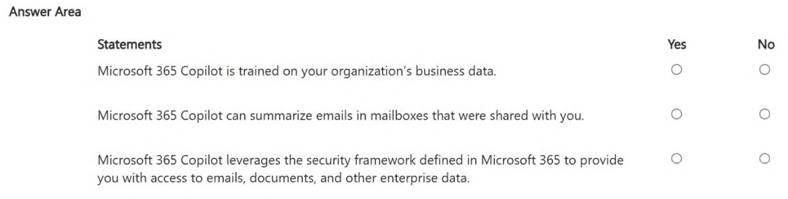
HOTSPOT -
For each of the following statements, select Yes if the statement is true. Otherwise, select No.
NOTE: Each correct selection is worth one point.
Show Answer
Correct Answer: No
Yes
Yes
Explanation: Microsoft 365 Copilot is not trained on your organization's business data; it uses pretrained models and grounds responses with Microsoft 365 data at runtime while respecting permissions. It can summarize emails you have permission to access, including shared mailboxes. It leverages the Microsoft 365 security, identity, compliance, and permissions framework.
Question 36
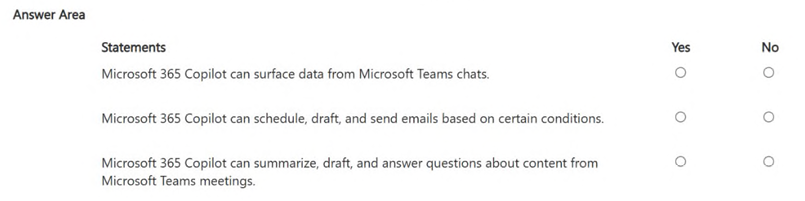
HOTSPOT -
For each of the following statements, select Yes if the statement is true. Otherwise, select No.
NOTE: Each correct selection is worth one point.
Show Answer
Correct Answer: Yes
No
Yes
Explanation: Microsoft 365 Copilot can use Teams chat data and summarize/answer questions about Teams meetings. It can draft emails, but automatic scheduling and sending based on conditions is handled by automation tools such as Power Automate, not Copilot itself.
Question 37
You are using Microsoft 365 Copilot to plan a trip and have asked Copilot to remember several details about the trip.
You cancel the trip plans.
You need to ensure that Copilot forgets the details.
What should you do?
A. From the My Account portal, delete the Copilot activity history.
B. From Copilot, delete memories.
C. From Copilot, delete custom instructions.
D. From Copilot, delete all the conversation about the trip.
Show Answer
Correct Answer: B
Explanation: Information you explicitly ask Copilot to remember is stored as saved memories. To make Copilot forget those details, delete the saved memories. Deleting chat history or activity history does not remove saved memories, and custom instructions control behavior rather than stored remembered information.
Question 38
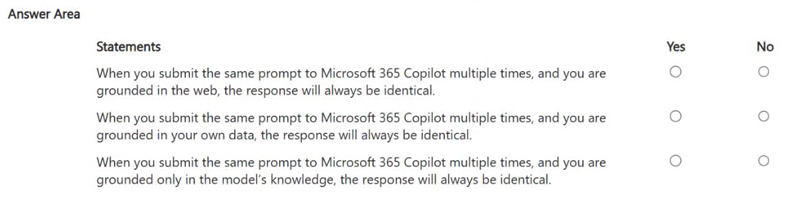
HOTSPOT -
For each of the following statements, select Yes if the statement is true. Otherwise, select No.
NOTE: Each correct selection is worth one point.
Show Answer
Correct Answer: No
No
No
Explanation: Copilot responses are not guaranteed to be identical across repeated prompts. Web grounding can change with web content, organizational data may change and generation is probabilistic, and model-only responses are also not guaranteed to be identical.
Question 39
You are creating a prompt in Microsoft 365 Copilot to get information about a proposal.
You need to ensure that the response is grounded in the proposal's information.
What is the best approach to achieve the goal? More than one answer choice may achieve the goal. Select the BEST answer.
A. Add context about the intended audience.
B. Instruct Copilot to rely on its training data to infer proposal details.
C. Reference the proposal content in the prompt.
D. Add a specific goal that you want Copilot to accomplish.
Show Answer
Correct Answer: C
Explanation: To ensure Microsoft 365 Copilot's response is grounded in the proposal itself, explicitly reference or attach the proposal content in the prompt (for example, 'Based on the attached proposal...'). Adding audience or a goal improves the prompt but does not ensure grounding in the proposal, and relying on training data is the opposite of the requirement.
Question 40
HOTSPOT -
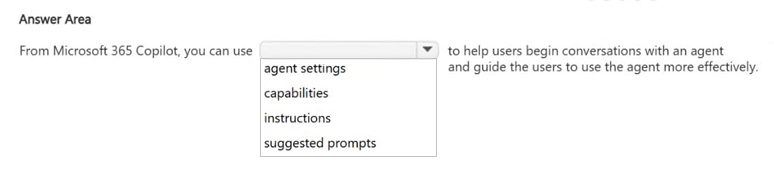
Select the answer that correctly completes the sentence.
Show Answer
Correct Answer: suggested prompts
Explanation: Suggested prompts (conversation starters) help users begin conversations with an agent and guide them to use the agent more effectively.
Question 42
You create a prompt in Microsoft 365 Copilot to help you create a draft project report.
You need the prompt to be available in the Copilot Prompt Gallery.
What should you do first?
A. Create a notebook.
B. Add an agent.
C. Create a page.
D. Run the prompt.
Show Answer
Correct Answer: D
Explanation: To make a prompt available in the Microsoft 365 Copilot Prompt Gallery, you first need to execute (run) the prompt. After it has been run, it can be saved and reused in the Prompt Gallery. Creating a notebook, adding an agent, or creating a page are not the prerequisite first step for a prompt you have just authored.
$19
Get all 85 questions with detailed answers and explanations
Instant download HTML + PDF delivered the moment payment clears.
Secure Stripe checkout we never see or store your card details.
7-day refund if files are defective see our refund policy.