HOTSPOT
-
You have a Microsoft 365 Copilot license.
You plan to run several prompts.
What should you use to ensure that Copilot generates the best response for each prompt? More than one answer choice may achieve the goal. To answer, select the BEST options in the answer area.
NOTE: Each correct selection is worth one point.
Show Answer
Correct Answer: Prompt 1: The Analyst agent
Prompt 2: The Researcher agent
Prompt 3: Chat
Explanation: Use the Analyst agent for structured data analysis and visualization, the Researcher agent for synthesizing internal and web sources with citations, and Chat for drafting/refining executive communications from provided documents.
Question 20
You need to access Microsoft 365 Copilot from a web browser.
Which URL should you use?
A. https://m365.cloud.microsoft
B. https://copilotstudio.microsoft.com
C. https://myapps.microsoft.com
D. https://myaccount.microsoft.com
Show Answer
Correct Answer: A
Explanation: Microsoft 365 Copilot on the web is accessed through the Microsoft 365 app at https://m365.cloud.microsoft. The other URLs are for Copilot Studio, My Apps, and My Account, not the Microsoft 365 Copilot web experience.
Question 21
HOTSPOT
-
Select the answer that correctly completes the sentence.
Show Answer
Correct Answer: Microsoft Purview
Explanation: Microsoft Purview provides governance, compliance, and data protection capabilities for Microsoft 365 Copilot, including applying governance policies to Copilot-generated interactions.
Question 22
HOTSPOT
-
Select the answer that correctly completes the sentence.
Show Answer
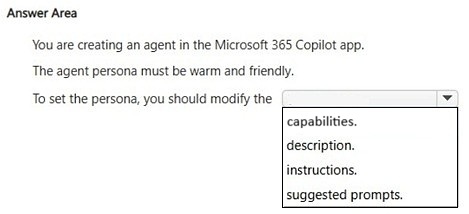
Correct Answer: instructions
Explanation: In Microsoft 365 Copilot agents, the persona (such as warm and friendly tone) is defined in the agent's instructions, which guide behavior and communication style.
Question 23
HOTSPOT
-
Select the answer that correctly completes the sentence.
Show Answer
Correct Answer: cannot modify the settings of
Explanation: The Researcher agent is a Microsoft-provided agent whose settings are not directly modifiable from Microsoft 365.
Question 24
You use Microsoft 365 Copilot.
You need to delete all your conversations by using the least amount of effort.
What is the best approach to achieve the goal? More than one answer choice may achieve the goal. Select the BEST answer.
A. the Microsoft 365 Copilot web app
B. the My Account portal in Microsoft 365
C. the Microsoft 365 Copilot desktop app
D. the Settings app in Windows 11
Show Answer
Correct Answer: B
Explanation: The My Account portal provides a centralized privacy/data management location where you can delete all Microsoft 365 Copilot conversation history in one action, making it the least-effort approach. The Copilot apps are primarily used to manage conversations individually rather than bulk-delete all history, and the Windows Settings app does not manage Microsoft 365 Copilot conversation history.
Question 25
HOTSPOT
-
For each of the following statements, select Yes if the statement is true. Otherwise, select No.
NOTE: Each correct selection is worth one point.
Show Answer
Correct Answer: No
Yes
No
Explanation: Agents created in the Microsoft 365 Copilot app are private by default, can be used in Microsoft Teams when available/shared appropriately, and shared users cannot modify the creator's agent instructions.
Question 26
HOTSPOT
-
Select the answer that correctly completes the sentence.
Show Answer
Correct Answer: users accept the AI-generated output without verifying its accuracy.
Explanation: Overreliance refers to trusting or relying on AI outputs without appropriate human verification or critical evaluation.
Question 27
You use the Researcher agent in Microsoft 365 Copilot to generate a report.
What can you use to verify whether the report was generated by using valid sources?
A. citations
B. instructions
C. memory
D. capabilities
Show Answer
Correct Answer: A
Explanation: Researcher reports include citations/sources that allow you to verify the origin and validity of the information used. Instructions are the prompts given to the agent, memory stores user context, and capabilities describe what the agent can do, not the evidence supporting a report.
Question 28
You use Microsoft 365 Copilot to generate a training plan.
You need to check if there are any existing training plans in your organization that are similar to the new training plan.
What should you use in Copilot?
A. Search
B. Designer
C. Apps
D. Pages
Show Answer
Correct Answer: A
Explanation: Copilot Search is used to find existing documents, files, and organizational knowledge across Microsoft 365. It is the appropriate feature to locate similar training plans that already exist. Designer creates visual content, Apps accesses integrated apps, and Pages is for organizing Copilot-generated content rather than searching organizational data.
$19
Get all 85 questions with detailed answers and explanations
Instant download HTML + PDF delivered the moment payment clears.
Secure Stripe checkout we never see or store your card details.
7-day refund if files are defective see our refund policy.