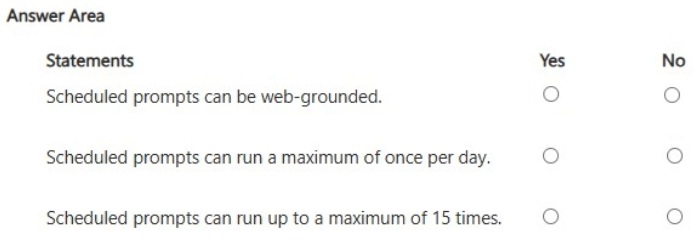
HOTSPOT
-
For each of the following statements, select Yes if the statement is true. Otherwise, select No.
NOTE: Each correct selection is worth one point.
Show Answer
Correct Answer: Yes
Yes
No
Explanation: Scheduled prompts can be web-grounded. Their maximum frequency is once per day, and they are not limited to only 15 total runs.
Question 5
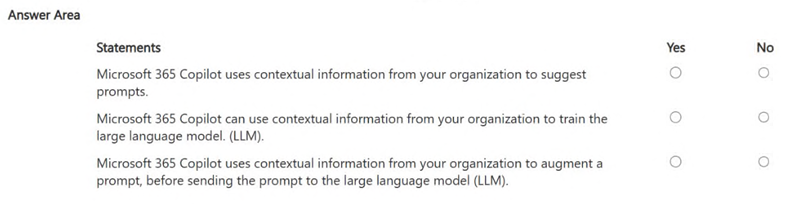
HOTSPOT -
For each of the following statements, select Yes if the statement is true. Otherwise, select No.
NOTE: Each correct selection is worth one point.
Show Answer
Correct Answer: 1. Yes
2. No
3. Yes
Explanation: Microsoft 365 Copilot uses organizational context to suggest prompts and enrich a prompt before sending it to the LLM. It does not use your organization’s data to train the LLM.
Question 6
You receive several images from a colleague.
You suspect that the images were generated by using Microsoft 365 Copilot.
What can you use to verify whether the images were AI-generated?
A. file names
B. watermarks
C. content credentials
D. file descriptions
Show Answer
Correct Answer: C
Explanation: Content credentials can record verifiable provenance information, including whether an image was AI-generated. File names and descriptions are not reliable indicators, and a visible watermark may be absent or removed.
Question 6
HOTSPOT
-
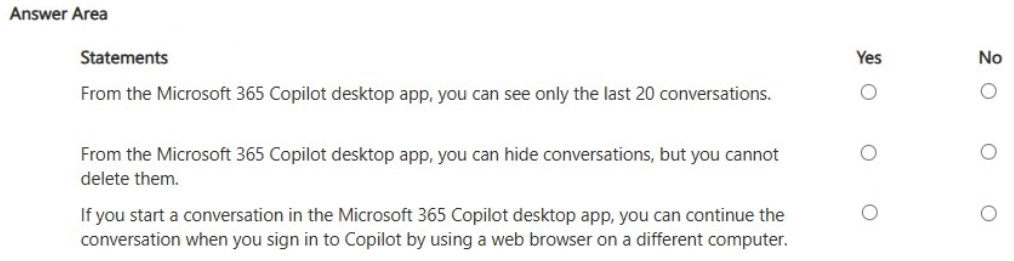
For each of the following statements, select Yes if the statement is true. Otherwise, select No.
NOTE: Each correct selection is worth one point.
Show Answer
Correct Answer: No
No
Yes
Explanation: The desktop app is not limited to only the last 20 conversations, supports deleting conversations, and conversation history syncs across signed-in devices/browsers.
Question 7
HOTSPOT
-
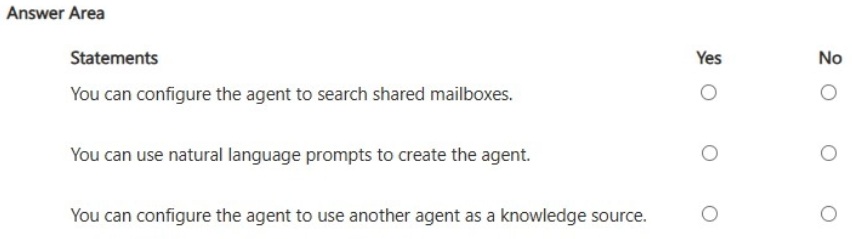
You are creating an agent in the Microsoft 365 Copilot app.
For each of the following statements, select Yes if the statement is true. Otherwise, select No.
NOTE: Each correct selection is worth one point.
Show Answer
Correct Answer: No
Yes
No
Explanation: In the Microsoft 365 Copilot app's agent builder, you can create agents using natural language prompts. Shared mailboxes and other agents are not supported as knowledge sources in the app (those capabilities are associated with more advanced Copilot Studio scenarios).
Question 7
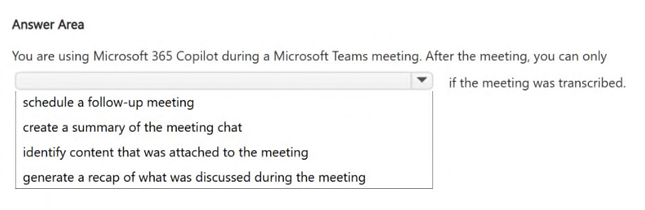
HOTSPOT
Select the answer that correctly completes the sentence.
Show Answer
Correct Answer: generate a recap of what was discussed during the meeting
Explanation: A post-meeting recap of the spoken discussion requires a meeting transcript.
Question 8
HOTSPOT
-
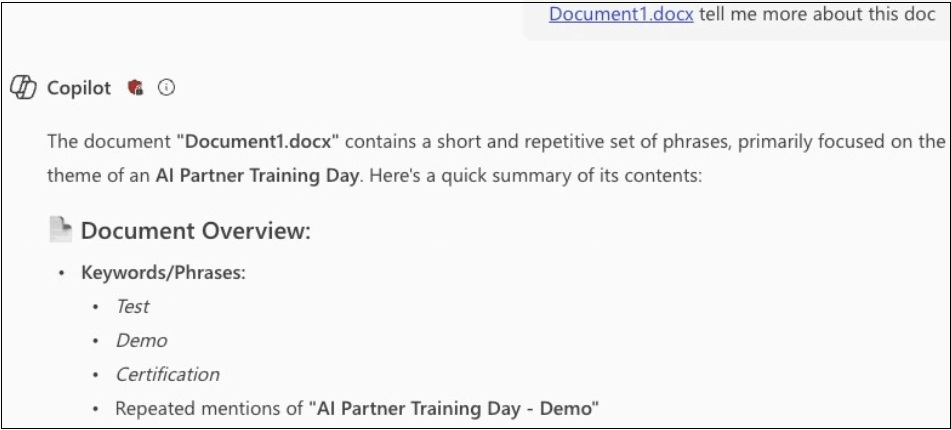
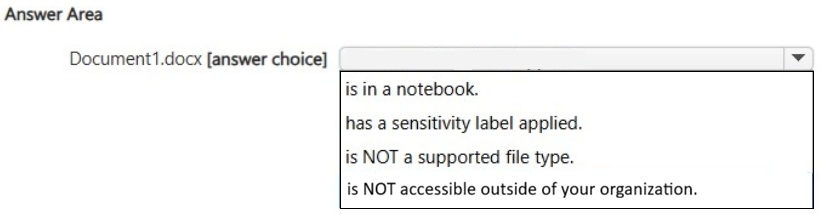
You have a Microsoft 365 Copilot conversation as shown in the following exhibit.
Use the drop-down menus to select the answer choice that completes the statement based on the information presented in the graphic.
Show Answer
Correct Answer: has a sensitivity label applied.
Explanation: The document is a supported .docx file and Copilot is able to reference it. The shield indicator in the interface is consistent with Microsoft Purview sensitivity labeling, making the best choice that the document has a sensitivity label applied.
Question 8
You are comparing the difference between Microsoft 365 Copilot and Microsoft 365 Copilot Chat.
What is available in both versions?
A. the Researcher agent
B. Copilot Pages
C. Copilot Notebooks
Show Answer
Correct Answer: B
Explanation: Copilot Pages is available in both Microsoft 365 Copilot and Microsoft 365 Copilot Chat. The Researcher agent and Copilot Notebooks are not generally available in the basic Copilot Chat experience.
Question 9
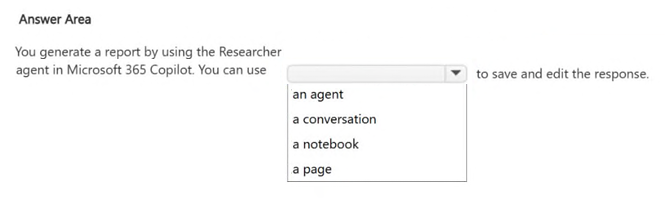
HOTSPOT -
Select the answer that correctly completes the sentence.
Show Answer
Correct Answer: a page
Explanation: A Copilot Page lets you save and edit a response generated by the Researcher agent.
Question 9
You ask Microsoft 365 Copilot to create a report based on information from the web.
You verify the response and discover that some information is fictional.
What is this an example of?
A. deepfake
B. fabrication
C. overreliance
D. prompt injection
E. bias
Show Answer
Correct Answer: B
Explanation: This is an example of fabrication (often called an AI hallucination), where the AI generates false or fictional information and presents it as if it were factual. It is not a deepfake, prompt injection, overreliance, or bias.
$19
Get all 85 questions with detailed answers and explanations
Instant download HTML + PDF delivered the moment payment clears.
Secure Stripe checkout we never see or store your card details.
7-day refund if files are defective see our refund policy.