HOTSPOT
-
Select the answer that correctly completes the sentence.
Show Answer
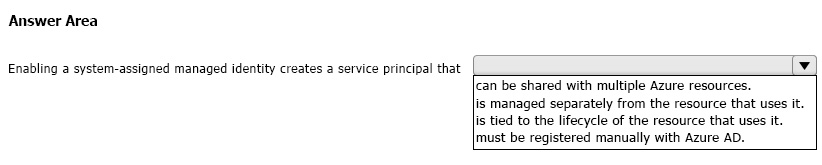
Correct Answer: is tied to the lifecycle of the resource that uses it.
Explanation: A system-assigned managed identity creates a service principal automatically in Microsoft Entra ID that is bound to the Azure resource. It is created and deleted with that resource and cannot be shared across multiple resources.
Question 56
You plan to move resources to the cloud.
You are evaluating the use of Infrastructure as a service (IaaS), Platform as a service (PaaS), and Software as a service (SaaS) cloud models.
You plan to manage only the data, user accounts, and user devices for a cloud-based app.
Which cloud model will you use?
A. SaaS
B. PaaS
C. IaaS
Show Answer
Correct Answer: A
Explanation: In the SaaS shared responsibility model, the cloud provider manages the application and underlying infrastructure, while the customer is responsible primarily for their data, user accounts/identities, and endpoint devices. Managing only those three areas matches SaaS.
Question 57
HOTSPOT
-
Select the answer that correctly completes the sentence.
Show Answer
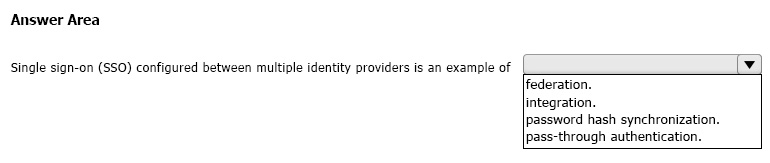
Correct Answer: federation
Explanation: SSO configured between multiple identity providers is federation, where trust relationships allow authentication across different identity systems. Integration is broader, while password hash synchronization and pass-through authentication are Azure AD sign-in methods, not multi-provider SSO models.
Question 58
HOTSPOT
-
For each of the following statements, select Yes if the statement is true. Otherwise, select No.
NOTE: Each correct selection is worth one point.
Show Answer
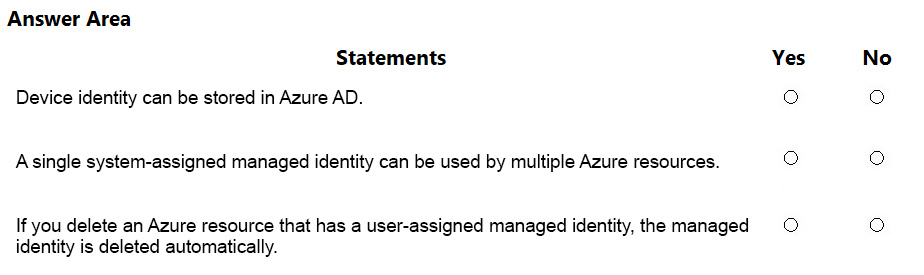
Correct Answer: Yes
No
No
Explanation: Device identities are stored in Azure AD (Microsoft Entra ID). A system-assigned managed identity is tied to a single resource and cannot be shared. User-assigned managed identities are independent resources and are not deleted when an attached resource is deleted.
Question 59
HOTSPOT
-
For each of the following statements, select Yes if the statement is true. Otherwise, select No.
NOTE: Each correct selection is worth one point.
Show Answer
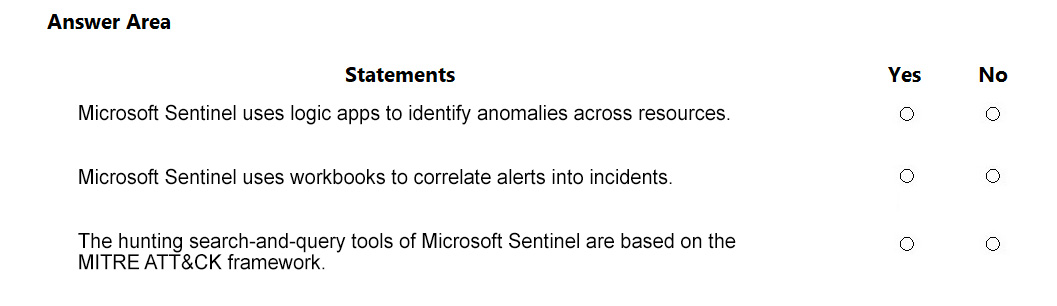
Correct Answer: No
No
Yes
Explanation: Logic Apps automate workflows (playbooks), not anomaly detection. Analytics rules correlate alerts into incidents, not workbooks. Microsoft Sentinel hunting queries are aligned with the MITRE ATT&CK framework.
Question 60
HOTSPOT
-
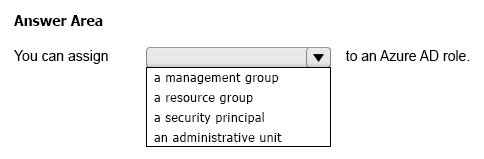
Select the answer that correctly completes the sentence.
Show Answer
Correct Answer: a security principal
Explanation: Microsoft Entra ID (Azure AD) roles are assigned to security principals (users, groups, service principals, or managed identities). Management groups and resource groups are Azure resource scopes for Azure RBAC, not assignable identities, and administrative units are containers.
Question 61
HOTSPOT
-
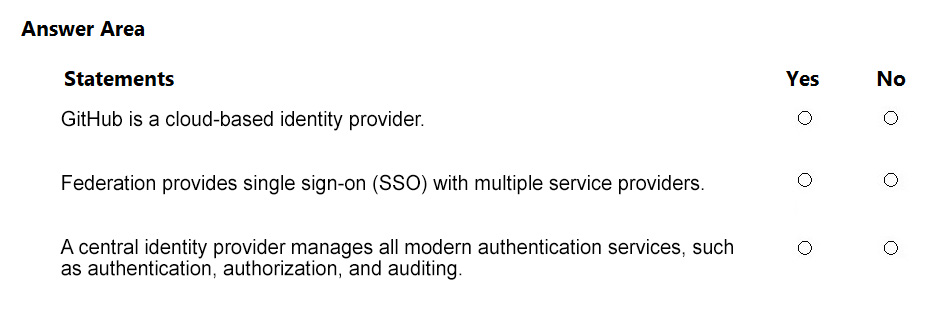
For each of the following statements, select Yes if the statement is true. Otherwise, select No.
NOTE: Each correct selection is worth one point.
Show Answer
Correct Answer: Yes
Yes
Yes
Explanation: Microsoft Entra documentation lists GitHub as an example of a cloud-based identity provider. Federation enables SSO across multiple service providers through trusted identity relationships. A central identity provider provides modern identity services including authentication, authorization, and auditing/monitoring capabilities.
Question 62
HOTSPOT
-
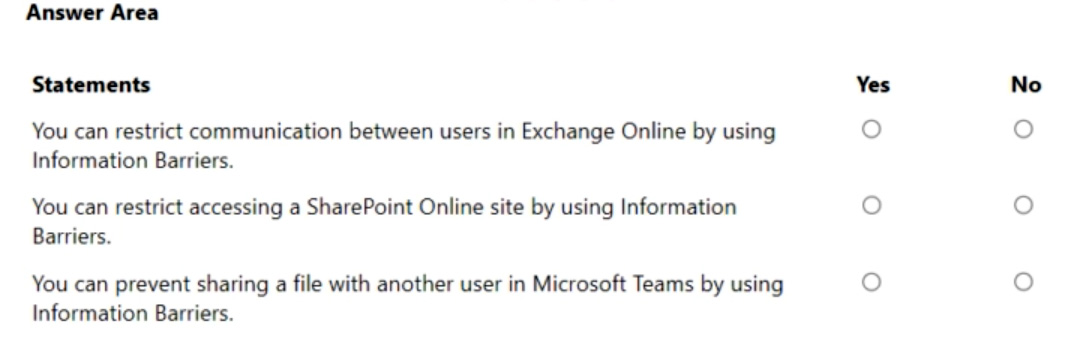
For each of the following statements, select Yes if the statement is true. Otherwise, select No.
NOTE: Each correct selection is worth one point.
Show Answer
Correct Answer: No
Yes
Yes
Explanation: Information Barriers do not restrict Exchange Online email communication, but they do restrict collaboration/access in SharePoint/OneDrive and prevent file sharing/collaboration in Microsoft Teams via those services.
Question 63
You have an Azure subscription.
You need to implement approval-based, time-bound role activation.
What should you use?
A. access reviews in Azure AD
B. Azure AD Privileged Identity Management (PIM)
C. Azure AD Identity Protection
D. Conditional access in Azure AD
Show Answer
Correct Answer: B
Explanation: Azure AD Privileged Identity Management (PIM) provides just-in-time, approval-based, and time-bound activation of privileged roles in Azure and Microsoft Entra ID. Access reviews are for periodic review of access, Identity Protection focuses on risk-based identity security, and Conditional Access enforces access policies rather than privileged role activation.
Question 64
Which portal contains the solution catalog?
A. Microsoft Purview compliance portal
B. Microsoft 365 Defender portal
C. Microsoft 365 admin center
D. Microsoft 365 Apps admin center
Show Answer
Correct Answer: A
Explanation: The Microsoft 365 Solution Catalog is located in the Microsoft Purview compliance portal, where organizations can discover and manage Microsoft 365 compliance and risk solutions. The other portals serve different administrative or security functions and do not host the Microsoft 365 Solution Catalog.
$19
Get all 235 questions with detailed answers and explanations
Instant download HTML + PDF delivered the moment payment clears.
Secure Stripe checkout we never see or store your card details.
7-day refund if files are defective see our refund policy.