Note: This question is part of a series of questions that present the same scenario. Each question in the series contains a unique solution that might meet the stated goals. Some question sets might have more than one correct solution, while others might not have a correct solution.
After you answer a question in this section, you will NOT be able to return to it. As a result, these questions will not appear in the review screen.
You have a container named container1 in an Azure Cosmos DB for NoSQL account.
You need to make the contents of container1 available as reference data for an Azure Stream Analytics job.
Solution: You create an Azure Synapse pipeline that uses Azure Cosmos DB for NoSQL change feed as a trigger and an Azure event hub as the output.
Does this meet the goal?
A. Yes
B. No
Show Answer
Correct Answer: B
Explanation: No. An Azure Event Hubs output is not a supported reference data source for an Azure Stream Analytics job, so sending Cosmos DB change-feed events there does not make the container’s contents available as reference data.
Question 42
Note: This question is part of a series of questions that present the same scenario. Each question in the series contains a unique solution that might meet the stated goals. Some question sets might have more than one correct solution, while others might not have a correct solution.
After you answer a question in this section, you will NOT be able to return to it. As a result, these questions will not appear in the review screen.
You have a container named container1 in an Azure Cosmos DB Core (SQL) API account.
You need to make the contents of container1 available as reference data for an Azure Stream Analytics job.
Solution: You create an Azure Data Factory pipeline that uses Azure Cosmos DB for NoSQL as the input and Azure Blob Storage as the output.
Does this meet the goal?
A. Yes
B. No
Show Answer
Correct Answer: A
Explanation: Yes. Azure Data Factory can copy data from the Cosmos DB for NoSQL container to Azure Blob Storage, which Azure Stream Analytics can use as reference data.
Question 43
Note: This question is part of a series of questions that present the same scenario. Each question in the series contains a unique solution that might meet the stated goals. Some question sets might have more than one correct solution, while others might not have a correct solution.
After you answer a question in this section, you will NOT be able to return to it. As a result, these questions will not appear in the review screen.
You have a container named container1 in an Azure Cosmos DB for NoSQL account.
You need to make the contents of container1 available as reference data for an Azure Stream Analytics job.
Solution: You create an Azure function to copy data to another Azure Cosmos DB for NoSQL container.
Does this meet the goal?
A. Yes
B. No
Show Answer
Correct Answer: B
Explanation: No. Copying the data to another Azure Cosmos DB container does not make it available as reference data for an Azure Stream Analytics job. Reference data must be provided through a supported reference-data source, such as Azure Blob Storage or Azure Data Lake Storage Gen2.
Question 44
You have an Azure Cosmos DB database that hosts a container named container1.
You need to ensure that the items stored in container1 will NOT expire unless their TTL value is set explicitly.
What should you do?
A. Set the DefaultTimeToLive property to 0.
B. Remove the DefaultTimeToLive property.
C. Set the DefaultTimeToLive property to null.
D. Set the DefaultTimeToLive property to –1.
Show Answer
Correct Answer: D
Explanation: Set DefaultTimeToLive to -1. This enables TTL for the container but gives items no expiration by default; an item expires only when its TTL is set explicitly.
Question 45
You have an Azure subscription that contains the resources shown in the following table.
You need to store the account key of account1 in KV1.
What should you use?
A. a key
B. a secret
C. a certificate
Show Answer
Correct Answer: B
Explanation: Store the account key as a secret in Azure Key Vault. Key Vault keys are for cryptographic operations, while secrets hold values such as passwords and account keys.
Question 46
You have an Azure Cosmos DB for NoSQL account that uses the default consistency level.
How can the consistency level be modified as part of a query request?
A. stronger consistency for write operations
B. weaker consistency for write operations
C. stronger consistency for read operations
D. weaker consistency for read operations
Show Answer
Correct Answer: D
Explanation: A query request can override the account’s default consistency only for read operations, and only to a weaker consistency level. Write consistency cannot be changed per request.
Question 47
Note: This question is part of a series of questions that present the same scenario. Each question in the series contains a unique solution that might meet the stated goals. Some question sets might have more than one correct solution, while others might not have a correct solution.
After you answer a question in this section, you will NOT be able to return to it. As a result, these questions will not appear in the review screen.
You have a database in an Azure Cosmos DB for NoSQL account that is configured for multi-region writes.
You need to use the Azure Cosmos DB SDK to implement the conflict resolution policy for a container. The solution must ensure that any conflicts are sent to the conflicts feed.
Solution: You set ConflictResolutionMode to Custom. You set ResolutionProcedure to a custom stored procedure. You configure the custom stored procedure to use the isTombstone parameter to resolve conflicts.
Does this meet the goal?
A. Yes
B. No
Show Answer
Correct Answer: B
Explanation: A registered custom stored procedure resolves conflicts rather than ensuring they are sent to the conflicts feed. With custom resolution, conflicts go to the feed when no resolution procedure is registered or the procedure fails. Using isTombstone does not change that.
Question 48
You have an Azure Cosmos DB for NoSQL account that has multiple write regions.
You need to receive an alert when requests that target the database exceed the available request units per second (RU/s).
Which Azure Monitor signal should you use?
A. Region Removed
B. Metadata Requests
C. Provisioned Throughput
D. Data Usage
Show Answer
Correct Answer: C
Explanation: Use the Provisioned Throughput signal to monitor RU/s consumption against the throughput available to the database and alert when it is exceeded.
Question 49
HOTSPOT
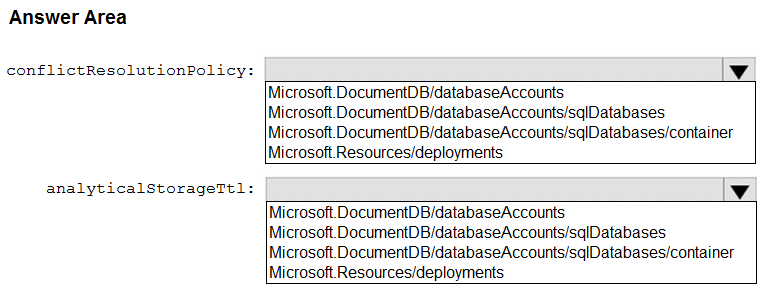
You plan to deploy multi-master support for an Azure Cosmos DB for NoSQL account by using an Azure Resource Manager (ARM) template. The deployment will perform the following actions:
• Create a database in the account.
• Create a container in the database.
• Configure Azure Synapse Link support the account.
You need to configure the conflictResolutionPolicy property and the analyticalStorageTtl property in the template.
Which namespace should you use for each property? To answer, select the appropriate options in the answer area.
NOTE: Each correct selection is worth one point.
Explanation: Both properties are configured on the container. Synapse Link must also be enabled on the account, but analyticalStorageTtl sets the analytical-store TTL for a container.
Question 50
HOTSPOT
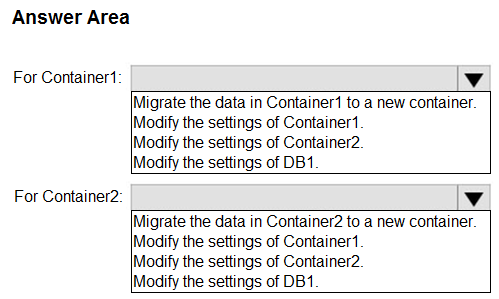
You have an Azure subscription that contains an Azure Cosmos DB for NoSQL database named DB1. The shared throughput provisioned for DB1 is 10,000 DTU/s. DB1 contains the containers shown in the following table.
You need to modify the throughput for the containers. The solution must meet the following requirements:
• The maximum throughput for Container1 must be 4,000 DTU/s.
• The throughput for Container2 must be shared across the containers.
• Administrative effort must be minimized.
What should you do? To answer, select the appropriate options in the answer area.
NOTE: Each correct selection is worth one point.
Show Answer
Correct Answer: Container1: Migrate the data in Container1 to a new container.
Container2: Migrate the data in Container2 to a new container.
Explanation: A container using shared database throughput cannot be switched to dedicated throughput, or vice versa. Create Container1’s replacement with a 4,000 RU/s maximum and Container2’s replacement with shared throughput, then migrate their data.
$19
Get all 177 questions with detailed answers and explanations
Instant download HTML + PDF delivered the moment payment clears.
Secure Stripe checkout we never see or store your card details.
7-day refund if files are defective see our refund policy.