Your organization has a Microsoft 365 subscription.
You need to generate a report that shows the permissions and active sharing links of content stored in Microsoft OneDrive accounts.
What should you use?
A. Audit in the Microsoft Defender portal
B. Reports in the Microsoft 365 admin center
C. Data access governance in the SharePoint admin center
D. eDiscovery in the Microsoft Purview portal
Show Answer
Correct Answer: C
Explanation: Data access governance in the SharePoint admin center is designed to provide visibility into SharePoint and OneDrive permissions, sharing, and active sharing links. It includes reports and insights about who has access to content and how it is shared, whereas Audit, Microsoft 365 Reports, and eDiscovery serve different purposes.
Question 40
HOTSPOT
-
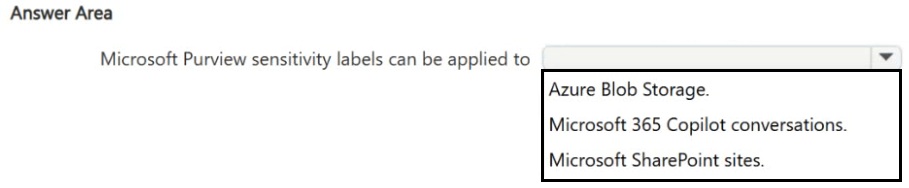
Select the answer that correctly completes the sentence.
Show Answer
Correct Answer: Microsoft SharePoint sites.
Explanation: Microsoft Purview sensitivity labels support container-level labeling for SharePoint sites (as well as Microsoft 365 Groups and Teams). They are not applied to Azure Blob Storage or Copilot conversations in this context.
Question 41
HOTSPOT
-
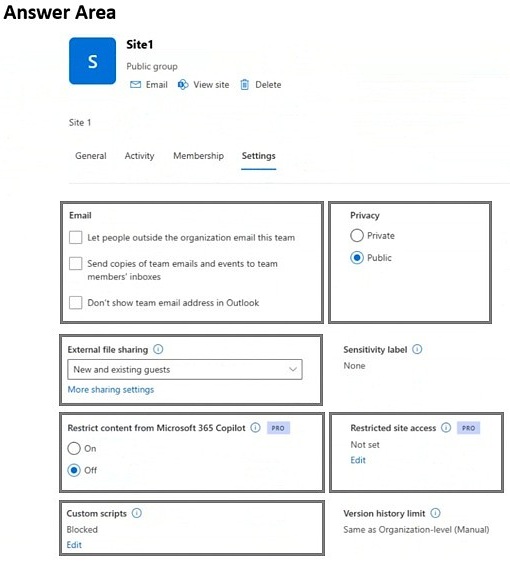
You have a Microsoft SharePoint site named Site1 and a security group named Group1.
You need to prevent all users that currently have access to Site1 from accessing the site content, unless the user is also a member of Group1.
Which settings should you configure? To answer, select the appropriate settings in the answer area.
Show Answer
Correct Answer: Privacy: Public (no change)
Restricted site access: Configure to allow only Group1
Explanation: Use Restricted site access to limit SharePoint site access to members of the specified security group. Privacy does not enforce this access restriction.
Question 42
HOTSPOT
-
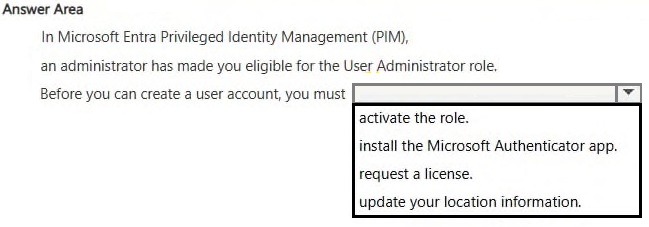
Select the answer that correctly completes the sentence.
Show Answer
Correct Answer: activate the role.
Explanation: In Microsoft Entra Privileged Identity Management (PIM), users who are eligible for a role must activate the eligible role assignment before performing privileged administrative tasks such as creating user accounts.
Question 43
Your organization has a Microsoft 365 subscription that contains a Microsoft SharePoint site named Site1.
You need to prevent users from sharing the content of Site1 to external users.
What should you use?
A. the Site1 content
B. the SharePoint admin center
C. the Microsoft 365 admin center
D. the Microsoft Entra admin center
Show Answer
Correct Answer: B
Explanation: To prevent external sharing for a specific SharePoint site, configure the site's External sharing setting in the SharePoint admin center (Active sites > select the site > Sharing). This setting can restrict or disable external sharing at the site level.
Question 44
Your organization has a Microsoft 365 subscription.
You discover that some users cannot sign in to Microsoft 365.
You need to view the failed Microsoft 365 sign-in attempts.
What should you use?
A. the Microsoft Defender portal
B. the Microsoft Entra admin center
C. the Microsoft Purview portal
D. the Microsoft 365 admin center
Show Answer
Correct Answer: B
Explanation: Microsoft Entra ID provides Sign-in logs that record successful and failed authentication attempts for Microsoft 365 users. These logs are accessed in the Microsoft Entra admin center under Monitoring & health > Sign-in logs, making it the correct place to investigate failed sign-in attempts.
Question 45
Your organization has a Microsoft 365 subscription that contains Microsoft SharePoint sites and Microsoft Teams teams.
You discover that the sites and the teams are shared to users outside your organization.
You need to identify which sites and teams were shared to the external users.
What should you use?
A. the SharePoint admin center
B. the Microsoft Teams admin center
C. the Microsoft 365 admin center
D. the Microsoft Defender portal
Show Answer
Correct Answer: A
Explanation: The SharePoint admin center provides visibility into external sharing for SharePoint sites, and because Microsoft Teams stores files in SharePoint and team-connected sites are managed there, it is the appropriate place to identify sites and teams that have been shared with external users. The Teams admin center focuses on Teams administration rather than organization-wide external sharing reports.
Question 46
Your company is piloting the use of Microsoft 365 Copilot and has purchased 100 Microsoft 365 Copilot licenses.
You need to view detailed reports about Copilot usage in Microsoft Teams, such as meeting hours summarized by Copilot and meeting actions taken by using Copilot.
What should you use?
A. the Microsoft 365 Copilot readiness report in the Microsoft 365 admin center
B. the Microsoft 365 Copilot usage report in the Microsoft 365 admin center
C. the Microsoft 365 Copilot dashboard in Microsoft Viva Insights
D. the Microsoft 365 Apps usage report in the Microsoft 365 admin center
Show Answer
Correct Answer: C
Explanation: The Microsoft 365 Copilot dashboard in Microsoft Viva Insights provides detailed adoption and usage analytics for Copilot, including Microsoft Teams meeting metrics such as meeting hours summarized/recapped by Copilot and meeting actions taken. The readiness report assesses deployment readiness, the Copilot usage report in the Microsoft 365 admin center provides broader usage reporting, and the Microsoft 365 Apps usage report is unrelated.
Question 47
HOTSPOT -
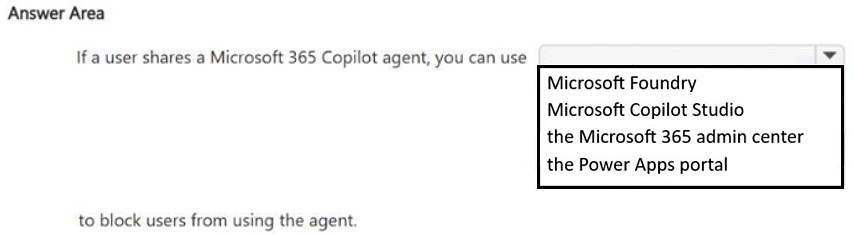
Select the answer that correctly completes the sentence.
Show Answer
Correct Answer: the Microsoft 365 admin center
Explanation: Administrators can manage and block shared Microsoft 365 Copilot agents through the Microsoft 365 admin center, including the Copilot agents management area.
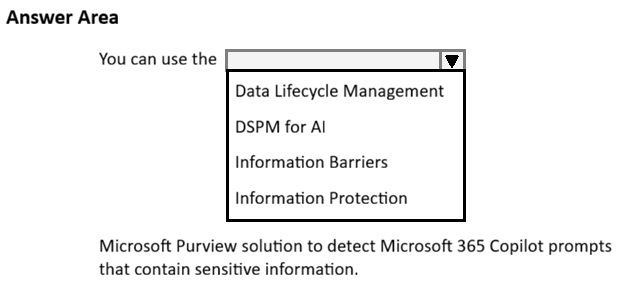
Question 48
HOTSPOT -
Select the answer that correctly completes the sentence.
Show Answer
Correct Answer: DSPM for AI
Explanation: Microsoft Purview DSPM for AI analyzes Microsoft 365 Copilot interactions, including prompts and responses, to detect sensitive information and assess AI-related data security risks.
$19
Get all 87 questions with detailed answers and explanations
Instant download HTML + PDF delivered the moment payment clears.
Secure Stripe checkout we never see or store your card details.
7-day refund if files are defective see our refund policy.