Associate Cloud Engineer Free Practice Questions — Page 2
Question 4
You are managing resources in a Google Cloud project. A new service account needs the ability to invoke a Cloud Run service. You need to gain the permissions to modify IAM policies for service accounts while adhering to the principle of least privilege. What should you do?
A. Request the roles/iam.serviceAccountAdmin role for your user account.
B. Request the roles/run.invoker role for your user account.
C. Request the Editor role for your user account.
D. Request the Owner role for your user account.
Show Answer
Correct Answer: A
Explanation: To grant a service account the ability to invoke a Cloud Run service, you need to modify IAM bindings. Among the options, the least-privilege role that provides administrative control over service accounts is roles/iam.serviceAccountAdmin. The Run Invoker role only allows invoking Cloud Run services and does not grant permission to manage IAM policies. Editor and Owner are overly broad and violate the principle of least privilege.
Question 5
You create a Deployment with 2 replicas in a Google Kubernetes Engine cluster that has a single preemptible node pool. After a few minutes, you use kubectl to examine the status of your Pod and observe that one of them is still in Pending status:
What is the most likely cause?
A. The pending Pod's resource requests are too large to fit on a single node of the cluster.
B. Too many Pods are already running in the cluster, and there are not enough resources left to schedule the pending Pod.
C. The node pool is configured with a service account that does not have permission to pull the container image used by the pending Pod.
D. The pending Pod was originally scheduled on a node that has been preempted between the creation of the Deployment and your verification of the Pods' status. It is currently being rescheduled on a new node.
Show Answer
Correct Answer: B
Explanation: One replica is running, so its resource requests can fit on a node. The other can remain Pending if the cluster lacks enough *available* resources to schedule it. A preemptible node pool makes preemption possible, but the status alone does not indicate that a node was preempted.
Sources:
https://www.marks4sure.com/associate-cloud-engineer-google-cloud-certified-associate-cloud-engineer-questions.html
Question 5
You are managing logging for your organization by aggregating logs into a centralized Google Cloud project. The aggregated logs come from two source projects: one for a frontend application and one for a backend application. You need to grant the frontend development team access to view all logs originating from the frontend project and only error-level logs from the backend project. The team must not be able to view any other logs. You want to follow the principle of least privilege and develop a cost-efficient solution. What should you do?
A. • In the centralized logging project, craft a query that combines all logs from the frontend project and error-level logs from the backend project, and grant the logging.viewer IAM role. • Save and share this query with the frontend team for them to use in the Logs Explorer. • Request the frontend team not to use any other query.
B. • Create two separate log sinks in the centralized project. • Configure one sink to route all frontend logs to a new, dedicated Cloud Storage bucket. • Configure a second sink to route only the error-level logs from the backend project to that same bucket. • Grant the frontend team read-only access to this bucket.
C. • Grant the frontend team the logging.viewer IAM role on both the frontend project and the backend project. • Instruct the developers to use a specific filter in the Logs Explorer to find the logs they need.
D. • In the centralized logging project, create a log view on the bucket that contains the aggregated logs. • Filter the view to include all logs from the frontend project and only logs with a severity level of ERROR from the backend project. • Grant the frontend team the logging.viewAccessor IAM role on this specific view.
Show Answer
Correct Answer: D
Explanation: Log views on Cloud Logging buckets allow you to restrict visibility to a filtered subset of logs. By creating a log view that includes all logs from the frontend project and only ERROR-severity logs from the backend project, then granting the frontend team the logging.viewAccessor role on that view, you enforce least privilege. The other options rely on user compliance, overgrant access, or introduce unnecessary routing and Cloud Storage complexity.
Question 6
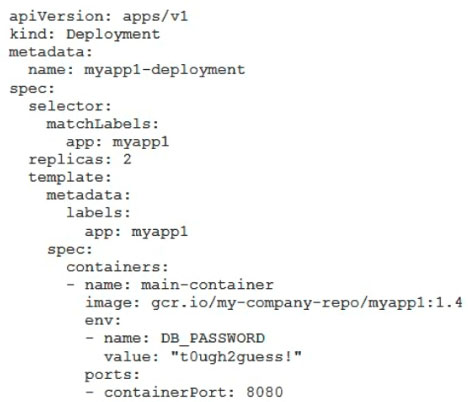
You've deployed a microservice called myapp1 to a Google Kubernetes Engine cluster using the YAML file specified below:
You need to refactor this configuration so that the database password is not stored in plain text. You want to follow Google-recommended practices. What should you do?
A. Store the database password inside the Docker image of the container, not in the YAML file.
B. Store the database password inside a Secret object. Modify the YAML file to populate the DB_PASSWORD environment variable from the Secret.
C. Store the database password inside a ConfigMap object. Modify the YAML file to populate the DB_PASSWORD environment variable from the ConfigMap.
D. Store the database password in a file inside a Kubernetes persistent volume, and use a persistent volume claim to mount the volume to the container.
Show Answer
Correct Answer: B
Explanation: Store the password in a Kubernetes Secret and configure the Deployment to populate `DB_PASSWORD` from that Secret (for example, using `valueFrom.secretKeyRef`). Secrets are intended for sensitive data such as passwords; ConfigMaps are for non-sensitive configuration, and embedding the password in an image or persistent volume does not follow the recommended approach.
Question 6
You are troubleshooting a complex application failure. You found several cryptic error messages containing no personally identifiable information (PII) in Cloud Logging that you do not recognize. You need to understand the meaning of these logs and determine what actions to take as quickly as possible. What should you do first?
A. Manually copy the error messages, and search for them in public forums and documentation.
B. Use Cloud Profiler to analyze the application’s performance during the time of the errors.
C. Use the “Explain this log entry” feature in Logs Explorer, and start a conversation with Gemini.
D. Search the application source code to determine the cause of the errors.
Show Answer
Correct Answer: C
Explanation: The fastest first step is to use the Logs Explorer 'Explain this log entry' feature with Gemini. It is designed to interpret unfamiliar log messages, explain likely causes, and suggest troubleshooting actions directly from Cloud Logging. The prompt notes the logs contain no PII, aligning with using this AI-assisted feature. Cloud Profiler analyzes performance rather than explaining log errors, manually searching is slower, and inspecting source code is better after understanding the error context.
Question 7
You work for a large company that recently acquired three smaller startups. All of the startups’ Google Cloud resources must be centrally managed under a single Google Cloud organization. However, each startup has its own budget and financial reporting structure. You need to ensure that each startup receives a separate monthly invoice for its Google Cloud consumption. What should you do?
A. Create a Google Cloud organization with a folder for each startup. Share a single Cloud Billing account, and use the detailed billing export to allocate costs.
B. Create a Google Cloud organization with a folder for each startup. Configure each startup to have its own Cloud Billing account.
C. Create a Google Cloud organization for each startup. Configure each startup to have its own Cloud Billing account.
D. Create a Google Cloud organization for each startup. Share a single Cloud Billing account, and use the detailed billing export to allocate costs.
Show Answer
Correct Answer: B
Explanation: A single Google Cloud organization can contain folders for each startup, satisfying the requirement for centralized management. Separate Cloud Billing accounts allow each startup to receive its own monthly invoice while remaining under the same organization. Multiple organizations would violate the requirement for a single organization, and a shared billing account would not produce separate invoices.
Question 8
You are managing Google Cloud infrastructure with Terraform. The Terraform configuration files are stored in a Git repository. You need to implement a solution that enables multiple team members to work on the Terraform configurations concurrently without conflicts and ensures that sensitive values are not persisted to local machines. What should you do?
A. Configure a local backend in Terraform, and deploy all changes by using a shared account on a bastion server.
B. Configure a Cloud Storage backend in Terraform.
C. Configure a local backend in Terraform, and store the state file in a Git repository.
D. Configure a local backend in Terraform, and manually share the Terraform state file with team members after every change.
Show Answer
Correct Answer: B
Explanation: A remote Cloud Storage backend centralizes Terraform state, supports state locking (when configured with GCS-supported mechanisms in modern Terraform), enables safe collaboration among multiple team members, and keeps sensitive state data off local machines. Local backends, Git-stored state, or manually shared state files are not appropriate for concurrent collaborative workflows and risk conflicts and exposure of sensitive values.
Question 9
Your organization has created hundreds of service accounts for different applications hosted on-premises and in other clouds that use Google Cloud APIs. You need to audit the service account keys that have been created and identify the keys that are older than 90 days.
What should you do?
A. Execute the gcloud asset search-all-resources --scope="organizations/[ORG_ID]" --query="createTime < [DATE_90_DAYS_AGO]" --asset-types="apikeys.googleapis.com/Key" --order-by="createTime" command.
B. Execute the gcloud iam service-accounts list --filter="createTime < [DATE_90_DAYS_AGO]" command.
C. Execute the gcloud tans keys list --filter="createTime < [DATE_90_DAYS_AGO]" command.
D. Execute the gcloud asset search-all-resources --scope="organizations/[ORG_ID]" --query="createTime < [DATE_90_DAYS_AGO]" --asset-types="iam.googleapis.com/ServiceAccountKey" --order-by="createTime" command.
Show Answer
Correct Answer: D
Explanation: To audit service account keys across an organization and identify keys older than 90 days, use Cloud Asset Inventory to search ServiceAccountKey assets. The asset type for service account keys is iam.googleapis.com/ServiceAccountKey, and filtering on createTime identifies older keys. The other options either target API keys, list service accounts rather than keys, or use an invalid command.
Question 10
You are deploying a new internal web application behind an internal Application Load Balancer. The application must be accessible from both the VPC network and on-premises network using the domain name internal.altostrat.com. This name must not be resolvable from the public internet. Your on-premises network is connected to the VPC network by using Cloud VPN, and you have configured an inbound server policy. You need to resolve the domain name with the least administrative overhead. What should you do?
A. Create an A record on the on-premises DNS server that points to the load balancer’s IP address.
B. Create a Cloud DNS managed private zone, authorize the VPC network to use it, and add an A record that points to the load balancer’s IP address.
C. Create a Cloud DNS managed public zone, and add an A record that points to the load balancer’s IP address.
D. On each employee’s workstation, edit the local HOSTS file to map the domain name to the load balancer’s IP address.
Show Answer
Correct Answer: B
Explanation: A Cloud DNS private managed zone authorized for the VPC allows the internal name to resolve only within the authorized network. With an inbound server policy already configured, on-premises DNS clients can resolve records in the private zone over the Cloud VPN. This keeps the name private and minimizes administrative overhead. A requires manual DNS management on-premises only, C exposes the name publicly, and D is not scalable.
Question 11
You are deploying a new frontend service for an online game. The service was built using a micro-frontend architecture and consists of multiple containers that interact using a service mesh. You need to control the number of compute instances that are running at a given time. What should you do?
A. Create a Compute Engine instance template using a container-optimized virtual machine (VM) instance, and create a startup script that installs Istio service mesh. Deploy the service, and create a managed instance group with a fixed number of instances to run the service.
B. Create a Cloud Run service specifying the minimum and maximum number of instances, and configure the service to use Cloud Service Mesh. Deploy all the containers to the service.
C. Create a Google Kubernetes Engine (GKE) Autopilot cluster, and enable Cloud Service Mesh. Deploy the service, and use vertical and horizontal Pod autoscaling to control the cluster size.
D. Create a Google Kubernetes Engine (GKE) Standard cluster with a node pool that has a fixed number of nodes. Enable the Cloud Service Mesh add-on, and deploy the service.
Show Answer
Correct Answer: D
Explanation: A micro-frontend composed of multiple containers that communicate through a service mesh is best suited to GKE with Cloud Service Mesh. The requirement is to control the number of compute instances running at a given time. A GKE Standard cluster with a node pool configured to a fixed size gives explicit control over the number of compute instances (nodes). Cloud Run scales instances dynamically within min/max bounds rather than keeping a fixed compute fleet, GKE Autopilot manages infrastructure automatically, and Compute Engine managed instance groups are not the typical platform for orchestrating multiple containers with a service mesh.
$19
Get all 323 questions with detailed answers and explanations
Instant download HTML + PDF delivered the moment payment clears.
Secure Stripe checkout we never see or store your card details.
7-day refund if files are defective see our refund policy.